Microsoft Access to HubSpot

CRM Migration Before

the Forced Sunset

Move from Microsoft Access (.accdb and .mdb files on the JET engine) to HubSpot CRM with tables, queries, Access forms, and VBA modules translated into a modern, web-based, mobile-ready system - getting off Access before the Microsoft 365 deprecation, runtime-only deployment limits, or a single-file lock contention forces a rushed migration.

image 85-1 Frame 2147211998 image 76 [Vectorized] image 87
Trusted by 50+ healthcare organizations
Desktop Integration Card
Microsoft Access to HubSpot  to HubSpot Migration

Teams that leveled up their development with HubXpert

white villas resort
pink cube
off market
express vietnam
leva medical
emi
poolshark
white villas resort
pink cube
off market
express vietnam
leva medical
emi
poolshark
The Problems

Why Migrate from

Microsoft Access to HubSpot?

Access has been on the way out for over a decade. Microsoft has been clear about its trajectory - runtime-only in many 365 plans, no web or mobile story, and increasingly limited inclusion in Microsoft 365 going forward. The teams running on Access today are usually doing so because the original developer is long gone and nobody wants to touch it.

icon-Jun-02-2026-04-13-42-2845-PM

Microsoft 365 Deprecation Pressure

Microsoft has been steadily reducing Access's footprint in Microsoft 365. The full Access client is no longer in many subscription plans. Runtime-only deployment is the norm for end users. The clear signal - and stated direction in 2026 - is that Access is not part of Microsoft's strategic future. Building or expanding on it today is investing in a deprecated platform.

icon (1)-1

Single-File Lock Contention and JET Engine Limits

An .accdb file on a network share works fine for two or three concurrent users. At five users it gets sluggish. At ten the lock contention starts producing data corruption warnings. The JET engine (and its successor ACE) was never designed for the concurrency a real CRM needs. Splitting the database into front-end and back-end helps but doesn't change the fundamentals.

icon (2)-1

No Web, No Mobile, No Remote Access

Access has no real web story. Access Web Apps were deprecated. SharePoint integration was deprecated. The result - users have to be on the corporate network or VPN, on Windows, with the Access client installed (or runtime), to use the system. Anyone outside the office is locked out. Anyone on a Mac or mobile is locked out.

icon (3)-1

Runtime-Only Deployment Means No Maintainability

End users get the Access runtime, which lets them open the .accdb but not modify forms, queries, or VBA. Maintenance requires a developer with the full Access client and access to the design objects. The combination of runtime-only deployment and a shrinking pool of Access developers means the original solution slowly ossifies.

icon (4)-1

VBA Modules and Linked Tables Are Tribal Knowledge

The VBA modules implement business logic that no documentation exists for. Linked tables connect to a SQL Server backend, an old Excel file, and another Access database that lives on someone's desktop. Every change is a careful study because nobody fully understands the dependencies, and the original developer retired in 2017.

icon (5)-1

The Real Cost: A Deprecated Platform With a Forcing Function on the Calendar

Access is not free anymore - it requires the full Office Pro Plus or a per-user license. But the real cost is the strategic risk of building on a platform Microsoft is actively de-emphasizing, the maintainability cost of runtime-only deployment with shrinking developer pool, and the operational ceiling of a system that can't go on the web or on mobile. Migrating to HubSpot now while Access is still operational is far cheaper than waiting for a forced exit when an upgrade or 365 plan change suddenly removes Access from the build.

Hubspot Users
How Many Businesses Are Moving to HubSpot?

The amount is a lot in the last 12 years. It is very obvious why businesses are moving or migrating.


HubSpot offers an easy to use high growth & fast deploy CRM platform that build for scale. You’ll find everything you need to run your business.

Group 23
The SOLUTION

What We Migrate from Microsoft Access

(Core Data & Assets)

Access migrations are deeper than spreadsheet migrations because the platform holds real custom application logic. We translate the tables, queries, forms, and VBA modules into HubSpot's modern data model.

  • CRM Records

    Contacts, Companies & Deal Data

    • check-icon
      Tables - all in-scope tables from the .accdb or .mdb file mapped to HubSpot standard or custom objects
    • check-icon
      Contacts - name, email, phone, title, owner, lifecycle stage, with deduplication on email and normalized phone
    • check-icon
      Companies / Accounts - domain-based deduplication, parent/child hierarchy, industry, size, region
    • check-icon
      Deals / Opportunities - stage, amount, close date, owner, with associations to contacts and companies preserved
    • check-icon
      Custom tables (Projects, Assets, Contracts, Tickets) mapped to HubSpot custom objects with associations
    • check-icon
      Activity history - emails, calls, meetings, notes from Access activity tables loaded as HubSpot timeline entries
    • check-icon
      Attachments stored in Access (or referenced from linked file paths) extracted and uploaded to HubSpot Files
  • Automation

    Calculations, Macros & Formulas

    • check-icon
      Access queries (Select, Update, Append, Make-Table, Crosstab) translated into HubSpot reports, list segments, and workflows
    • check-icon
      VBA modules reviewed and translated - most map to HubSpot workflows or operations actions
    • check-icon
      Form-level event handlers (BeforeUpdate, AfterUpdate, Click) replaced by HubSpot workflows
    • check-icon
      Macros translated into HubSpot workflow actions
    • check-icon
      Scheduled VBA routines (overnight email sends, batch updates) replaced by HubSpot scheduled workflows
    • check-icon
      Auto-numbering and audit logging fields replaced by HubSpot system properties and audit log
    • check-icon
      Email-via-VBA logic (Outlook automation, SendObject) replaced by HubSpot workflow email actions with proper tracking
  • Structure & Setup

    Schema, Validation & Field Mapping

    • check-icon
      Schema discovery - every table, query, form, report, macro, and module documented
    • check-icon
      Field mapping - every Access field mapped to a HubSpot property with the right type
    • check-icon
      Custom objects defined for tables that don't fit Contact/Company/Deal
    • check-icon
      Pipelines and stages built to match the Access status field values
    • check-icon
      Validation rules from Access table validation translated into HubSpot property validation and required fields
    • check-icon
      Lookup tables (state, country, status) translated into HubSpot dropdown property options
    • check-icon
      User-level permissions from Access workgroup security translated into HubSpot teams, roles, and permission sets
  • Integrations

    Data Sources & Connected Files

    • check-icon
      Source .accdb / .mdb file inventoried - front-end forms file, back-end data file, linked tables
    • check-icon
      Linked tables (SQL Server, Excel, other Access files, SharePoint lists) documented and re-pointed
    • check-icon
      ODBC connections to upstream databases mapped and either re-pointed at HubSpot or kept as a feed
    • check-icon
      Outlook integration (VBA SendObject, Outlook.Application automation) replaced by HubSpot workflow emails
    • check-icon
      Access reports re-built as HubSpot dashboards or kept as exported PDFs depending on use case
    • check-icon
      File attachments stored as Access Attachment fields or linked file paths extracted to HubSpot Files
    • check-icon
      Decommissioning plan for the .accdb file with a read-only archive snapshot retained for audit
BENEFITS

Benefits of Migrating

From Microsoft Access to HubSpot

Moving off Access future-proofs against the Microsoft 365 deprecation, eliminates the single-file lock contention ceiling, and adds the web, mobile, and marketing platform Access never had.
Execution

Future-Proof Off Microsoft 365 Deprecation

HubSpot is a modern SaaS platform with a clear strategic roadmap. The risk of being on a Microsoft product family that is shrinking in 365 plans goes away.

Adding Value

Real Web and Mobile Access

First-class web app, native mobile app, and CMS for customer-facing pages. Anyone with a browser and credentials can use HubSpot - no VPN, no Windows requirement, no Access runtime install.

spreadsheets

No More Single-File Lock Contention

Concurrent editing scales to hundreds or thousands of users without lock contention or corruption risk. The .accdb concurrency ceiling disappears.

Cost Increasing

Modern Marketing and Email Built In

Marketing automation, email campaigns, lead capture, attribution, and nurture sequences are native - not VBA SendObject hacks bolted onto Access forms.

Growth

No VBA Developer Dependency

Workflows are built and edited in a no-code UI. The developer dependency on Access - which was getting harder to staff every year - disappears.

Shift

Reports That Refresh Themselves

Native dashboards with drill-through replace Access reports built on queries. Reports refresh automatically as records change.

our process

Our Microsoft Access to HubSpot

Migration Process

A clear, step-by-step execution plan with full visibility at every stage. No black boxes, no unexpected issues during migration.
Step 1.

Discovery & Access Solution Audit

We document the full Access solution - tables, queries, forms, reports, macros, modules, linked tables - and identify what migrates natively versus what needs translation.
  • Check icon Full schema export - tables, fields, types, indexes, relationships
  • Check icon Query inventory - Select, Update, Append, Make-Table, Crosstab queries documented
  • Check icon VBA module inventory - every module and function documented with its callers
  • Check icon Linked table audit - SQL Server, Excel, SharePoint, other Access files re-pointed or excluded
Discovery
Step 2.

Schema Mapping & HubSpot Configuration

We map every Access table to a HubSpot object (standard or custom) and configure the destination to match the data model.
  • Check icon Table-to-object mapping - Contacts/Companies/Deals to standard objects, custom tables to custom objects
  • Check icon Field-to-property mapping with correct types (single line, dropdown, date, number, currency)
  • Check icon Pipelines, stages, lookup table values, and validation rules configured
  • Check icon Custom objects defined for tables that don't fit Contact/Company/Deal
Data Preparation
Step 3.

Data Extraction, Cleanup & Migration

We extract data from Access, clean it, and import in batches with validation at every step.
  • Check icon Data extraction via ODBC, ACE OLEDB, or direct .accdb table export
  • Check icon Attachment field contents (or linked files) extracted and prepared for HubSpot Files
  • Check icon Deduplication on email (contacts), domain (companies), name + amount (deals)
  • Check icon Sandbox import with full row count reconciliation against source
Validation
Step 4.

VBA Translation & Workflow Build

We translate VBA modules and queries into HubSpot workflows and reports, then cut the team over.
  • Check icon VBA modules triaged into workflow-translatable, code-action-required, or out-of-scope
  • Check icon Workflow build for stage changes, lead rotation, task creation, email sends
  • Check icon Access reports rebuilt as HubSpot dashboards
  • Check icon Cutover date scheduled with the .accdb frozen or marked read-only
Go-Live
Step 5.

Training & Adoption Support

We train the team on HubSpot's record model and reporting, and stay close for the first month.
  • Check icon Sales team training on the contact, company, deal model and pipeline workflow
  • Check icon Ops training on workflows, dashboards, custom objects, and properties
  • Check icon Reference cheat sheet - Access concept on the left, HubSpot equivalent on the right
  • Check icon 30-day adoption check-ins, dashboard tuning, workflow refinement
Training & Support
THE DIFFERENCE

From Microsoft Access Complexity to

HubSpot Clarity

The worst outcome of a migration is ending up with a HubSpot system that still feels like Microsoft Access. We use the migration as an opportunity to simplify, restructure, and improve how your CRM actually works.
What Was in Microsoft Access
Platform Direction

Microsoft 365 deprecation, runtime-only deployment, no strategic investment from Microsoft

Public company with active R&D, clear roadmap, and a large partner ecosystem

Concurrency

.accdb single-file lock contention; reliable up to ~5 users, struggles past 10

SaaS platform built for hundreds or thousands of concurrent users without lock contention

Web & Mobile

No web story, no mobile story, requires Windows + Access client/runtime + corporate network or VPN

First-class web app, native mobile app, accessible from anywhere with a browser

Maintainability

VBA developer required; runtime-only deployment limits end-user maintainability; shrinking developer pool

No-code workflows administered by ops or marketing without a specialist developer

Marketing

VBA SendObject and Outlook automation for any email; no native marketing

Native marketing automation, email campaigns, attribution, and nurture sequences

CASE STUDY

Our Clients

David Jenyns

David Jenyns

Creator of SYSTEMology®

SystemHub

Working with Ratul was a game-changer for us. His expertise and dedication significantly improved our marketing strategies and CRM implementation, leading to noticeable growth in our customer engagement and sales.

Faster time to value with
unified data

60%

Personalized experience have
increased stats.

10,000+

Joe Liffrig

Joe Liffrig

Technology Product Leader at Cornerstone Licensing

Cornerstone

HubXpert delivered what we needed. Their team migrated our CRM data from Microsoft Dynamics 365 to HubSpot, ensuring a smooth transition with no disruption. The migration was organized, accurate, and focused on data integrity.

CRM Records Migrated

33,638+

Data Accuracy Maintained

100%

Liselotte Leijten-Deppenbroek

Liselotte Leijten-Deppenbroek

Chief Operating Officer

PinkCube

HubXpert successfully migrated over 200,000+ support tickets from Trengo to HubSpot Service Hub, delivering a seamless transition, improved automation, and a scalable customer support operation.

Support tickets migrated

200,000+

Service pipelines & automations implemented

65+

ROADMAP

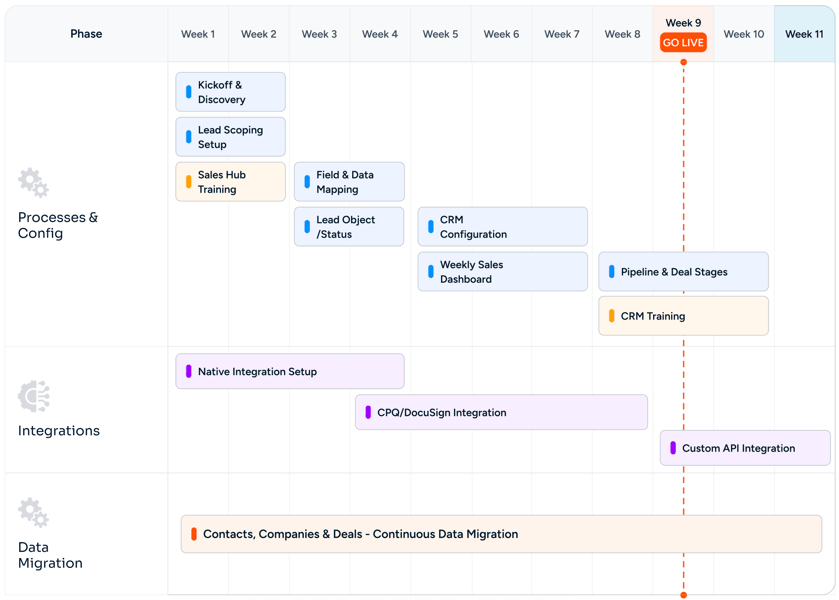
Our Microsoft Access to HubSpot Migration

Roadmap

Microsoft Access to HubSpot CRM Migration Before the Forced Sunset Roadmap
CHALLENGES

Common Migration Challenges (And How We Solve Them)

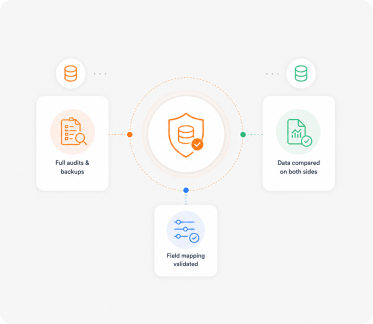
Migration issues don't come from the transfer itself. They come from poor planning, bad mapping, and no validation. We fix these before they become problems.

Zero 
Data Loss

Beating the Microsoft 365 Deprecation Clock

Access is shrinking in Microsoft 365 plans, and the trajectory is clear. We work backward from your tenant's renewal date and build a migration timeline that gets you off Access before a 365 plan change forces a rushed exit.

Accurate 
Reports

Linked Table Re-Pointing

Linked tables to SQL Server, Excel, SharePoint, or other Access files all get documented and re-pointed. SQL Server backends often stay in place with HubSpot syncing from them. Excel and other Access linked tables either get migrated alongside the main solution or kept as a decoupled feed.

Rectangle 34625310-1

VBA Module Translation, Not Lift-and-Shift

VBA modules don't migrate as code - they get triaged. Most map to HubSpot workflows or sequences. Some require workflow custom code actions. A few are out of scope and get either retired or kept as a decoupled utility.

Custom Objects Mapped Right

Access Form to HubSpot Record View

Access forms get translated into HubSpot record views with the right properties surfaced in the right cards. Forms used for data entry by external users become HubSpot Forms with native CRM routing.

No
Downtime

Attachment Field Extraction

Access Attachment fields holding documents and images get extracted and uploaded to HubSpot Files, then re-attached to the correct record. Linked file paths (\\fileserver\docs\contract.pdf) get either uploaded to HubSpot Files or kept as URL properties on the record.

Fast Team 
Adoption

Concurrency and No Lock Contention

The single-file lock contention ceiling disappears. HubSpot is built for hundreds or thousands of concurrent users. The five-user reliability ceiling of an .accdb on a network share goes away on day one.

MIGRATION

Other Migration
to

HubSpot We Offer

We handle migrations from different platforms and systems into HubSpot, ensuring your data, workflows, and processes are properly rebuilt, not just transferred.
Act! CRM migration logo
Act! CRM

Planning an Act! CRM to HubSpot migration? We ensure accurate data transfer, automation rebuilding, and CRM optimization..

ActiveCampaign migration logo
ActiveCampaign

Planning an ActiveCampaign to HubSpot migration? We ensure accurate data transfer and automation rebuilding..

Adobe Experience Manager migration logo
Adobe Experience Manager

Planning an Adobe Experience Manager to HubSpot CMS migration? We ensure seamless content migration and optimization..

Agile CRM migration logo
Agile CRM

Planning an Agile CRM to HubSpot migration? We ensure accurate data transfer and CRM optimization support..

Apollo.io migration logo
Apollo.io

Migrate from Apollo.io to HubSpot Sales Hub with Sequences, engagement history, Apollo data hygiene, intent signals, Plays, and Chrome extension workflows preserved.

BigCommerce migration logo
BigCommerce

Migrate customer, order, and product data from BigCommerce or BigCommerce Enterprise into HubSpot.

Bitrix24 migration logo
Bitrix24

Planning a Bitrix24 to HubSpot migration? We ensure accurate data transfer, automation rebuilding, and CRM optimization..

Brevo migration logo
Brevo

Planning a Brevo to HubSpot migration? We ensure accurate data transfer, automation rebuilding, and CRM optimization..

Campaign Monitor migration logo
Campaign Monitor

Planning a Campaign Monitor to HubSpot migration? We ensure accurate data transfer and automation rebuilding..

Close CRM migration logo
Close CRM

Planning a Close CRM to HubSpot migration? We ensure accurate data transfer, workflow rebuilding, and CRM optimization..

Constant Contact migration logo
Constant Contact

Planning a Constant Contact to HubSpot migration? We ensure accurate data transfer and automation rebuilding..

Contentful migration logo
Contentful

Planning a Contentful to HubSpot CMS migration? We ensure accurate content mapping and CMS optimization support..

ConvertKit migration logo
ConvertKit

Planning a ConvertKit to HubSpot migration? We ensure accurate data transfer and CRM optimization support..

Copper CRM migration logo
Copper CRM

Planning a Copper CRM to HubSpot migration? We ensure accurate data transfer, automation rebuilding, and CRM optimization..

CSV Files migration logo
CSV Files

Migrate CSV exports from any legacy system to HubSpot CRM with field mapping, encoding fixes, deduplication, and validation.

Custom CRM migration logo
Custom CRM

Planning a custom CRM to HubSpot migration? We ensure accurate data mapping, workflow rebuilding, and CRM optimization..

Drift migration logo
Drift

Transfer from Drift to HubSpot Service Hub with live chat migration, workflow setup, and customer support optimization..

Drip migration logo
Drip

Planning a Drip to HubSpot migration? We ensure accurate data transfer and automation rebuilding..

Drupal migration logo
Drupal

Planning a Drupal to HubSpot CMS migration? We ensure accurate content transfer and CMS optimization support..

Eloqua migration logo
Eloqua

Planning an Eloqua to HubSpot migration? We ensure accurate data transfer, campaign rebuilding, and CRM optimization..

FileMaker Pro migration logo
FileMaker Pro

Migrate from FileMaker Pro (Claris) to HubSpot CRM with Layouts, scripts, Container fields, and the relationships graph translated into HubSpot's modern data model.

Freshdesk migration logo
Freshdesk

Planning a Freshdesk to HubSpot Service Hub migration? We ensure accurate data transfer and support automation setup..

Freshsales migration logo
Freshsales

Planning a Freshsales to HubSpot migration? We ensure accurate data transfer, workflow rebuilding, and CRM optimization..

GetResponse migration logo
GetResponse

Planning a GetResponse to HubSpot migration? We ensure accurate data transfer, automation rebuilding, and CRM optimization..

Ghost migration logo
Ghost

Planning a Ghost to HubSpot CMS migration? We ensure accurate blog migration and SEO optimization support..

GoHighLevel migration logo
GoHighLevel

Planning a GoHighLevel to HubSpot migration? We ensure accurate data transfer and CRM optimization support..

Google Sheets migration logo
Google Sheets

Migrate from Google Sheets to HubSpot CRM with deduplication, field mapping, Apps Script translation, and ImportRange dependencies replaced by a relational system.

Gorgias migration logo
Gorgias

Move from Gorgias to HubSpot Service Hub with accurate ticket transfer, automation rebuilding, and inbox optimization..

Groove by Clari migration logo
Groove by Clari

Migrate from Groove by Clari to HubSpot Sales Hub Sequences with full Flow continuity, Spaces, Playbooks, and Salesforce-native data preserved.

Help Scout migration logo
Help Scout

Upgrade from Help Scout to HubSpot Service Hub with ticket migration, automation rebuilding, and reporting configuration..

HubSpot Agency Client Handoff migration logo
HubSpot Agency Client Handoff

Transfer a HubSpot portal from your agency tenant to your client cleanly.

HubSpot Sandbox to Production migration logo
HubSpot Sandbox to Production

Promote tested HubSpot configuration and data from a Standard Sandbox or Development Sandbox into production.

Insightly migration logo
Insightly

Planning an Insightly to HubSpot migration? We ensure accurate data transfer, automation rebuilding, and CRM optimization..

Intercom migration logo
Intercom

Planning an Intercom to HubSpot Service Hub migration? We ensure seamless conversation and workflow migration support..

Jira Service Management migration logo
Jira Service Management

Migrate Jira Service Management to HubSpot Service Hub with ticket syncing, workflow setup, and service automation support..

Joomla migration logo
Joomla

Planning a Joomla to HubSpot CMS migration? We ensure accurate content transfer, template rebuilding, and SEO optimization..

Kayako migration logo
Kayako

Switch from Kayako to HubSpot Service Hub with ticket migration, automation rebuilding, and inbox setup support..

Keap migration logo
Keap

Planning a Keap to HubSpot migration? We ensure accurate data transfer, automation rebuilding, and CRM optimization..

Klaviyo migration logo
Klaviyo

Planning a Klaviyo to HubSpot migration? We ensure accurate data transfer, automation rebuilding, and CRM optimization..

Legacy ERP Data migration logo
Legacy ERP Data

Migrate customer, account, and contact master data from SAP, Oracle EBS, JD Edwards, or Sage ERP into HubSpot CRM with structured ETL, master data reconciliation, and IT-friendly extraction.

LinkedIn Sales Navigator migration logo
LinkedIn Sales Navigator

Migrate LinkedIn Sales Navigator workflows into HubSpot Sales Hub Sequences with Lead Lists, Account Lists, InMail history, SNAP integration, Smart Links, and TeamLink continuity preserved.

LiveAgent migration logo
LiveAgent

Switch from LiveAgent to HubSpot Service Hub with support data migration, workflow rebuilding, and CRM configuration..

Magento (Adobe Commerce) migration logo
Magento (Adobe Commerce)

Migrate customer, order, and product data from Magento Open Source or Adobe Commerce into HubSpot.

Mailchimp migration logo
Mailchimp

Planning a Mailchimp to HubSpot migration? We ensure accurate data transfer, automation rebuilding, and CRM optimization..

Marketo migration logo
Marketo

Planning a Marketo to HubSpot migration? We ensure accurate data transfer, workflow rebuilding, and CRM optimization..

Merging Two HubSpot Portals migration logo
Merging Two HubSpot Portals

Consolidate two HubSpot portals into a single source of truth after a merger or acquisition.

Microsoft Access migration logo
Microsoft Access

Migrate from Microsoft Access (.accdb / .mdb) to HubSpot CRM with tables, queries, Access forms, and VBA modules translated.

Microsoft Dynamics 365 migration logo
Microsoft Dynamics 365

Planning a Dynamics 365 to HubSpot migration? We ensure accurate data transfer, automation rebuilding, and CRM optimization..

Microsoft Excel migration logo
Microsoft Excel

Migrate from Excel spreadsheets to HubSpot CRM with deduplication, field mapping, formula translation, and pivot reports rebuilt as dashboards.

Monday CRM migration logo
Monday CRM

Planning a Monday CRM to HubSpot migration? We ensure accurate data transfer and CRM optimization support..

NetSuite CRM migration logo
NetSuite CRM

Planning a NetSuite CRM to HubSpot migration? We ensure accurate data transfer and CRM optimization support..

Nutshell migration logo
Nutshell

Planning a Nutshell to HubSpot migration? We ensure accurate data transfer, workflow rebuilding, and CRM optimization..

Odoo CRM migration logo
Odoo CRM

Planning an Odoo CRM to HubSpot migration? We ensure accurate data transfer, automation rebuilding, and CRM optimization..

Omnisend migration logo
Omnisend

Planning an Omnisend to HubSpot migration? We ensure accurate data transfer, automation rebuilding, and CRM optimization..

Ontraport migration logo
Ontraport

Planning an Ontraport to HubSpot migration? We ensure accurate data transfer and CRM optimization support..

Outreach migration logo
Outreach

Move from Outreach to HubSpot Sales Hub with sequence migration, workflow rebuilding, pipeline setup, and reporting support..

Pardot migration logo
Pardot

Planning a Pardot to HubSpot migration? We ensure accurate data transfer, workflow rebuilding, and CRM optimization..

Pipedrive migration logo
Pipedrive

Planning a Pipedrive to HubSpot migration? We ensure accurate data transfer, pipeline rebuilding, and CRM optimization..

PrestaShop migration logo
PrestaShop

Migrate customer, order, and product data from PrestaShop into HubSpot.

Re:amaze migration logo
Re:amaze

Migrate from Re:amaze to HubSpot Service Hub with seamless ticket transfer, workflow setup, and support optimization..

Salesforce migration logo
Salesforce

Planning a Salesforce to HubSpot migration? We ensure accurate data transfer, automation rebuilding, and CRM optimization..

Salesforce Marketing Cloud migration logo
Salesforce Marketing Cloud

Planning a Salesforce Marketing Cloud to HubSpot migration? We ensure accurate data transfer and automation rebuilding..

Salesloft migration logo
Salesloft

Switch from Salesloft to HubSpot Sales Hub with our expert sales automation migration, sequence setup, and CRM optimization support..

SAP CRM migration logo
SAP CRM

Planning an SAP CRM to HubSpot migration? We ensure accurate data transfer, automation rebuilding, and CRM optimization..

ServiceNow migration logo
ServiceNow

Move from ServiceNow to HubSpot Service Hub with ticket migration, automation rebuilding, and reporting setup support..

SharpSpring migration logo
SharpSpring

Planning a SharpSpring to HubSpot migration? We ensure accurate data transfer, automation rebuilding, and CRM optimization..

Shopify migration logo
Shopify

Migrate customer, order, and product data from Shopify (or Shopify Plus) into HubSpot.

Sitecore migration logo
Sitecore

Planning a Sitecore to HubSpot CMS migration? We ensure accurate content transfer and CMS optimization support..

Splitting One Portal into Regional Portals migration logo
Splitting One Portal into Regional Portals

Split one HubSpot portal into multiple - by geography, business unit, or brand.

Squarespace migration logo
Squarespace

Planning a Squarespace to HubSpot CMS migration? We ensure accurate content transfer and CMS optimization support..

Streak migration logo
Streak

Planning a Streak to HubSpot migration? We ensure accurate data transfer, workflow rebuilding, and CRM optimization..

SugarCRM migration logo
SugarCRM

Planning a SugarCRM to HubSpot migration? We ensure accurate data transfer, workflow rebuilding, and CRM optimization..

Webflow migration logo
Webflow

Planning a Webflow to HubSpot CMS migration? We ensure accurate design transfer, CMS rebuilding, and SEO optimization..

Wix migration logo
Wix

Planning a Wix to HubSpot CMS migration? We ensure accurate content transfer and SEO optimization support..

WooCommerce migration logo
WooCommerce

Migrate customer, order, and product data from WooCommerce on WordPress into HubSpot.

WordPress migration logo
WordPress

Planning a WordPress to HubSpot CMS migration? We ensure accurate content transfer, template rebuilding, and SEO optimization..

Zendesk migration logo
Zendesk

Planning a Zendesk to HubSpot Service Hub migration? We ensure accurate ticket transfer and workflow optimization..

Zoho CRM migration logo
Zoho CRM

Planning a Zoho CRM to HubSpot migration? We ensure accurate data transfer, workflow rebuilding, and CRM optimization..

Zoho Desk migration logo
Zoho Desk

Planning a Zoho Desk to HubSpot Service Hub migration? We have experts to ensure accurate ticket transfer and CRM optimization..

ZoomInfo migration logo
ZoomInfo

Migrate from ZoomInfo Engage to HubSpot Sales Hub Sequences with full ZoomInfo data integration, Intent signals, Chorus conversation intelligence, WorkflowOS, and Copilot continuity.

FAQ

Questions You Might Have

How long does a Microsoft Access to HubSpot migration take?

Most Access migrations run 4 to 8 weeks. Solutions with extensive VBA, many linked tables, complex Access forms, or large attachment fields can stretch to 10 weeks. The variable is solution complexity and VBA depth, not record count.

Why migrate now - Access still works for us?

Microsoft has been steadily reducing Access's footprint in Microsoft 365 - runtime-only in many plans, deprecated in others, and signaled as not part of the strategic roadmap. Migrating now while the platform is still well-supported is far easier than migrating in a forced exit when a 365 renewal removes Access from the build.

What about our VBA modules?

They get translated, not migrated as code. Each module is reviewed and triaged. Most map to HubSpot workflows, sequences, or operations actions. Some require workflow custom code actions. The few that have no equivalent are flagged early and either retired, kept as a decoupled utility, or quoted as a custom build.

Can you migrate our Access forms?

Forms get translated into HubSpot record views (for internal data entry) or HubSpot Forms (for external user submissions). The right approach depends on who uses each form. Either way, the data lands in HubSpot directly with no intermediate Access file.

What about linked tables to SQL Server?

SQL Server backends often stay in place. We design a sync from SQL Server into HubSpot - either via Operations Hub data sync, a native integration, or a custom API integration. The Access front-end goes away; the SQL Server data stays where it is.

Will we lose any historical data?

No. Every record in scope migrates, including activity history, notes, and attachments. The original .accdb file is preserved as a read-only archive for audit and reference.

We have multiple .accdb files that link to each other - can you handle that?

Yes. We document the full file dependency graph, decide which files migrate to HubSpot, which get retired, and which stay as kept-but-decoupled utilities. The linking relationships either become HubSpot associations or get replaced by an integration design.

What about our Access reports?

Reports get rebuilt as HubSpot dashboards with drill-through. For reports that need exact PDF formatting (regulatory filings, customer statements), we build a HubSpot custom report that exports to PDF in the same format.

How does HubSpot handle the concurrency issues we have on .accdb?

The single-file lock contention model is gone. HubSpot is a SaaS platform built for hundreds or thousands of concurrent users. The five-user reliability ceiling and the fear of corruption from 10+ concurrent edits both disappear on day one.

Will users need to install anything new?

No. HubSpot runs in any modern web browser and has a native mobile app. There is no client install, no runtime, no Windows requirement, no VPN. Users with credentials can work from anywhere on any device.

BOOK CONSULTATION

Make Your Decision

We make everything else easy

With 5+ years of industry experience, 150+ successful projects, and a 98% client satisfaction rate, we've built deep migration expertise across every major CRM, CMS, marketing, and helpdesk platform. Our team has helped 20+ retainer clients personalize their HubSpot setup post-migration, so you don't just inherit a copy of your old system - you launch on a CRM that actually fits how your business runs.

Check Icon Takes 30 minutes
check icon Delivered by certified HubSpot expert
Hero Image