





-2.png)


-2.png)



.png)


.webp)

.png)


.png)















-1.webp)
-1.webp)



.webp)

-1-1.webp)



-2.webp)

-1-1.webp)

-2-1.png)

-1-1.webp)
-1-1.webp)
-1-1.png)







Marketing automation is a core revenue driver, with companies reporting that automated workflows can generate up to 451% more qualified leads compared to non-automated campaigns. (annuitas.com)
Because of this impact, migrating automation into HubSpot is not a simple rebuild task. It requires a structured hubspot automation migration process to ensure workflows, triggers, and dependencies continue functioning correctly after migration.
Without proper planning, businesses risk breaking lead routing, email nurturing sequences, lifecycle updates, and scoring models during transition.
This guide breaks down the technical steps to transfer marketing workflows to HubSpot while preserving logic, data dependencies, and execution accuracy, whether you are moving from Marketo, Pardot, ActiveCampaign, Salesforce, Eloqua, or another platform. The platform notes further down cover what changes for each one.
What Automation Workflows Can Be Migrated to HubSpot?
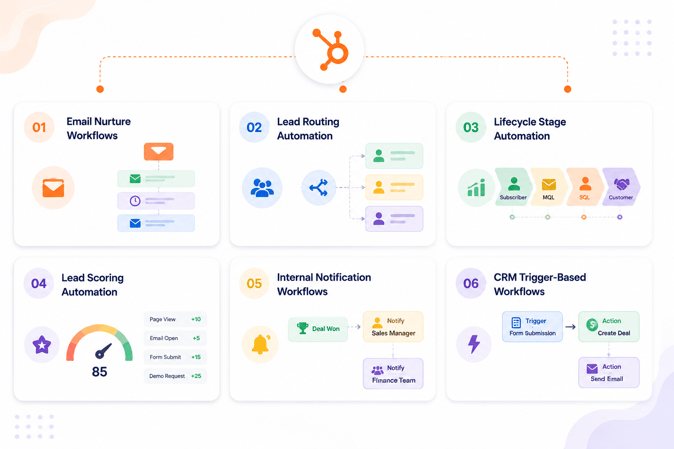
Before starting the migration, it is important to define which automation logic can be transferred into HubSpot and which workflows need to be rebuilt manually. Most platforms follow similar automation structures, but HubSpot requires specific configuration for triggers, objects, and dependencies.
Email Nurture Workflows
Email nurture workflows are commonly used for lead engagement and can be fully recreated in HubSpot.
Typical examples include:
- Welcome email sequences
- Lead nurturing campaigns
- Re-engagement workflows
- Product education sequences
These workflows are usually rebuilt using HubSpot marketing email workflows with enrollment triggers based on contact properties or actions.
Lead Routing Automation
Lead routing workflows determine how incoming leads are assigned to sales teams.
Common routing rules include:
- Territory based assignment
- Industry based assignment
- Company size based assignment
- Form submission based routing
In HubSpot, these are typically implemented using workflow-based deal or contact ownership assignment rules.
Lifecycle Stage Automation
Lifecycle automation ensures contacts move through stages such as Subscriber, Lead, MQL, SQL, and Customer.
During migration, it is important to map:
- Existing lifecycle definitions
- Stage progression rules
- Trigger conditions for stage updates
This ensures reporting and funnel tracking remain accurate after migration.
Lead Scoring Automation
Lead scoring rules can be migrated but must be rebuilt inside HubSpot based on contact and behavioral properties.
Common scoring inputs include:
- Email engagement
- Website activity
- Form submissions
- Job title or company size
- Product interaction
Scoring logic should be reviewed carefully before recreation to avoid inconsistencies in qualification rules.
Internal Notification Workflows
Internal workflows are used to alert teams about important CRM events.
Examples include:
- New lead notifications
- High value deal alerts
- SLA breach notifications
- Task assignment alerts
These workflows are typically recreated using HubSpot internal notification and task automation actions.
CRM Trigger Based Automation
Some workflows are triggered directly from CRM data changes.
Examples include:
- Property value updates
- Deal stage changes
- Contact list membership changes
- Ticket creation or updates
These triggers must be mapped carefully to HubSpot properties and objects before rebuilding automation.
Once all workflow types are identified, the next step is performing a full pre-migration automation audit to understand dependencies and hidden workflow logic.
Migrating From a Specific Platform
The audit and rebuild steps below apply no matter which system you are moving from, but a few platforms have quirks worth knowing before you start.
Marketo to HubSpot
Marketo campaigns are built around smart campaigns and smart lists rather than the enrollment-trigger model HubSpot uses, so a direct one-to-one conversion rarely works. Each Marketo smart campaign needs to be broken down into its trigger logic and rebuilt as a HubSpot workflow with equivalent enrollment criteria. Marketo’s program-based structure, with membership statuses like Registered or Attended, has no native HubSpot equivalent either, so program status tracking usually gets rebuilt using custom properties and lifecycle stages instead.
Pardot to HubSpot
Pardot Engagement Studio programs map reasonably well to HubSpot workflows, since both use a branching, trigger-based model. This makes Pardot one of the more straightforward automation migrations. The bigger risk is Pardot’s scoring and grading system, which HubSpot does not separate the same way. Grading, a fit score, and scoring, an engagement score, need to be rebuilt as two distinct HubSpot properties rather than collapsed into one, or lead qualification rules will not behave the same way after migration.
ActiveCampaign to HubSpot
ActiveCampaign automations rely heavily on its own tagging system to control workflow logic, and those tags do not migrate automatically into HubSpot. Before rebuilding, decide which ActiveCampaign tags become HubSpot list memberships, which become contact properties, and which get dropped, since HubSpot workflows use properties and lists as enrollment criteria rather than freeform tags.
Salesforce Automation to HubSpot
Salesforce automation, built with Flow or the older Process Builder, usually mixes marketing and operational logic inside the same automation. HubSpot generally keeps these separate, as marketing workflows versus internal notification workflows. Splitting a single Salesforce Flow into its marketing-facing and operations-facing pieces before migration avoids trying to rebuild one oversized workflow with too many responsibilities.
Eloqua to HubSpot
Eloqua’s program canvas concept is closer to Marketo’s program model than to HubSpot’s single-workflow model. Eloqua’s wait steps and decision rules need to be translated into HubSpot’s delay and branch actions individually, rather than migrated as a whole canvas. Audit Eloqua’s shared lists and segments first, since a segment referenced by multiple programs can get missed if migration works program by program instead of segment first.
Pre-Migration Automation Audit
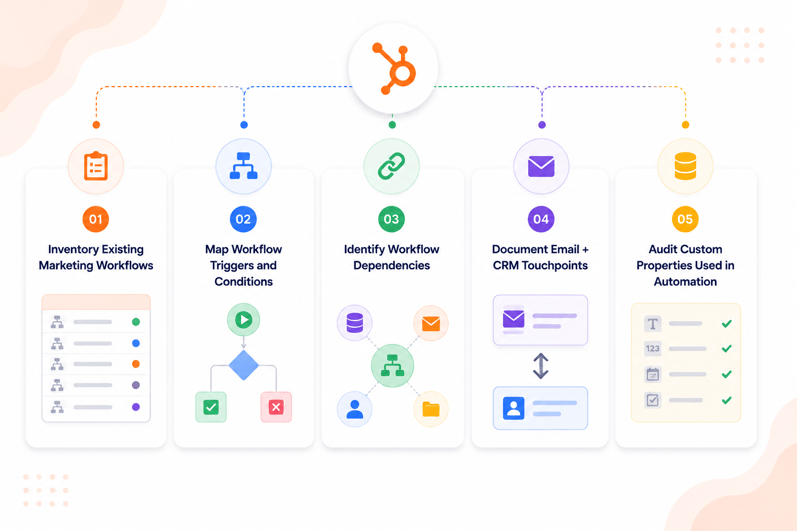
A structured audit is the most critical part of the hubspot automation migration process because most workflow failures happen due to missing dependencies rather than incorrect workflow logic.
Before rebuilding anything in HubSpot, every automation rule, trigger, and dependency must be fully documented.
Inventory Existing Marketing Workflows
Start by listing all active and inactive workflows in your current system.
Capture:
- Workflow name
- Purpose
- Status (active or paused)
- Object type (contact, deal, company, ticket)
- Business owner
This ensures no hidden or legacy workflows are missed during migration.
Map Workflow Triggers and Conditions
Every workflow is driven by specific triggers that must be replicated in HubSpot.
Common triggers include:
- Form submissions
- Email engagement
- Property changes
- List membership updates
- API or integration events
Each trigger should be documented with exact conditions to ensure correct rebuilding in HubSpot.
Identify Workflow Dependencies
Most workflows rely on external or internal dependencies.
Examples include:
- Custom contact properties
- Deal properties
- Lists and segments
- Lifecycle stages
- Integration data fields
Missing dependencies are one of the most common causes of broken automation after migration.
Document Email and CRM Touchpoints
Workflows often interact with multiple systems at once.
Document:
- Emails sent from workflows
- CRM updates (property changes, deal updates)
- Task creation for sales teams
- Notifications to internal teams
- External system updates via API
This helps ensure all touchpoints are recreated inside HubSpot workflows.
Audit Custom Properties Used in Automation
Many workflows depend on custom fields that control logic or segmentation.
Review:
- Lead scoring fields
- Lifecycle stage fields
- Status fields
- Boolean flags used in logic
- Integration-specific fields
Before migration, confirm that each property exists or will be recreated in HubSpot.
Once this audit is complete, the workflow reconstruction phase in HubSpot becomes significantly more accurate and predictable.
Step 1: Document Existing Automation Logic
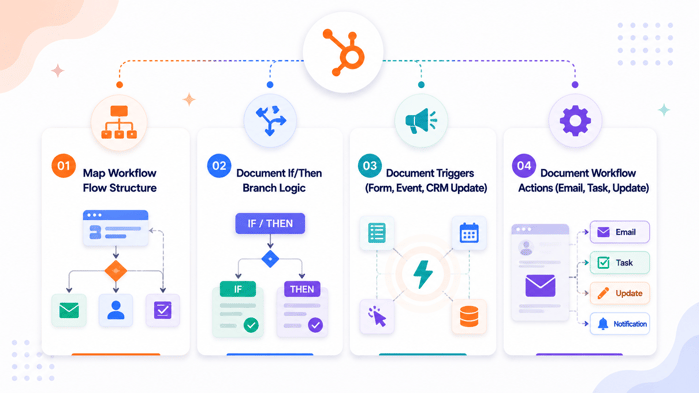
After completing the audit, the next step in the hubspot automation migration process is converting your workflow knowledge into a structured implementation blueprint. This ensures every automation rule can be rebuilt accurately inside HubSpot.
Map Workflow Flow Structure
Begin by breaking down each workflow into its full structure.
Document:
- Entry trigger
- Workflow steps
- Decision points
- Exit conditions
- End result
This creates a clear flow diagram of how automation behaves in your current system.
Document If/Then Branch Logic
Most automation workflows rely on conditional logic that determines different paths.
Examples include:
- If lead score > threshold then assign to sales
- If form submitted then send email sequence
- If lifecycle stage changes then update CRM fields
Each branch must be documented clearly so it can be recreated using HubSpot workflow branches.
Document Triggers (Form, Event, CRM Update)
Triggers define when a workflow starts.
Common triggers include:
- Form submissions
- Contact property updates
- Deal stage changes
- List membership changes
- API events
Each trigger must be recorded with exact conditions to ensure identical behavior in HubSpot.
Document Workflow Actions (Email, Task, Update)
Finally, document all actions executed inside workflows.
Examples include:
- Sending marketing emails
- Creating tasks for sales teams
- Updating contact properties
- Moving deals between stages
- Triggering internal notifications
This step ensures that no business logic is lost during migration.
Once workflow logic is fully documented, the system becomes ready for rebuilding inside HubSpot with minimal risk of misconfiguration.
Step 2: Prepare HubSpot for Automation Migration
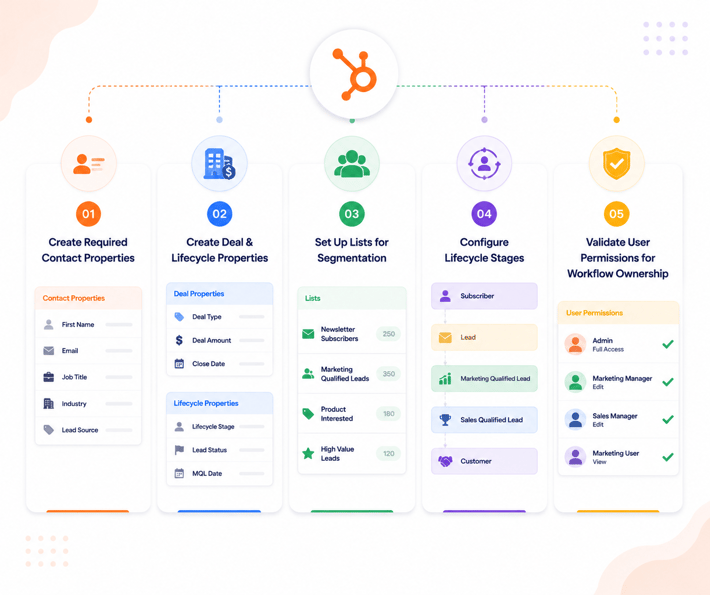
Before rebuilding workflows, HubSpot must be configured with the correct data structure. This step ensures that all workflow dependencies exist before automation logic is implemented, reducing the risk of broken triggers or failed actions.
Create Required Contact Properties
Workflows often rely on contact properties to control logic and segmentation.
Create or validate properties such as:
- Lead Status
- Lead Score
- Lifecycle Stage
- Source
- Campaign Name
- Custom qualification fields
These properties must exist before workflows are rebuilt, otherwise enrollment and branching logic will fail.
Create Deal and Lifecycle Properties
If your automation includes sales workflows, ensure deal-related properties are configured.
Examples include:
- Deal Stage
- Deal Amount
- Close Date
- Pipeline
- Deal Type
- Forecast Category
Lifecycle stage properties should also be aligned with your marketing and sales funnel definitions.
Set Up Lists for Segmentation
Many workflows depend on dynamic or static lists for enrollment and filtering.
Prepare lists such as:
- New leads
- Engaged contacts
- Marketing qualified leads
- Sales qualified leads
- Existing customers
These lists will act as workflow triggers and suppression conditions inside HubSpot.
Configure Lifecycle Stages
Lifecycle stages must be standardized before automation is activated.
Typical stages include:
- Subscriber
- Lead
- Marketing Qualified Lead
- Sales Qualified Lead
- Customer
Ensure stage definitions match your existing CRM logic to maintain accurate funnel reporting after migration.
Validate User Permissions for Workflow Ownership
Workflow ownership and execution depend on correct user permissions.
Before migration:
- Create all HubSpot users
- Assign correct roles and permissions
- Ensure sales and marketing teams have workflow access
- Validate team-based access controls
Without proper permissions, workflows may fail to execute or assign actions incorrectly.
Once HubSpot is fully prepared, the environment is ready for rebuilding automation workflows with consistent structure and reliable execution.
Step 3: Recreate Marketing Automation in HubSpot
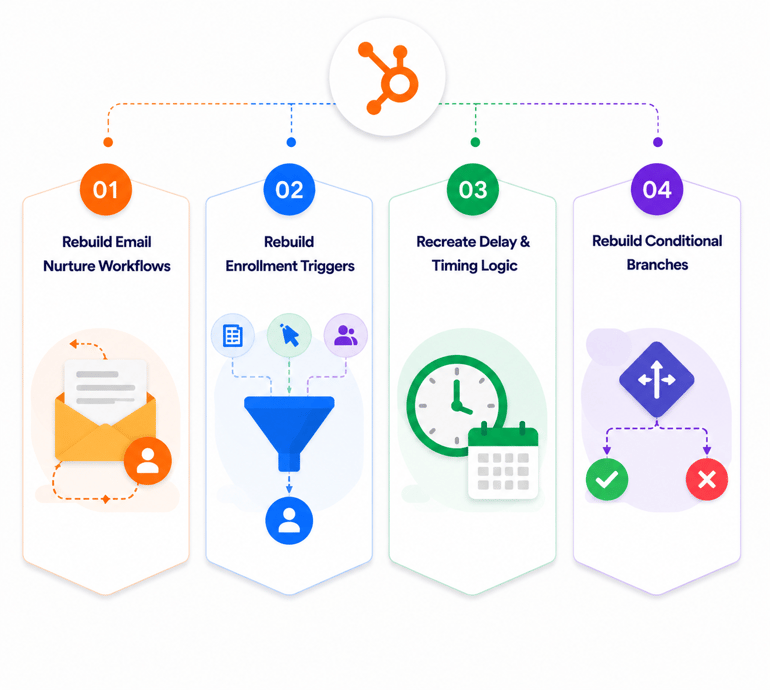
After HubSpot is prepared with the required data structure, the next step is rebuilding core marketing automation workflows. This is where the actual migrate marketing automation to hubspot execution begins.
Rebuild Email Nurture Workflows
Start with email-based automation such as nurturing sequences.
Recreate:
- Welcome email workflows
- Lead nurturing sequences
- Re-engagement campaigns
- Educational drip campaigns
Each workflow should mirror the original logic, including delays, branching conditions, and exit criteria.
Rebuild Enrollment Triggers
Enrollment triggers determine when contacts enter a workflow.
In HubSpot, configure triggers based on:
- Form submissions
- List membership
- Lifecycle stage changes
- Contact property updates
- Page views or events
Ensure triggers match the original system exactly to avoid incorrect enrollment or missed contacts.
Recreate Delay and Timing Logic
Timing is critical in marketing automation.
Rebuild:
- Time delays between emails
- Business day delays (if applicable)
- Time-based triggers (e.g., after 3 days, 7 days)
- Wait-until conditions based on behavior
Incorrect timing configuration is one of the most common causes of migration discrepancies.
Rebuild Conditional Branches
If/then logic must be carefully replicated inside HubSpot workflows.
Examples include:
- If lead score > threshold then send to sales
- If email opened then move to next step
- If deal created then stop marketing workflow
Each branch should be tested individually before activating full workflows.
Validate Workflow Behavior with Test Contacts
Before activating workflows at scale, run test contacts through each automation path.
Validate:
- Enrollment triggers fire correctly
- Branch logic behaves as expected
- Emails are sent at correct intervals
- Contact properties update correctly
This ensures that migrated workflows behave identically to the original system before going live.
Step 4: Rebuild Lead Management Automation
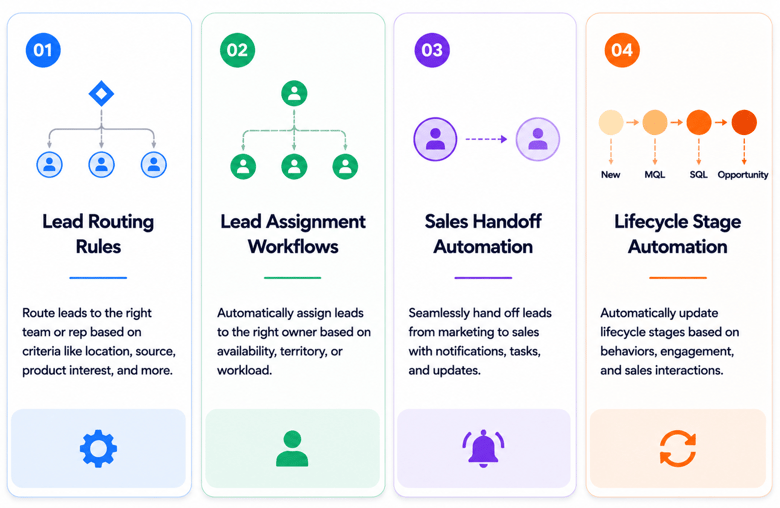
Once core marketing workflows are functioning, the next stage in the hubspot automation migration process is rebuilding lead management logic. This ensures leads continue to move correctly from marketing to sales without breaking routing or ownership rules.
Lead Routing Rules
Lead routing workflows determine how incoming leads are distributed across teams.
Rebuild routing logic based on:
- Geography or territory
- Industry or vertical
- Company size
- Product interest
- Lead source
In HubSpot, this is typically handled using workflow-based property updates and deal or contact ownership assignment rules.
Lead Assignment Workflows
Lead assignment ensures that each contact or deal is owned by the correct sales representative.
Common assignment logic includes:
- Round-robin assignment
- Territory-based assignment
- Account-based assignment
- VIP or enterprise routing
Before activating workflows, ensure all sales users exist in HubSpot so assignments map correctly.
Sales Handoff Automation
Sales handoff workflows ensure smooth transition from marketing to sales.
Typical automation includes:
- Notifying sales when a lead is qualified
- Creating a deal automatically
- Assigning ownership to a sales rep
- Updating lifecycle stage to SQL
This step is critical for maintaining pipeline continuity after migration.
Lifecycle Stage Automation
Lifecycle stage automation keeps CRM reporting aligned with the buyer journey.
Recreate rules such as:
- Lead to MQL based on engagement or scoring
- MQL to SQL based on sales qualification
- SQL to Opportunity based on deal creation
- Customer stage updates after deal close
Ensure lifecycle updates are consistent across all workflows to avoid reporting mismatches.
Validate Lead Flow with Test Records
Before activating workflows in production, test the full lead journey.
Validate:
- Correct assignment of leads
- Proper lifecycle stage updates
- Accurate deal creation behavior
- Notifications delivered to correct users
This ensures lead management automation works reliably after migration and supports sales operations without disruption.
Step 5: Rebuild Lead Scoring Automation
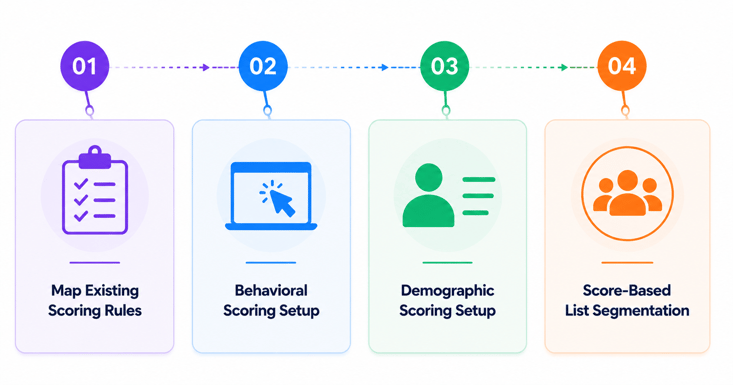
Lead scoring is often one of the most critical components of marketing automation. During migration, it must be carefully rebuilt to ensure lead qualification accuracy remains consistent inside HubSpot.
Map Existing Scoring Rules
Start by documenting all scoring logic from the source system.
Common scoring inputs include:
- Email opens and clicks
- Form submissions
- Website visits
- Content downloads
- Job title or seniority
- Company size or industry
Each rule should be mapped to a HubSpot contact or behavioral property before implementation.
Behavioral Scoring Setup
Behavioral scoring tracks engagement based on user actions.
In HubSpot, configure scoring for:
- Email engagement activity
- Website page visits
- CTA interactions
- Form submissions
- Event registrations
Assign point values that match the original scoring system as closely as possible to preserve lead qualification consistency.
Demographic Scoring Setup
Demographic scoring evaluates contact fit based on static attributes.
Common criteria include:
- Job title or role
- Company size
- Industry type
- Location
- Revenue range
These properties should already exist from earlier migration steps and can be directly used in HubSpot scoring rules.
Score-Based List Segmentation
Once scoring rules are rebuilt, create dynamic lists based on score thresholds.
Examples include:
- High-intent leads
- Marketing qualified leads (MQL)
- Sales qualified leads (SQL)
- Low-engagement leads
These lists can then be used for workflow enrollment, sales routing, or targeted campaigns.
Validate Lead Scoring Accuracy
Before activating scoring in production, test with sample contacts.
Validate:
- Score increases correctly based on actions
- Demographic rules apply correctly
- List membership updates in real time
- No duplicate or inflated scoring occurs
Lead scoring should only be activated after confirming consistency with the original system logic.
Step 6: Rebuild Internal Automation Workflows
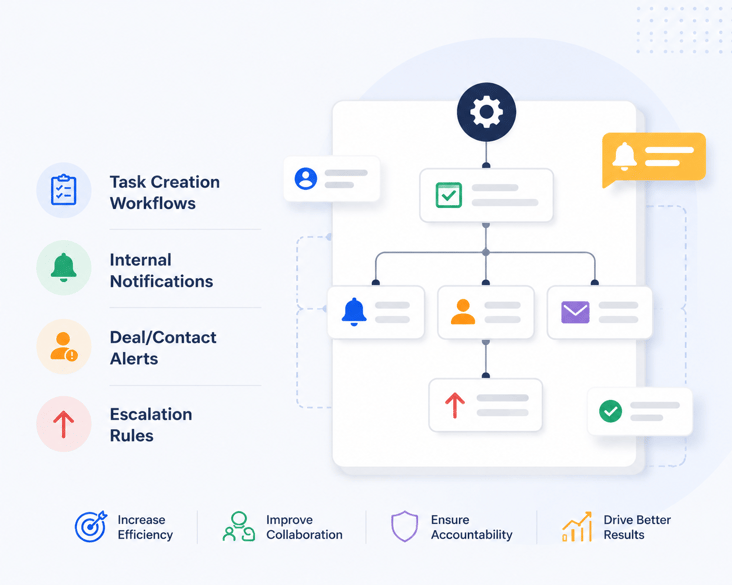
Internal automation ensures that teams are notified, tasks are created, and critical actions are triggered inside HubSpot without manual intervention. During migration, these workflows must be carefully rebuilt to maintain operational continuity.
Task Creation Workflows
Many marketing and sales processes rely on automated task creation.
Rebuild workflows that:
- Create follow-up tasks for sales reps
- Assign onboarding tasks after deal creation
- Trigger reminder tasks for stalled leads
- Generate internal review tasks for high-priority contacts
Ensure task owners are correctly mapped to HubSpot users to avoid orphaned assignments.
Internal Notifications
Internal notifications keep teams informed about key CRM activities in real time.
Common notifications include:
- New lead alerts
- High-value lead notifications
- Deal stage changes
- Lifecycle stage updates
- Form submission alerts
In HubSpot, these are configured using workflow-based internal email or notification actions.
Deal and Contact Alerts
Some workflows are designed specifically to alert stakeholders about important record changes.
Examples include:
- When a deal reaches a specific value threshold
- When a contact becomes a marketing qualified lead
- When a deal is stagnant for a defined period
- When high-intent activity is detected
These alerts help sales and marketing teams react quickly to critical opportunities.
Escalation Rules
Escalation workflows ensure that unresponsive or high-priority records are automatically escalated.
Common escalation rules include:
- Stalled deals exceeding a time threshold
- Unassigned high-value leads
- Missed SLA conditions
- No response after multiple touchpoints
In HubSpot, these rules are implemented using time delays, if/then branches, and workflow re-enrollment settings.
Validate Internal Automation Behavior
Before finalizing migration, test internal workflows using sample contacts and deals.
Validate:
- Tasks are assigned to correct users
- Notifications are delivered in real time
- Escalation rules trigger correctly
- No duplicate or missing alerts occur
Internal automation should only be activated in production after confirming that all operational workflows function as expected.
Step 7: Validate Automation After Migration
After rebuilding all workflows, the final step in the hubspot automation migration process is validating that automation behaves exactly as expected. This ensures no logic gaps, broken triggers, or execution failures exist before going live.
Test Workflow Enrollment Triggers
Start by verifying that workflows enroll the correct records.
Test triggers such as:
- Form submissions
- Contact property changes
- Lifecycle stage updates
- List membership changes
- Deal stage changes
Ensure only intended records enter each workflow and no unintended enrollments occur.
Validate Workflow Actions
Next, confirm that each workflow action executes correctly.
Check:
- Email delivery timing
- Task creation accuracy
- Property updates
- Deal or contact updates
- Internal notifications
Any mismatch between expected and actual actions indicates a configuration or dependency issue.
Test Branching Logic
If/then logic must be tested across all possible paths.
Validate:
- Correct branch selection based on conditions
- Proper handling of missing or empty properties
- Accurate segmentation-based routing
- Exit criteria working as expected
Each branch should be tested using separate sample records.
Verify Email and CRM Sync Behavior
Workflows often depend on synchronization between HubSpot and external systems.
Validate:
- CRM field updates reflect correctly in HubSpot
- External system updates are triggered where applicable
- Email workflows sync with contact properties
- No duplicate updates or conflicting actions occur
Perform End-to-End Workflow Testing
Finally, simulate full lifecycle journeys.
Examples include:
- Lead enters workflow → receives email sequence → becomes MQL → assigned to sales
- Contact submits form → receives nurture emails → triggers notification → creates deal
End-to-end testing ensures the full automation chain functions correctly after migration.
Automation should only be activated in production after successful validation across triggers, actions, branching logic, and system sync behavior.
Common Automation Migration Mistakes
Even when workflows are carefully documented and rebuilt, small configuration errors can cause automation failures after migration. Most issues are not caused by HubSpot itself, but by missing dependencies or incorrect assumptions during the migration process.
Migrating Workflows Without Dependency Mapping
One of the most common mistakes is rebuilding workflows without fully mapping dependencies.
Missing elements often include:
- Custom contact properties
- List memberships
- Lifecycle stages
- Deal properties
- External integration fields
If dependencies are not recreated first, workflows may trigger incorrectly or fail entirely.
Rebuilding Workflows Before Data Structure Is Ready
Workflows depend on a stable data foundation.
If workflows are rebuilt before:
- Properties are created
- Lifecycle stages are configured
- Lists are defined
- Users are set up
then automation will not function as expected or may require repeated rework.
Missing Hidden Triggers (Forms, APIs, Integrations)
Many workflows rely on triggers that are not immediately visible in documentation.
Examples include:
- API-based triggers from external systems
- Embedded form submissions on websites
- CRM sync events
- Third-party integration updates
If these are not identified during audit, important automation paths will break after migration.
Ignoring Suppression Rules
Suppression rules control when workflows should NOT run.
Common suppression conditions include:
- Existing customers
- Internal team members
- Unsubscribed contacts
- High-value accounts
Failing to recreate suppression rules can lead to duplicate emails, incorrect assignments, or poor user experience.
Not Testing Workflow Branch Logic
Even if workflows are correctly rebuilt, untested branch logic can create incorrect outcomes.
Common issues include:
- Wrong IF/THEN conditions
- Incorrect property thresholds
- Missing fallback paths
- Improper exit conditions
Each branch must be tested using controlled sample records before activation.
Activating Workflows Without Gradual Rollout
A frequent migration mistake is enabling all workflows at once.
Best practice is to:
- Test with sample contacts
- Run workflows in small batches
- Monitor execution logs
- Gradually scale activation
This reduces risk and makes it easier to isolate issues early.
A successful automation migration depends not only on rebuilding workflows, but on validating every dependency, trigger, and execution path before going live.
Marketing Automation Migration Checklist
Use this checklist to validate the full hubspot automation migration process before activating workflows in production. This ensures all dependencies, logic, and execution paths are correctly implemented.
Workflow Inventory Check
- All existing workflows documented
- Active and inactive workflows identified
- Workflow owners mapped
- Workflow purpose clearly defined
Dependency Mapping Check
- Required contact properties created
- Deal and lifecycle properties configured
- Lists and segments recreated
- External integrations identified
- Hidden triggers documented
HubSpot Setup Check
- Lifecycle stages configured
- User accounts created and assigned
- Permissions validated for workflow access
- Custom properties tested and available
Workflow Recreation Check
- Email nurture workflows rebuilt
- Lead routing workflows rebuilt
- Lead scoring logic implemented
- Internal notification workflows configured
- CRM-triggered workflows recreated
Testing Check
- Enrollment triggers tested
- Workflow actions validated
- Branching logic tested
- Email delivery confirmed
- CRM updates verified
Activation Readiness Check
- Test contacts validated successfully
- Workflow logs reviewed
- No duplicate or conflicting workflows
- Suppression rules configured
- Gradual rollout plan prepared
A migration should only be considered complete when workflows are fully tested across all triggers, actions, and edge cases, not just recreated inside HubSpot.
How HubXpert Handles HubSpot Automation Migration Process
HubXpert automation migration is treats as a structured engineering process rather than a simple workflow rebuild. The goal is to ensure that every marketing, sales, and CRM automation behaves exactly as it did in the source system, while improving stability inside HubSpot.
Our process typically includes:
- Full automation audit and dependency mapping
- Workflow logic documentation and flow reconstruction
- HubSpot data structure preparation
- Workflow rebuild in HubSpot with phased execution
- Lead scoring and segmentation migration
- Internal automation and notification setup
- End-to-end workflow testing
- Controlled activation with monitoring
Each step is validated before moving to the next stage to reduce the risk of broken triggers, missing dependencies, or incorrect automation behavior.
Wrapping Up
Migrating marketing automation workflows to HubSpot is not just a configuration task. It is a structured hubspot automation migration process that requires careful mapping of logic, dependencies, triggers, and data structures.
When done correctly, businesses retain full control of their lead nurturing, scoring, routing, and lifecycle automation without disruption. When done poorly, it results in broken workflows, inconsistent data, and lost revenue opportunities.
A successful migration depends on one principle: rebuild logic first, then activate automation only after full validation.
FAQs
Can I directly transfer marketing workflows to HubSpot?
No. Workflows from other platforms cannot be directly imported into HubSpot. They must be manually recreated using HubSpot workflow tools based on documented logic and dependencies.
What is included in a HubSpot automation migration process?
It includes workflow audit, dependency mapping, data structure preparation, workflow recreation, lead scoring setup, internal automation setup, and end-to-end testing.
Do I need to rebuild automation workflows manually in HubSpot?
Yes. HubSpot requires workflows to be rebuilt manually, but this ensures better control, stability, and alignment with CRM data structure.
How do I migrate lead scoring into HubSpot?
Lead scoring must be recreated using HubSpot contact properties and scoring rules based on behavioral and demographic criteria.
What breaks most often during automation migration?
Missing dependencies, incorrect triggers, and untested branch logic are the most common causes of workflow failures.
How do I test migrated workflows in HubSpot?
Use test contacts to validate enrollment triggers, actions, branching logic, and CRM updates before activating workflows in production.
Can I migrate from Marketo to HubSpot?
Yes. Marketo’s smart campaigns need to be broken into their underlying trigger logic and rebuilt as HubSpot workflows, since Marketo’s program and campaign structure does not map one to one with HubSpot’s enrollment-based model.
Can I migrate from Pardot to HubSpot?
Yes, and it is usually more straightforward than other platforms since both use branching, trigger-based workflows. The main thing to rebuild carefully is Pardot’s separate scoring and grading system as two distinct HubSpot properties.
Can I migrate from ActiveCampaign to HubSpot?
Yes. The main extra step is deciding how ActiveCampaign’s tags convert into HubSpot list memberships or contact properties, since HubSpot workflows do not use freeform tags the way ActiveCampaign does.
Founder & CEO @ Hubxpert. My goal is to make every company using HubSpot succeed in their marketing organisation and automation.

Ratul Rahman
Table of Contents:

Subscribe to our newsletter

Do You Need a Healthcare-Specific CRM, or HubSpot?
Some practices outgrow HubSpot. Most don't. Here is the real threshold test, and where a healthcare-specific CRM actually wins.
Referral Tracking Software or Your CRM? A Healthcare Guide
HubSpot has no native referral object. Here is how referral tracking actually gets built inside a CRM, and when you need dedicated software instead.

HubSpot at Enterprise Scale: Fix Pipeline Velocity First
Slow pipeline velocity often gets blamed on HubSpot outgrowing enterprise needs. Here's how to diagnose the real cause before a costly Salesforce migration.
Syncing Invoices Between HubSpot & Your Accounting Software
A healthcare CRM tracks inquiries as records, moves them through a visible pipeline, and automates the follow-up. Here is how.

CRM for Healthcare: How It Actually Works Day to Day
A healthcare CRM tracks inquiries as records, moves them through a visible pipeline, and automates the follow-up. Here is how.

HubSpot EHR CRM Integration: What Actually Syncs
No native HubSpot EHR connector exists yet. Here is how EHR CRM integration really works, and what should never sync.
-
Do You Need a Healthcare-Specific CRM, or HubSpot?
hello
-
Referral Tracking Software or Your CRM? A Healthcare Guide
hello
-
HubSpot at Enterprise Scale: Fix Pipeline Velocity First
hello
-
Syncing Invoices Between HubSpot & Your Accounting Software
hello
-
CRM for Healthcare: How It Actually Works Day to Day
hello
-
HubSpot EHR CRM Integration: What Actually Syncs
hello