Excel to HubSpot CRM

Migration Without

Losing the History

Move your contacts, companies, deals, and pipelines out of XLSX workbooks and into HubSpot CRM with deduplication, field mapping, formula translation, and a real audit trail - replacing version sprawl, broken VLOOKUPs, and Pivot Table month-end with a relational system the whole team can trust.

image 85-1 Frame 2147211998 image 76 [Vectorized] image 87
Trusted by 50+ healthcare organizations
Desktop Integration Card
Excel to HubSpot CRM  to HubSpot Migration

Teams that leveled up their development with HubXpert

white villas resort
pink cube
off market
express vietnam
leva medical
emi
poolshark
white villas resort
pink cube
off market
express vietnam
leva medical
emi
poolshark
The Problems

Why Migrate from

Excel to HubSpot?

Almost every company we migrate started in Excel. The workbook did its job for years. The pain only becomes obvious once headcount, deal volume, or compliance pressure outgrows what a shared workbook can hold.

icon-Jun-02-2026-04-13-42-2845-PM

Version Sprawl and the Final_v3_USE_THIS Problem

There are seven copies of the master pipeline workbook on the shared drive, each named some variant of clients_final_v3_USE_THIS.xlsx. Two reps are editing different copies on Friday afternoon. Monday morning, nobody can tell which version is current. The shared workbook lock keeps prompting people to open as read-only. Reconciliation eats half a day every week.

icon (1)-1

VLOOKUP Errors That Propagate Silently

Half the worksheet runs on VLOOKUPs and INDEX/MATCH chains pointing at other tabs and other workbooks. When someone inserts a column, the references shift and the formulas return #N/A - or worse, the wrong value. Errors compound through dependent cells before anyone notices the totals are wrong.

icon (2)-1

No Data Validation or Field Constraints

The Stage column has Closed Won, closed-won, CW, Won, won., and Closed/Won - six spellings of the same value. Phone numbers are stored as text, dates as text, and currencies as numbers with the $ baked in. Conditional Formatting hides the worst of it, but pivot reports are unreliable until someone manually cleans the data.

icon (3)-1

No Audit Trail and No Real Permissions

Excel has no concept of who changed what, when, or why. Track Changes was deprecated. The shared workbook lock model is brittle. Anyone with edit access can overwrite a deal value, delete a row, or paste over a formula and there is no record of it. For revenue data this is a real risk.

icon (4)-1

No Automation, No Triggers, No Workflow

Macros and Power Query handle some transformation, but there is no concept of a trigger when a deal stage changes, no email when a task is due, no rotation rule for new leads. Every follow-up depends on someone remembering to check the workbook. Power Automate flows can stitch some of it together but only if a developer maintains them.

icon (5)-1

The Real Cost: Hours of Manual Reconciliation and Decisions Made on Stale Data

A spreadsheet is free. The hours your team spends reconciling versions, fixing broken VLOOKUPs, cleaning Stage columns before the monthly Pivot Table report, and recovering from accidental overwrites are not. Most growing teams quietly burn 5 to 15 hours per week per ops person on workbook maintenance - and make pipeline decisions on data that is already two days old. HubSpot CRM replaces the workbook with a single source of truth that updates as work happens.

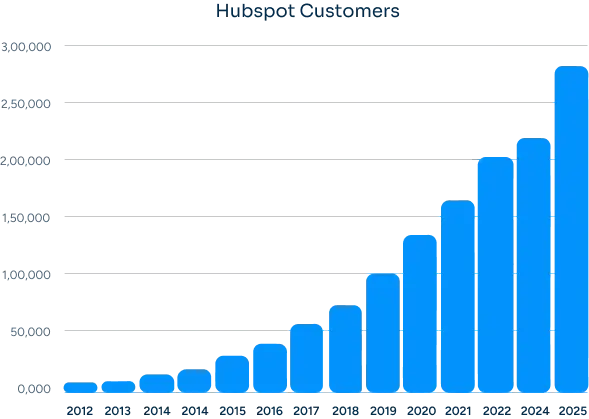
Hubspot Users
How Many Businesses Are Moving to HubSpot?

The amount is a lot in the last 12 years. It is very obvious why businesses are moving or migrating.


HubSpot offers an easy to use high growth & fast deploy CRM platform that build for scale. You’ll find everything you need to run your business.

Group 23
The SOLUTION

What We Migrate from Excel

(Core Data & Assets)

Most Excel migrations are an import-and-pray exercise. We do the deduplication, field mapping, formula translation, and validation work first - so what lands in HubSpot is clean, related, and reportable from day one.

  • CRM Records

    Contacts, Companies & Deal Data

    • check-icon
      Contacts - name, email, phone, title, owner, lifecycle stage, source, with deduplication on email and normalized phone
    • check-icon
      Companies - domain-based deduplication, parent/child hierarchy where present, industry, size, region
    • check-icon
      Deals - name, amount, stage, close date, owner, associated contacts and company, with currency normalized
    • check-icon
      Pipelines - multiple sales pipelines mapped to HubSpot pipelines with stage probability and stage order preserved
    • check-icon
      Tasks and activities - open tasks migrated with owner, due date, and notes carried into HubSpot Tasks
    • check-icon
      Notes and call logs - free-text notes columns parsed into HubSpot Notes timeline entries
    • check-icon
      Custom fields - any extra columns (Account Manager, Renewal Date, Health Score) mapped to HubSpot custom properties
  • Automation

    Calculations, Macros & Formulas

    • check-icon
      VLOOKUP and INDEX/MATCH chains replaced with HubSpot association labels and calculated properties
    • check-icon
      Pivot Tables rebuilt as HubSpot reports and dashboards (no monthly refresh ritual)
    • check-icon
      Conditional Formatting rules translated into HubSpot list segments and property color coding
    • check-icon
      Power Query transformations replaced by HubSpot operations workflows (deduplication, formatting, enrichment)
    • check-icon
      Excel macros (VBA) reviewed - most are replaced by HubSpot workflows or operations actions
    • check-icon
      Recurring tasks (renewal reminders, follow-up cadences) rebuilt as HubSpot workflow-triggered tasks
    • check-icon
      Round-robin lead assignment from a sheet replaced by HubSpot rotation rules
  • Structure & Setup

    Schema, Validation & Field Mapping

    • check-icon
      Field mapping spreadsheet built first - every Excel column mapped to a HubSpot property or flagged for cleanup
    • check-icon
      Data validation rules (dropdowns, date formats) translated into HubSpot property types and required fields
    • check-icon
      Stage column normalization - six spellings of Closed Won collapsed to a single value before import
    • check-icon
      Phone number formatting standardized to E.164 during import
    • check-icon
      Date and currency type conversion handled in pre-import staging
    • check-icon
      Deduplication rules defined per object - email for contacts, domain for companies, name + amount for deals
    • check-icon
      Required fields, dropdown options, and property groups configured to match the workbook structure
  • Integrations

    Data Sources & Connected Files

    • check-icon
      Source XLSX files inventoried - primary workbooks, satellite sheets, archive copies
    • check-icon
      External workbook references (links to other XLSX files) mapped and resolved
    • check-icon
      Power Query connections to SQL, SharePoint, or web sources documented and re-pointed at HubSpot or kept as ETL feeds
    • check-icon
      Outlook integration - emails and calendar events that referenced the workbook moved into HubSpot's email and meetings tools
    • check-icon
      Teams or SharePoint shared workbook locations decommissioned with read-only archive snapshots
    • check-icon
      Excel-based reports in Power BI re-pointed at HubSpot via the HubSpot connector
    • check-icon
      Any Zapier or Make automations reading from the workbook re-pointed at HubSpot CRM
BENEFITS

Benefits of Migrating

From Excel to HubSpot

The workbook served its purpose. Moving to HubSpot replaces the rituals that kept it usable with a system that does the work for you.
Execution

One Source of Truth

No more clients_final_v3.xlsx. Every contact, company, and deal lives in one record that everyone reads from and writes to in real time.

Adding Value

Real Validation and Required Fields

Phone numbers are phone numbers. Dates are dates. Stages are picked from a dropdown. The data is clean because the system enforces it, not because someone scrubs it before the monthly report.

spreadsheets

Audit Trail on Every Change

Every property edit, stage move, and association change is logged with the user and timestamp. Revenue numbers are defensible.

Cost Increasing

Automation Without VBA

Stage changes trigger emails. New leads get rotated. Tasks get created on a schedule. No macros, no Power Automate flows held together by one person.

Growth

Reports That Refresh Themselves

Pivot Tables become dashboards that update as deals move. The monthly Pivot Table refresh ritual disappears.

Shift

Mobile and Collaboration Built In

Reps update deals from their phone after a call. Nobody needs to email the workbook around or wonder who has it locked.

our process

Our Excel to HubSpot

Migration Process

A clear, step-by-step execution plan with full visibility at every stage. No black boxes, no unexpected issues during migration.
Step 1.

Discovery & Workbook Audit

We catalog every workbook, tab, and column in scope, and identify the data quality issues we need to fix before import.
  • Check icon Inventory of every XLSX file in scope - primary workbook, satellite sheets, archive versions
  • Check icon Tab-by-tab schema review with column types, dropdown values, and formula dependencies
  • Check icon Data quality assessment - duplicate rate, blank fields, format inconsistencies, formula errors
  • Check icon Confirm which workbook version is the source of truth where multiple exist
Discovery
Step 2.

Field Mapping & HubSpot Configuration

We map every Excel column to a HubSpot property and configure the destination to match how your team works.
  • Check icon Field mapping spreadsheet - every column mapped to a HubSpot property or flagged for cleanup
  • Check icon Custom properties created with the right type (single line, dropdown, date, number, currency)
  • Check icon Pipelines and stages built to match your existing process
  • Check icon Required fields, dropdown options, and property groups configured
Data Preparation
Step 3.

Data Cleanup & Migration

We clean the data in a staging workbook, then import in a controlled batch with validation at every step.
  • Check icon Stage normalization - collapse multiple spellings, standardize phone and date formats
  • Check icon Deduplication on email (contacts), domain (companies), name + amount (deals)
  • Check icon Staging import into a HubSpot sandbox for QA before production
  • Check icon Production import in batches with row counts reconciled against the source
Validation
Step 4.

Reports, Workflows, and Cutover

We rebuild your Pivot Table reports as dashboards, set up the workflows that replace your macros, and cut the team over.
  • Check icon Pivot Table reports rebuilt as HubSpot dashboards
  • Check icon Workflow automation for stage changes, lead rotation, and task creation
  • Check icon Read-only archive of the original workbook preserved for reference
  • Check icon Cutover date scheduled with a clear no-edit window on the source workbook
Go-Live
Step 5.

Training & Adoption Support

We train the team on HubSpot's record model and reporting, and stay close for the first month.
  • Check icon Sales team training on the contact, company, deal model and pipeline workflow
  • Check icon Ops training on workflows, dashboards, and import tools
  • Check icon Reference cheat sheet - Excel concept on the left, HubSpot equivalent on the right
  • Check icon 30-day adoption check-ins and report tuning
Training & Support
THE DIFFERENCE

From Excel Complexity to

HubSpot Clarity

The worst outcome of a migration is ending up with a HubSpot system that still feels like Excel. We use the migration as an opportunity to simplify, restructure, and improve how your CRM actually works.
What Was in Excel
Source of Truth

Multiple workbook versions on a shared drive - clients_final_v3_USE_THIS.xlsx

Single source of truth, edited concurrently by the whole team in real time

Data Validation

Stage column has six spellings of Closed Won, no enforcement, Conditional Formatting hides the mess

Dropdowns, required fields, and property types enforced by the system

Formulas & Lookups

VLOOKUPs and INDEX/MATCH chains that break when a column is inserted

Native associations and calculated properties that don't break when the schema evolves

Reporting

Pivot Tables refreshed manually each month, often after a data cleanup pass

Live dashboards that update as deals move, with drill-through to the underlying records

Audit & Permissions

No record of who changed what; the shared workbook lock is the only access control

Full audit log, granular permissions, and role-based access on every property

CASE STUDY

Our Clients

David Jenyns

David Jenyns

Creator of SYSTEMology®

SystemHub

Working with Ratul was a game-changer for us. His expertise and dedication significantly improved our marketing strategies and CRM implementation, leading to noticeable growth in our customer engagement and sales.

Faster time to value with
unified data

60%

Personalized experience have
increased stats.

10,000+

Joe Liffrig

Joe Liffrig

Technology Product Leader at Cornerstone Licensing

Cornerstone

HubXpert delivered what we needed. Their team migrated our CRM data from Microsoft Dynamics 365 to HubSpot, ensuring a smooth transition with no disruption. The migration was organized, accurate, and focused on data integrity.

CRM Records Migrated

33,638+

Data Accuracy Maintained

100%

Liselotte Leijten-Deppenbroek

Liselotte Leijten-Deppenbroek

Chief Operating Officer

PinkCube

HubXpert successfully migrated over 200,000+ support tickets from Trengo to HubSpot Service Hub, delivering a seamless transition, improved automation, and a scalable customer support operation.

Support tickets migrated

200,000+

Service pipelines & automations implemented

65+

ROADMAP

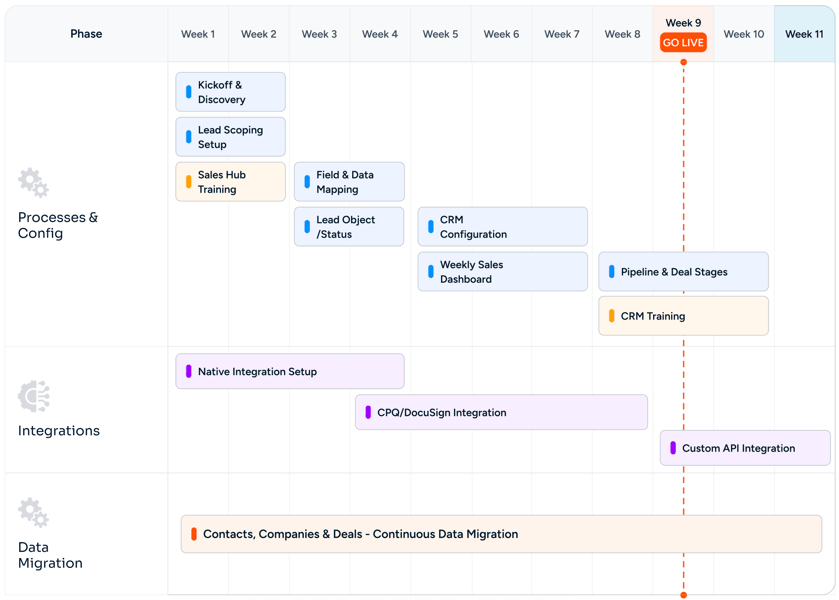
Our Excel to HubSpot Migration

Roadmap

Excel to HubSpot CRM Migration Without Losing the History Roadmap
CHALLENGES

Common Migration Challenges (And How We Solve Them)

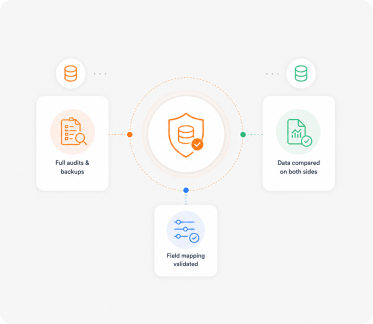
Migration issues don't come from the transfer itself. They come from poor planning, bad mapping, and no validation. We fix these before they become problems.

Zero 
Data Loss

Multiple Workbooks Disagree

When three versions of the master workbook exist with conflicting data, we run a reconciliation pass - newest record wins, older records archived for reference, conflicts surfaced for the team to resolve before import.

Accurate 
Reports

Stage and Status Column Normalization

Six spellings of Closed Won become one. We document every variant we find, propose a normalization map, and let the team approve before the import. Same for Source, Industry, and any other free-text dropdown column.

Rectangle 34625310-1

VLOOKUP and Formula Translation

VLOOKUP chains across tabs become HubSpot associations. INDEX/MATCH lookups become calculated properties. Power Query transformations become operations workflows. Nothing breaks because the formulas are gone - the relationships are now explicit in the data model.

Custom Objects Mapped Right

Phone, Date, and Currency Formats

Phone numbers stored as text, dates stored as text, currencies stored as numbers with $ baked in - all normalized to HubSpot's expected formats in staging before import. E.164 phone, ISO 8601 dates, currency as number with currency code separate.

No
Downtime

Pivot Tables to Dashboards

Every monthly Pivot Table report is rebuilt as a HubSpot dashboard that refreshes automatically. The monthly cleanup-and-refresh ritual disappears. Dashboards drill through to the underlying records.

Fast Team 
Adoption

Preserving the Historical Workbook

The source XLSX is preserved as a read-only archive for reference, audit, and the inevitable question about what a deal looked like in 2022. The cutover is clean - write activity moves to HubSpot the moment the import is signed off.

MIGRATION

Other Migration
to

HubSpot We Offer

We handle migrations from different platforms and systems into HubSpot, ensuring your data, workflows, and processes are properly rebuilt, not just transferred.
Act! CRM migration logo
Act! CRM

Planning an Act! CRM to HubSpot migration? We ensure accurate data transfer, automation rebuilding, and CRM optimization..

ActiveCampaign migration logo
ActiveCampaign

Planning an ActiveCampaign to HubSpot migration? We ensure accurate data transfer and automation rebuilding..

Adobe Experience Manager migration logo
Adobe Experience Manager

Planning an Adobe Experience Manager to HubSpot CMS migration? We ensure seamless content migration and optimization..

Agile CRM migration logo
Agile CRM

Planning an Agile CRM to HubSpot migration? We ensure accurate data transfer and CRM optimization support..

Apollo.io migration logo
Apollo.io

Migrate from Apollo.io to HubSpot Sales Hub with Sequences, engagement history, Apollo data hygiene, intent signals, Plays, and Chrome extension workflows preserved.

BigCommerce migration logo
BigCommerce

Migrate customer, order, and product data from BigCommerce or BigCommerce Enterprise into HubSpot.

Bitrix24 migration logo
Bitrix24

Planning a Bitrix24 to HubSpot migration? We ensure accurate data transfer, automation rebuilding, and CRM optimization..

Brevo migration logo
Brevo

Planning a Brevo to HubSpot migration? We ensure accurate data transfer, automation rebuilding, and CRM optimization..

Campaign Monitor migration logo
Campaign Monitor

Planning a Campaign Monitor to HubSpot migration? We ensure accurate data transfer and automation rebuilding..

Close CRM migration logo
Close CRM

Planning a Close CRM to HubSpot migration? We ensure accurate data transfer, workflow rebuilding, and CRM optimization..

Constant Contact migration logo
Constant Contact

Planning a Constant Contact to HubSpot migration? We ensure accurate data transfer and automation rebuilding..

Contentful migration logo
Contentful

Planning a Contentful to HubSpot CMS migration? We ensure accurate content mapping and CMS optimization support..

ConvertKit migration logo
ConvertKit

Planning a ConvertKit to HubSpot migration? We ensure accurate data transfer and CRM optimization support..

Copper CRM migration logo
Copper CRM

Planning a Copper CRM to HubSpot migration? We ensure accurate data transfer, automation rebuilding, and CRM optimization..

CSV Files migration logo
CSV Files

Migrate CSV exports from any legacy system to HubSpot CRM with field mapping, encoding fixes, deduplication, and validation.

Custom CRM migration logo
Custom CRM

Planning a custom CRM to HubSpot migration? We ensure accurate data mapping, workflow rebuilding, and CRM optimization..

Drift migration logo
Drift

Transfer from Drift to HubSpot Service Hub with live chat migration, workflow setup, and customer support optimization..

Drip migration logo
Drip

Planning a Drip to HubSpot migration? We ensure accurate data transfer and automation rebuilding..

Drupal migration logo
Drupal

Planning a Drupal to HubSpot CMS migration? We ensure accurate content transfer and CMS optimization support..

Eloqua migration logo
Eloqua

Planning an Eloqua to HubSpot migration? We ensure accurate data transfer, campaign rebuilding, and CRM optimization..

FileMaker Pro migration logo
FileMaker Pro

Migrate from FileMaker Pro (Claris) to HubSpot CRM with Layouts, scripts, Container fields, and the relationships graph translated into HubSpot's modern data model.

Freshdesk migration logo
Freshdesk

Planning a Freshdesk to HubSpot Service Hub migration? We ensure accurate data transfer and support automation setup..

Freshsales migration logo
Freshsales

Planning a Freshsales to HubSpot migration? We ensure accurate data transfer, workflow rebuilding, and CRM optimization..

GetResponse migration logo
GetResponse

Planning a GetResponse to HubSpot migration? We ensure accurate data transfer, automation rebuilding, and CRM optimization..

Ghost migration logo
Ghost

Planning a Ghost to HubSpot CMS migration? We ensure accurate blog migration and SEO optimization support..

GoHighLevel migration logo
GoHighLevel

Planning a GoHighLevel to HubSpot migration? We ensure accurate data transfer and CRM optimization support..

Google Sheets migration logo
Google Sheets

Migrate from Google Sheets to HubSpot CRM with deduplication, field mapping, Apps Script translation, and ImportRange dependencies replaced by a relational system.

Gorgias migration logo
Gorgias

Move from Gorgias to HubSpot Service Hub with accurate ticket transfer, automation rebuilding, and inbox optimization..

Groove by Clari migration logo
Groove by Clari

Migrate from Groove by Clari to HubSpot Sales Hub Sequences with full Flow continuity, Spaces, Playbooks, and Salesforce-native data preserved.

Help Scout migration logo
Help Scout

Upgrade from Help Scout to HubSpot Service Hub with ticket migration, automation rebuilding, and reporting configuration..

HubSpot Agency Client Handoff migration logo
HubSpot Agency Client Handoff

Transfer a HubSpot portal from your agency tenant to your client cleanly.

HubSpot Sandbox to Production migration logo
HubSpot Sandbox to Production

Promote tested HubSpot configuration and data from a Standard Sandbox or Development Sandbox into production.

Insightly migration logo
Insightly

Planning an Insightly to HubSpot migration? We ensure accurate data transfer, automation rebuilding, and CRM optimization..

Intercom migration logo
Intercom

Planning an Intercom to HubSpot Service Hub migration? We ensure seamless conversation and workflow migration support..

Jira Service Management migration logo
Jira Service Management

Migrate Jira Service Management to HubSpot Service Hub with ticket syncing, workflow setup, and service automation support..

Joomla migration logo
Joomla

Planning a Joomla to HubSpot CMS migration? We ensure accurate content transfer, template rebuilding, and SEO optimization..

Kayako migration logo
Kayako

Switch from Kayako to HubSpot Service Hub with ticket migration, automation rebuilding, and inbox setup support..

Keap migration logo
Keap

Planning a Keap to HubSpot migration? We ensure accurate data transfer, automation rebuilding, and CRM optimization..

Klaviyo migration logo
Klaviyo

Planning a Klaviyo to HubSpot migration? We ensure accurate data transfer, automation rebuilding, and CRM optimization..

Legacy ERP Data migration logo
Legacy ERP Data

Migrate customer, account, and contact master data from SAP, Oracle EBS, JD Edwards, or Sage ERP into HubSpot CRM with structured ETL, master data reconciliation, and IT-friendly extraction.

LinkedIn Sales Navigator migration logo
LinkedIn Sales Navigator

Migrate LinkedIn Sales Navigator workflows into HubSpot Sales Hub Sequences with Lead Lists, Account Lists, InMail history, SNAP integration, Smart Links, and TeamLink continuity preserved.

LiveAgent migration logo
LiveAgent

Switch from LiveAgent to HubSpot Service Hub with support data migration, workflow rebuilding, and CRM configuration..

Magento (Adobe Commerce) migration logo
Magento (Adobe Commerce)

Migrate customer, order, and product data from Magento Open Source or Adobe Commerce into HubSpot.

Mailchimp migration logo
Mailchimp

Planning a Mailchimp to HubSpot migration? We ensure accurate data transfer, automation rebuilding, and CRM optimization..

Marketo migration logo
Marketo

Planning a Marketo to HubSpot migration? We ensure accurate data transfer, workflow rebuilding, and CRM optimization..

Merging Two HubSpot Portals migration logo
Merging Two HubSpot Portals

Consolidate two HubSpot portals into a single source of truth after a merger or acquisition.

Microsoft Access migration logo
Microsoft Access

Migrate from Microsoft Access (.accdb / .mdb) to HubSpot CRM with tables, queries, Access forms, and VBA modules translated.

Microsoft Dynamics 365 migration logo
Microsoft Dynamics 365

Planning a Dynamics 365 to HubSpot migration? We ensure accurate data transfer, automation rebuilding, and CRM optimization..

Microsoft Excel migration logo
Microsoft Excel

Migrate from Excel spreadsheets to HubSpot CRM with deduplication, field mapping, formula translation, and pivot reports rebuilt as dashboards.

Monday CRM migration logo
Monday CRM

Planning a Monday CRM to HubSpot migration? We ensure accurate data transfer and CRM optimization support..

NetSuite CRM migration logo
NetSuite CRM

Planning a NetSuite CRM to HubSpot migration? We ensure accurate data transfer and CRM optimization support..

Nutshell migration logo
Nutshell

Planning a Nutshell to HubSpot migration? We ensure accurate data transfer, workflow rebuilding, and CRM optimization..

Odoo CRM migration logo
Odoo CRM

Planning an Odoo CRM to HubSpot migration? We ensure accurate data transfer, automation rebuilding, and CRM optimization..

Omnisend migration logo
Omnisend

Planning an Omnisend to HubSpot migration? We ensure accurate data transfer, automation rebuilding, and CRM optimization..

Ontraport migration logo
Ontraport

Planning an Ontraport to HubSpot migration? We ensure accurate data transfer and CRM optimization support..

Outreach migration logo
Outreach

Move from Outreach to HubSpot Sales Hub with sequence migration, workflow rebuilding, pipeline setup, and reporting support..

Pardot migration logo
Pardot

Planning a Pardot to HubSpot migration? We ensure accurate data transfer, workflow rebuilding, and CRM optimization..

Pipedrive migration logo
Pipedrive

Planning a Pipedrive to HubSpot migration? We ensure accurate data transfer, pipeline rebuilding, and CRM optimization..

PrestaShop migration logo
PrestaShop

Migrate customer, order, and product data from PrestaShop into HubSpot.

Re:amaze migration logo
Re:amaze

Migrate from Re:amaze to HubSpot Service Hub with seamless ticket transfer, workflow setup, and support optimization..

Salesforce migration logo
Salesforce

Planning a Salesforce to HubSpot migration? We ensure accurate data transfer, automation rebuilding, and CRM optimization..

Salesforce Marketing Cloud migration logo
Salesforce Marketing Cloud

Planning a Salesforce Marketing Cloud to HubSpot migration? We ensure accurate data transfer and automation rebuilding..

Salesloft migration logo
Salesloft

Switch from Salesloft to HubSpot Sales Hub with our expert sales automation migration, sequence setup, and CRM optimization support..

SAP CRM migration logo
SAP CRM

Planning an SAP CRM to HubSpot migration? We ensure accurate data transfer, automation rebuilding, and CRM optimization..

ServiceNow migration logo
ServiceNow

Move from ServiceNow to HubSpot Service Hub with ticket migration, automation rebuilding, and reporting setup support..

SharpSpring migration logo
SharpSpring

Planning a SharpSpring to HubSpot migration? We ensure accurate data transfer, automation rebuilding, and CRM optimization..

Shopify migration logo
Shopify

Migrate customer, order, and product data from Shopify (or Shopify Plus) into HubSpot.

Sitecore migration logo
Sitecore

Planning a Sitecore to HubSpot CMS migration? We ensure accurate content transfer and CMS optimization support..

Splitting One Portal into Regional Portals migration logo
Splitting One Portal into Regional Portals

Split one HubSpot portal into multiple - by geography, business unit, or brand.

Squarespace migration logo
Squarespace

Planning a Squarespace to HubSpot CMS migration? We ensure accurate content transfer and CMS optimization support..

Streak migration logo
Streak

Planning a Streak to HubSpot migration? We ensure accurate data transfer, workflow rebuilding, and CRM optimization..

SugarCRM migration logo
SugarCRM

Planning a SugarCRM to HubSpot migration? We ensure accurate data transfer, workflow rebuilding, and CRM optimization..

Webflow migration logo
Webflow

Planning a Webflow to HubSpot CMS migration? We ensure accurate design transfer, CMS rebuilding, and SEO optimization..

Wix migration logo
Wix

Planning a Wix to HubSpot CMS migration? We ensure accurate content transfer and SEO optimization support..

WooCommerce migration logo
WooCommerce

Migrate customer, order, and product data from WooCommerce on WordPress into HubSpot.

WordPress migration logo
WordPress

Planning a WordPress to HubSpot CMS migration? We ensure accurate content transfer, template rebuilding, and SEO optimization..

Zendesk migration logo
Zendesk

Planning a Zendesk to HubSpot Service Hub migration? We ensure accurate ticket transfer and workflow optimization..

Zoho CRM migration logo
Zoho CRM

Planning a Zoho CRM to HubSpot migration? We ensure accurate data transfer, workflow rebuilding, and CRM optimization..

Zoho Desk migration logo
Zoho Desk

Planning a Zoho Desk to HubSpot Service Hub migration? We have experts to ensure accurate ticket transfer and CRM optimization..

ZoomInfo migration logo
ZoomInfo

Migrate from ZoomInfo Engage to HubSpot Sales Hub Sequences with full ZoomInfo data integration, Intent signals, Chorus conversation intelligence, WorkflowOS, and Copilot continuity.

FAQ

Questions You Might Have

How long does an Excel to HubSpot migration take?

Most Excel migrations run 3 to 6 weeks. Larger workbooks with 50+ tabs, complex VLOOKUP chains, or multiple disagreeing versions can stretch to 8 weeks. The variable is data quality, not row count.

What if our Excel data is messy - duplicates, inconsistent stages, missing fields?

That is the norm, not the exception. We allocate explicit time in the project for deduplication, stage normalization, format standardization, and required-field backfill. The cleanup happens in a staging file before anything touches HubSpot, so the production import is clean on day one.

Can you migrate VLOOKUPs and Power Query transformations?

We translate them. VLOOKUP chains across tabs become HubSpot associations. Power Query transformations become operations workflows or pre-import cleanup steps. Pivot Tables become dashboards. The functionality survives, the formula maintenance does not.

What happens to our macros and VBA?

Most macros are replaced by HubSpot workflows - stage change triggers, task creation, email sends, lead rotation. The few that genuinely have no native equivalent (complex pricing calculators, custom export formats) are flagged for either a HubSpot custom code action or a kept-but-decoupled utility script.

Will we lose any historical data?

No. Every row in scope is migrated. Records that fail validation are flagged for review, not silently dropped. The original XLSX is preserved as a read-only archive for audit and reference.

How do you handle multiple versions of the same workbook?

We pick the source of truth with you up front. If multiple versions are genuinely in active use, we run a reconciliation pass - newest record wins, conflicts surfaced for the team to resolve before import. We do not silently merge conflicting data.

Can we keep using Excel alongside HubSpot?

Yes, for the use cases where it makes sense - pricing calculators, financial modeling, scratch analysis. The system of record for contacts, companies, and deals moves to HubSpot. Data can be exported back to Excel any time for ad hoc analysis.

What about our Pivot Table reports?

Every Pivot Table in scope is rebuilt as a HubSpot dashboard. Dashboards refresh automatically as records change, drill through to the underlying data, and are shareable with permissions. The monthly Pivot Table refresh ritual goes away.

How do you handle phone numbers, dates, and currencies stored as text?

We normalize during the staging step. Phone numbers go to E.164 format. Dates go to ISO 8601. Currency values get separated from the symbol with the currency code stored as a property. The import lands in HubSpot with proper types, not text-shaped numbers.

Do we need to clean the spreadsheet before you start?

No. Cleanup is part of the project - that's most of the value. If you clean it first you'll do work twice. Hand it to us in whatever state it's in and we'll work the cleanup into the migration plan.

BOOK CONSULTATION

Make Your Decision

We make everything else easy

With 5+ years of industry experience, 150+ successful projects, and a 98% client satisfaction rate, we've built deep migration expertise across every major CRM, CMS, marketing, and helpdesk platform. Our team has helped 20+ retainer clients personalize their HubSpot setup post-migration, so you don't just inherit a copy of your old system - you launch on a CRM that actually fits how your business runs.

Check Icon Takes 30 minutes
check icon Delivered by certified HubSpot expert
Hero Image