Legacy ERP Data Migration

to HubSpot CRM

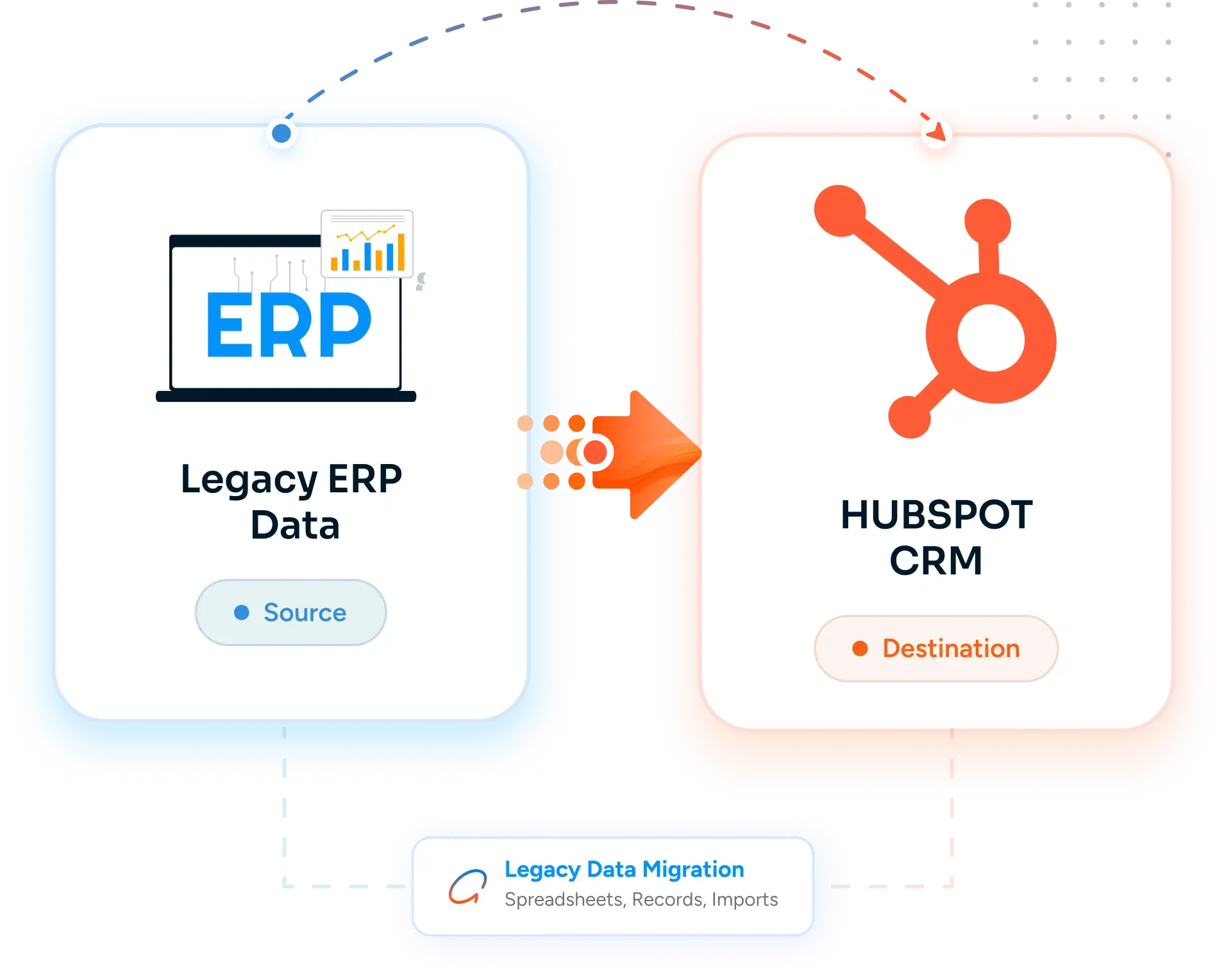
Move customer, account, and contact master data out of SAP, Oracle EBS, JD Edwards, Sage, or other legacy ERPs and into HubSpot CRM with structured ETL, master data reconciliation, and an extraction approach that works with IT - turning the general ledger into clean, deduplicated, sales-ready data the commercial team can finally use.

image 85-1 Frame 2147211998 image 76 [Vectorized] image 87
Trusted by 50+ healthcare organizations
Desktop Integration Card
Legacy ERP Data Migration  to HubSpot Migration

Teams that leveled up their development with HubXpert

white villas resort
pink cube
off market
express vietnam
leva medical
emi
poolshark
white villas resort
pink cube
off market
express vietnam
leva medical
emi
poolshark
The Problems

Why Migrate from

Legacy ERP Data to HubSpot?

ERP data lives where the financial truth lives - and that data was almost never modeled for sales, marketing, or customer engagement. Getting it out cleanly is half the project. We have done this with SAP, Oracle EBS, JD Edwards, Sage, NetSuite, and several less-known systems.

icon-Jun-02-2026-04-13-42-2845-PM

Data Extraction Politics and IT Bottleneck

ERP data sits behind IT. Production access is restricted, change windows are quarterly, and DBA hours are scarce. Every extraction request becomes a project of its own - schema reviews, security sign-offs, scheduled extracts, encrypted file drops. The commercial team waits weeks for what looked on paper like a one-day job.

icon (1)-1

ETL Fragility and One-Off Extracts

The last extract was built for a specific report, runs once a quarter, and breaks every time the schema changes. There's no documented ETL - just SQL scripts in someone's home drive, a SSIS package nobody owns, or a Crystal Reports definition that exports CSV. Re-running it for a different scope or schema means rebuilding from scratch.

icon (2)-1

Master Data Quality and Customer Hierarchy

The customer master has 14,000 accounts, 6,000 of which are inactive, 2,000 are duplicates of active records, and 500 have null country codes. Parent/child hierarchy is encoded in a 6-character account number convention nobody documented. Getting clean, deduplicated, hierarchically organized customer master data into HubSpot is the actual hard problem.

icon (3)-1

Schema Documentation Is Tribal Knowledge

The customer master is in KNA1, KNB1, KNVV in SAP - or AR_CUSTOMERS_ALL in Oracle EBS - or F0101, F03012 in JD Edwards. Which fields matter, which are deprecated, which are populated only for certain countries, which are calculated downstream - all of it lives in the head of one person who's been there 18 years.

icon (4)-1

Financial Truth and Commercial Truth Diverge

Sales adds prospects in their tool. Finance enters customers in the ERP only after a contract is signed. The two systems agree on names but nothing else. There is no shared customer ID, no agreed master data, no clean way to join orders to sales activity. Reporting on customer lifetime value across the funnel is an exercise in spreadsheet reconciliation.

icon (5)-1

The Real Cost: A Custom Project With IT Coordination, ETL Work, and Master Data Reconciliation

Legacy ERP migration is not a fixed-fee CSV import. The cost is the IT coordination, the structured extraction, the master data reconciliation, the customer hierarchy mapping, the deduplication of 14,000 accounts down to the 5,000 that are real, and the integration design between HubSpot (commercial) and the ERP (financial). Most ERP migrations land in the $30,000 to $80,000 range, sometimes higher for SAP at scale. We custom-quote every ERP project - the $5K and $10K tiers don't apply.


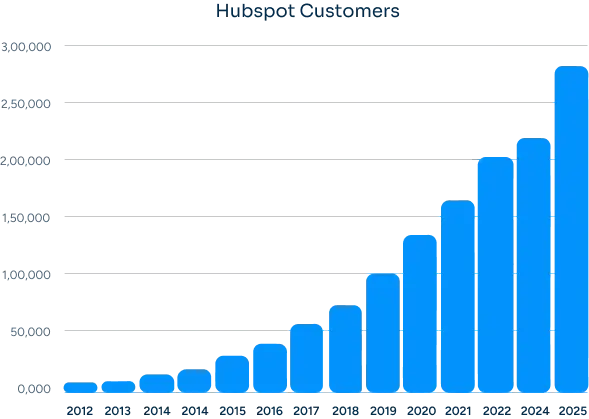
Hubspot Users
How Many Businesses Are Moving to HubSpot?

The amount is a lot in the last 12 years. It is very obvious why businesses are moving or migrating.


HubSpot offers an easy to use high growth & fast deploy CRM platform that build for scale. You’ll find everything you need to run your business.

Group 23
The SOLUTION

What We Migrate from Legacy ERP Data

(Core Data & Assets)

ERP migrations are deeper than spreadsheet migrations because the data was never modeled for sales. We do the structured ETL, master data reconciliation, and integration design work first - so HubSpot becomes the commercial system of record while the ERP stays the financial system of record.

  • CRM Records

    Contacts, Companies & Deal Data

    • check-icon
      Customer master - KNA1/KNB1/KNVV (SAP), AR_CUSTOMERS_ALL (Oracle EBS), F0101/F03012 (JD Edwards), or equivalent - deduplicated and mapped to HubSpot Companies
    • check-icon
      Customer hierarchy - parent/child relationships from the account master mapped to HubSpot company associations
    • check-icon
      Contacts - extracted from ERP contact tables and contact persons, deduplicated on email, associated to companies
    • check-icon
      Open opportunities - quotes, pipeline orders, or sales documents from the ERP mapped to HubSpot Deals where commercially relevant
    • check-icon
      Order and invoice history - loaded as a snapshot to HubSpot custom objects for sales and CSM reference
    • check-icon
      Product catalog (material master, item master) loaded to HubSpot Products for use in deals and quotes

    • check-icon
      Sales territory and account ownership extracted from ERP sales org structure and mapped to HubSpot deal owner and team
  • Automation

    Calculations, Macros & Formulas

    • check-icon
      ETL pipeline built - documented, versioned, and re-runnable for incremental refreshes
    • check-icon
      Master data reconciliation logic - deduplication, hierarchy resolution, status normalization (active/inactive/blocked)
    • check-icon
      Field mapping with type conversion (ERP numeric currencies to HubSpot currency properties, ERP dates to ISO 8601)
    • check-icon
      Active customer filter - exclude inactive, blocked, or one-time customers per business rules
    • check-icon
      Lifecycle stage and status mapping from ERP customer status codes to HubSpot lifecycle stage
    • check-icon
      Operations Hub data sync (or custom integration) configured for ongoing customer master sync
    • check-icon
      Triggered workflows for new customer creation, status change, and credit hold from the ERP feed
  • Structure & Setup

    Schema, Validation & Field Mapping

    • check-icon
      Schema discovery - relevant ERP tables, fields, codes, and lookups documented with the IT team
    • check-icon
      Field mapping spreadsheet - every ERP field mapped to a HubSpot property, calculated property, or excluded with a reason
    • check-icon
      Custom properties created with the right type and source-system reference (SAP customer number, Oracle account ID)
    • check-icon
      Custom objects defined for ERP concepts that don't fit Contact/Company/Deal (Subscriptions, Service Contracts, Assets)
    • check-icon
      Pipeline structure aligned with ERP sales document flow (quote, order, invoice, paid)
    • check-icon
      Deduplication keys defined - customer number, tax ID, domain, name+address
    • check-icon
      Master data governance plan - which system owns which fields, how conflicts are resolved
  • Integrations

    Data Sources & Connected Files

    • check-icon
      ERP source system documented - SAP ECC/S4, Oracle EBS, JD Edwards EnterpriseOne, Sage 100/300/X3, NetSuite, or other
    • check-icon
      Extraction approach - RFC/BAPI for SAP, Open Interface tables for Oracle, Database tables for JDE, or REST API where available
    • check-icon
      Operations Hub data sync configured for ongoing customer master sync where the ERP supports it
    • check-icon
      Middleware (MuleSoft, Boomi, SnapLogic, Workato) integrated where one is already in place
    • check-icon
      ERP-to-HubSpot bi-directional sync designed - what flows from HubSpot to ERP, what flows from ERP to HubSpot
    • check-icon
      BI and reporting tools (Power BI, Tableau, Cognos) re-pointed at HubSpot via the HubSpot connector
    • check-icon
      ERP read access retained for audit and reconciliation, write activity for commercial data moves to HubSpot
BENEFITS

Benefits of Migrating

From Legacy ERP Data to HubSpot

ERP stays in the financial system of record. HubSpot becomes the commercial system of record. The two are integrated, the master data agrees, and the team finally has a customer view that joins financial truth with sales activity.
Execution

A Real Commercial System of Record

Sales, marketing, and customer success get a CRM designed for them - not a screen built into the ERP for finance. Pipeline, activities, attribution, and engagement all live in one place.

Adding Value

Master Data That Finally Agrees

Customer master is reconciled, deduplicated, and synced. The disconnect between sales' prospect list and finance's customer master ends. One customer, one ID, one record both systems agree on.

spreadsheets

Customer Hierarchy Modeled Correctly

Parent/child account relationships from the ERP get translated into HubSpot company associations. Reporting on the full account family becomes possible without a spreadsheet pivot.

Cost Increasing

Order and Invoice History at Hand

Order and invoice history loaded into HubSpot custom objects and surfaced on the company record. Account managers see financial context without VPN-ing into the ERP.

Growth

Native Marketing Built In

Marketing automation, email campaigns, lead capture, attribution, and nurture sequences are native to HubSpot - not bolted onto the ERP through middleware.

Shift

IT Bottleneck Reduced

Once the integration is built, ongoing customer master sync runs on a schedule. The commercial team stops filing tickets for ad hoc customer extracts.

our process

Our Legacy ERP Data to HubSpot

Migration Process

A clear, step-by-step execution plan with full visibility at every stage. No black boxes, no unexpected issues during migration.
Step 1.

Discovery, IT Alignment & Scope

We work with IT and the business to scope the extraction, agree the master data rules, and document the integration design.
  • Check icon ERP system identification (SAP ECC/S4, Oracle EBS, JD Edwards, Sage, NetSuite) and access plan
  • Check icon Stakeholder alignment - IT, finance, sales, marketing on what moves and what stays
  • Check icon Master data governance plan - which system owns which fields, how conflicts are resolved
  • Check icon Integration architecture - one-time migration, ongoing sync, bi-directional flow, middleware in path
Discovery
Step 2.

Schema Discovery & Field Mapping

We document the relevant ERP schema with the team that knows it, then build the field mapping that drives the ETL.
  • Check icon Relevant ERP tables documented with the DBA or functional consultant who owns them
  • Check icon Field mapping spreadsheet - every ERP field mapped to a HubSpot property or excluded with a reason
  • Check icon Custom objects defined for ERP concepts that don't fit Contact/Company/Deal
  • Check icon Deduplication keys, hierarchy logic, and active/inactive filters defined
Data Preparation
Step 3.

ETL Build, Extraction & Sandbox Migration

We build the ETL pipeline, extract from the ERP via the agreed method, and run a full sandbox migration with reconciliation.
  • Check icon ETL pipeline built - extraction, transformation (deduplication, hierarchy, normalization), load
  • Check icon Extraction via RFC/BAPI (SAP), Open Interface (Oracle), database tables (JDE), or REST API where available
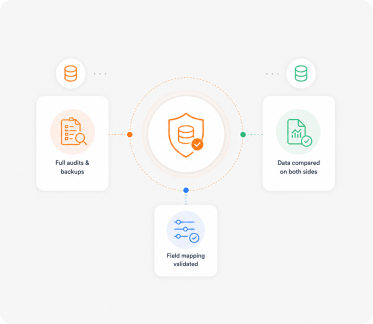
  • Check icon Sandbox migration with full row count and value reconciliation against source
  • Check icon Validation report - what passed, what was deduplicated, what was excluded by business rule
Validation
Step 4.

Production Migration, Integration Build & Cutover

We run the production migration, build the ongoing sync, and cut the commercial team over to HubSpot.
  • Check icon Production migration in batches with row counts reconciled live
  • Check icon Ongoing customer master sync built - Operations Hub data sync, native integration, or middleware
  • Check icon Bi-directional sync configured per the integration design
  • Check icon Cutover with a clear handoff - ERP is financial system of record, HubSpot is commercial
Go-Live
Step 5.

Training, Governance & Adoption Support

We train the commercial team, document the master data governance, and stay close for the first 60 days.
  • Check icon Sales, marketing, and CSM training on the contact, company, deal model and pipeline workflow
  • Check icon Ops training on workflows, custom objects, dashboards, and the ERP integration
  • Check icon Master data governance runbook - who owns what, how to resolve conflicts, refresh cadence
  • Check icon 60-day adoption check-ins, dashboard tuning, integration monitoring
Training & Support
THE DIFFERENCE

From Legacy ERP Complexity to

HubSpot Clarity

The worst outcome of a migration is ending up with a HubSpot system that still feels like Legacy ERP Data. We use the migration as an opportunity to simplify, restructure, and improve how your CRM actually works.
What Was in Legacy ERP Data
System Purpose

Designed for finance - general ledger, accounts receivable, billing, inventory

Designed for commercial - sales pipeline, marketing campaigns, customer engagement, attribution

Data Access

Restricted production access, DBA hours, quarterly change windows, IT-mediated extracts

Self-service for the commercial team with role-based permissions and a documented ongoing sync

Master Data

ERP customer master is the financial truth, often with 50%+ inactive records and undocumented hierarchy

Deduplicated, hierarchically organized commercial customer master synced from the ERP source of truth

Marketing & Engagement

Not the ERP's job - marketing, email, attribution all live in third-party tools synced through middleware

Native marketing automation, email, attribution, and nurture sequences in one platform

Reporting

Reports built by IT or BI team using Crystal Reports, Cognos, BusinessObjects, or BI on top of the ERP

Native commercial dashboards with drill-through, plus BI tools re-pointed at HubSpot for unified financial+commercial reporting

CASE STUDY

Our Clients

David Jenyns

David Jenyns

Creator of SYSTEMology®

SystemHub

Working with Ratul was a game-changer for us. His expertise and dedication significantly improved our marketing strategies and CRM implementation, leading to noticeable growth in our customer engagement and sales.

Faster time to value with
unified data

60%

Personalized experience have
increased stats.

10,000+

Joe Liffrig

Joe Liffrig

Technology Product Leader at Cornerstone Licensing

Cornerstone

HubXpert delivered what we needed. Their team migrated our CRM data from Microsoft Dynamics 365 to HubSpot, ensuring a smooth transition with no disruption. The migration was organized, accurate, and focused on data integrity.

CRM Records Migrated

33,638+

Data Accuracy Maintained

100%

Liselotte Leijten-Deppenbroek

Liselotte Leijten-Deppenbroek

Chief Operating Officer

PinkCube

HubXpert successfully migrated over 200,000+ support tickets from Trengo to HubSpot Service Hub, delivering a seamless transition, improved automation, and a scalable customer support operation.

Support tickets migrated

200,000+

Service pipelines & automations implemented

65+

ROADMAP

Our Legacy ERP Data to HubSpot Migration

Roadmap

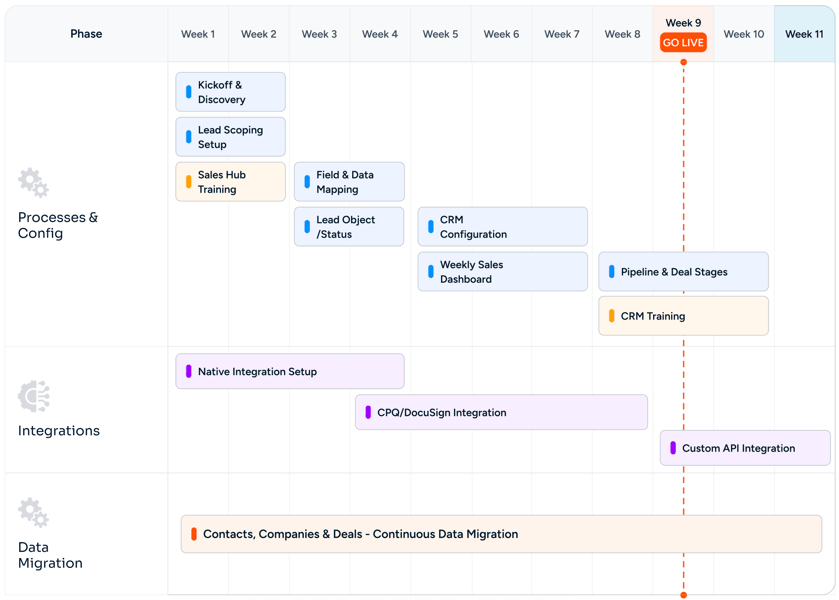
Legacy ERP Data Migration to HubSpot CRM (SAP, Oracle, JDE, Sage) Roadmap
CHALLENGES

Common Migration Challenges (And How We Solve Them)

Migration issues don't come from the transfer itself. They come from poor planning, bad mapping, and no validation. We fix these before they become problems.

Zero 
Data Loss

Working With IT, Not Around Them

ERP data extraction needs IT. We approach it as a partnership - security sign-offs, schema reviews, agreed extraction windows, encrypted file drops, audit logs. The DBA and functional consultant are part of the project team, not gatekeepers to work around.

Accurate 
Reports

Master Data Reconciliation

Deduplication of 14,000 accounts down to the 5,000 that are real. Inactive customer filtering. Tax ID and domain matching. Parent/child hierarchy resolution. We document the reconciliation rules, propose them to the business, and execute them in the ETL with a full audit trail of what was merged or excluded.

Rectangle 34625310-1

Customer Hierarchy and Account Family

Parent/child account relationships from the ERP - sometimes encoded in account numbers, sometimes in dedicated hierarchy tables - get translated into HubSpot company associations. Reporting on the full account family becomes possible.

Custom Objects Mapped Right

ERP-to-HubSpot Integration Architecture

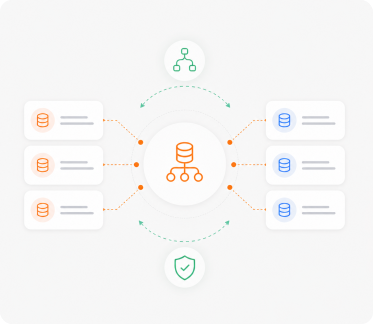
We design the integration up front - what flows from HubSpot to ERP (new account creation, contact updates), what flows from ERP to HubSpot (customer master, order history, credit status), what cadence (real-time, hourly, daily). Operations Hub data sync, native integrations, or middleware (MuleSoft, Boomi, Workato) - chosen by the data shape.

No
Downtime

Order and Invoice History as Custom Objects

Historical orders and invoices get loaded as HubSpot custom objects associated to companies. Account managers see financial context on the company record without VPN access to the ERP. Going forward, the sync keeps the order history current.

Fast Team 
Adoption

Bi-Directional Sync Without Conflicts

Master data governance is defined up front - which system owns which fields. Conflicts are resolved by the documented owner. The bi-directional sync respects the governance and surfaces conflicts that need a human decision rather than silently overwriting.

MIGRATION

Other Migration
to

HubSpot We Offer

We handle migrations from different platforms and systems into HubSpot, ensuring your data, workflows, and processes are properly rebuilt, not just transferred.
Act! CRM migration logo
Act! CRM

Planning an Act! CRM to HubSpot migration? We ensure accurate data transfer, automation rebuilding, and CRM optimization..

ActiveCampaign migration logo
ActiveCampaign

Planning an ActiveCampaign to HubSpot migration? We ensure accurate data transfer and automation rebuilding..

Adobe Experience Manager migration logo
Adobe Experience Manager

Planning an Adobe Experience Manager to HubSpot CMS migration? We ensure seamless content migration and optimization..

Agile CRM migration logo
Agile CRM

Planning an Agile CRM to HubSpot migration? We ensure accurate data transfer and CRM optimization support..

Apollo.io migration logo
Apollo.io

Migrate from Apollo.io to HubSpot Sales Hub with Sequences, engagement history, Apollo data hygiene, intent signals, Plays, and Chrome extension workflows preserved.

BigCommerce migration logo
BigCommerce

Migrate customer, order, and product data from BigCommerce or BigCommerce Enterprise into HubSpot.

Bitrix24 migration logo
Bitrix24

Planning a Bitrix24 to HubSpot migration? We ensure accurate data transfer, automation rebuilding, and CRM optimization..

Brevo migration logo
Brevo

Planning a Brevo to HubSpot migration? We ensure accurate data transfer, automation rebuilding, and CRM optimization..

Campaign Monitor migration logo
Campaign Monitor

Planning a Campaign Monitor to HubSpot migration? We ensure accurate data transfer and automation rebuilding..

Close CRM migration logo
Close CRM

Planning a Close CRM to HubSpot migration? We ensure accurate data transfer, workflow rebuilding, and CRM optimization..

Constant Contact migration logo
Constant Contact

Planning a Constant Contact to HubSpot migration? We ensure accurate data transfer and automation rebuilding..

Contentful migration logo
Contentful

Planning a Contentful to HubSpot CMS migration? We ensure accurate content mapping and CMS optimization support..

ConvertKit migration logo
ConvertKit

Planning a ConvertKit to HubSpot migration? We ensure accurate data transfer and CRM optimization support..

Copper CRM migration logo
Copper CRM

Planning a Copper CRM to HubSpot migration? We ensure accurate data transfer, automation rebuilding, and CRM optimization..

CSV Files migration logo
CSV Files

Migrate CSV exports from any legacy system to HubSpot CRM with field mapping, encoding fixes, deduplication, and validation.

Custom CRM migration logo
Custom CRM

Planning a custom CRM to HubSpot migration? We ensure accurate data mapping, workflow rebuilding, and CRM optimization..

Drift migration logo
Drift

Transfer from Drift to HubSpot Service Hub with live chat migration, workflow setup, and customer support optimization..

Drip migration logo
Drip

Planning a Drip to HubSpot migration? We ensure accurate data transfer and automation rebuilding..

Drupal migration logo
Drupal

Planning a Drupal to HubSpot CMS migration? We ensure accurate content transfer and CMS optimization support..

Eloqua migration logo
Eloqua

Planning an Eloqua to HubSpot migration? We ensure accurate data transfer, campaign rebuilding, and CRM optimization..

FileMaker Pro migration logo
FileMaker Pro

Migrate from FileMaker Pro (Claris) to HubSpot CRM with Layouts, scripts, Container fields, and the relationships graph translated into HubSpot's modern data model.

Freshdesk migration logo
Freshdesk

Planning a Freshdesk to HubSpot Service Hub migration? We ensure accurate data transfer and support automation setup..

Freshsales migration logo
Freshsales

Planning a Freshsales to HubSpot migration? We ensure accurate data transfer, workflow rebuilding, and CRM optimization..

GetResponse migration logo
GetResponse

Planning a GetResponse to HubSpot migration? We ensure accurate data transfer, automation rebuilding, and CRM optimization..

Ghost migration logo
Ghost

Planning a Ghost to HubSpot CMS migration? We ensure accurate blog migration and SEO optimization support..

GoHighLevel migration logo
GoHighLevel

Planning a GoHighLevel to HubSpot migration? We ensure accurate data transfer and CRM optimization support..

Google Sheets migration logo
Google Sheets

Migrate from Google Sheets to HubSpot CRM with deduplication, field mapping, Apps Script translation, and ImportRange dependencies replaced by a relational system.

Gorgias migration logo
Gorgias

Move from Gorgias to HubSpot Service Hub with accurate ticket transfer, automation rebuilding, and inbox optimization..

Groove by Clari migration logo
Groove by Clari

Migrate from Groove by Clari to HubSpot Sales Hub Sequences with full Flow continuity, Spaces, Playbooks, and Salesforce-native data preserved.

Help Scout migration logo
Help Scout

Upgrade from Help Scout to HubSpot Service Hub with ticket migration, automation rebuilding, and reporting configuration..

HubSpot Agency Client Handoff migration logo
HubSpot Agency Client Handoff

Transfer a HubSpot portal from your agency tenant to your client cleanly.

HubSpot Sandbox to Production migration logo
HubSpot Sandbox to Production

Promote tested HubSpot configuration and data from a Standard Sandbox or Development Sandbox into production.

Insightly migration logo
Insightly

Planning an Insightly to HubSpot migration? We ensure accurate data transfer, automation rebuilding, and CRM optimization..

Intercom migration logo
Intercom

Planning an Intercom to HubSpot Service Hub migration? We ensure seamless conversation and workflow migration support..

Jira Service Management migration logo
Jira Service Management

Migrate Jira Service Management to HubSpot Service Hub with ticket syncing, workflow setup, and service automation support..

Joomla migration logo
Joomla

Planning a Joomla to HubSpot CMS migration? We ensure accurate content transfer, template rebuilding, and SEO optimization..

Kayako migration logo
Kayako

Switch from Kayako to HubSpot Service Hub with ticket migration, automation rebuilding, and inbox setup support..

Keap migration logo
Keap

Planning a Keap to HubSpot migration? We ensure accurate data transfer, automation rebuilding, and CRM optimization..

Klaviyo migration logo
Klaviyo

Planning a Klaviyo to HubSpot migration? We ensure accurate data transfer, automation rebuilding, and CRM optimization..

Legacy ERP Data migration logo
Legacy ERP Data

Migrate customer, account, and contact master data from SAP, Oracle EBS, JD Edwards, or Sage ERP into HubSpot CRM with structured ETL, master data reconciliation, and IT-friendly extraction.

LinkedIn Sales Navigator migration logo
LinkedIn Sales Navigator

Migrate LinkedIn Sales Navigator workflows into HubSpot Sales Hub Sequences with Lead Lists, Account Lists, InMail history, SNAP integration, Smart Links, and TeamLink continuity preserved.

LiveAgent migration logo
LiveAgent

Switch from LiveAgent to HubSpot Service Hub with support data migration, workflow rebuilding, and CRM configuration..

Magento (Adobe Commerce) migration logo
Magento (Adobe Commerce)

Migrate customer, order, and product data from Magento Open Source or Adobe Commerce into HubSpot.

Mailchimp migration logo
Mailchimp

Planning a Mailchimp to HubSpot migration? We ensure accurate data transfer, automation rebuilding, and CRM optimization..

Marketo migration logo
Marketo

Planning a Marketo to HubSpot migration? We ensure accurate data transfer, workflow rebuilding, and CRM optimization..

Merging Two HubSpot Portals migration logo
Merging Two HubSpot Portals

Consolidate two HubSpot portals into a single source of truth after a merger or acquisition.

Microsoft Access migration logo
Microsoft Access

Migrate from Microsoft Access (.accdb / .mdb) to HubSpot CRM with tables, queries, Access forms, and VBA modules translated.

Microsoft Dynamics 365 migration logo
Microsoft Dynamics 365

Planning a Dynamics 365 to HubSpot migration? We ensure accurate data transfer, automation rebuilding, and CRM optimization..

Microsoft Excel migration logo
Microsoft Excel

Migrate from Excel spreadsheets to HubSpot CRM with deduplication, field mapping, formula translation, and pivot reports rebuilt as dashboards.

Monday CRM migration logo
Monday CRM

Planning a Monday CRM to HubSpot migration? We ensure accurate data transfer and CRM optimization support..

NetSuite CRM migration logo
NetSuite CRM

Planning a NetSuite CRM to HubSpot migration? We ensure accurate data transfer and CRM optimization support..

Nutshell migration logo
Nutshell

Planning a Nutshell to HubSpot migration? We ensure accurate data transfer, workflow rebuilding, and CRM optimization..

Odoo CRM migration logo
Odoo CRM

Planning an Odoo CRM to HubSpot migration? We ensure accurate data transfer, automation rebuilding, and CRM optimization..

Omnisend migration logo
Omnisend

Planning an Omnisend to HubSpot migration? We ensure accurate data transfer, automation rebuilding, and CRM optimization..

Ontraport migration logo
Ontraport

Planning an Ontraport to HubSpot migration? We ensure accurate data transfer and CRM optimization support..

Outreach migration logo
Outreach

Move from Outreach to HubSpot Sales Hub with sequence migration, workflow rebuilding, pipeline setup, and reporting support..

Pardot migration logo
Pardot

Planning a Pardot to HubSpot migration? We ensure accurate data transfer, workflow rebuilding, and CRM optimization..

Pipedrive migration logo
Pipedrive

Planning a Pipedrive to HubSpot migration? We ensure accurate data transfer, pipeline rebuilding, and CRM optimization..

PrestaShop migration logo
PrestaShop

Migrate customer, order, and product data from PrestaShop into HubSpot.

Re:amaze migration logo
Re:amaze

Migrate from Re:amaze to HubSpot Service Hub with seamless ticket transfer, workflow setup, and support optimization..

Salesforce migration logo
Salesforce

Planning a Salesforce to HubSpot migration? We ensure accurate data transfer, automation rebuilding, and CRM optimization..

Salesforce Marketing Cloud migration logo
Salesforce Marketing Cloud

Planning a Salesforce Marketing Cloud to HubSpot migration? We ensure accurate data transfer and automation rebuilding..

Salesloft migration logo
Salesloft

Switch from Salesloft to HubSpot Sales Hub with our expert sales automation migration, sequence setup, and CRM optimization support..

SAP CRM migration logo
SAP CRM

Planning an SAP CRM to HubSpot migration? We ensure accurate data transfer, automation rebuilding, and CRM optimization..

ServiceNow migration logo
ServiceNow

Move from ServiceNow to HubSpot Service Hub with ticket migration, automation rebuilding, and reporting setup support..

SharpSpring migration logo
SharpSpring

Planning a SharpSpring to HubSpot migration? We ensure accurate data transfer, automation rebuilding, and CRM optimization..

Shopify migration logo
Shopify

Migrate customer, order, and product data from Shopify (or Shopify Plus) into HubSpot.

Sitecore migration logo
Sitecore

Planning a Sitecore to HubSpot CMS migration? We ensure accurate content transfer and CMS optimization support..

Splitting One Portal into Regional Portals migration logo
Splitting One Portal into Regional Portals

Split one HubSpot portal into multiple - by geography, business unit, or brand.

Squarespace migration logo
Squarespace

Planning a Squarespace to HubSpot CMS migration? We ensure accurate content transfer and CMS optimization support..

Streak migration logo
Streak

Planning a Streak to HubSpot migration? We ensure accurate data transfer, workflow rebuilding, and CRM optimization..

SugarCRM migration logo
SugarCRM

Planning a SugarCRM to HubSpot migration? We ensure accurate data transfer, workflow rebuilding, and CRM optimization..

Webflow migration logo
Webflow

Planning a Webflow to HubSpot CMS migration? We ensure accurate design transfer, CMS rebuilding, and SEO optimization..

Wix migration logo
Wix

Planning a Wix to HubSpot CMS migration? We ensure accurate content transfer and SEO optimization support..

WooCommerce migration logo
WooCommerce

Migrate customer, order, and product data from WooCommerce on WordPress into HubSpot.

WordPress migration logo
WordPress

Planning a WordPress to HubSpot CMS migration? We ensure accurate content transfer, template rebuilding, and SEO optimization..

Zendesk migration logo
Zendesk

Planning a Zendesk to HubSpot Service Hub migration? We ensure accurate ticket transfer and workflow optimization..

Zoho CRM migration logo
Zoho CRM

Planning a Zoho CRM to HubSpot migration? We ensure accurate data transfer, workflow rebuilding, and CRM optimization..

Zoho Desk migration logo
Zoho Desk

Planning a Zoho Desk to HubSpot Service Hub migration? We have experts to ensure accurate ticket transfer and CRM optimization..

ZoomInfo migration logo
ZoomInfo

Migrate from ZoomInfo Engage to HubSpot Sales Hub Sequences with full ZoomInfo data integration, Intent signals, Chorus conversation intelligence, WorkflowOS, and Copilot continuity.

FAQ

Questions You Might Have

How long does a Legacy ERP to HubSpot migration take?

Most ERP migrations run 6 to 12 weeks. SAP at enterprise scale, multi-instance Oracle EBS environments, or migrations with bespoke middleware can run 16 to 20 weeks. The variable is IT coordination time and master data quality, not record count.

What does an ERP migration cost?

Legacy ERP migrations don't fit the standard $5K Plus or $10K Enterprise tiers. Most ERP projects land in the $30,000 to $80,000 range, sometimes higher for SAP at scale or for migrations that include ongoing bi-directional integration. We custom-quote every ERP project after the discovery call.

Which ERPs do you migrate from?

We have done SAP (ECC and S/4HANA), Oracle E-Business Suite, JD Edwards EnterpriseOne, Sage (100, 300, X3), NetSuite, Microsoft Dynamics GP/AX/NAV, and several less-known industry ERPs. The approach is the same - schema discovery, master data reconciliation, ETL, and integration design.

Do we replace the ERP?

No. The ERP stays in the financial system of record. HubSpot becomes the commercial system of record. The two are integrated, the master data agrees, and each system does what it's good at. Replacing an ERP is a different, much larger project we don't offer.

How do you extract data from the ERP?

It depends on the system. SAP - RFC/BAPI calls or table extracts via SAP Data Services. Oracle EBS - Open Interface tables or direct database extracts. JD Edwards - database table extracts via the F-tables. Sage - REST API where available, ODBC otherwise. The extraction method is agreed with IT in week one.

How do you handle master data deduplication?

Deduplication runs on documented keys - customer number, tax ID, normalized name+address, domain. Match candidates are surfaced for business review before merge. The merge logic is documented and the audit trail is preserved.

Will sales reps need access to the ERP?

Less and less. Order history, invoice status, and credit hold information all sync into HubSpot custom objects on the company record. Most sales workflows that previously required ERP access become self-service in HubSpot.

What about ongoing sync after the migration?

We design the ongoing sync up front - which records sync, in which direction, on what cadence. Options include Operations Hub data sync (where the ERP is supported), native integration (where one exists), or custom middleware (MuleSoft, Boomi, Workato) where bi-directional logic is needed.

Can we keep using our BI tools (Power BI, Tableau, Cognos) on top of HubSpot?

Yes. Power BI, Tableau, and others can query HubSpot via the HubSpot connector or the HubSpot API. Many clients keep their existing BI for unified financial+commercial reporting and use HubSpot's native dashboards for day-to-day commercial operations.

What if our ERP customer master has 50% inactive records?

That is normal. The first reconciliation step is filtering active versus inactive per the business rules. Inactive records can be excluded entirely, migrated as archived records (no marketing activity), or migrated with a special status property. The right answer depends on what you need for historical reporting.

BOOK CONSULTATION

Make Your Decision

We make everything else easy

With 5+ years of industry experience, 150+ successful projects, and a 98% client satisfaction rate, we've built deep migration expertise across every major CRM, CMS, marketing, and helpdesk platform. Our team has helped 20+ retainer clients personalize their HubSpot setup post-migration, so you don't just inherit a copy of your old system - you launch on a CRM that actually fits how your business runs.

Check Icon Takes 30 minutes
check icon Delivered by certified HubSpot expert
Hero Image