CSV File Migration to

HubSpot CRM

Done Properly

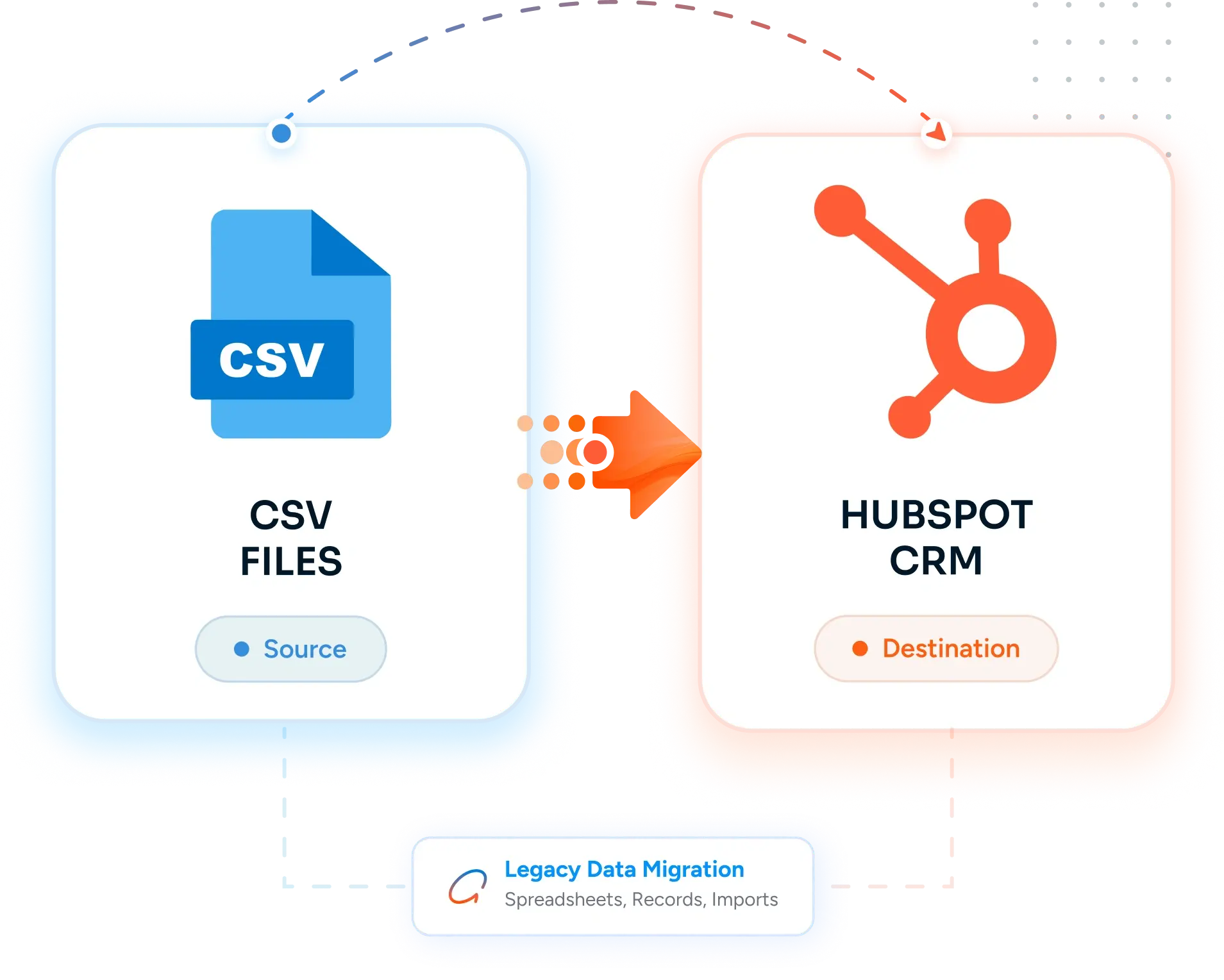
Move contacts, companies, deals, and historical data from CSV exports into HubSpot CRM with field mapping, encoding fixes, deduplication, and validation - replacing one-shot CSV imports and the manual cleanup that follows with a controlled, repeatable migration that lands clean data on day one.

image 85-1 Frame 2147211998 image 76 [Vectorized] image 87
Trusted by 50+ healthcare organizations
Desktop Integration Card
CSV File Migration to  to HubSpot Migration

Teams that leveled up their development with HubXpert

white villas resort
pink cube
off market
express vietnam
leva medical
emi
poolshark
white villas resort
pink cube
off market
express vietnam
leva medical
emi
poolshark
The Problems

Why Migrate from

CSV Files to HubSpot?

CSV files are the lingua franca of data export. Almost every legacy system exports to CSV, and almost every team has a folder of CSVs that nobody wants to import because the last attempt was painful.

icon-Jun-02-2026-04-13-42-2845-PM

No Relational Structure in a Flat File

A CSV is a table. Contacts, companies, deals, and activities all flatten into rows with foreign keys that exist only in your head. The relationship between Acme Corp the company and the four contacts who work there lives in a Company Name column, which only matches if the spelling is identical across all five rows. There is no enforcement, no constraints, and no way to catch a mismatch before import.

icon (1)-1

Encoding Bugs That Show Up After Import

The CSV exported from a Windows app in CP-1252. The import tool assumed UTF-8. The contact named José becomes José across 4,000 rows. Smart quotes become mojibake. The em dash becomes three garbage characters. The fix is straightforward - re-encode in UTF-8 with BOM before import - but only if you check first.

icon (2)-1

Delimiter and Quoting Chaos

Some CSVs use commas. Some use semicolons because they were exported from a European system. Some use tabs. Some have unquoted fields that contain commas in the address. Some have quotes inside quoted fields with no escape. The first 100 rows look fine; the 1,247th row breaks the parser and shifts every subsequent row by one column.

icon (3)-1

No Constraints, No Validation, No Defaults

A CSV will accept anything. Stage column with a typo? Accepted. Phone number with a comma in it? Accepted. Date in three different formats across the same column? Accepted. The validation has to happen on import - and if it doesn't, the bad data lands in the destination system and propagates everywhere.

icon (4)-1

Manual Imports That Nobody Documents

Every quarter someone runs a CSV import to refresh the contacts. The field mapping happens in the import wizard. Nobody documents which columns went to which fields, what was deduplicated, what was skipped, what failed. The next quarter someone else runs a different import with a different mapping and the data drifts.

icon (5)-1

The Real Cost: A Folder of CSVs Nobody Wants to Touch and Imports That Land Bad Data

CSV is free. The hours spent cleaning the encoding, hand-fixing the delimiter chaos, deduplicating after the import landed, and explaining to the team why the mojibake characters are in the contact names - those are not free. Most teams have a folder of CSVs from legacy systems they never properly migrated, because the last attempt was a mess. HubSpot CRM with a properly executed import script lands clean, related, validated data in one pass - and gives you a documented, repeatable process for the next one.

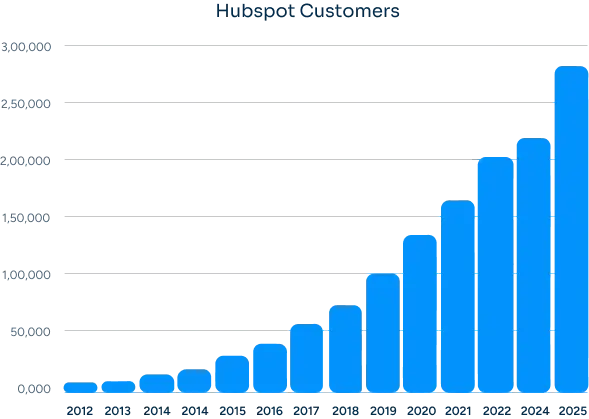
Hubspot Users
How Many Businesses Are Moving to HubSpot?

The amount is a lot in the last 12 years. It is very obvious why businesses are moving or migrating.


HubSpot offers an easy to use high growth & fast deploy CRM platform that build for scale. You’ll find everything you need to run your business.

Group 23
The SOLUTION

What We Migrate from CSV Files

(Core Data & Assets)

Most CSV imports fail on the second pass. We do the encoding detection, delimiter sniffing, header row reconciliation, deduplication, and field mapping work first - so the import lands clean and is repeatable for future refreshes.

  • CRM Records

    Contacts, Companies & Deal Data

    • check-icon
      Contacts - name, email, phone, title, owner, lifecycle stage, source, with deduplication on email and normalized phone
    • check-icon
      Companies - domain-based deduplication, parent/child hierarchy where present, industry, size, region
    • check-icon
      Deals - name, amount, stage, close date, owner, with foreign keys resolved to actual contact and company associations
    • check-icon
      Activities - emails, calls, meetings, notes from CSV exports of legacy systems with timestamps preserved
    • check-icon
      Custom records - any CSV-exported object (subscriptions, assets, tickets) mapped to HubSpot custom objects
    • check-icon
      Historical records - multi-year history exports loaded as a one-time snapshot with original timestamps preserved
    • check-icon
      Cross-CSV foreign keys (Company Name, Account Owner) resolved to HubSpot associations during import
  • Automation

    Calculations, Macros & Formulas

    • check-icon
      Import script - a documented, repeatable script that loads each CSV with explicit field mapping
    • check-icon
      Encoding detection and conversion - UTF-8 with BOM as the standard target
    • check-icon
      Delimiter sniffing and reconciliation - comma, semicolon, tab, pipe handled per file
    • check-icon
      Header row normalization - column names mapped to HubSpot property names with a documented map
    • check-icon
      Deduplication logic - within file, across files, and against existing HubSpot records
    • check-icon
      Validation rules - phone, date, email, currency, and dropdown values checked before insert
    • check-icon
      Re-runnable refreshes - the same script can re-import a refreshed CSV with idempotent upserts
  • Structure & Setup

    Schema, Validation & Field Mapping

    • check-icon
      Field mapping spreadsheet - every CSV column mapped to a HubSpot property or flagged for cleanup
    • check-icon
      Custom properties created with the right type (single line, dropdown, date, number, currency)
    • check-icon
      Pipelines and stages built to match the values in the source CSV stage column
    • check-icon
      Required fields and dropdown options configured to match the data in scope
    • check-icon
      Foreign key resolution - Company Name strings resolved to HubSpot company records
    • check-icon
      Deduplication keys defined per object - email for contacts, domain for companies, name + amount for deals
    • check-icon
      Property groups configured so the new properties land in a sensible place in the record view
  • Integrations

    Data Sources & Connected Files

    • check-icon
      Source CSV files inventoried - primary export, satellite exports, archive copies, schema versions
    • check-icon
      Source system documented - what application or report generated each CSV, on what schedule
    • check-icon
      Refresh cadence agreed - one-time migration, monthly refresh, or daily sync
    • check-icon
      Future ingestion path - Operations Hub data sync, native integration, or a documented script run
    • check-icon
      Archive retention - original CSV files kept as a read-only audit reference
    • check-icon
      Downstream tools (BI, reporting, data warehouse) re-pointed at HubSpot via the HubSpot API or connector
    • check-icon
      Source system access decommissioned (or kept read-only) once the migration is signed off
BENEFITS

Benefits of Migrating

From CSV Files to HubSpot

CSV is a transport format, not a system. Moving the data into HubSpot turns a folder of files into a system the team can actually use.
Execution

Real Relational Structure

Foreign keys become real associations. Acme Corp is one company record with four contacts and twelve deals attached, not a string repeated across 16 rows.

Adding Value

Encoding and Delimiter Issues Caught Before Import

We sniff encoding, detect the delimiter, and validate the parse on every file before it touches HubSpot. No mojibake, no shifted columns, no surprise after import.

spreadsheets

Deduplication That Survives Refreshes

Deduplication happens within file, across files, and against existing HubSpot records. The same script can refresh next month without creating duplicates.

Cost Increasing

Documented, Repeatable Imports

The field mapping, validation rules, and deduplication logic are documented in a script - not in someone's head. Future refreshes are repeatable, auditable, and fast.

Growth

Validation the System Enforces

Phone numbers are phone numbers. Dates are dates. Stages are picked from a dropdown. The data is clean because the system enforces it, not because someone scrubs it after import.

Shift

A Real System Instead of a Folder

The folder of CSVs becomes a HubSpot portal with workflows, reports, dashboards, and an audit trail. The CSV files become a documented archive, not the system of record.

our process

Our CSV Files to HubSpot

Migration Process

A clear, step-by-step execution plan with full visibility at every stage. No black boxes, no unexpected issues during migration.
Step 1.

Discovery & CSV Inventory

We catalog every CSV in scope, identify the source system, encoding, and delimiter, and build a header row reconciliation map.
  • Check icon CSV file inventory - primary export, satellite exports, archive copies, schema versions
  • Check icon Source system identification - what application generated each file and on what schedule
  • Check icon Encoding detection (UTF-8, CP-1252, ISO-8859-1) and delimiter sniffing per file
  • Check icon Header row reconciliation map across files where column names drift between exports
Discovery
Step 2.

Field Mapping & HubSpot Configuration

We map every CSV column to a HubSpot property and configure the destination to match the structure in the source data.
  • Check icon Field mapping spreadsheet - every column mapped to a HubSpot property or flagged for cleanup
  • Check icon Custom properties created with the right type (single line, dropdown, date, number, currency)
  • Check icon Pipelines, stages, and dropdown options configured to match the values in the source
  • Check icon Deduplication keys and validation rules defined per object
Data Preparation
Step 3.

Import Script Build & Sandbox Run

We build the import script, run it against a sandbox, and reconcile the result against the source.
  • Check icon Import script with encoding conversion, delimiter handling, deduplication, and validation
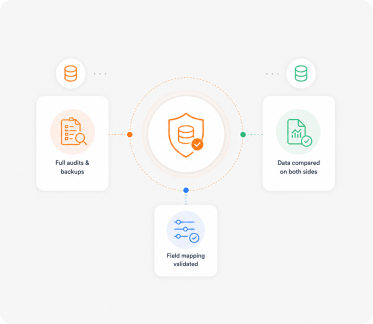
  • Check icon Sandbox import with full row count reconciliation against the source
  • Check icon Validation report - what passed, what failed, what was deduplicated, what was skipped
  • Check icon Sample record review with the team before production
Validation
Step 4.

Production Import & Cutover

We run the import in production, reconcile the row counts, and cut the team over to HubSpot as the system of record.
  • Check icon Production import in batches with row counts reconciled live
  • Check icon Failed rows reviewed and re-imported with corrections
  • Check icon Read-only archive of the source CSV files preserved for reference
  • Check icon Cutover date scheduled with the source system frozen or marked read-only
Go-Live
Step 5.

Refresh Process & Training

We document the refresh process so future imports are repeatable, and train the team on HubSpot.
  • Check icon Refresh script and runbook documented for future imports
  • Check icon Sales team training on the contact, company, deal model and pipeline workflow
  • Check icon Ops training on workflows, dashboards, and the import refresh process
  • Check icon 30-day adoption check-ins and post-import data quality review
Training & Support
THE DIFFERENCE

From CSV Files Complexity to

HubSpot Clarity

The worst outcome of a migration is ending up with a HubSpot system that still feels like CSV Files. We use the migration as an opportunity to simplify, restructure, and improve how your CRM actually works.
What Was in CSV Files
Structure

Flat file with foreign keys as strings - relationships exist only in your head

Real relational model with associations, custom objects, and enforced cardinality

Encoding & Format

Encoding (UTF-8, CP-1252) and delimiter (comma, semicolon, tab) handled file by file by hand

Imports land in a unified, validated format with type checking on every property

Validation

No constraints, no defaults, no validation - anything in the file becomes data after import

Property types, dropdowns, required fields, and validation rules enforced by the system

Deduplication

Manual deduplication after import, often partial, often wrong, never repeatable

Deduplication on import with documented keys (email, domain, name+amount) and idempotent refreshes

Repeatability

Each import is a one-shot wizard run with no documented mapping

Documented, repeatable import script with versioned field mapping and a runbook

CASE STUDY

Our Clients

David Jenyns

David Jenyns

Creator of SYSTEMology®

SystemHub

Working with Ratul was a game-changer for us. His expertise and dedication significantly improved our marketing strategies and CRM implementation, leading to noticeable growth in our customer engagement and sales.

Faster time to value with
unified data

60%

Personalized experience have
increased stats.

10,000+

Joe Liffrig

Joe Liffrig

Technology Product Leader at Cornerstone Licensing

Cornerstone

HubXpert delivered what we needed. Their team migrated our CRM data from Microsoft Dynamics 365 to HubSpot, ensuring a smooth transition with no disruption. The migration was organized, accurate, and focused on data integrity.

CRM Records Migrated

33,638+

Data Accuracy Maintained

100%

Liselotte Leijten-Deppenbroek

Liselotte Leijten-Deppenbroek

Chief Operating Officer

PinkCube

HubXpert successfully migrated over 200,000+ support tickets from Trengo to HubSpot Service Hub, delivering a seamless transition, improved automation, and a scalable customer support operation.

Support tickets migrated

200,000+

Service pipelines & automations implemented

65+

ROADMAP

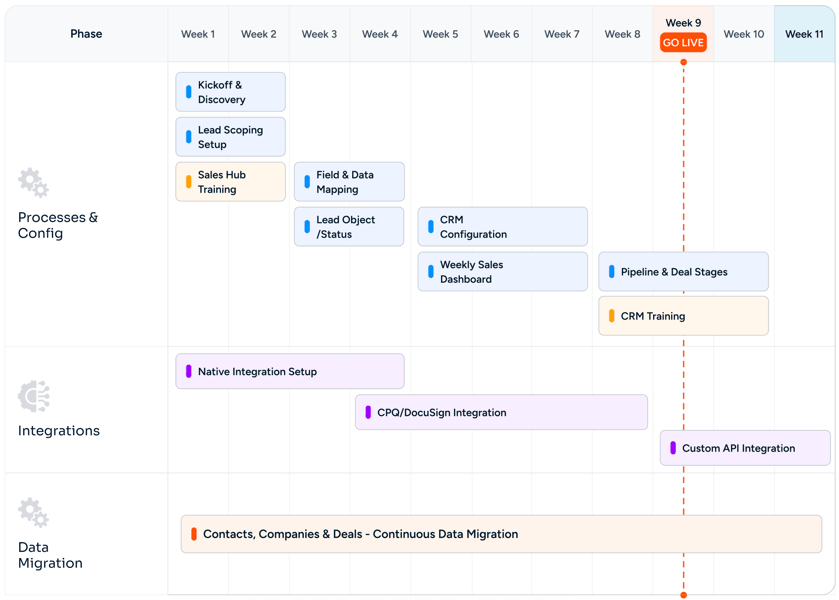
Our CSV Files to HubSpot Migration

Roadmap

CSV File Migration to HubSpot CRM Done Properly Roadmap
CHALLENGES

Common Migration Challenges (And How We Solve Them)

Migration issues don't come from the transfer itself. They come from poor planning, bad mapping, and no validation. We fix these before they become problems.

Zero 
Data Loss

Encoding (UTF-8) Fixed Before Import

Every file gets encoding detection up front. CP-1252 and ISO-8859-1 files get re-encoded to UTF-8 with BOM before import. The mojibake problem is solved at the source, not patched after the fact.

Accurate 
Reports

Delimiter and Quoting Resolved Per File

Comma, semicolon, tab, pipe - each file gets its delimiter sniffed and parsed correctly. Unquoted fields with embedded commas, escaped quotes, multi-line fields - all handled by a real CSV parser, not a string split.

Rectangle 34625310-1

Foreign Keys Resolved to Associations

Cross-row references like Company Name on a contact row get resolved to HubSpot company associations during import. If Acme Corp is spelled three different ways across the source, we propose a normalization map and let the team approve before import.

Custom Objects Mapped Right

Deduplication Across Files

Deduplication runs within the file, across all in-scope files, and against existing HubSpot records. Documented keys per object - email for contacts, domain for companies, name + amount for deals.

No
Downtime

Header Row Drift Across Exports

Successive exports from the same system often have slight header differences - Email Address vs Email, Phone vs Phone Number. We build a header reconciliation map so all variants land in the same HubSpot property.

Fast Team 
Adoption

Repeatable Refresh Process

The first import is the hard one. Once the script and field mapping are documented, refreshes from a new export of the same source become a one-command operation with idempotent upserts and no risk of duplicates.

MIGRATION

Other Migration
to

HubSpot We Offer

We handle migrations from different platforms and systems into HubSpot, ensuring your data, workflows, and processes are properly rebuilt, not just transferred.
Act! CRM migration logo
Act! CRM

Planning an Act! CRM to HubSpot migration? We ensure accurate data transfer, automation rebuilding, and CRM optimization..

ActiveCampaign migration logo
ActiveCampaign

Planning an ActiveCampaign to HubSpot migration? We ensure accurate data transfer and automation rebuilding..

Adobe Experience Manager migration logo
Adobe Experience Manager

Planning an Adobe Experience Manager to HubSpot CMS migration? We ensure seamless content migration and optimization..

Agile CRM migration logo
Agile CRM

Planning an Agile CRM to HubSpot migration? We ensure accurate data transfer and CRM optimization support..

Apollo.io migration logo
Apollo.io

Migrate from Apollo.io to HubSpot Sales Hub with Sequences, engagement history, Apollo data hygiene, intent signals, Plays, and Chrome extension workflows preserved.

BigCommerce migration logo
BigCommerce

Migrate customer, order, and product data from BigCommerce or BigCommerce Enterprise into HubSpot.

Bitrix24 migration logo
Bitrix24

Planning a Bitrix24 to HubSpot migration? We ensure accurate data transfer, automation rebuilding, and CRM optimization..

Brevo migration logo
Brevo

Planning a Brevo to HubSpot migration? We ensure accurate data transfer, automation rebuilding, and CRM optimization..

Campaign Monitor migration logo
Campaign Monitor

Planning a Campaign Monitor to HubSpot migration? We ensure accurate data transfer and automation rebuilding..

Close CRM migration logo
Close CRM

Planning a Close CRM to HubSpot migration? We ensure accurate data transfer, workflow rebuilding, and CRM optimization..

Constant Contact migration logo
Constant Contact

Planning a Constant Contact to HubSpot migration? We ensure accurate data transfer and automation rebuilding..

Contentful migration logo
Contentful

Planning a Contentful to HubSpot CMS migration? We ensure accurate content mapping and CMS optimization support..

ConvertKit migration logo
ConvertKit

Planning a ConvertKit to HubSpot migration? We ensure accurate data transfer and CRM optimization support..

Copper CRM migration logo
Copper CRM

Planning a Copper CRM to HubSpot migration? We ensure accurate data transfer, automation rebuilding, and CRM optimization..

CSV Files migration logo
CSV Files

Migrate CSV exports from any legacy system to HubSpot CRM with field mapping, encoding fixes, deduplication, and validation.

Custom CRM migration logo
Custom CRM

Planning a custom CRM to HubSpot migration? We ensure accurate data mapping, workflow rebuilding, and CRM optimization..

Drift migration logo
Drift

Transfer from Drift to HubSpot Service Hub with live chat migration, workflow setup, and customer support optimization..

Drip migration logo
Drip

Planning a Drip to HubSpot migration? We ensure accurate data transfer and automation rebuilding..

Drupal migration logo
Drupal

Planning a Drupal to HubSpot CMS migration? We ensure accurate content transfer and CMS optimization support..

Eloqua migration logo
Eloqua

Planning an Eloqua to HubSpot migration? We ensure accurate data transfer, campaign rebuilding, and CRM optimization..

FileMaker Pro migration logo
FileMaker Pro

Migrate from FileMaker Pro (Claris) to HubSpot CRM with Layouts, scripts, Container fields, and the relationships graph translated into HubSpot's modern data model.

Freshdesk migration logo
Freshdesk

Planning a Freshdesk to HubSpot Service Hub migration? We ensure accurate data transfer and support automation setup..

Freshsales migration logo
Freshsales

Planning a Freshsales to HubSpot migration? We ensure accurate data transfer, workflow rebuilding, and CRM optimization..

GetResponse migration logo
GetResponse

Planning a GetResponse to HubSpot migration? We ensure accurate data transfer, automation rebuilding, and CRM optimization..

Ghost migration logo
Ghost

Planning a Ghost to HubSpot CMS migration? We ensure accurate blog migration and SEO optimization support..

GoHighLevel migration logo
GoHighLevel

Planning a GoHighLevel to HubSpot migration? We ensure accurate data transfer and CRM optimization support..

Google Sheets migration logo
Google Sheets

Migrate from Google Sheets to HubSpot CRM with deduplication, field mapping, Apps Script translation, and ImportRange dependencies replaced by a relational system.

Gorgias migration logo
Gorgias

Move from Gorgias to HubSpot Service Hub with accurate ticket transfer, automation rebuilding, and inbox optimization..

Groove by Clari migration logo
Groove by Clari

Migrate from Groove by Clari to HubSpot Sales Hub Sequences with full Flow continuity, Spaces, Playbooks, and Salesforce-native data preserved.

Help Scout migration logo
Help Scout

Upgrade from Help Scout to HubSpot Service Hub with ticket migration, automation rebuilding, and reporting configuration..

HubSpot Agency Client Handoff migration logo
HubSpot Agency Client Handoff

Transfer a HubSpot portal from your agency tenant to your client cleanly.

HubSpot Sandbox to Production migration logo
HubSpot Sandbox to Production

Promote tested HubSpot configuration and data from a Standard Sandbox or Development Sandbox into production.

Insightly migration logo
Insightly

Planning an Insightly to HubSpot migration? We ensure accurate data transfer, automation rebuilding, and CRM optimization..

Intercom migration logo
Intercom

Planning an Intercom to HubSpot Service Hub migration? We ensure seamless conversation and workflow migration support..

Jira Service Management migration logo
Jira Service Management

Migrate Jira Service Management to HubSpot Service Hub with ticket syncing, workflow setup, and service automation support..

Joomla migration logo
Joomla

Planning a Joomla to HubSpot CMS migration? We ensure accurate content transfer, template rebuilding, and SEO optimization..

Kayako migration logo
Kayako

Switch from Kayako to HubSpot Service Hub with ticket migration, automation rebuilding, and inbox setup support..

Keap migration logo
Keap

Planning a Keap to HubSpot migration? We ensure accurate data transfer, automation rebuilding, and CRM optimization..

Klaviyo migration logo
Klaviyo

Planning a Klaviyo to HubSpot migration? We ensure accurate data transfer, automation rebuilding, and CRM optimization..

Legacy ERP Data migration logo
Legacy ERP Data

Migrate customer, account, and contact master data from SAP, Oracle EBS, JD Edwards, or Sage ERP into HubSpot CRM with structured ETL, master data reconciliation, and IT-friendly extraction.

LinkedIn Sales Navigator migration logo
LinkedIn Sales Navigator

Migrate LinkedIn Sales Navigator workflows into HubSpot Sales Hub Sequences with Lead Lists, Account Lists, InMail history, SNAP integration, Smart Links, and TeamLink continuity preserved.

LiveAgent migration logo
LiveAgent

Switch from LiveAgent to HubSpot Service Hub with support data migration, workflow rebuilding, and CRM configuration..

Magento (Adobe Commerce) migration logo
Magento (Adobe Commerce)

Migrate customer, order, and product data from Magento Open Source or Adobe Commerce into HubSpot.

Mailchimp migration logo
Mailchimp

Planning a Mailchimp to HubSpot migration? We ensure accurate data transfer, automation rebuilding, and CRM optimization..

Marketo migration logo
Marketo

Planning a Marketo to HubSpot migration? We ensure accurate data transfer, workflow rebuilding, and CRM optimization..

Merging Two HubSpot Portals migration logo
Merging Two HubSpot Portals

Consolidate two HubSpot portals into a single source of truth after a merger or acquisition.

Microsoft Access migration logo
Microsoft Access

Migrate from Microsoft Access (.accdb / .mdb) to HubSpot CRM with tables, queries, Access forms, and VBA modules translated.

Microsoft Dynamics 365 migration logo
Microsoft Dynamics 365

Planning a Dynamics 365 to HubSpot migration? We ensure accurate data transfer, automation rebuilding, and CRM optimization..

Microsoft Excel migration logo
Microsoft Excel

Migrate from Excel spreadsheets to HubSpot CRM with deduplication, field mapping, formula translation, and pivot reports rebuilt as dashboards.

Monday CRM migration logo
Monday CRM

Planning a Monday CRM to HubSpot migration? We ensure accurate data transfer and CRM optimization support..

NetSuite CRM migration logo
NetSuite CRM

Planning a NetSuite CRM to HubSpot migration? We ensure accurate data transfer and CRM optimization support..

Nutshell migration logo
Nutshell

Planning a Nutshell to HubSpot migration? We ensure accurate data transfer, workflow rebuilding, and CRM optimization..

Odoo CRM migration logo
Odoo CRM

Planning an Odoo CRM to HubSpot migration? We ensure accurate data transfer, automation rebuilding, and CRM optimization..

Omnisend migration logo
Omnisend

Planning an Omnisend to HubSpot migration? We ensure accurate data transfer, automation rebuilding, and CRM optimization..

Ontraport migration logo
Ontraport

Planning an Ontraport to HubSpot migration? We ensure accurate data transfer and CRM optimization support..

Outreach migration logo
Outreach

Move from Outreach to HubSpot Sales Hub with sequence migration, workflow rebuilding, pipeline setup, and reporting support..

Pardot migration logo
Pardot

Planning a Pardot to HubSpot migration? We ensure accurate data transfer, workflow rebuilding, and CRM optimization..

Pipedrive migration logo
Pipedrive

Planning a Pipedrive to HubSpot migration? We ensure accurate data transfer, pipeline rebuilding, and CRM optimization..

PrestaShop migration logo
PrestaShop

Migrate customer, order, and product data from PrestaShop into HubSpot.

Re:amaze migration logo
Re:amaze

Migrate from Re:amaze to HubSpot Service Hub with seamless ticket transfer, workflow setup, and support optimization..

Salesforce migration logo
Salesforce

Planning a Salesforce to HubSpot migration? We ensure accurate data transfer, automation rebuilding, and CRM optimization..

Salesforce Marketing Cloud migration logo
Salesforce Marketing Cloud

Planning a Salesforce Marketing Cloud to HubSpot migration? We ensure accurate data transfer and automation rebuilding..

Salesloft migration logo
Salesloft

Switch from Salesloft to HubSpot Sales Hub with our expert sales automation migration, sequence setup, and CRM optimization support..

SAP CRM migration logo
SAP CRM

Planning an SAP CRM to HubSpot migration? We ensure accurate data transfer, automation rebuilding, and CRM optimization..

ServiceNow migration logo
ServiceNow

Move from ServiceNow to HubSpot Service Hub with ticket migration, automation rebuilding, and reporting setup support..

SharpSpring migration logo
SharpSpring

Planning a SharpSpring to HubSpot migration? We ensure accurate data transfer, automation rebuilding, and CRM optimization..

Shopify migration logo
Shopify

Migrate customer, order, and product data from Shopify (or Shopify Plus) into HubSpot.

Sitecore migration logo
Sitecore

Planning a Sitecore to HubSpot CMS migration? We ensure accurate content transfer and CMS optimization support..

Splitting One Portal into Regional Portals migration logo
Splitting One Portal into Regional Portals

Split one HubSpot portal into multiple - by geography, business unit, or brand.

Squarespace migration logo
Squarespace

Planning a Squarespace to HubSpot CMS migration? We ensure accurate content transfer and CMS optimization support..

Streak migration logo
Streak

Planning a Streak to HubSpot migration? We ensure accurate data transfer, workflow rebuilding, and CRM optimization..

SugarCRM migration logo
SugarCRM

Planning a SugarCRM to HubSpot migration? We ensure accurate data transfer, workflow rebuilding, and CRM optimization..

Webflow migration logo
Webflow

Planning a Webflow to HubSpot CMS migration? We ensure accurate design transfer, CMS rebuilding, and SEO optimization..

Wix migration logo
Wix

Planning a Wix to HubSpot CMS migration? We ensure accurate content transfer and SEO optimization support..

WooCommerce migration logo
WooCommerce

Migrate customer, order, and product data from WooCommerce on WordPress into HubSpot.

WordPress migration logo
WordPress

Planning a WordPress to HubSpot CMS migration? We ensure accurate content transfer, template rebuilding, and SEO optimization..

Zendesk migration logo
Zendesk

Planning a Zendesk to HubSpot Service Hub migration? We ensure accurate ticket transfer and workflow optimization..

Zoho CRM migration logo
Zoho CRM

Planning a Zoho CRM to HubSpot migration? We ensure accurate data transfer, workflow rebuilding, and CRM optimization..

Zoho Desk migration logo
Zoho Desk

Planning a Zoho Desk to HubSpot Service Hub migration? We have experts to ensure accurate ticket transfer and CRM optimization..

ZoomInfo migration logo
ZoomInfo

Migrate from ZoomInfo Engage to HubSpot Sales Hub Sequences with full ZoomInfo data integration, Intent signals, Chorus conversation intelligence, WorkflowOS, and Copilot continuity.

FAQ

Questions You Might Have

How long does a CSV migration to HubSpot take?

Most CSV migrations run 3 to 5 weeks. Multi-source migrations with 10+ CSVs from different systems, schema drift across exports, or significant data quality issues can stretch to 6 to 8 weeks.

What if our CSV has encoding (UTF-8 vs CP-1252) issues?

We detect the encoding on every file before import and re-encode to UTF-8 with BOM as the standard. The mojibake problem (José becoming José) is solved at the source, not patched after the fact.

Can you handle CSVs with semicolon or tab delimiters?

Yes. We sniff the delimiter on every file and parse accordingly. Comma, semicolon, tab, pipe - all handled. The parser also handles quoted fields with embedded commas, escaped quotes, and multi-line fields.

What happens to duplicate rows in our CSV?

Deduplication runs within the file (same email twice), across in-scope files (same email in contacts.csv and leads.csv), and against existing HubSpot records (same email already in your portal). Documented keys per object - you approve the keys before the import.

Can you migrate CSVs from multiple source systems at once?

Yes. Each source has its own field mapping, encoding, delimiter, and deduplication rules. They get imported in dependency order - companies before contacts, contacts before deals - so associations resolve correctly.

What about CSVs with foreign key references to other tables?

Foreign keys (Company Name on contacts, Contact Email on deals) get resolved to HubSpot associations during import. If a referenced record doesn't exist yet, we either create it or stage the row for a second-pass import.

Will we need to clean the CSVs before you start?

No. Cleanup is part of the project - that's most of the value. Hand us the files in whatever state they're in. Encoding fixes, delimiter handling, header reconciliation, deduplication, and validation all happen in the import script.

Can the import be re-run on a refreshed CSV?

Yes. The script is built to be idempotent. Re-running it on a fresh export from the same source upserts rather than duplicates. The field mapping and runbook are documented for the team to run independently.

What if some rows fail validation?

Failed rows are reported, not silently dropped. You see exactly what failed and why. Most failures are correctable (missing required field, malformed date) and get fixed and re-imported in a second pass.

Do you keep the original CSV files?

Yes. The source files are preserved as a read-only archive for audit and reference. The import script and field mapping are versioned alongside them, so the migration is reproducible if it ever needs to be re-run.

BOOK CONSULTATION

Make Your Decision

We make everything else easy

With 5+ years of industry experience, 150+ successful projects, and a 98% client satisfaction rate, we've built deep migration expertise across every major CRM, CMS, marketing, and helpdesk platform. Our team has helped 20+ retainer clients personalize their HubSpot setup post-migration, so you don't just inherit a copy of your old system - you launch on a CRM that actually fits how your business runs.

Check Icon Takes 30 minutes
check icon Delivered by certified HubSpot expert
Hero Image