Inside TRT Australia's treatment operating system

An Australian TRT provider was running a clinical treatment journey on a project management tool, a shared inbox and manual invoices. Clients had no way to see where they stood. HubXpert built a connected client portal and staff portal on HubSpot that carries the full journey, from intake and triage through bloodwork review, prescribing and ongoing resupply.
image 90 (2)

8

Connected systems into one record

5

Lifecycle modules built

2

Portals delivered, client and clinical.

15

Full implementation timeline

A telehealth practice

About the client

TRT Australia delivers testosterone replacement therapy as an ongoing treatment relationship rather than a one-off consultation. A client comes in through intake, is triaged, submits bloodwork, has that bloodwork reviewed by a doctor, receives a treatment recommendation, pays, gets medication dispensed through either an eRx or a pharmacy route, and then repeats a version of that cycle for as long as they stay in treatment.


That model puts unusual weight on operations. Every client is simultaneously a clinical record, a billing record, a fulfilment record and a scheduling record, and all four have to agree with each other. A doctor reviewing bloodwork needs the previous results, the current protocol and the treatment history in front of them. A client waiting on a script needs to know whether it has been approved, whether they have paid, and where it is being dispensed. A customer service agent answering the phone needs all of it.


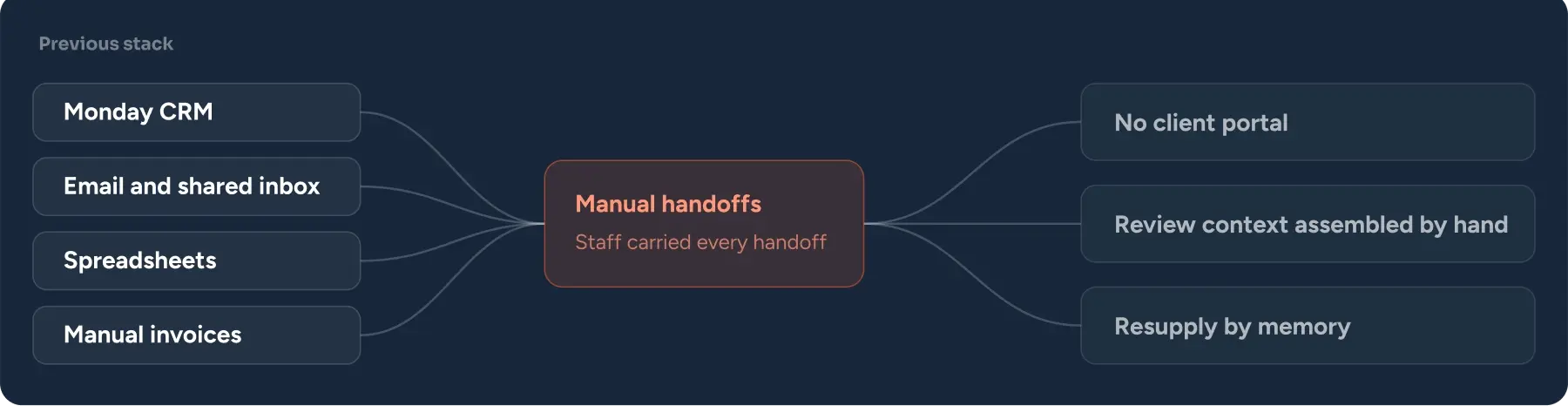
None of that was held anywhere. TRT Australia ran on Monday CRM, email, spreadsheets and manual invoices, with no client-facing portal at all. The clinical work was sound. The system underneath it was a set of tools that each held a fragment of the same client.


The result was a treatment relationship the client could not see into. They did not know their status, they did not know when to order next, and the billing did not explain itself. Every one of those gaps arrived at the support inbox.

What You Will Learn:

  • 1 How to hold a clinical journey in HubSpot without automating decisions.
  • 2 How to give clients a self-service view of treatment status, bloodwork and payment.
  • 3 How to connect intake, review, prescribing, & fulfilment without reliance on memory.
THE TREATMENT WORKED. THE PROCESS AROUND IT DID NOT.

The Challenges

TRT Australia's clients were in a recurring clinical relationship being managed with tools built for tracking projects and sending email. As the client base grew, the cost of that showed up in two places: the support inbox, and the number of steps that only happened because a specific person remembered to do them.

  1. 1

    There was no client portal.

    Clients had nowhere to log in. Every question about status, bloodwork, medication or payment had to be asked of a person, and answered by a person going to look it up.

  2. 2

    Monday CRM was holding a clinical process it was not built for

    Monday tracked tasks. It did not hold a client record, a treatment history, a bloodwork series or a billing state. Using it as the system of record meant the real record lived in whatever combination of board, spreadsheet and email thread was most recent.

  3. 3

    Clients could not see their own status.

     A client who had uploaded bloodwork had no way to know whether it had been reviewed. A client due for resupply had no way to know they were due. The information existed internally, and reaching it required contacting support.

  4. 4

    Billing was confusing.

    Moving a client from intake to triage, from bloodwork to doctor review, from approval to payment, and from payment to dispensing all happened because a person carried it across. Every handoff was a place where the process could stall silently.

  5. 5

    Bloodwork review started from scratch every time.

    A doctor reviewing results had to assemble the context themselves: pull previous bloodwork, recall the current protocol, check the treatment history. The clinical reasoning was consistent, but the preparation work was repeated in full for every review.

  6. 6

    Staff were the integration.

    Moving a client from intake to triage, from bloodwork to doctor review, from approval to payment, and from payment to dispensing all happened because a person carried it across. Every handoff was a place where the process could stall silently.

  7. 7

    Ongoing care ran on memory.

    Bloodwork requests, pathology referrals, resupply and follow-up all depended on someone noticing the right moment had arrived. Nothing in the system was watching for it.

"Before HubSpot, we were living kind of in chaos with Post-it notes. Every lead, every patient type, and every renewal had to be tracked manually, and our front desk was spending more time managing spreadsheets than focusing on patients."

Dr. Jean-Paul Leva
Dr. Jean-Paul Leva Board-Certified Cosmetic & General Surgeon, FACS
ONE RECORD, FROM INTAKE TO RESUPPLY.

Our Solutions

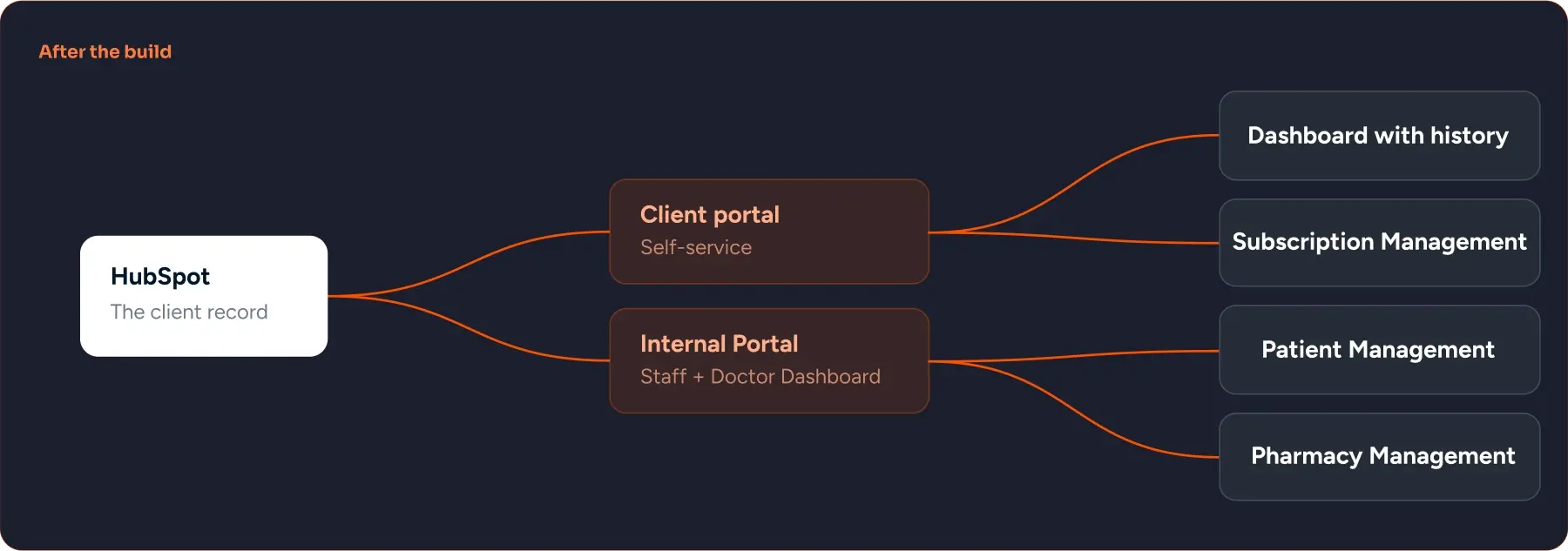
HubXpert built two connected portals on HubSpot. The client portal is the client-facing layer for treatment and ongoing-care information. The staff portal gives doctors, clinical staff and customer service the operational view behind it. Both read from the same record, so a client and the person helping them are looking at the same thing.


The build order mattered. The client record and object model were designed end to end before anything was configured, because a treatment journey with this many dependencies cannot be assembled module by module and expected to agree with itself afterwards.

What we replaced, and what we built

Previous stack Previous stack diagram
After 6 weeks
After the build After the build diagram
  1. 1

    One client record holds the whole treatment journey.

    Intake information, health history, uploaded documents and bloodwork are stored in HubSpot against the client record. Medication selections, payment status, fulfilment route, booking history and communication history sit on the same record. There is one place to look, and it holds the whole relationship rather than a fragment of it.

  2. 2

    Intake and triage run on automation. Clinical decisions do not.

    n8n automations process form submissions and move records into the correct triage stage, organising the intake information and workflow status automatically. The split here is deliberate and it is the most important design decision on the project: automation handles sorting, routing and status. Clinical approval and treatment decisions are made by the clinical team and the doctors, and the system records them rather than making them.

  3. 3

    Bloodwork review with the context already assembled.

    The bloodwork area brings current results, previous bloodwork, treatment history and relevant clinical context together in one view. AI-assisted tools compare results over time and produce a structured clinical review draft, working against TRT Australia's own clinical rules and safety checks maintained in a clinical knowledge base. The doctor reviews and edits that draft, records the clinical outcome, and creates the final clinical review report. The doctor's judgment is still the output. What changed is that they no longer spend the first part of every review rebuilding the picture.

  4. 4

    Medication, payment, and fulfilment are linked.

    The medication workflow holds the doctor's recommendation, the client's medication choice, payment status, fulfilment route and prescribing context together. It covers primary TRT protocols, additional doctor-suggested medications, eRx and pharmacy pathways, and the scripting doctor attached to each medication where that is required. BPoint is connected for payment verification, and paid medication records stay linked to the treatment selections they belong to, which is what makes billing legible to the client and auditable internally.

  5. 5

    Doctor Callback, with the full picture on the call.

    The Doctor Callback module manages booking invitations, confirmed appointments, missed calls, rebooking, consultation notes, communication history and audit activity. Calendly provides doctor availability and booking links, and Aircall is connected to the calling workspace. During the consultation the doctor can see the relevant intake, clinical, medication and booking context on the same record they are working in.

  6. 6

    Prescribing splits itself after the consultation.

    Once the consultation is complete and the required clinical confirmations are recorded, eligible eRx medication progresses through ScriptPad while pharmacy items stay on their pharmacy fulfilment route. The routing follows the clinical confirmation rather than a person deciding what to do next.

  7. 7

    Ongoing care is part of the lifecycle, not a separate process.

    Bloodwork requests, pathology referrals, medication resupply, medical questions, customer service tickets, payments and follow-up communication are all handled inside the same system. The client portal surfaces the client-facing part of that, so a client can see what is due and act on it. The staff portal keeps the connected clinical and operational history visible to the team.

They operated as an extension of our internal team and consistently delivered outcomes that exceeded expectations.

Malachowski, J. CEO at TRT Australia · 5.0 · See on Clutch Review
Image (2)
ARCHITECTURE FIRST, BUILD SECOND.

How We Got There

The first work was not in HubSpot. It was mapping how a client actually moves through TRT Australia, from intake to a signed clinical review to a dispensed script to the next cycle, and designing the object model, properties and stage logic for all of it before anything was configured. The build then ran in stages, each tested and handed over before the next began.

Phase 1

Discovery

Mapped the full treatment journey, the clinical decision points, and the real workflow in Monday, email and spreadsheets, including the workarounds the team had built.

Phase 2

Architecture

Designed the HubSpot object model, properties, pipelines and stage logic for every module end to end, and defined where automation stops and clinical judgment starts.

Phase 3

Client portal

Built the client-facing layer covering treatment status, bloodwork, medication selections, payment and ongoing-care requests.

Phase 4

Clinical layer
and staff portal

Built the bloodwork review workspace, linked the clinical knowledge base, and implemented AI-assisted drafting with doctor sign-off.

Phase 5

Automation and 
integrations

Connected n8n for routing, Calendly for booking, Aircall for calls, BPoint for payments, and ScriptPad for eRx, building medication and care automation.

Phase 6

Handover

Tested every workflow and integration path, trained the clinical and customer service teams, and moved into ongoing development.

THE CLIENT CAN SEE WHERE THEY STAND.

The Outcomes

TRT Australia now runs the treatment journey inside one connected system. Intake sorts itself, bloodwork review arrives with its context assembled, medication decisions stay attached to their payment and fulfilment, prescribing routes itself after the consultation, and the client can see all of it without contacting support.

The portal is in active development. Ongoing care, reporting and the clinical review workspace are all being extended as TRT Australia’s treatment volume grows.

8

Systems connected into one client record

5

Lifecycle modules built

2

Portals delivered, client and clinical.

Clients stopped asking where they stood.  Treatment status, bloodwork history, medication selections and payment state are visible in the client portal. The questions that used to arrive as support tickets are now answered by the client looking at their own record.

Billing explains itself. Paid medication records stay linked to the treatment selections they relate to, so a client can see what they paid for and the team can trace it without reconstructing the sequence.

Handoffs stopped depending on people. Intake routes to triage automatically, prescribing routes to eRx or pharmacy based on recorded clinical confirmation, and resupply is a lifecycle stage rather than something a person notices.

Clinical review starts from a complete picture. Doctors open a review with current results, previous bloodwork, treatment history and a structured draft already in place, then apply their own judgment and sign off. The clinical decision did not move. The preparation did.

Automation was kept out of clinical decisions on purpose. Every clinical approval and treatment decision is made by the clinical team and recorded by the system. That boundary is what makes the rest of the automation safe to run.

One operational view for the team. Customer service, clinical staff and doctors work from the same connected history rather than three partial versions of it.

Before

Manual
  • Monday CRM, email, spreadsheets and manual invoices

  • No client-facing portal

  • Clients contacted support to learn their own status
  • Intake sorted and routed by hand

  • Clinical review context assembled from scratch each time

  • Booking, calls and consultation notes in separate tools
  • Prescribing handled manually per client


After

Automatic
  • HubSpot as the single client record for intake, clinical, medication and billing context
  • Client portal showing treatment status, bloodwork, medication and payment
  • Status and next steps visible to the client without contacting anyone
  • n8n automates submissions and moves records to the right triage stage.
  • View current results, past bloodwork, and treatment history with a draft for doctor review.
  • Calendly and Aircall linked to the callback module with client context.
  • eRx moves through ScriptPad after confirmation; pharmacy items remain on their route.

Working with HubXpert has been exceptional. Their HubSpot expertise, strategic approach, and attention to detail made them feel like a true extension of our team. They consistently delivered beyond expectations and genuinely improved how our business operates. Highly recommended.

Malachowski, J. CEO at TRT Australia · 5.0 (26 reviews)
Image (2)
THE ARCHITECTURE, IN THE OPEN

Inside the Portal

image 92 (2) (1)
In this video, Dr. Leva explains, in a 3-4 minute video, the difficulty of tracking leads across TV, Google, and Facebook campaigns, and how disconnected systems slowed down patient follow-up and retention efforts.
What multi-brand operators ask before they start

Frequently asked questions

  • No. The portal handles the client relationship, the operational workflow and the communication around treatment, and connects to the systems that handle clinical and dispensing functions rather than replacing them. TRT Australia's build connects to ScriptPad for eRx and keeps pharmacy items on their existing pharmacy route.

  • The clinical team and the doctors. Automation handles intake processing, triage routing, status, notifications and fulfilment routing. Clinical approval and treatment decisions are made by clinicians and recorded by the system. That boundary is designed before anything is built.

  • AI-assisted tools compare bloodwork results over time and produce a structured clinical review draft. They work against the provider's own clinical rules and safety checks, maintained in a clinical knowledge base that the provider controls. A doctor reviews and edits the draft, records the clinical outcome and creates the final report. The AI never issues a clinical decision.

  • Yes. Clients can see the doctor's recommendation, make their medication selection, and pay through the portal. BPoint verifies the payment, and the paid record stays linked to the treatment selection it relates to, so the client can see what they paid for and the team can trace it.

BOOK A CONSULTATION

Ready to Build the Engine Behind Your Growth?

We build the systems underneath growth. CRM, website, search, outbound, and automation, connected so your team stops doing the work software should do.

Icon-Apr-08-2026-10-02-31-8097-AM Takes 30 minutes
Icon-Apr-08-2026-10-02-31-8097-AM Delivered by certified HubSpot expert
Ratul-Rahman