AI Agent Development That Automates Real Business Work

AI agents that automate real work across marketing, sales, support, and operations. Built for teams that need automation which survives contact with production data, with deep CRM-native experience as our specialty.

Desktop Integration Card
Container-Sep-14-2026-01-42-29-8997-PM

100% Human Review Before Launch

Zero Runaway Cost Overruns

Instant Agent Kill Switch

20+ AI Agents Deployed

100% Human Review Before Launch

Zero Runaway Cost Overruns

Instant Agent Kill Switch

20+ AI Agents Deployed

100% Human Review Before Launch

Zero Runaway Cost Overruns

Instant Agent Kill Switch

20+ AI Agents Deployed

100% Human Review Before Launch

Zero Runaway Cost Overruns

Instant Agent Kill Switch

20+ AI Agents Deployed

DEFINITION

What Is AI Agentic Development

AI agentic development means building software agents that take multi-step action inside your existing systems, not just answer questions. An agent reads a record, decides what to do next, and acts, updating a deal, routing a ticket, drafting a follow-up, then reporting what it did.

We build agents grounded in your actual data and your actual permissions, with guardrails and cost caps set before anything goes live. What you get is something your team can trust with real customer records, not a demo that falls apart under production volume.

A single pilot agent moves faster than a full multi-agent system, but the process behind it stays the same: assess the data, strategize the use case, build, connect, enable, optimize.

THE PROBLEM

Where AI Projects Break

Three failure patterns account for most of it, and all three are operational rather than technical.

icon (1)-Sep-14-2026-11-47-30-9120-AM

Pilots Never Reach Production

An agent built against sample data behaves nothing like one running on live systems. Costs climb once real volume arrives, the business case gets harder to defend, and the project stalls between proof of concept and rollout.

icon (1)-Sep-14-2026-11-47-30-9120-AM

Agents Inherit Whatever Is Wrong With Your Data

Duplicate records, half-populated fields, and inconsistent stages are survivable when a person reviews the output. An agent acts on what it reads, at volume, and does not stop to question it.

icon (1)-Sep-14-2026-11-47-30-9120-AM

Nobody Owns the System After Launch

Prompts drift, models get updated, and your data changes shape as the business does. An agent that resolved tickets correctly in week one degrades quietly unless somebody reviews its performance and retunes it.

WHAT WE BUILD

Three Levels of
AI Agent Build

Agentic AI splits into three layers with very different running costs. Knowing which one your problem needs is the difference between a $7,500 project and a $20,000 one.

1

Platform-Native Assistant Enablement

The conversational layer that drafts content, summarizes records, and answers questions from your existing systems. Free on many platforms and consumes no credits.

  • Drafts, summaries, and answers from your existing data
  • Lowest cost layer, usually already available
2

Pre-Built Agent Deployment

Ready-made agents that handle multi-step work on their own, resolving support conversations or sourcing prospects. Runs in the platform's agent console.

  • Multi-step work: support resolution, prospecting, routing
  • Faster to launch, governed by credit consumption
3

Custom Agentic Development

When no pre-built agent fits your process, we design your own around your prompts, your knowledge, and your data.

  • Custom agents built around your process and knowledge
  • Custom components and API connections where needed
WHERE THEY RUN

Where Agents Operate in Your Business

Agents work from the same customer record every team already uses, so nothing has to be synced, exported, or reconciled between systems.

1

Marketing

Campaign content and asset generation, lead nurturing sequences, segmentation and list logic.

  • Check icon (1) Campaign content and asset generation
  • Check icon (1) Lead nurturing sequences
  • Check icon (1) Segmentation and list logic
2

Sales

Prospect research and account summaries, outreach drafting and follow-up, deal prioritization and forecasting inputs.

  • Check icon (1) Prospect research and account summaries
  • Check icon (1) Outreach drafting and follow-up
  • Check icon (1) Deal prioritization and forecasting inputs
3

Support

Resolving inbound conversations, ticket summaries and suggested replies, routing and escalation logic.

  • Check icon (1) Customer agent resolving inbound conversations
  • Check icon (1) Ticket summaries and suggested replies
  • Check icon (1) Routing and escalation logic
4

Operations

Duplicate detection and record standardization, cross-object workflow automation, data sync monitoring between systems.

  • Check icon (1) Duplicate detection and record standardization
  • Check icon (1) Cross-object workflow automation
  • Check icon (1) Data sync monitoring between systems

OUTCOMES

What Changes Once Agents Are Running

Measured against the operational problems most revenue teams bring us, rather than against a feature list.

Your Team Stops Doing Work a System Should Do

The administrative layer of the job, updating records, chasing follow-ups, drafting the same email for the fortieth time, moves to an agent, cutting manual data entry and freeing your team from the repetitive internal tasks that used to eat the day.

Handoffs Stop Falling Through the Gaps

Routing, assignment, and escalation run on rules that execute every time rather than when somebody remembers, so fewer records sit unowned and accountability stays clear across teams.

Response Times Drop Without Adding Headcount

Inbound conversations get answered and qualified at volumes your current team could not cover manually, with faster first response and coverage outside business hours, while human effort stays reserved for the complex cases that actually need it.

Your Data Gets Cleaner Instead of Dirtier

Data quality usually degrades as volume grows. Agents configured properly work the other direction, running duplicate detection continuously and producing more complete customer records, the kind of reporting you can defend in a QBR.

SECURITY

How We Protect Your Access and Data

Handing an agent access to your CRM means handing it access to your customer data. We treat that access the way we'd want it treated if it were ours.

1

NDA and IP Ownership Before Anything Starts

Every engagement opens with a signed NDA, and everything we build, workflows, prompts, code, documentation, transfers to you as IP when we deliver. Nothing stays locked to us after the project ends.

  • Signed NDA before any system access is granted
  • Full IP transfer on delivery, no vendor lock-in
2

Access Scoped to the People Who Need It

Only the team members assigned to your project get into your systems, and only with the permissions that project requires. Access is granted per engagement and revoked when it closes, not left open by default.

  • Role-based access, least privilege by default
  • Access revoked automatically at project close
3

Encryption in Transit and at Rest

Any client data our agents touch, records, credentials, conversation logs, moves over encrypted connections and sits encrypted in storage. This holds regardless of which model or platform a project runs on.

  • TLS in transit, encrypted storage at rest
  • Same standard across every provider we build on
4

Every Agent Action Logged

Separate from the cost caps under Guardrails above, every action an agent takes, what it reads, what it writes, what it sends, is logged and reviewable. If something goes wrong, you can see exactly what happened and when.

  • Action-level audit trail, not just usage logs
  • Reviewable by your team on request
YOUR OPTIONS

Why CRM-Native AI Outperforms Bolt-On Tools

The difference is not model quality, since most tools call the same underlying models. It is what the agent can see, what it is permitted to change, and whether any of its activity reaches your reporting.
Group-Sep-14-2026-12-04-03-9737-PM AI Inside Your CRM AI Bolted On From Outside
What the agent reads The live record A synced copy, as current as the last sync
What it can change Updates deals, tickets, and contacts directly Read-only, or writes back through an integration
Reporting Activity logs on the record timeline Sits outside your attribution model
Permissions Inherits the roles you already maintain A second set of users to provision and audit
Cost Credits on your existing platform bill A separate subscription per tool
Adding a system later The agent already sees the new data Another integration to build and maintain
When something goes wrong One audit trail, one place to look Logs split across systems

Our CRM-native work is built on HubSpot, where agent tooling requires Professional or Enterprise tiers and assistant features are included on every tier including the free CRM.

OUR PROCESS

How We Get You
From Pilot to Production

Six stages, each with a defined exit point, so the project cannot drift into the gap where most AI work stalls.
Step 1.

Assess

We review your data structure, existing workflows, and integrations to establish what agents can realistically act on today.
  • Check icon Data structure and quality reviewed against agent requirements
  • Check icon Existing workflows and integrations mapped
  • Check icon A realistic picture of what agents can act on today
Group-Apr-09-2026-11-15-13-1727-AM
Step 2.

Strategize

We prioritize use cases by business impact against build complexity, then define what success looks like in numbers before anything is built.
  • Check icon Use cases prioritized by business impact against build complexity
  • Check icon Success defined in numbers before anything is built
  • Check icon A build plan agreed before work starts
Illustration
Step 3.

Build

We configure agents in the platform's agent tooling or build custom ones, grounded in a knowledge vault assembled from your approved content.
  • Check icon Agents configured in platform tooling, or built custom
  • Check icon Knowledge vault assembled from your approved content
  • Check icon Grounded in your actual data, not a generic model
Illustration-1
Step 4.

Connect

We integrate the systems the agent needs to read from or write to, whether that is an ERP, a data warehouse, or an internal application.
  • Check icon Systems integrated for the agent to read from or write to
  • Check icon ERP, data warehouse, or internal application connections built
  • Check icon API integrations tested before go-live
Beta_testing_1_
Step 5.

Enable

We train the teams who will work alongside the agent, document the escalation rules, and set the permissions that govern what it can change.
  • Check icon Teams trained to work alongside the agent
  • Check icon Escalation rules documented
  • Check icon Permissions set to govern what the agent can change
Group-Apr-09-2026-02-43-53-4007-PM
Step 6.

Optimize

We review performance against the baseline, refine prompts and routing logic, and expand scope once the first use case holds up.
  • Check icon Performance reviewed against the baseline
  • Check icon Prompts and routing logic refined
  • Check icon Scope expanded once the first use case holds up
Illustration
PACKAGES

What It Costs

AI Readiness Audit

$2,000+

Timeline: 2 to 3 weeks.

  • Data and system structure assessment against what agents need to operate
  • Use case shortlist ranked by business impact and build complexity
  • Credit or token consumption forecast for the workloads you are considering
  • Implementation roadmap and executive readout

Agent Pilot

$7,500+

Timeline: 3 to 4 weeks.

  • One agent built and deployed, pre-built or custom
  • Knowledge vault assembled from your approved content
  • Guardrails, approval steps, and human handoff rules
  • Cost cap and spend alerts configured before go-live
  • Performance baseline, 30-day review, and team training

Agentic System Build

$20,000+

Timeline: 8 to 12 weeks.

  • Multi-agent design across marketing, sales, service, or operations
  • RAG integration against your documentation, knowledge base, and records
  • Secure API integrations with ERP, ecommerce, or internal systems
  • Governance framework covering permissions, approvals, and human review
  • Full testing, documentation, and role-based enablement

Optimization Retainer

$2,500 /month

Alternative: ad hoc support at $95 per hour if you do not need a standing retainer.

  • Monthly performance review across every live agent
  • Prompt refinement and knowledge vault updates
  • Consumption monitoring against your cap
  • Quarterly expansion planning and priority support
CUSTOM SCOPE

Not Sure
Your Data Is Ready?

Most agentic projects fail on data quality rather than model quality, which is why we will not quote a build without looking at your systems first. Two to three weeks, fixed fee, credited back against whatever you build next.

WHAT WE DELIVER

What You Actually Get

Concrete deliverables rather than a description of our methodology. Everything below is something we hand over.

  • Agents built and deployed, pre-built or custom

  • Knowledge vaults assembled and structured from your approved documentation

  • RAG pipelines connecting agents to content that lives outside your core systems

  • Workflow automation built around agent triggers and outputs

  • API integrations with ERP, ecommerce, data warehouse, or internal systems

  • Consumption model with monthly caps and spend alerts

  • Escalation rules and human review checkpoints, documented

  • Role-based training sessions with recordings and a prompt library

  • Performance dashboards tracking resolution, deflection, and adoption

GUARDRAILS

Governance and
Cost Control

Two things sink agentic projects after launch: an agent that says something it should not, and a bill nobody forecast. Both are preventable at build time.

1

Human Review Where It Matters

Approval steps sit in front of anything customer-facing. A support agent answers only from your knowledge base and cannot take custom instructions, so a thin knowledge base produces confident wrong answers rather than no answer.

  • Approval steps in front of anything customer-facing
  • Agents answer only from your approved knowledge base
2

Permissions Inherited, Not Reinvented

Agents operate inside the access model you already maintain. Platform admins have to enable AI access before an agent can reach customer data, and agent-building permission is granted deliberately.

  • Agents inherit the access model you already maintain
  • Agent-building permission granted deliberately, not by default
3

Cost Capped Before Go-Live

Credits do not roll over month to month, and platforms can auto-upgrade your tier if you exceed the limit. We set caps and alerts before an agent handles its first conversation.

  • Caps and alerts set before an agent's first conversation
  • Credit consumption monitored against your limit
Case studies

Featured AI Works

Every organization adopts AI for different reasons. The following examples show how agentic AI can be applied to real business challenges.

DEVOPS

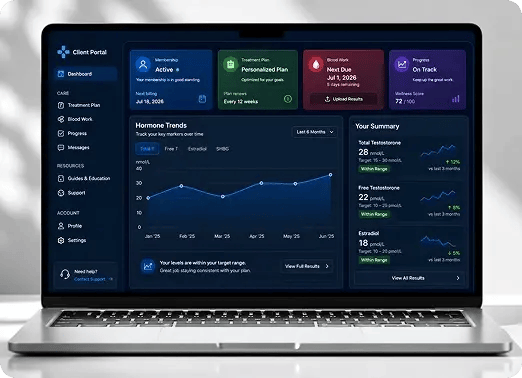
Automating Healthcare Workflows: A Deep Dive into the TRT Australia Portal Architecture

TRT Australia has launched a comprehensive client portal that centralizes the therapy journey for subscription users, allowing them to upload bloodwork, view doctor reviews, and track GP physical progress directly from a unified dashboard.

Website screenshot
OUR IMPACT

We Make It WorkFor Your Business

HubXpert has helped teams put agents into production that actually hold up under real volume, not just a demo.

Group-Apr-09-2026-11-51-37-8540-AM

500K+

Conversations Automated

Conversations Automated

Measured across live deployments handling real customer and internal traffic, not test environments.

35%

Average Deflection Rate

Average Deflection Rate

Tickets and inquiries resolved by the agent without a human handoff, measured against pre-deployment volume for the same team.

FAQ

Questions You Might Have

  • A chatbot answers questions. An AI agent takes multi-step action on its own: routing a ticket, updating a record, drafting follow-up, then reporting what it did. That changes operations.

  • Clean enough that an agent reading a record gets an accurate picture. That means resolved duplicates, consistent lifecycle stages, and populated properties. The audit tells you where you stand.

  • If you have developers with spare capacity, build it yourself. Most mid-market teams do not. The work is less about prompts than data architecture, permissions, and knowing which tier gates a feature.

  • A single-agent pilot takes 3 to 4 weeks from kickoff, including the knowledge vault build and testing. A multi-agent system takes 8 to 12 weeks. The readiness audit adds 2 to 3 weeks before either.

  • Yes. We connect agents to ERP systems, data warehouses, ecommerce platforms, and internal applications through APIs, and build RAG pipelines against external docs. Most builds are native at the core.

  • Approval steps sit in front of customer-facing output, and escalation rules hand the conversation to a person when confidence drops or the topic falls outside the vault. Every action is logged.

  • Not contractually, and some teams handle it internally. But prompts drift, models get updated, and your data changes shape. An agent left alone for six months is usually worse than it was at launch.

  • We work on the platform you already run on, and we are deep specialists in HubSpot. If you run HubSpot, the agent inherits your roles, records, and reporting. Otherwise we build in your stack.

  • Platforms document how each AI feature processes customer data, and the answer varies by feature. We review this against your governance requirements during the audit and configure settings.

bOOK CONSULTATION

Start With the
Readiness Audit


Two to three weeks, $2,500, credited back against whatever you build next. You get a clear answer on whether your data can support agents today, which use cases are worth the spend, and what it will cost to run them.

Icon-Apr-08-2026-10-02-31-8097-AM Takes 30 minutes
Icon-Apr-08-2026-10-02-31-8097-AM Delivered by a certified AI specialist
Ratul-Rahman