





-2.png)


-2.png)



.png)


.webp)

.png)


.png)















-1.webp)
-1.webp)



.webp)

-1-1.webp)



-2.webp)

-1-1.webp)

-2-1.png)

-1-1.webp)
-1-1.webp)
-1-1.png)






HubSpot has no built-in referral object. There is no dropdown for "referring provider" waiting to be filled in. What HubSpot does have is a general mechanism: association labels. Most practices can use this to build referral tracking without buying a dedicated referral platform.
This guide covers how that mechanism actually works, when it is enough, and when a practice has genuinely outgrown it.
Why Referral Leakage Is a Real Problem, Not Just a CRM Gap
Referral leakage is the industry term for a referral that gets sent but never turns into a booked visit. It happens when a referring physician's office faxes or calls in a name. Nobody on the receiving end follows up before the patient loses interest or goes elsewhere. Practices without a system to catch this rely on staff memory. That does not scale past a handful of referral sources.
The mechanics of the problem are structural, not a HubSpot limitation. A referral arrives through a channel a CRM was never built to watch by default. That channel might be a phone call, a fax, or a portal message from another practice's system. Someone has to manually create the record before any pipeline or workflow can act on it. The CRM's job starts the moment that record exists, not before.
HubSpot Has No Native Referral Object. Here Is What It Uses Instead
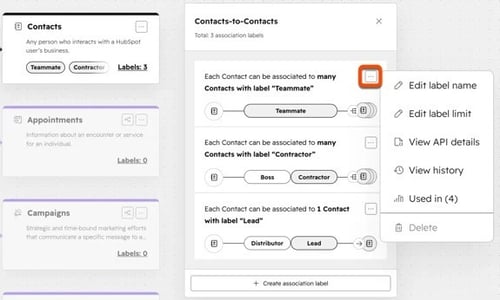
HubSpot's standard object model covers contacts, companies, deals, and tickets (Source: "Understand HubSpot's Records and Objects"). None of them is a referral or partner object. The mechanism HubSpot documents for this exact use case is association labels. This is a label placed on the connection between two records, for example between a referring physician's company record and a patient's deal.
That label can read "Referring Provider," and it turns an ordinary link between two records into something reportable.
This costs nothing extra and works on any tier. A referring provider becomes its own company record. Every patient they send becomes a deal associated to that company, carrying the "Referring Provider" label.
A practice with a manageable number of referral sources, a few dozen physicians or partner organizations, can run entirely on this pattern. No custom object or Enterprise-tier upgrade is required.
The Demand Signal HubSpot Has Sat On Since 2017
A HubSpot user posted an idea in December 2017. It asked for referral sources to link to deals the same way contacts do. A HubSpot employee replied in March 2021 (Source: "Linked Referral Sources to Deals, Just Like Contacts"). The employee called it "a great idea" but explained that scaling the underlying infrastructure across portals with hundreds of thousands of contacts was the real blocker. It was not on the roadmap then, and it still is not a native feature now.
That reply matters more than it looks. It confirms this gap is a known, acknowledged limitation, not a workaround nobody has thought of. Every solution below works around a constraint HubSpot itself has stated it does not plan to remove.
Building Referral Tracking With Association Labels
- Create a company record for each referring provider or partner organization, even a solo physician's office. Treat the referral source as an account, not a one-off note on a patient's file.
- Under Data Management, set up an association label between the Company and Deal objects, named something direct like "Referring Provider."
- When a referral comes in, create the deal and associate it to the referring company using that label. This is the one manual step nothing automates, since the referral itself usually arrives outside HubSpot.
- Build a workflow that enrolls new deals with that association and fires a task for staff to make first contact within a set window, closing the gap where leakage actually happens.
- Add a dashboard report grouping deals by the "Referring Provider" label, so referral volume and outcome per source becomes visible without pulling a spreadsheet.
When You Need a Custom Object Instead
|
Situation |
Association Labels |
Custom Object |
|
A few dozen referral sources |
Sufficient |
Unnecessary |
|
Hundreds of referral sources with tiered value or commission tracking |
Becomes unwieldy |
Purpose-built for this |
|
Needing referral-specific custom fields (specialty, region, contract terms) |
Not supported on the label itself |
Fully supported |
|
Subscription tier required |
Any tier |
Sales Hub Enterprise |
A custom Referral Partner object makes sense once a practice needs structured fields a label cannot carry. Contract terms, referral tier, and a running commission balance are common examples. Below that threshold, building a custom object is added complexity without added benefit.
Reporting on Referral Performance
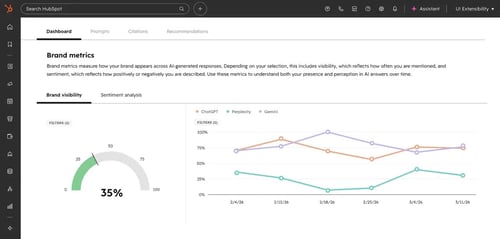
Once deals carry the referral association, HubSpot's Custom Report Builder can group and filter by that label. It works the same way it would group by any other property. A practice can see which referring providers generate the most deals. It can also see which ones convert to booked and retained patients at the highest rate, and which sources have gone quiet and need direct outreach.
This is what turns referral relationships that used to live in someone's memory into a reportable pipeline. It closes the loop a spreadsheet never could, since the report updates as deals move rather than requiring someone to re-tally it.
What This Setup Cannot Do Out of the Box
Association labels and custom objects solve the tracking and reporting problem. They do not solve intake. HubSpot has no native fax-to-record capture. A referral that arrives by fax still needs a person, or a separate fax-to-email tool, to get it into the system as a deal. There is no built-in insurance or prior-authorization verification either.
There is also no native HL7 or FHIR support for pulling referral data directly out of a referring practice's own EHR. A practice with heavy fax volume or a real need for automated clinical-system-to-clinical-system referral routing may still need the kind of EHR CRM integration that handles that specific problem. A CRM's association labels only start working once the referral is already a record inside it.
A Note on What Counts as PHI in Referral Data
A referring provider's name, practice, and contact information is ordinary business data on its own. It is the same as any other company record in a CRM. It becomes a different question once that provider record is linked to a specific patient. That link, combined with a diagnosis or the reason for referral, changes things.
At that point the combination can qualify as Protected Health Information under HIPAA's identifier standards. This is a reasoned distinction based on how HIPAA defines PHI, not a claim confirmed by a specific HubSpot document.
A practice handling sensitive referral reasons should still apply the same sensitive-data property flagging used for any other PHI field. Referral tracking is not automatically exempt.
Frequently Asked Questions

What is referral management in a CRM?
It means tracking who referred a patient, following up before the referral goes cold, and reporting on which referral sources actually convert. All of this happens inside the CRM a practice already uses for its other sales and marketing work.
Does HubSpot have a native referral or partner object?
No. HubSpot has confirmed this directly in response to a long-standing feature request. Referral tracking is built using association labels between existing objects, or a custom object for more complex cases.
Can a small practice track referrals without dedicated referral management software?
Yes, for a practice with a manageable number of referral sources. Association labels handle tracking and reporting at no extra cost. A practice with heavy fax intake or hundreds of referral relationships should weigh a dedicated platform against that added complexity.
Is referring-physician information considered PHI?
The provider's contact information alone generally is not. Once it is linked to a specific patient and a specific diagnosis or reason for referral, the combination can qualify as PHI. It should be flagged and handled accordingly.
What happens when referral volume outgrows association labels?
A custom Referral Partner object becomes worth building once referral sources number in the hundreds. It is also worth building when sources need structured fields like contract terms or commission tracking. That is a Sales Hub Enterprise capability.
%201%20(1).svg)
Winner
SalesForce, for its ability to handle large-scale operations and complex business needs, though HubSpot is scalable for SMBs.
Senior RevOps Strategist at Hubxpert

Fazle Rabbi
Table of Contents:

Subscribe to our newsletter
Do You Need a Healthcare-Specific CRM, or HubSpot?
Some practices outgrow HubSpot. Most don't. Here is the real threshold test, and where a healthcare-specific CRM actually wins.
Referral Tracking Software or Your CRM? A Healthcare Guide
HubSpot has no native referral object. Here is how referral tracking actually gets built inside a CRM, and when you need dedicated software instead.

HubSpot at Enterprise Scale: Fix Pipeline Velocity First
Slow pipeline velocity often gets blamed on HubSpot outgrowing enterprise needs. Here's how to diagnose the real cause before a costly Salesforce migration.
Syncing Invoices Between HubSpot & Your Accounting Software
A healthcare CRM tracks inquiries as records, moves them through a visible pipeline, and automates the follow-up. Here is how.

CRM for Healthcare: How It Actually Works Day to Day
A healthcare CRM tracks inquiries as records, moves them through a visible pipeline, and automates the follow-up. Here is how.

HubSpot EHR CRM Integration: What Actually Syncs
No native HubSpot EHR connector exists yet. Here is how EHR CRM integration really works, and what should never sync.
-
Do You Need a Healthcare-Specific CRM, or HubSpot?
hello
-
Referral Tracking Software or Your CRM? A Healthcare Guide
hello
-
HubSpot at Enterprise Scale: Fix Pipeline Velocity First
hello
-
Syncing Invoices Between HubSpot & Your Accounting Software
hello
-
CRM for Healthcare: How It Actually Works Day to Day
hello
-
HubSpot EHR CRM Integration: What Actually Syncs
hello