





-2.png)


-2.png)



.png)


.webp)

.png)










.png)







-1.webp)
-1.webp)



.webp)

-1-1.webp)



-2.webp)

-1-1.webp)

-2-1.png)

-1-1.webp)
-1-1.webp)
-1-1.png)







No native connector links HubSpot to any major EHR system, including Nextech and Meditech. Real EHR CRM integration happens through direct API work, middleware, or a healthcare interoperability platform, not a marketplace toggle.
HubSpot confirmed in August 2026 that an Epic integration is in private beta, but that covers Epic only, not Nextech or Meditech, and it is not yet generally available. What moves between the two systems is limited by design. Appointment and referral data sync one way into HubSpot. Clinical detail stays in the EHR, where it belongs.
Why There Is No Native HubSpot-to-EHR Connector Yet
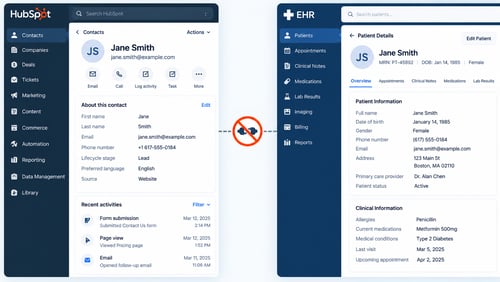
Nextech's own partner directory lists more than 30 technology partners. None of them is HubSpot, Salesforce, or any general-purpose CRM (Source: "Nextech Technology Partners"). Meditech's developer workspace is gated to its own customers, with no CRM integration listed. HubSpot's own healthcare product page confirms this pattern directly. It states that EHR connections happen through API work or third-party connectors, not through a native integration.
The one exception in motion belongs to Epic, not Nextech or Meditech. A HubSpot staff member confirmed on the Community forum in August 2026 that an Epic integration is in private beta (Source: "Enable EHR Integration Support Within HubSpot"). That is one vendor, still gated, and it does not change the integration path for practices running Nextech or Meditech today.
The Three Real Paths to Connect HubSpot and an EHR
Three approaches account for nearly every working setup. Each fits a different practice size and technical budget.
- Direct API work against the EHR's FHIR or HL7 v2 interface, custom-built for that specific practice and its specific EHR version.
- iPaaS middleware, such as Zapier, Workato, or Make, passing data between the EHR's exposed endpoints and HubSpot's API on a scheduled basis.
- A healthcare interoperability platform, such as Redox or Healthie, built to normalize HL7 and FHIR data across many EHR systems at once.
The third path has its own limit worth knowing before you commit to it. Redox's own supported-CRM list names Salesforce, not HubSpot. That means HubSpot-side connection work usually still requires custom configuration, even through an interoperability platform built for exactly this problem.
What Actually Syncs From the EHR to HubSpot
|
Data Field |
Typical Sync Direction |
|
Contact demographics (name, email, phone, date of birth) |
One-way, EHR to HubSpot |
|
Appointment date, type, and confirmation status |
One-way, EHR to HubSpot |
|
Referral source |
One-way, EHR to HubSpot |
|
Billing or package identifiers |
One-way, EHR to HubSpot |
Documented integrations of this kind run on a batch cycle, not a live feed. One official example syncs roughly every 30 minutes rather than instantly. None of the setups reviewed for this article write data back to the EHR. The flow runs one direction only, EHR to CRM, which keeps the clinical system as the single source of truth.
What Should Never Sync Into HubSpot
Clinical notes, lab results, diagnoses, and treatment plans stay in the EHR. This is not a preference. It is a structural boundary that holds regardless of tier or integration method. HubSpot does have properties technically capable of holding a health-identifying detail, but those properties are Enterprise-only and require an active HIPAA compliant CRM setup before they can legally hold anything. Even then, a flagged property cannot be used inside personalization tokens, chatbots, or most workflow actions. Putting clinical detail into a system that cannot act on it defeats the purpose of moving it there in the first place.
If Middleware Touches PHI, It Needs Its Own BAA
HubSpot's Business Associate Agreement covers only HubSpot's own handling of Protected Health Information (Source: "Store Sensitive Data in HubSpot"). It says nothing about any third-party pipe carrying that same data between systems. If Zapier, Workato, or an interoperability platform touches PHI in transit, that vendor needs its own separate BAA with the practice. One signed agreement does not cover the whole chain. Confirm every tool in the path has its own agreement before PHI starts flowing through it.
A Field-by-Field Guide to What Belongs Where
|
Field |
Where It Belongs |
|
Name, email, phone |
Standard HubSpot contact property |
|
Appointment date, type, status |
Standard HubSpot property or custom object |
|
Referral source |
Standard HubSpot property |
|
Insurance or health-plan ID |
HubSpot Sensitive Data property, Enterprise tier, BAA required |
|
Diagnosis or condition |
EHR only, never HubSpot |
|
Clinical notes or treatment plans |
EHR only, never HubSpot |
|
Lab results |
EHR only, never HubSpot |
This table is the piece most integration guides skip. They tell you clinical data stays out and demographic data goes in, then stop there. The middle row matters just as much. Insurance and health-plan identifiers sit in a gray zone, technically storable, but only inside a property flagged and gated the same way any other PHI field is gated.
Choosing the Right Integration Path for Your Practice
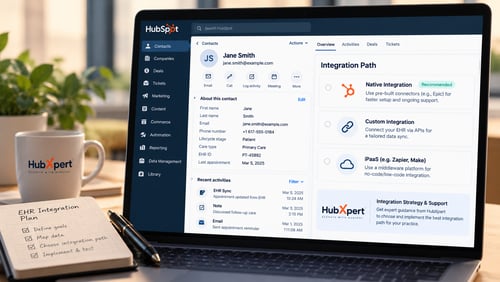
A single-location practice with in-house development resources can usually justify direct API work against its EHR's FHIR interface. It costs more upfront but avoids a recurring middleware fee. A practice without a development team is better served by iPaaS middleware, which trades some flexibility for a faster setup. A multi-location health system running several EHR systems at once should look at a dedicated interoperability platform, since normalizing several data formats by hand does not scale past a handful of locations.
Whichever path a practice picks, the same boundary applies. A properly scoped healthcare CRM setup built around this exact separation keeps HubSpot handling engagement and outreach, while the EHR keeps handling clinical care. Integration should make that boundary easier to maintain, not blur it.
Frequently Asked Questions
Does HubSpot have a native Nextech or Meditech integration?
No. Neither vendor lists HubSpot as a technology partner. Any connection requires custom API work, middleware, or an interoperability platform.
Is Epic different from Nextech and Meditech here?
Yes. HubSpot confirmed an Epic integration is in private beta as of August 2026. It is Epic-only, still gated, and not generally available. Nextech and Meditech are unaffected by this beta.
Can lab results or diagnoses ever go into HubSpot?
No. That data stays in the EHR regardless of tier, BAA status, or integration method. HubSpot is not built to serve as a clinical system of record.
Does middleware carrying patient data need its own BAA?
Yes. HubSpot's BAA covers only HubSpot's own handling of PHI. Any middleware or interoperability platform touching that data needs a separate signed agreement.
Is the sync one-way or two-way?
One-way in every documented setup reviewed for this article. Data flows from the EHR into HubSpot on a batch cycle. HubSpot does not write data back into the EHR.
As a Hubspot Automation Developer at Hubxpert, I specialize in API integration, seamlessly connecting HubSpot with third-party applications. My role encompasses understanding client needs, crafting custom code solutions, and ensuring the smooth operation of our automation workflows. I actively address any HubSpot integration challenges and stay updated with the platform's latest advancements. My dedication ensures clients harness the full potential of HubSpot.

Tanzinul Kabir
Table of Contents:

Subscribe to our newsletter

3D Web Design Templates & Examples You Can Reuse
Browse 3D web design templates and examples, plus where to find free downloads, and see how 3D web page design lifts a site without slowing the site down.

3D Web Design Tools & Software Compared for 2026
Compare 3D web design tools and web based 3D design software, and see where 3D models and 3D assets for web design fit your existing front-end build pipeline.

HubSpot Onboarding Cost: What the Fee Really Covers
See what HubSpot onboarding cost covers, how onboarding fees get quoted and how to compare implementation quotes line by line before you commit to a partner.

HubSpot Enterprise Onboarding (What Changes by Tier)
See how HubSpot enterprise onboarding differs from Professional and Starter, covering advanced onboarding scope, admin training and what each tier includes.

Best HubSpot CRM Implementation Consulting Agencies for B2B
Compare 6 HubSpot partners for B2B with pros, cons, and pricing. Learn how to judge companies offering HubSpot implementation services and spot red flags.

How to Build a HubSpot Implementation Plan That Holds Up
Follow a HubSpot implementation plan covering scoping, data cleanup and go-live. Includes an implementation checklist and a realistic 60-day timeline.
-
3D Web Design Templates & Examples You Can Reuse
hello
-
3D Web Design Tools & Software Compared for 2026
hello
-
HubSpot Onboarding Cost: What the Fee Really Covers
hello
-
HubSpot Enterprise Onboarding (What Changes by Tier)
hello
-
Best HubSpot CRM Implementation Consulting Agencies for B2B
hello
-
How to Build a HubSpot Implementation Plan That Holds Up
hello