





-2.png)


-2.png)



.png)


.webp)

.png)










.png)







-1.webp)
-1.webp)



.webp)

-1-1.webp)



-2.webp)

-1-1.webp)

-2-1.png)

-1-1.webp)
-1-1.webp)
-1-1.png)






A healthcare CRM captures a patient inquiry as a record the moment it arrives. That record moves through a visible pipeline, from first contact to scheduled visit to retained patient.
Reminders and follow-up run automatically in the background. Reporting then shows which channel actually produced booked visits, not just inquiries. That is the mechanical core, and most explanations of a healthcare CRM stop before describing any of it concretely.
The Patient Journey Mapped to HubSpot's Object Model
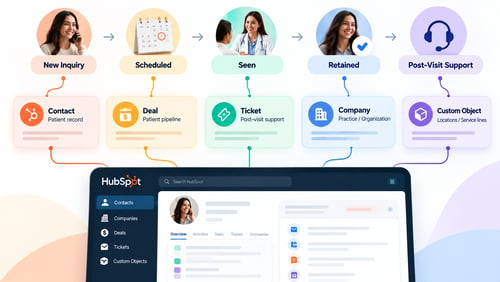
HubSpot organizes data into four object types (Source: "Understand HubSpot's Records and Objects"). Each one plays a specific role in a practice's marketing operation. A contact is the patient record itself, holding name, contact details, and communication history. A deal tracks progress through pipeline stages. This is the natural home for a patient's status: New Inquiry, Scheduled, Seen, Retained.
A ticket is built for post-visit service issues, such as a billing question or a scheduling complaint. It is not part of the acquisition pipeline. A custom object extends the model further. This is useful for a practice with multiple locations or service lines that need their own tracking structure.
These objects connect through associations. A single contact can link to a deal, a ticket, and a company record at once. A practice manager watching the deal pipeline is really watching patients move through stages. No one has to stare at a spreadsheet trying to remember who called last week.
What Happens the Moment a Patient Inquiry Comes In
A form submission or an online booking creates or updates a contact record. A deal then gets created and placed at the first pipeline stage, usually labeled something like New Inquiry. This is exactly the question a home healthcare practice manager asked on HubSpot's own Community forum (Source: "Anyone Suggest How HubSpot CRM Works for My Healthcare Marketing").
The reply from a HubSpot Elite Partner is worth repeating almost verbatim. It starts with the same question every practice should ask first: how are leads entering the CRM, and what happens to them after? It then recommends personalization tokens for details that make a reminder feel relevant, such as an upcoming appointment date. That beats a generic mass email.
One tier note from that same thread matters here. Deeper customer journey analytics, tracking a patient across multiple touchpoints before they convert, requires Marketing Hub or Sales Hub Enterprise. The basic contact-to-deal flow described above does not.
The Follow-Up and Reminder Automation Running in the Background
Workflows in HubSpot enroll a record based on a trigger. The workflow then runs a sequence of actions against that record. A common healthcare application enrolls a deal once its appointment-date property is set. The workflow then delays until a fixed point before that date, such as the morning prior. It sends a personalized reminder email at that moment, referencing the specific appointment and provider. No one on staff has to remember to send it.
The same mechanism handles recall campaigns for lapsed patients and consistent follow-up after a missed appointment. What changes is the trigger and the delay, not the underlying structure. This is the piece most generic explanations of healthcare CRM software skip entirely. They describe the outcome, automated reminders, without ever naming the mechanism that produces it: a triggered workflow on a deal property.
Referral Tracking & Routing
Referral source lives as a property on the contact record, set the moment a referred patient enters the system. A referred patient's deal can start at a distinct pipeline stage. This separates the front-office follow-up for a referral from a first-time cold inquiry.
Reporting then rolls this up by referring provider or partner, showing which relationships actually generate booked visits. A CRM built around clearer referral management changes that. What used to live in someone's memory becomes a tracked, reportable pipeline.
What the Reporting Actually Shows You
Dashboards replace the spreadsheet a front-office manager used to update by hand. The useful version of this reporting does not just count inquiries. It attributes each inquiry to a source and tracks that source through the pipeline. It then shows which channels are producing patients who actually get seen, not just patients who fill out a form and disappear.
A channel that generates a high volume of inquiries but a low rate of scheduled visits is one result. A channel that generates fewer inquiries but converts most of them is a very different one.
What This Looks Like at Scale
The clearest published example of this working at scale comes from Santagostino, a multi-specialty telehealth group (Source: "Santagostino Case Study"). It is worth stating plainly that this data runs through December 2023, so it is not a fresh figure. The practice is also based in Italy, not the United States. With that caveat in place, the scale is still instructive.
The group's contact database grew ninefold, from roughly 90,000 to 830,000 contacts. Quarterly email campaigns alone were driving about 13,000 medical bookings. Organic traffic rose 1,359 percent over the same period the CRM and marketing platform were in place.
Is a Healthcare CRM the Same as an EHR?
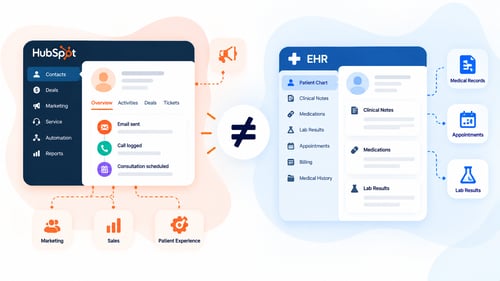
No. A CRM tracks inquiries, pipeline stages, referrals, and marketing outreach. It is not built to hold clinical notes, lab results, or diagnoses. Those should never sync into it, regardless of subscription tier. Practices connecting a CRM to their existing clinical system need to draw that boundary deliberately. A poorly scoped EHR CRM integration can pull clinical fields into the marketing platform by accident. The CRM's job is engagement and outreach. The EHR's job is the clinical record.
Frequently Asked Questions
What is a healthcare CRM, in one sentence?
It is a system that tracks a patient inquiry as a record and moves it through a pipeline toward a scheduled and completed visit. Follow-up runs automatically along the way.
Do I need Enterprise tier to run any of this?
No, not for the core contact-to-deal pipeline and basic reminder workflows. Deeper customer journey analytics across multiple touchpoints does require Marketing Hub or Sales Hub Enterprise.
Can a small practice run this without a dedicated marketing team?
Yes. Once the pipeline stages and reminder workflows are set up, most of the day-to-day operation runs on its own. The setup itself is the part that benefits from experienced configuration.
How is a patient referral actually tracked?
Referral source is stored as a property on the contact, set when the referred patient first enters the system. Reporting rolls that property up by referring provider or partner.
What does a realistic outcome look like?
Outcomes vary widely by practice size and starting point, so treat any specific figure as an example, not a guarantee. The Santagostino case shows what sustained use over years can produce at a large multi-location group. A solo or small-group practice should expect a smaller, slower version of the same pattern.
Senior RevOps Strategist at Hubxpert

Fazle Rabbi
Table of Contents:

Subscribe to our newsletter

3D Web Design Templates & Examples You Can Reuse
Browse 3D web design templates and examples, plus where to find free downloads, and see how 3D web page design lifts a site without slowing the site down.

3D Web Design Tools & Software Compared for 2026
Compare 3D web design tools and web based 3D design software, and see where 3D models and 3D assets for web design fit your existing front-end build pipeline.

HubSpot Onboarding Cost: What the Fee Really Covers
See what HubSpot onboarding cost covers, how onboarding fees get quoted and how to compare implementation quotes line by line before you commit to a partner.

HubSpot Enterprise Onboarding (What Changes by Tier)
See how HubSpot enterprise onboarding differs from Professional and Starter, covering advanced onboarding scope, admin training and what each tier includes.

Best HubSpot CRM Implementation Consulting Agencies for B2B
Compare 6 HubSpot partners for B2B with pros, cons, and pricing. Learn how to judge companies offering HubSpot implementation services and spot red flags.

How to Build a HubSpot Implementation Plan That Holds Up
Follow a HubSpot implementation plan covering scoping, data cleanup and go-live. Includes an implementation checklist and a realistic 60-day timeline.
-
3D Web Design Templates & Examples You Can Reuse
hello
-
3D Web Design Tools & Software Compared for 2026
hello
-
HubSpot Onboarding Cost: What the Fee Really Covers
hello
-
HubSpot Enterprise Onboarding (What Changes by Tier)
hello
-
Best HubSpot CRM Implementation Consulting Agencies for B2B
hello
-
How to Build a HubSpot Implementation Plan That Holds Up
hello