





-2.png)


-2.png)



.png)


.webp)

.png)










.png)







-1.webp)
-1.webp)



.webp)

-1-1.webp)



-2.webp)

-1-1.webp)

-2-1.png)

-1-1.webp)
-1-1.webp)
-1-1.png)







In a quarterly business review, a CRO asks why deals that used to close in 60 days are now taking 94. Someone on the call says maybe the team's outgrown HubSpot. Nobody pushes back.
Because "we've outgrown the CRM" is an easier story to tell a board than "our stage definitions haven't been touched since we were a third the size we are now." Six weeks later there's a Salesforce migration proposal on the table, priced at more than the company's entire HubSpot spend for the next three years.
That's usually the wrong six weeks. Before a slipping pipeline becomes a platform decision, it's worth actually diagnosing why deals are moving slower, because in most cases the biggest culprit isn't the CRM at all.
The Real Question Behind "Does HubSpot Scale"
"Does HubSpot scale" isn't one question, it's three, and collapsing them into one is how a fixable process problem turns into a six-figure migration decision.
Record volume is one axis: can the platform actually hold the number of contacts, companies, and deals a large org generates. Process complexity is a second: can it support the approval chains, territory splits, and multi-product pipelines a large org runs.
Customization depth is a third: can it be extended with genuinely custom logic when a workflow or a native feature doesn't cover an edge case. These three things move at different rates as a company grows, and a team that's actually hitting a ceiling on one of them often assumes it's hitting a ceiling on all three.
Why Pipeline Velocity Drops As Companies Scale, Regardless Of CRM
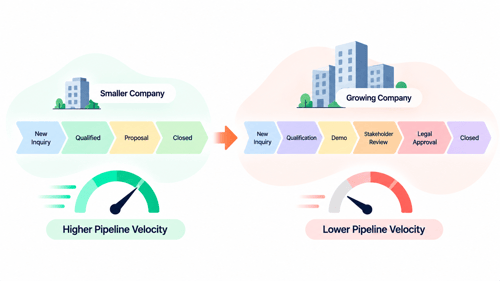
Pipeline velocity has a specific formula: (Number of Qualified Opportunities × Average Deal Size × Win Rate) ÷ Sales Cycle Length. It's worth naming because most of the conversations about "HubSpot can't keep up" are really conversations about the denominator getting bigger, sales cycle length, and that has structural causes that have nothing to do with which CRM sits underneath the process.
A pipeline built when the company sold one product to one buyer persona doesn't automatically stay clean once it's selling three products to five buyer personas through the same stages. Approval steps get added for larger contracts without anyone updating the stage names to reflect them.
Reps hired in the last two years never got trained on stage discipline the way the founding sales team did, because there was no formal onboarding for it, there was just tribal knowledge that thinned out as the team grew. None of that is a platform limitation. It's what happens to any sales process that scales headcount faster than it scales its own documentation.
What Actually Limits HubSpot At Enterprise Size
Here's the honest version of the ceiling, not the vendor-brochure version and not the "everyone outgrows it eventually" version either.
Where The Limits Aren't
Raw record volume is not where most companies hit a wall. HubSpot's own API documentation shows record limits in the millions for standard objects like contacts and companies on enterprise-scale accounts, so a company with half a million contacts is nowhere near a technical ceiling most teams assume exists.
Custom objects, sandboxes for safely testing changes before they hit production, and Multi-Account Management for connecting up to thirty separate HubSpot accounts under one reporting layer are all real Enterprise-tier capabilities built specifically for this size of company, not afterthoughts bolted onto a small-business tool.
Where The Limits Actually Show Up
The genuine ceiling shows up in customization depth, not volume. A company that needs code-level logic branching off dozens of interdependent conditions, the kind of thing Salesforce's Apex layer is built for, will eventually find HubSpot's workflow branching and custom-coded actions more constrained by comparison.
Deeply nested territory management across many regions and product lines, or a genuinely multi-cloud product suite that needs unified CPQ across businesses with very different pricing logic, is where Salesforce's architecture was built to go further.
These are real differences, not marketing spin, and a company running into them isn't wrong to look at Salesforce. The mistake is assuming a slow pipeline is evidence of this kind of ceiling when it usually isn't.
Fixing Pipeline Velocity Inside HubSpot Before You Assume It's The Platform
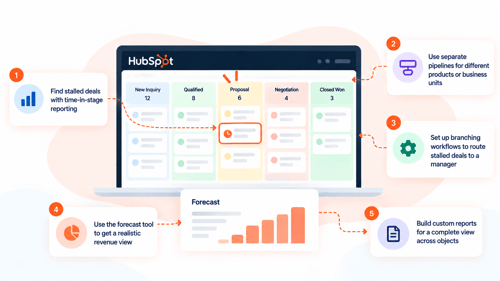
If the actual complaint is "deals move too slowly," here's what to check before a platform decision gets made on top of it.
Start with time-in-stage reporting. Most default dashboards show which stage a deal sits in, not how long it's been stuck there, and stalled deals sitting silently in the middle of a pipeline are usually the single biggest drag on the sales-cycle-length number in the velocity formula.
A related piece we've written, why HubSpot deals go cold and how to build reminders around it, covers this directly, and the same logic scales to an enterprise pipeline just as well as a small one.
Check whether the org is running one shared pipeline across multiple product lines or business units that should really have their own. A pipeline designed for a single, simple sales motion gets messy fast once it's stretched to cover several different ones.
And the fix is usually structural, not a platform migration. We've covered this exact decision, one pipeline or several, in more depth in our piece on service-line pipeline structure.
From there, the tools that actually move the needle at this size are the ones built for it: branching workflows that route a stalled enterprise deal to a manager rather than just sending another automated email.
The forecast tool for weighting revenue by real confidence instead of raw stage, and the custom report builder for cross-object reporting once a single pipeline report stops being enough. None of these require leaving the platform. They require someone actually using the Enterprise tier the company is already paying for.
When It's Actually Time To Consider Salesforce
Some companies genuinely outgrow HubSpot, and that is worth acknowledging. The signs are usually specific, not just that the CRM feels slow or difficult to manage.
You may need a different platform when HubSpot cannot support a critical custom process, you need unified CPQ across very different pricing models, or separate business units legally require completely separate systems of record.
That last one is worth pausing on, because it's the one most often solved wrong. A company assuming it needs to leave HubSpot for genuine data separation across business units often hasn't checked whether Multi-Account Management.
Which connects multiple HubSpot accounts while keeping their data genuinely separate, would solve the actual problem without a full platform migration. It's worth ruling that out before treating Salesforce as the only path to real separation. For a fuller, balanced look at where each platform actually wins, see HubXpert's HubSpot vs Salesforce comparison.
FAQs
What's a healthy pipeline velocity benchmark?
There isn't a single universal number, it depends heavily on deal size and industry. What matters more than hitting a benchmark is tracking the trend over time and knowing which of the four inputs, opportunity count, deal size, win rate, or cycle length, is actually driving a change, rather than reacting to the overall number alone.
Does HubSpot have a record limit that could actually be hit at enterprise scale?
For the vast majority of companies, no. HubSpot's documented record limits for standard objects run into the millions on enterprise-tier accounts. The ceiling most large companies actually hit is around customization depth and process complexity, not the number of records the CRM can store.
Can multiple business units share one HubSpot portal without hurting reporting accuracy?
Yes, with the right structure: separate pipelines per business unit, consistent use of a brand or business-unit property, and reports built to filter by that property rather than assuming one pipeline tells the whole story. Where the data genuinely needs to stay separate rather than just organized, Multi-Account Management is the better fit than forcing everything into one shared portal.
Is switching to Salesforce actually going to fix a slow pipeline?
Not on its own. A slow pipeline caused by inconsistent stage discipline, missing exit criteria, or no visibility into stalled deals will still be slow on Salesforce, because those are process problems, not platform problems. Migrating fixes a genuine platform ceiling; it doesn't fix a process that was never rebuilt as the company grew.
What's the honest cost comparison between fixing HubSpot and migrating to Salesforce?
A pipeline and reporting rebuild inside an existing HubSpot Enterprise subscription is almost always a fraction of the cost, in both money and disruption, of a full CRM migration, which typically involves new licensing, a rebuild of every workflow and integration, and a real productivity dip during the transition. That doesn't mean migration is never worth it, it means the pipeline problem should be ruled out as fixable first, since it usually is.
Maximize Your HubSpot Investment With HubXpert
Before recommending a migration, HubXpert audits the actual pipeline, properties, and reporting structure behind a "does this still work at our size" question, because most of the time the honest answer is that the platform isn't the bottleneck.
We rebuild pipeline structure, stage discipline, and reporting for companies that have outgrown their original HubSpot setup without needing to outgrow HubSpot itself.
See our HubSpot Sales Hub implementation service for pipeline and forecasting rebuilds, our HubSpot admin and technical support service for ongoing optimization at scale, or check current HubSpot Enterprise pricing before comparing it against a migration quote.
If the honest answer really is that you need harder separation between business units, our guides to merging two HubSpot portals and splitting one portal into regional portals cover that path too.
Founder & CEO @ Hubxpert. My goal is to make every company using HubSpot succeed in their marketing organisation and automation.

Ratul Rahman
Table of Contents:

Subscribe to our newsletter

3D Web Design Templates & Examples You Can Reuse
Browse 3D web design templates and examples, plus where to find free downloads, and see how 3D web page design lifts a site without slowing the site down.

3D Web Design Tools & Software Compared for 2026
Compare 3D web design tools and web based 3D design software, and see where 3D models and 3D assets for web design fit your existing front-end build pipeline.

HubSpot Onboarding Cost: What the Fee Really Covers
See what HubSpot onboarding cost covers, how onboarding fees get quoted and how to compare implementation quotes line by line before you commit to a partner.

HubSpot Enterprise Onboarding (What Changes by Tier)
See how HubSpot enterprise onboarding differs from Professional and Starter, covering advanced onboarding scope, admin training and what each tier includes.

Best HubSpot CRM Implementation Consulting Agencies for B2B
Compare 6 HubSpot partners for B2B with pros, cons, and pricing. Learn how to judge companies offering HubSpot implementation services and spot red flags.

How to Build a HubSpot Implementation Plan That Holds Up
Follow a HubSpot implementation plan covering scoping, data cleanup and go-live. Includes an implementation checklist and a realistic 60-day timeline.
-
3D Web Design Templates & Examples You Can Reuse
hello
-
3D Web Design Tools & Software Compared for 2026
hello
-
HubSpot Onboarding Cost: What the Fee Really Covers
hello
-
HubSpot Enterprise Onboarding (What Changes by Tier)
hello
-
Best HubSpot CRM Implementation Consulting Agencies for B2B
hello
-
How to Build a HubSpot Implementation Plan That Holds Up
hello