





-2.png)


-2.png)



.png)


.webp)

.png)










.png)







-1.webp)
-1.webp)



.webp)

-1-1.webp)



-2.webp)

-1-1.webp)

-2-1.png)

-1-1.webp)
-1-1.webp)
-1-1.png)







A prospect downloads your capabilities deck, reviews your proposal, checks pricing, and shares it internally. None of these actions get scored in HubSpot.
Meanwhile, a low-quality form submission may receive the same attention as an account with multiple stakeholders actively evaluating your services.
PQA (Product-Qualified Account) scoring started in SaaS, where companies score accounts based on product usage. Professional services firms can apply the same idea by scoring signals like proposal engagement, content activity, portal usage, and stakeholder interactions.
This article explains how to adapt PQA scoring for professional services in HubSpot.
Why Read This Blog?
- Understand which signals actually predict buying intent for a relationship-driven, engagement-based business, and which ones are just noise borrowed from a SaaS playbook that doesn't fit.
- Learn how to build and automate this scoring model inside HubSpot specifically, not as a theoretical framework.
- See how to measure whether the model is working and adjust it as your firm's business development process changes.
What is a PQA Score?
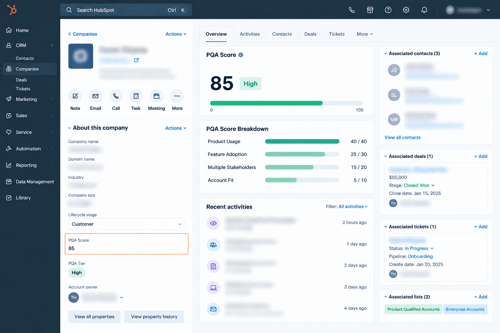
A PQA score for a professional services firm is a number on a company record that reflects how ready that account is to become a client, built from the combination of firmographic fit and how the people at that account are engaging with your firm, proposals, content, and outreach.
PQA vs. MQL & SQL
An MQL reflects a single marketing touch, a form fill, a webinar registration. An SQL reflects a partner's or a rep's judgment after a conversation. A PQA is neither. It's an aggregate signal across everyone at the account: if three people from the same company have opened your proposal, attended a discovery call, and revisited your services page, that account is behaving differently than one where a single junior employee filled out a contact form once.
How PQA scoring identifies account-level buying intent
The core idea carried over from SaaS is real and useful: buying decisions at most companies, including decisions to hire a law firm, an accounting practice, or a consultancy, are rarely made by one person acting alone. Scoring the account rather than the individual contact catches that a specific opportunity is developing even before any one person on the buying side has said so explicitly.
When PQA scoring makes sense for professional services
It's worth the setup for firms selling into companies with more than one decision-maker or influencer involved, which covers most B2B professional services above a certain deal size. It's less worth building for firms whose engagements are won almost entirely through a single relationship (a solo practitioner's personal network, for instance), where there's no multi-person signal to aggregate in the first place.
What Should a PQA Score Measure?
- Company or account fit: does the prospect match your firm's actual best-client profile, industry, company size, budget range, and the kind of engagement (project-based, retainer, one-time) your firm is actually staffed to deliver well.
- Service engagement: this is the direct substitute for "product usage" in the SaaS model. For professional services, that means proposal and document engagement (opens, time spent, pages revisited), client portal activity where your firm has one, content engagement (case studies, service pages, guides), and meeting attendance.
- Intent and behavioral signals: pricing or fee-structure page visits, repeat visits to a specific practice area page, a forwarded proposal reaching a new stakeholder, direct inbound questions about scope or timeline.
- Negative or disqualifying signals: a company outside your target size or industry, a proposal opened once and never revisited, a scheduled call that gets repeatedly rescheduled or no-showed, a stated budget below your minimum engagement size.
How to Define Your PQA Scoring Model
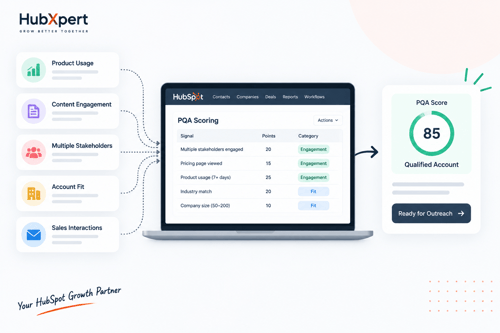
To define PQA scoring model, you need to know these first:
Choose The Right Qualification Signals
Pull your last 15 to 20 signed engagements and look for what those accounts actually did before signing: did multiple stakeholders engage with the proposal, did they revisit specific pages, how many touches happened before the engagement was signed. Build your signal list from that pattern, not from a generic list of "things you could theoretically track."
Assign Points Based On Importance
A proposal opened by three separate people at the account is a stronger signal than the same proposal opened three times by one person. Weight fit criteria and engagement criteria separately, and don't let volume of activity from a single contact outweigh genuine breadth across the account.
Set a clear PQA threshold
Decide the point total, or the combination of fit and engagement thresholds, that moves an account from "in cultivation" to "qualified and ready for direct outreach." Test the threshold against your own historical data before rolling it out: would this model have correctly flagged your last quarter's actual signed engagements, and roughly when.
Keep The Scoring Model Simple & Measurable
A model with two or three well-chosen fit criteria and three or four engagement signals is easier for partners to trust and easier to recalibrate than one trying to account for every possible interaction.
How to Build PQA Scoring in HubSpot
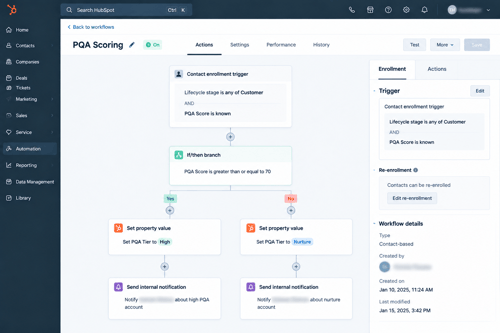
Here's the build sequence in order, from setting up the underlying data to turning the score on.
Step 1: Set Up the Company-Level Fit Properties First
Before opening the lead scoring tool, confirm the properties it needs already exist and are populated: industry, employee count, plan tier, whatever criteria your closed-won review identified as real fit indicators. Scoring against sparsely filled properties just produces a score with gaps in it.
Step 2: Define Your Custom Events for Usage Data
For genuinely account-level signals, an integration connected, a workspace-level setting enabled, set the event's primaryObject to COMPANY so it logs directly to the company record instead of requiring a rollup from individual contacts.
Custom events can be created via API, JavaScript tracking, or spreadsheet import, and via webhooks on Data Hub Professional or Enterprise (Source: How to Create Custom Events). Decide this event architecture before building the score around it, since events aren't retroactive once defined.
Step 3: Navigate to Marketing > Lead Scoring & Click
Choose Companies as the object, since the goal is an account-level view rather than individual contact behavior.
Step 4: Choose the Score Type
Build a combined score if you want fit and usage rolled into one number, or separate fit and engagement scores if you'd rather require both to independently clear a threshold, which tends to produce a cleaner signal than a single blended total (Source: Understand the Lead Scoring Tool).
Step 5: Set Your Score Limit
HubSpot offers ranges from -100 to 100 up through -10,000 to 10,000 (Source: Build Lead Scores). Choose a range wide enough to separate "barely qualified" from "clearly qualified" without making every threshold feel arbitrary.
Step 6: Build Your Fit Criteria as a Property Group
Add the property group and set point values per rule, weighted toward whatever properties most reliably separated your closed-won accounts from the ones that never converted.
Step 7: Build Usage & Engagement as an Event Group
Add event rules referencing your custom events, with a points cap on the group so no single high-volume event type can dominate the score. Set negative points here too: no activity in a defined window, a canceled subscription, a wrong-fit signal, so the score can fall as well as rise.
Step 8: Decide How Contact-Level Usage Rolls Up
If a usage signal is naturally contact-level (an individual logging in), you can let it roll up to the company automatically, but HubSpot chooses the aggregation method (sum or average) per event type, not you.
For breadth metrics like distinct active users, calculate the count in your own product backend and send it as a company-level event or property instead of relying on the rollup.
Step 9: Define Your Qualification Rule
Set the threshold that moves an account from "in progress" to "qualified," whether that's a single combined score crossing a number or fit and engagement thresholds that both need to clear independently.
Step 10: Review the Score, Then Turn It On
Walk through the full criteria list once more before activating it, checking that point values reflect what your closed-won review actually showed, not just what seemed reasonable while building.
Step 11: Test and Validate Against Real Accounts
Run the finished model against accounts that already converted and accounts that churned out of a trial. If it scores a churned account as highly qualified, or misses one that converted, adjust the weighting before the score goes live for sales.
Automate PQA Qualification in HubSpot
Use workflows to update PQA status. The lead score recalculates automatically as new property and engagement data comes in. Build a workflow triggered when the score crosses your qualification threshold to handle everything that should happen next.
Notify and assign sales teams. From that workflow, trigger an internal notification to the account owner or BD lead, and use the Rotate record to owner action to assign newly qualified accounts, supporting load-balanced, round robin, or random distribution across specified users or teams (Source: Assign and Rotate Record Owners Using Workflows).
Trigger follow-up actions. Add a task-creation step so whoever gets the account has a specific next action, a call to schedule, a proposal to follow up on, rather than a record appearing with no context about why it qualified.
Keep qualification data up to date. Because the score recalculates as data changes, the same workflow logic that flags new qualified accounts can also catch accounts whose engagement has gone cold, useful for pulling a stalled account out of active outreach before a partner wastes more time on it.
Track & Improve PQA Performance
- Monitor qualified accounts. A single-object report on companies, filtered by your PQA score property, shows how many accounts are qualifying per month and whether that volume is trending in the right direction.
- Measure PQA-to-opportunity conversion. Build a funnel report tracking what share of qualified accounts actually advance to a signed engagement or an active proposal stage. Low conversion here usually means the qualification threshold is too loose, not that the concept has failed.
- Track pipeline and revenue impact. Tag deals that originated from a PQA-qualified account and compare their win rate and average engagement value against the firm's overall average. If PQA-sourced opportunities aren't closing at a meaningfully better rate, the signal weighting needs another look.
- Review and adjust scoring rules. Revisit the model on a set schedule, quarterly is reasonable for most firms, since which signals actually predict a signed engagement shifts as your service lines, pricing, and BD process evolve.
Common PQA Scoring Mistakes You Should Know
Here are some common mistakes you should know before you start:
Using Too Many Signals
A model trying to score every possible interaction is harder to calibrate and harder for partners to trust than one built on a handful of signals proven against real closed-won data.
Giving Every Activity The Same Weight
A proposal reopened by a second stakeholder at the account is not the same signal as the original contact opening it a second time. Treat breadth across the account as its own scoring dimension, not just a byproduct of total activity volume.
Relying On Outdated Or Incomplete Data
If your firm has changed its service lines or ideal client profile since the fit criteria were set, the score is measuring fit against a client profile that no longer matches what the firm is actually best positioned to serve.
Setting The Score Once And Never Reviewing It
Nothing in HubSpot will tell you the model has drifted out of accuracy. Only your own conversion data will, which means the review has to be a scheduled habit, not a reaction to something going visibly wrong.
When HubSpot PQA Scoring Needs Expert Setup
Complex CRM and account structures. Firms with multiple practice groups, each effectively running its own business development process, often need more than one scoring model, or a model that correctly separates practice-group-specific fit criteria without conflicting with each other.
Multiple service or sales motions. A firm running both project-based new business and ongoing retainer account management needs qualification logic that doesn't confuse renewal or expansion signals with new-business intent signals, since those are genuinely different situations that shouldn't be scored the same way.
Advanced workflows and routing. Routing logic that accounts for practice group, account tier, and partner capacity simultaneously goes beyond a single workflow and benefits from someone who has built this kind of branching logic before, particularly in firms with ethical wall or permission requirements layered on top.
Custom reporting and attribution. Tying qualified-account activity cleanly to signed revenue, especially across multiple practice groups or service lines, often needs report structures and possibly a subscription tier beyond what's already configured.
How HubXpert Can Help You
This is exactly the kind of configuration work we handle as part of HubSpot onboarding and implementation: mapping your firm's actual fit criteria and engagement signals, building the scoring model correctly the first time, and setting up the routing and reporting around it so partners trust the number enough to act on it.
We've worked with professional services firms whose account structures outgrew a single default pipeline, and the pattern is consistent: the technical build is rarely the hard part, getting the criteria and thresholds right for how your specific firm actually wins business is. If any of the situations above sound like where your firm is right now, talk to HubXpert about your HubSpot onboarding before building this on your own.
FAQs
What is a PQA score in HubSpot?
For a professional services firm, a PQA score is a company-level score built in HubSpot's lead scoring tool that combines firmographic fit with account-wide engagement signals, proposal views, portal activity, content engagement, meeting attendance, rather than the in-product usage data a PQA score would track for a SaaS company.
How do you calculate a PQA score?
By combining a fit score (built from property groups reflecting your ideal client profile) with an engagement score (built from event groups tracking proposal, portal, and content engagement) into a single company-level score, with a threshold set against your own historical closed-won data.
Can HubSpot automate PQA qualification?
Yes. A workflow triggered when the score property crosses your defined threshold can send internal notifications, assign the account to a partner or BD lead using the Rotate record to owner action, and create a follow-up task, all without manual monitoring of the score.
What is the difference between PQA and lead scoring?
PQA scoring is a specific, account-level application of HubSpot's general lead scoring tool. Standard lead scoring can apply to a contact, a company, or a deal, and often weighs marketing engagement heavily. A PQA model for professional services is scoped deliberately to the company object and weighted toward service and proposal engagement across every stakeholder at the account.
How often should a PQA scoring model be reviewed?
Quarterly is a reasonable default for most firms, though any meaningful change to your service lines, target client profile, or pricing structure is worth an off-cycle review, since those changes shift which signals actually predict a signed engagement.
Final Takeaway
Build the score around signals that actually showed up before your firm's last real batch of signed engagements, not a list of everything HubSpot happens to be able to track. Automate the qualification and follow-up so a high-scoring account reaches a partner while the signal is still fresh.
And put a review of the model on the calendar now, because the signals that predict a good client today won't be the same ones in eighteen months, and nothing in the platform will flag that drift for you.
If your firm's account structure is more complex than a single practice group with one BD process, get in touch with HubXpert about building this properly the first time.
Founder & CEO @ Hubxpert. My goal is to make every company using HubSpot succeed in their marketing organisation and automation.

Ratul Rahman
Table of Contents:

Subscribe to our newsletter

3D Web Design Templates & Examples You Can Reuse
Browse 3D web design templates and examples, plus where to find free downloads, and see how 3D web page design lifts a site without slowing the site down.

3D Web Design Tools & Software Compared for 2026
Compare 3D web design tools and web based 3D design software, and see where 3D models and 3D assets for web design fit your existing front-end build pipeline.

HubSpot Onboarding Cost: What the Fee Really Covers
See what HubSpot onboarding cost covers, how onboarding fees get quoted and how to compare implementation quotes line by line before you commit to a partner.

HubSpot Enterprise Onboarding (What Changes by Tier)
See how HubSpot enterprise onboarding differs from Professional and Starter, covering advanced onboarding scope, admin training and what each tier includes.

Best HubSpot CRM Implementation Consulting Agencies for B2B
Compare 6 HubSpot partners for B2B with pros, cons, and pricing. Learn how to judge companies offering HubSpot implementation services and spot red flags.

How to Build a HubSpot Implementation Plan That Holds Up
Follow a HubSpot implementation plan covering scoping, data cleanup and go-live. Includes an implementation checklist and a realistic 60-day timeline.
-
3D Web Design Templates & Examples You Can Reuse
hello
-
3D Web Design Tools & Software Compared for 2026
hello
-
HubSpot Onboarding Cost: What the Fee Really Covers
hello
-
HubSpot Enterprise Onboarding (What Changes by Tier)
hello
-
Best HubSpot CRM Implementation Consulting Agencies for B2B
hello
-
How to Build a HubSpot Implementation Plan That Holds Up
hello