





-2.png)


-2.png)



.png)


.webp)

.png)










.png)







-1.webp)
-1.webp)



.webp)

-1-1.webp)



-2.webp)

-1-1.webp)

-2-1.png)

-1-1.webp)
-1-1.webp)
-1-1.png)







Your client signed the contract. Then everything went slightly off script.
They booked the kickoff early, uploaded a W-9 before anyone asked, skipped the welcome email, and replied to the sales rep instead. Three days later, HubSpot says the client is “stuck” and triggers the wrong automation.
Sound familiar?
That is how professional services onboarding actually works. Clients take the next step that makes sense to them, not necessarily the step your process map expects.
The problem is when your HubSpot pipeline treats those shortcuts as delays. That is where a perfectly healthy client can suddenly look “behind.”
Here’s what actually happens when a client goes out of order.
Why The Pipeline Looks Broken The Moment A Client Goes Out Of Order
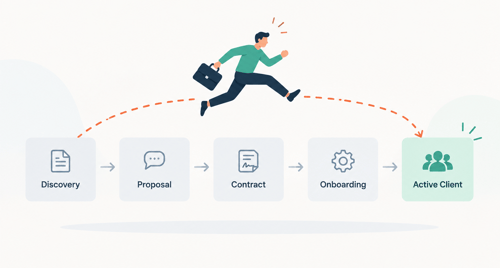
Most HubSpot onboarding pipelines get built the same way: list your steps, turn each one into a stage, connect a workflow to move the ticket forward when a step finishes. It works perfectly in the demo. It falls apart on client three.
The problem shows up in a few consistent ways. A ticket sits in "Documents Collected" for two weeks because the client actually finished that step, but the workflow trigger that should have advanced it never fired, since the client submitted the form before the ticket ever reached that stage.
Or a ticket bounces backward when someone manually drags it, because HubSpot's default behavior on a stage move is to ask for that stage's required properties, and if the person managing it hits cancel, the ticket reverts to the previous stage rather than staying put.
There's a real HubSpot Community thread from an onboarding admin describing exactly this. Their clients don't complete steps in order and sometimes skip them outright.
Their worry: using a normal staged pipeline means tickets flip back and forth as clients complete things non-sequentially, and they lose visibility into what's actually been done. Their proposed fix was to strip the pipeline down to just "In Progress" and "Complete," with tasks handling the rest (Source: HubSpot Community).
That workaround solves the bouncing problem. It also throws away the entire reason you wanted a pipeline: seeing where each client actually stands. Two stages tell you almost nothing.
This shows up constantly in professional services, where every client's paperwork, compliance needs, and internal approvals move at different speeds. If you're still working out what HubSpot should even look like for a consultancy, agency, or firm outside the typical SaaS setup, our broader guide on HubSpot for professional services is the better starting point before pipeline design.
The Real Issue: Stages Track Sequence, Properties Track Progress
Here's the fix in one sentence: a pipeline stage should represent a checkpoint your team confirms, not a task the client is expected to complete in a fixed order.
Most teams collapse those two ideas into one. They treat "client is in stage 3" as meaning "client has completed steps 1 and 2, and is now doing step 3." That assumption is what breaks the moment a client does step 3 before step 2.
Once you separate them, the fix becomes mechanical. Individual milestones (document submitted, identity verified, kickoff held, billing set up) live on ticket properties that can be marked complete in any order.
The pipeline stage is a summary state your workflow calculates from those properties, not a stand-in for them. A client can complete milestones in any sequence, and the stage only moves when the specific combination your team cares about is actually true.
This is the structural decision the whole build depends on, so it's worth sitting with before you touch HubSpot.
Building The Pipeline That Survives Skipped Steps
Here's how that principle turns into an actual HubSpot build, in the order to do it.
01. List every client-facing milestone, not every internal task
Welcome email sent doesn't count, since that's something you do, not something the client did. Intake form submitted, identity documents uploaded, kickoff call held, and payment method confirmed do count. Aim for four to six milestones.
More than that and your reporting gets noisy; fewer and you lose the ability to see where clients actually stall.
02. Turn each milestone into its own checkbox or dropdown property on the Ticket object
Name them so they read as completed facts: "Intake Form Submitted," not "Collecting Intake Form." HubSpot workflows trigger more reliably off a clear yes/no state than off a task description.
03. Design stages as checkpoints, not sequential steps
A stage like "Ready for Kickoff" should represent "all the milestones that need to happen before kickoff are true," regardless of which one finished first. This is the part almost every guide gets wrong: they build stages that mirror the milestone list one-to-one, which recreates the sequencing problem you're trying to avoid.
04. Set the workflow trigger on property changes, not stage entry
Instead of "when ticket enters stage X, do Y," use "when any milestone property changes, re-check all conditions and move the ticket to whichever stage those conditions now match." This is the single change that fixes out-of-order completion, because the workflow stops assuming what already happened and starts checking what's actually true every time something changes.
05. Use required properties as a soft gate, not a hard sequence
HubSpot lets you require specific properties to be filled before a ticket can move into a given stage. Use this to stop a ticket from being marked "Client Active" without a completed kickoff logged, not to force clients through steps in a specific order. If your process genuinely needs a hard order (KYC before kickoff, for a regulated engagement), gate that specific transition and leave the rest flexible.
Setting Up The Ticket Pipeline, Objects & Properties
With the logic settled, the build itself is straightforward inside Service Hub.
Create a dedicated pipeline under Settings > Objects > Tickets > Pipelines, separate from any support pipeline you already run. Mixing onboarding and support tickets in one pipeline makes your reports unreadable within a month, since the two have completely different SLA expectations and completely different stage lists.
Associate every onboarding ticket with its Company record, not just the Contact. A lot of professional services onboarding data (engagement scope, billing entity, account owner) lives at the company level, and workflows referencing the wrong object are the most common reason automations quietly stop firing.
A stage structure that holds up for most professional services onboarding looks like this:
|
Stage |
What it actually confirms |
|
Onboarding Started |
Ticket created from a closed-won deal |
|
Intake in Progress |
At least one milestone complete, not all |
|
Ready for Kickoff |
Intake and any compliance milestones complete |
|
Kickoff Complete |
Kickoff call logged against the ticket |
|
Client Active |
Every required milestone confirmed, ticket closed |
Notice "Intake in Progress" doesn't say which milestone came first. That's intentional. It's a checkpoint that's true regardless of order, which is exactly what keeps the pipeline from bouncing.
For the milestone properties themselves, a naming convention saves you real pain later. Prefixing custom properties (something like "OB_Intake_Submitted") makes them easy to find inside the workflow builder six months from now, when someone else on your team is trying to debug why a ticket isn't moving.
Automations That Check Conditions Instead Of Assuming Order
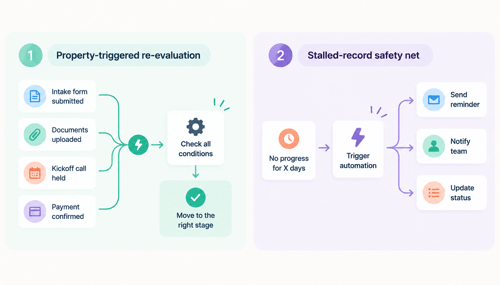
This is where the pipeline either holds up or doesn't. Two workflow patterns do the actual work.
Pattern one: property-triggered re-evaluation
Build one workflow enrolled on "any of these milestone properties has changed," not on a specific stage. Inside it, use an if/then branch that checks the full combination of milestone properties and sets the ticket stage to match.
Every time a client does something, the workflow re-checks the whole picture and puts the ticket where it belongs, whether that client did things in your expected order or not.
Pattern two: stalled-record safety net
Separately, build a time-based branch that checks how long a ticket has sat without a stage change. If it's been five business days with no movement, fire an internal task to the ticket owner.
This catches the clients who genuinely aren't engaging, which is a different problem from clients who are engaging out of order, and your automation needs to tell the two apart.
Keep re-enrollment on for the property-triggered workflow. If a client corrects a document or a milestone gets unchecked by mistake, you want the workflow to run again and fix the stage rather than leaving it stale.
Recovering Onboardings That Already Went Off Track
Don't fix an existing backlog by hand, ticket by ticket. Run the property-triggered workflow once against your existing open tickets using HubSpot's manual re-enrollment option. It re-evaluates every ticket against the milestone data already on the record and corrects the stage automatically.
For ongoing visibility, build a saved filter view on the ticket index, not just a pipeline board: pipeline is Client Onboarding, ticket owner is known, and last activity date is more than five business days ago. This surfaces genuinely stalled onboardings without flagging every client who's simply working through milestones out of sequence, which a pure stage-based view can't distinguish.
For reporting further up, HubSpot's stage calculated properties (date entered a stage, cumulative time in a stage) update automatically as tickets move, and require Service Hub Professional or Enterprise (Source: HubSpot Knowledge Base).
Once your stages represent real checkpoints instead of assumed sequence, these properties tell you something accurate: not "clients are stuck in step 3," but how long clients actually take to reach Ready for Kickoff.
One more thing to check before treating this as permanent architecture. HubSpot introduced a Projects object in late 2025, and a beta "Onboarding" pipeline inside it started rolling out to Service Hub Professional and Enterprise accounts around mid-2026. It's purpose-built for this use case and may replace a Ticket-based approach over time. Check your own portal's Data Management settings for availability before deciding whether to build on Tickets now or wait.
FAQs
Should I Use A Ticket Pipeline Or A Deal Pipeline For Client Onboarding?
Use Tickets. Deal pipelines are built around sales probability and closing a single transaction, which doesn't fit an onboarding process with multiple parallel milestones. Tickets keep onboarding separate from your sales pipeline and support required-property gating that deal stages weren't designed for in this context.
What Should I Do When A Client Skips A Step Entirely Instead Of Doing It Out Of Order?
Decide upfront which milestones are genuinely optional and which are required to reach "Client Active." Build your if/then branch so optional milestones simply don't block stage progression, while required ones do. Don't build a single rigid path and then manually override it every time reality doesn't match, since that's how pipelines drift out of sync with what's actually true.
Will Required Properties Per Stage Stop Clients From Skipping Steps?
No, and that's not really what they're for. Required properties stop your team from manually moving a ticket forward without confirming something, like KYC status. They don't control what order a client acts in. Use them as a data-quality check at specific gates, not as the mechanism for handling sequence.
Do I Need Service Hub Professional To Build This?
You need a Service Hub subscription to create a dedicated ticket pipeline at all, and Professional or Enterprise specifically for stage calculated properties and required stage properties, which this whole approach depends on. Check your current plan's feature list in HubSpot's own documentation before building, since tier requirements shift with product updates.
Is HubSpot's New Projects And Onboarding Pipeline A Better Option Than Tickets?
It might be, depending on where it lands. It's purpose-built for onboarding tracking and shipped with its own reporting. As of now it's rolling out in beta to Service Hub Professional and Enterprise accounts, so the honest answer is to check whether it's available and stable in your specific portal before treating it as the default choice over a well-built Ticket pipeline.
Maximize Your HubSpot Investment With HubXpert
We map your actual onboarding milestones, build the ticket pipeline and workflow logic behind the scenes, and hand back a system your team can run without touching the automation layer again.
If you already work under an agency or consultancy's own brand, we build this under your name, not ours, which is the whole point of white-label implementation.
The mistake most firms make is treating onboarding automation as a one-time setup. Client mix changes, service lines get added, and a pipeline that fit your business a year ago starts producing the exact bouncing-ticket problem this article walks through. Ours are built to be handed off and maintained, not just delivered and forgotten.
If you're ready to fix a pipeline that's already breaking, or build one correctly before it does, talk to our HubSpot implementation team.
Senior RevOps Strategist at Hubxpert

Fazle Rabbi
Table of Contents:

Subscribe to our newsletter

3D Web Design Templates & Examples You Can Reuse
Browse 3D web design templates and examples, plus where to find free downloads, and see how 3D web page design lifts a site without slowing the site down.

3D Web Design Tools & Software Compared for 2026
Compare 3D web design tools and web based 3D design software, and see where 3D models and 3D assets for web design fit your existing front-end build pipeline.

HubSpot Onboarding Cost: What the Fee Really Covers
See what HubSpot onboarding cost covers, how onboarding fees get quoted and how to compare implementation quotes line by line before you commit to a partner.

HubSpot Enterprise Onboarding (What Changes by Tier)
See how HubSpot enterprise onboarding differs from Professional and Starter, covering advanced onboarding scope, admin training and what each tier includes.

Best HubSpot CRM Implementation Consulting Agencies for B2B
Compare 6 HubSpot partners for B2B with pros, cons, and pricing. Learn how to judge companies offering HubSpot implementation services and spot red flags.

How to Build a HubSpot Implementation Plan That Holds Up
Follow a HubSpot implementation plan covering scoping, data cleanup and go-live. Includes an implementation checklist and a realistic 60-day timeline.
-
3D Web Design Templates & Examples You Can Reuse
hello
-
3D Web Design Tools & Software Compared for 2026
hello
-
HubSpot Onboarding Cost: What the Fee Really Covers
hello
-
HubSpot Enterprise Onboarding (What Changes by Tier)
hello
-
Best HubSpot CRM Implementation Consulting Agencies for B2B
hello
-
How to Build a HubSpot Implementation Plan That Holds Up
hello