





-2.png)


-2.png)



.png)


.webp)

.png)










.png)







-1.webp)
-1.webp)



.webp)

-1-1.webp)



-2.webp)

-1-1.webp)

-2-1.png)

-1-1.webp)
-1-1.webp)
-1-1.png)






SaaS onboarding can quickly become messy when every new customer depends on someone remembering the next step. A deal closes, a kickoff needs to be scheduled, tasks need to be assigned, and follow-ups need to happen, often across different people and tools.
That matters because 63% of customers consider onboarding when deciding whether to buy, according to HubSpot.
HubSpot can automate many of these repetitive steps using workflows, from creating tasks and updating records to sending emails and notifying the right team.
In this guide, we'll show you how to automate SaaS onboarding in HubSpot while keeping the process simple, consistent, and easy for your team to manage.
Why Spreadsheets Break Down as Customer Onboarding Scales
Two things happen at the same time, and either one alone would probably be survivable.
First, a spreadsheet has no memory of time. It tells you a step is unchecked, not how long it has been unchecked or who was supposed to check it. Onboarding delays are rarely caused by one big failure.
They are caused by a two-day gap between "deal closed" and "someone starts the kickoff call," repeated across a dozen customers, that nobody notices because nothing is timestamped.
Second, there is no trigger connecting the system where the deal lives and the system where onboarding gets tracked. A rep closes a deal in HubSpot, then someone, often that same rep on a Friday afternoon, has to remember to add a row to the onboarding sheet. Miss that step and the customer does not get onboarded until they email in confused about why nothing has happened.
Neither problem is really about effort. Your CS team is not being careless, they are running a process that depends on a human noticing and acting at exactly the right moment, every time, for every customer. That is not a process. That is hope with a spreadsheet attached.
What HubSpot Actually Gives You For This
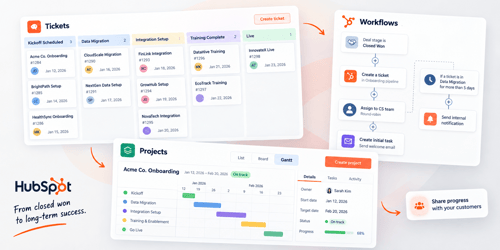
Three tools matter here, and increasingly a fourth one layered on top of the third.
Ticket pipelines
Tickets have been part of Service Hub since it launched, and pipelines work the same way for tickets as they do for deals: a board where every card is one customer's onboarding, moving through stages you define, for example Kickoff Scheduled, Data Migration, Integration Setup, Training Complete, Live.
Every stage move is timestamped automatically, which means you can report on how long onboarding actually takes and where it stalls, something a spreadsheet cannot give you without someone manually logging dates.
Pipeline access itself is not gated behind a paid plan, the free tier includes one pipeline, but the automation that makes it worth doing is. A Service Hub Starter, Professional, or Enterprise subscription is required to configure pipeline stage automation, such as triggering a task or an internal notification when a ticket changes stage (Source: HubSpot Knowledge Base, pipeline automations for objects).
Pipeline counts scale with plan tier too, Starter accounts typically get a couple of pipelines and Professional and Enterprise get considerably more, though it is worth checking the exact number in your own portal since HubSpot adjusts these limits from time to time.
Workflows
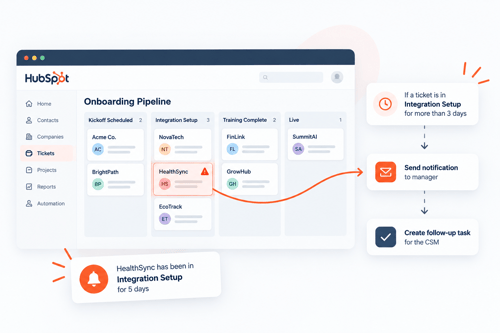
This is where the closed-won-to-kickoff handoff actually gets automated. A deal-based workflow filtered on "deal stage is equal to Closed Won" can create a ticket automatically, drop it into your onboarding pipeline, assign it to a specific owner or round-robin it across your CS team, and fire off the first task without anyone touching a spreadsheet. You can layer on stage-based automation too: if a ticket sits in "Data Migration" for more than five days without moving, send an internal notification instead of finding out three weeks later that the customer went quiet.
The Projects object
This is the part that has genuinely changed in the last two years, and a lot of the onboarding advice still circulating online has not caught up. HubSpot introduced a standalone Service object in late 2024, built for post-sale delivery work like onboarding, separate from tickets and deals.
By 2026, HubSpot folded that use case into a broader Projects object instead: a full CRM object with its own pipelines, start and target due dates, self-updating "Overdue" and "Due soon" tags, subtasks, and a gantt view currently in beta (Source: HubSpot Knowledge Base, understand and use the projects object). A HubSpot product manager has described the older Service object as effectively a narrower version of what Projects now does. If your team built onboarding on the Service object in 2025, the practical question is when to migrate to Projects, not whether to.
Projects is available across HubSpot's products and plans, though pipeline rules and workflow-based automation on projects still require a Starter, Professional, or Enterprise subscription. Service Hub Professional's May 2026 release also added an "Onboarding Plans" capability built on top of Projects: a default onboarding pipeline, milestone tracking, and five out-of-the-box reports, shareable with the customer through the customer portal.
This is vendor and partner commentary rather than a HubSpot knowledge-base article, so treat the exact feature list as directional until you confirm it in your own portal.
That customer-facing visibility matters more than it sounds. Customers who can see their own onboarding progress tend to send fewer "where are we on this" emails, which frees up CS time that would otherwise go to status updates instead of actual onboarding work.
Building The Pipeline: Step By Step
Here is the build order, assuming a Sales Hub subscription with deals already flowing and either a Service Hub subscription for tickets, or Projects activated (Projects does not require Service Hub).
- Choose your object first. If onboarding is genuinely reactive and short, a handful of setup tasks measured in days, a ticket pipeline is simpler and cheaper to run. If onboarding is a real project with milestones, a defined start and end date, and several people touching different pieces of it, use Projects.
Do not default to tickets just because that is what your team has always used, then discover six months later you need milestone tracking tickets were never built to give you.
- Map your actual stages before you touch settings. Write down what genuinely happens between "deal closed" and "customer is live," not an idealized version. Most SaaS onboarding pipelines land around five to seven stages, something like Kickoff Scheduled, Data Migration or Import, Integration and SSO Setup,
Configuration Review, Training, Go-Live, and Post-Launch Check-in. Fewer stages than that and your reporting is too coarse to find bottlenecks. More than that and reps stop updating status carefully because it starts to feel like busywork.
- Build the pipeline and lock the first stage. In Settings, create the pipeline under Objects (Tickets or Projects), name your stages, and turn on the pipeline rule that restricts skipping stages if your process genuinely has to happen in order, data migration before training, for example.
- Automate creation from the closed-won deal. Build a deal-based workflow: trigger on "Deal stage is equal to Closed Won," add the Create Record action, and select Ticket or Project depending on your object choice. Set the default owner, either statically or through a round-robin rotation if new accounts get split across your CS team.
- Automate the handoff tasks. Inside the pipeline, set up stage-based automation so entering a stage creates the task tied to it, send SSO instructions, schedule training, request a data export, and assign it to the owner. This is the piece that actually replaces the checklist: the item now exists as a task with an owner and a due date instead of a row someone has to remember to check.
- Connect reporting before you launch, not after. Build a report on cumulative time in stage, filtered to the last quarter, so you have a baseline the week you go live. You want to know in month two whether onboarding is taking longer or shorter than it used to, and you cannot know that if you never measured month one.
Where The Automation Actually Breaks & How To Catch It
Automating the pipeline does not mean it runs itself forever. A few failure patterns show up consistently.
Tickets or projects pile up in one stage with no owner activity. This usually means the stage-based automation exists but the escalation piece does not.
Add a time-based workflow: if a record has sat in a stage longer than your target, say three business days, send an internal notification to the owner's manager, not just the owner. A reminder to someone already behind rarely fixes the problem, a reminder to their manager usually does.
Customers go dark mid-onboarding. This is a process gap automation cannot fully close, but it can catch it faster. Set a workflow on ticket or project properties: if there has been no logged customer email or call activity in a set number of days while the record is in an active stage, flag it for the CSM to intervene, rather than waiting for the customer to eventually reply.
Reporting numbers do not match what the team is actually seeing. Almost always a workflow re-enrollment or trigger-condition issue. Check whether your closed-won trigger is filtering on the right deal pipeline (a generic "deal stage is Closed Won" filter without a pipeline condition will fire on deals from other pipelines too, if you run more than one), and whether tickets or projects created manually are enrolled into the same automation as the ones created by workflow.
Onboarding records for churned customers sit open forever. Build a small cleanup workflow: if the associated contact's lifecycle stage changes away from Customer, or the deal gets marked lost after the fact, auto-move the record to a Cancelled stage rather than leaving it stalled in your active pipeline, quietly skewing your time-in-stage reporting.
FAQs
Should I use tickets or the Projects object for SaaS onboarding in HubSpot?
Use tickets if onboarding is short and reactive, typically resolved within a couple of weeks through a handful of discrete tasks. Use Projects if onboarding runs longer, involves multiple owners, or needs milestone and date tracking, since Projects has start dates, target due dates, and a gantt view built in that tickets do not.
Do I need Service Hub Professional to automate onboarding ticket creation from a closed-won deal?
You need a Service Hub Starter, Professional, or Enterprise subscription to configure pipeline stage automation on tickets, and a paid Sales Hub tier to build the deal-based workflow that triggers ticket or project creation. The Onboarding Plans milestone and reporting features were introduced specifically for Service Hub Professional.
Can HubSpot track product usage during onboarding, or do I need another tool?
HubSpot tracks the relationship and communication layer, emails, calls, tickets, and task completion, but it does not natively track what a customer is doing inside your product. SaaS teams that need in-app usage data during onboarding typically pair HubSpot with a product analytics tool and sync key usage events back in as custom properties or timeline entries.
How many onboarding stages should a SaaS pipeline have?
Most working setups land between five and seven stages. Fewer than that and your reporting cannot tell you where onboarding actually slows down. More than that and reps tend to stop updating stage status carefully because it starts to feel like data entry instead of tracking real progress.
What happens to onboarding tickets if a customer churns mid-process?
Nothing happens automatically unless you build for it. Without a cleanup workflow, an onboarding ticket or project for a churned customer just sits open indefinitely, quietly inflating your average time-to-onboard reporting. Set a workflow that moves the record to a Cancelled or Closed stage when the associated deal is marked lost or the contact's lifecycle stage changes.
Wrapping Up
None of this requires ripping out your CRM or buying new software. It requires deciding, on purpose, whether tickets or Projects fits how your onboarding actually runs, then spending an afternoon wiring the workflow that connects "deal closed" to "onboarding started" so it stops depending on someone remembering.
The spreadsheet was never really the problem. It was standing in for automation nobody had built yet.
If you want a second set of eyes on the object choice or the workflow build, particularly if you are migrating off an older Service object setup, this is the kind of implementation work HubXpert's HubSpot implementation services handle for SaaS teams running onboarding through HubSpot every day.
Founder & CEO @ Hubxpert. My goal is to make every company using HubSpot succeed in their marketing organisation and automation.

Ratul Rahman
Table of Contents:

Subscribe to our newsletter

3D Web Design Templates & Examples You Can Reuse
Browse 3D web design templates and examples, plus where to find free downloads, and see how 3D web page design lifts a site without slowing the site down.

3D Web Design Tools & Software Compared for 2026
Compare 3D web design tools and web based 3D design software, and see where 3D models and 3D assets for web design fit your existing front-end build pipeline.

HubSpot Onboarding Cost: What the Fee Really Covers
See what HubSpot onboarding cost covers, how onboarding fees get quoted and how to compare implementation quotes line by line before you commit to a partner.

HubSpot Enterprise Onboarding (What Changes by Tier)
See how HubSpot enterprise onboarding differs from Professional and Starter, covering advanced onboarding scope, admin training and what each tier includes.

Best HubSpot CRM Implementation Consulting Agencies for B2B
Compare 6 HubSpot partners for B2B with pros, cons, and pricing. Learn how to judge companies offering HubSpot implementation services and spot red flags.

How to Build a HubSpot Implementation Plan That Holds Up
Follow a HubSpot implementation plan covering scoping, data cleanup and go-live. Includes an implementation checklist and a realistic 60-day timeline.
-
3D Web Design Templates & Examples You Can Reuse
hello
-
3D Web Design Tools & Software Compared for 2026
hello
-
HubSpot Onboarding Cost: What the Fee Really Covers
hello
-
HubSpot Enterprise Onboarding (What Changes by Tier)
hello
-
Best HubSpot CRM Implementation Consulting Agencies for B2B
hello
-
How to Build a HubSpot Implementation Plan That Holds Up
hello