





-2.png)


-2.png)



.png)


.webp)

.png)










.png)







-1.webp)
-1.webp)



.webp)

-1-1.webp)



-2.webp)

-1-1.webp)

-2-1.png)

-1-1.webp)
-1-1.webp)
-1-1.png)







A professional services firm we worked with had a CRM everyone could access, but few partners actually used it. Marketing lived in another system, referrals were tracked in spreadsheets, and keeping client data updated became a job of its own.
That is the challenge behind finding the best CRM for professional services firms. The right CRM is not necessarily the one with the most features. It is the one that fits how your firm wins clients, manages relationships, tracks referrals, and follows up on opportunities.
For consulting, accounting, architecture, and other professional services firms, HubSpot CRM is the answer. It brings sales, marketing, automation, and reporting into one platform without requiring a large CRM administration team.
Let’s look at what makes a CRM the best choice for professional services firms and where HubSpot fits.
HubSpot vs. Salesforce for Professional Services Firms
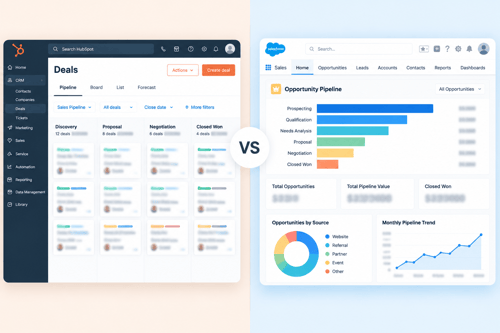
Salesforce goes deeper on customization. If your firm needs a highly specific, custom-built data model with a dedicated technical admin maintaining it, Salesforce can do things HubSpot can't. That depth comes with a real cost: a steeper learning curve for partners who don't want to live inside a CRM, and a longer, more expensive setup to get there.
HubSpot wins on time to value and on keeping everything in one place. Marketing, business development activity, proposals, and client history sit in one system that a non-technical partner can actually use without training.
For a firm whose real challenge is getting partners to log activity in the first place, that difference matters more than deep customization most firms will never touch.
Here's the part worth being honest about: for law firms specifically, neither HubSpot nor Salesforce handles trust accounting or real conflict-of-interest checking on its own. Both need a dedicated legal practice management tool for that piece, regardless of which CRM sits alongside it. So the comparison for the compliance side is a wash.
What decides it is the marketing and business development layer, and that's where HubSpot's usability and built-in marketing tools give it the edge for firms without a Salesforce admin on staff.
Bottom line: Salesforce makes sense for large firms with dedicated CRM admin resources and highly specific customization needs. For most professional services firms, HubSpot for professional services is the better fit.
Why HubSpot Fits Professional Services Firms
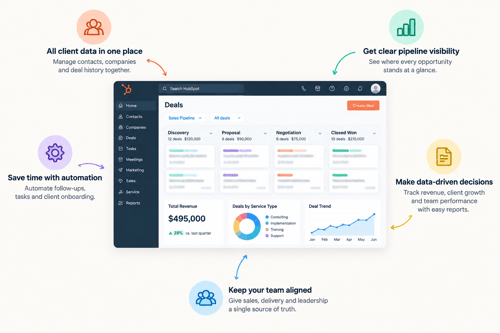
A few things about how these firms actually work make HubSpot's design a natural match.
-
The Sale Runs On Relationships, Not A Funnel
Trust takes months or years to build, often before there's even a specific project to sell. HubSpot's pipeline stages can be rebuilt around that instead of a generic sales funnel, something that takes real configuration in Salesforce but is straightforward in HubSpot.
-
Referrals Drive Most Of The Growth
Client referrals and professional network introductions usually bring in more business than outbound or paid ads. HubSpot works well as referral tracking when referral source is set up as a deal property, showing which sources actually turn into signed work.
-
Revenue Comes From Engagements, Not One-Time Sales
Closing a deal isn't the end, it's the start of delivery: a matter, a project, a retainer. HubSpot custom objects give engagement-based work its own home instead of stretching deal fields built for a pre-close sales process.
-
The Buying Group Is Small And Senior
The people deciding whether to hire your firm are often the same people who'll do the work. A CRM that's easy for a partner to actually open and use, rather than something they avoid, matters more here than in a typical B2B sale.
Where the Sub-Types Need Different Handlings
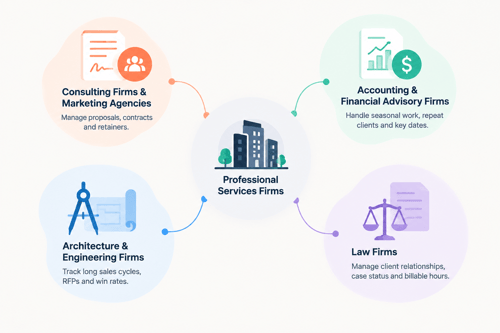
Even with HubSpot as the right core platform, the setup shouldn't look the same for every kind of firm.
CRM for Consulting Firms & Marketing Agencies
This group runs closest to a normal proposal-driven sale: an RFP or scoping call, a statement of work, a signed contract. HubSpot's pipeline maps well onto that, and retainers create a real renewal motion worth tracking like a subscription business would.
CRM for Accounting & Financial Advisory Firms
These firms deal with sharp seasonal swings, tax season especially, and a lot of repeat business with the same clients year after year. Engagement letters, entity type, and filing deadlines matter as much as standard deal fields, and HubSpot's custom properties handle that without much friction.
CRM for Architecture & Engineering Firms
These firms often go through long, formal buying processes: RFPs, qualification rounds, sometimes public-sector bidding rules. Sales cycles can run past a year. Win rate on formal RFPs is worth tracking as its own metric, something most default CRM setups don't surface without configuration.
CRM for Law Firms
Here's where the caveat matters most. HubSpot can track referral sources, log client conversations, and manage the relationship-building that leads to a new client, and it does that well. What it can't do, and neither can Salesforce, is trust accounting or a real, audit-logged conflict check.
Some CRM vendors advertise "conflict checking" as a feature. Read that claim carefully: flagging a possible conflict as a note on a contact isn't the same as a system built to search matters, related parties, and opposing parties with an enforced, logged process.
Law firms that get this right run HubSpot for marketing and business development, alongside dedicated legal practice management software (Clio, Tabs3, and similar) for the compliance side.
That's not a weakness specific to HubSpot, it's true of any general CRM, and it doesn't change the recommendation for the BD and marketing layer itself.
What a Professional Services CRM Needs to Get Right
Whichever platform a firm picks, four things separate a CRM partners actually use from one they quietly stop using after a few months.
- Pipeline stages built around relationships, not just a funnel. Something like Relationship Started, Active Conversations, Specific Opportunity Found, Proposal Sent, Engagement Signed matches what's really happening, long before there's a "deal" in the usual sense.
- Referral tracking at the deal level, not just the contact level. Knowing which referral partner or network actually leads to signed work, and how much that work is worth, is the single most useful report most firms don't have yet.
- A place for engagement-based work that isn't a deal and isn't a support ticket. The ongoing project, matter, or retainer needs its own record, with its own fields for scope, budget, timeline, and staffing.
- Permissions that make sense for a partnership. Partners need to see their own book clearly without seeing everyone else's in full detail, and anywhere ethical walls apply, this is a real requirement, not a nice-to-have.
How to Build The System in HubSpot
Six steps, in the order they should actually happen.
Step 01: Map Your Real BD Process
Before changing pipeline settings, understand how your firm actually wins business. Review recent engagements and build stages around your real sales process, not a generic template.
Step 02: Build Relationship-Based Pipeline Stages
Create deal stages that reflect relationship progress. Separate early relationship-building from qualified opportunities with clear buying signals.
Step 03: Track Referral Sources Properly
Make referral source a required deal field, not just a contact property. This helps you understand which sources generate actual revenue.
Step 04: Set Up Team Permissions
Configure access by partner or practice group so teams can manage their accounts while leadership maintains visibility across the firm.
Step 05: Create Custom Objects When Needed
As your firm grows, use custom objects for engagements or matters to improve delivery tracking and reporting. This typically becomes relevant for larger teams using Enterprise features.
Step 06: Optimize Forecasting & Automation
Review forecast categories, automation rules, and pipeline performance regularly to keep your process accurate as your business evolves.
Why HubXpert for Your HubSpot Implementation
Choosing HubSpot is the first decision. Setting it up correctly is the one that actually determines whether partners use it. This is where most self-built HubSpot setups for professional services firms fall short, not the pipeline stages themselves.
But the decisions behind them: custom object structure, ethical wall permissions, referral attribution reporting, none of which have an obvious default and all of which get skipped under deadline pressure.
We built our HubSpot onboarding and implementation process specifically around RevOps work for firms like this, not a generic template applied to every industry the same way. That means starting with your actual BD process, sitting down with partners to understand how engagements really start.
And building the pipeline, permissions, and custom object structure around that from day one, instead of retrofitting it after data has already piled up in the wrong place. If your firm runs multiple practice groups, mixes new business with retainer work, or has outgrown a single default pipeline, talk to HubXpert about your HubSpot onboarding.
FAQs
Which CRM is better, HubSpot or Salesforce, for professional services firms?
For most professional services firms, HubSpot is the better fit. It's easier for non-technical partners to use, keeps marketing and business development in one place, and gets a firm to a working setup faster. Salesforce makes more sense for large firms with a dedicated CRM admin and highly specific customization needs that go beyond what HubSpot's data model supports.
Is HubSpot a good CRM for law firms specifically?
For business development and marketing, yes. For matter management, trust accounting, and conflict checking, no, those need dedicated legal practice management software regardless of which CRM a firm chooses. Most law firms that succeed with HubSpot run it alongside a legal-specific system rather than expecting one platform to do both jobs.
How should professional services firms set up CRM pipeline stages?
Build stages around relationship progress instead of a generic sales funnel: something like initial relationship, active conversations, a specific opportunity found, proposal or statement of work, and signed engagement.
Do professional services firms need HubSpot Enterprise, or is Professional enough?
Professional is usually enough for firms with a simple, referral-based pipeline and standard reporting needs. Enterprise becomes necessary once a firm needs custom objects to track matter numbers, project codes, or ongoing engagement data, along with more advanced permissions for larger partner groups.
How do you track referral sources properly in a CRM?
Set referral source as a required field on the deal, not just the contact, so you can report on revenue by source instead of just contact count by source.
Conclusion
For most professional services firms, this isn't a close call. HubSpot gets partners actually using the system, keeps marketing and business development together, and doesn't require a dedicated admin team to run.
Salesforce earns its place for firms that genuinely need deeper customization and have the resources to support it, but that's a smaller group than the market conversation sometimes suggests. When it comes down to choosing a CRM for professional services firms, HubSpot covers what most firms actually need without the overhead.
Choosing HubSpot is the easy part. Setting it up around how your firm actually wins clients is where the real work is. If you want help doing that properly, talk to us about a professional services CRM implementation.
Founder & CEO @ Hubxpert. My goal is to make every company using HubSpot succeed in their marketing organisation and automation.

Ratul Rahman
Table of Contents:

Subscribe to our newsletter

3D Web Design Templates & Examples You Can Reuse
Browse 3D web design templates and examples, plus where to find free downloads, and see how 3D web page design lifts a site without slowing the site down.

3D Web Design Tools & Software Compared for 2026
Compare 3D web design tools and web based 3D design software, and see where 3D models and 3D assets for web design fit your existing front-end build pipeline.

HubSpot Onboarding Cost: What the Fee Really Covers
See what HubSpot onboarding cost covers, how onboarding fees get quoted and how to compare implementation quotes line by line before you commit to a partner.

HubSpot Enterprise Onboarding (What Changes by Tier)
See how HubSpot enterprise onboarding differs from Professional and Starter, covering advanced onboarding scope, admin training and what each tier includes.

Best HubSpot CRM Implementation Consulting Agencies for B2B
Compare 6 HubSpot partners for B2B with pros, cons, and pricing. Learn how to judge companies offering HubSpot implementation services and spot red flags.

How to Build a HubSpot Implementation Plan That Holds Up
Follow a HubSpot implementation plan covering scoping, data cleanup and go-live. Includes an implementation checklist and a realistic 60-day timeline.
-
3D Web Design Templates & Examples You Can Reuse
hello
-
3D Web Design Tools & Software Compared for 2026
hello
-
HubSpot Onboarding Cost: What the Fee Really Covers
hello
-
HubSpot Enterprise Onboarding (What Changes by Tier)
hello
-
Best HubSpot CRM Implementation Consulting Agencies for B2B
hello
-
How to Build a HubSpot Implementation Plan That Holds Up
hello