





-2.png)


-2.png)



.png)


.webp)

.png)










.png)







-1.webp)
-1.webp)



.webp)

-1-1.webp)



-2.webp)

-1-1.webp)

-2-1.png)

-1-1.webp)
-1-1.webp)
-1-1.png)







Your firm generated 40% more leads this quarter. Case count barely moved.
That gap is common, and it usually gets blamed on intake speed or lead quality. Sometimes it is. More often, the real problem is that nobody in the firm can say what a signed case actually costs, by channel, in dollars. Cost per lead tells you what traffic costs. It says nothing about which channel puts a signed retainer on your desk.
This piece breaks down how to build a real cost-per-signed-case number inside HubSpot: the properties, the report, and the two places HubSpot will quietly mislead you if you set it up wrong.
Cost Per Lead Is Lying to Your Marketing Budget
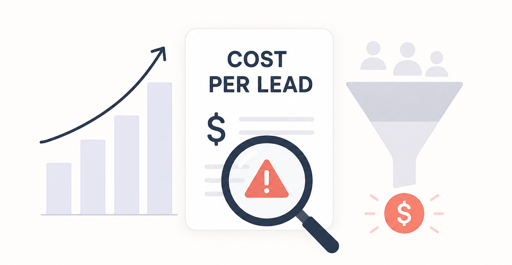
Legal advertising costs more than any other industry tracked by WordStream's benchmark data. The average cost per click for legal keywords runs $9.87, and the average cost per lead sits at $131.63, both the highest of any category in the 2026 dataset (Source: "Lawyers and Advertising, What Actually Drives Signed Cases in the Digital Era").
Despite spending that much per lead, a large share of firms still cannot say what a signed case costs them. Roughly 26% of firms do not track their leads at all, and about 65% of lawyers say they do not know which marketing metrics to measure (Source: "Law Firm Marketing Statistics 2026: Key Benchmarks").
Lead volume moving up while case count stays flat is often described as a lead-quality problem, and sometimes it is one. More often, it is what happens when a firm measures the wrong stage of the funnel. Cost per lead answers how much traffic cost.
It says nothing about the stage that pays the bills, a signed retainer, which is a question that fits into the wider case for how law firms should structure marketing measurement overall. Two campaigns can produce identical lead counts at identical cost and generate completely different revenue, depending on how many of those leads actually sign.
What Cost Per Signed Case Actually Measures

Cost per signed case is total marketing spend for a period divided by the number of retainers signed as a direct result of that spend, broken out by channel or campaign. The formula is simple: marketing spend divided by signed cases equals cost per signed case.
What separates it from cost per lead is the denominator. Lead-based math stops at the top of the funnel. Signed-case math carries the number all the way through intake to the point a client actually retains the firm.
The gap between the two numbers can be large. At a $150 cost per lead and a 14% lead-to-client conversion rate, the effective cost per signed case is $1,071. At the same $150 cost per lead but a 40% conversion rate, the cost per signed case drops to $375 (Source: "Legal Marketing Benchmarks 2026").
Same ad spend, same keywords, same market. The only variable that changed is what happens after the lead arrives, and that variable stays invisible in a cost-per-lead report.
Where HubSpot's Native ROI Tools Fall Short
HubSpot's Ads dashboard shows a built-in ROI figure, but it is hardcoded to the deal Amount property and closed-won revenue. It cannot point at a custom property, such as a signed-case count or a case-value figure entered separately from the deal amount. Firms that have tried this report the ROI number coming back wrong or negative even when the underlying business is healthy, because the dashboard is measuring the wrong field.
Two tier gates matter as well. Revenue Attribution reporting, which connects closed deals back to the touchpoints that influenced them, requires Marketing Hub Professional. Full multi-touch attribution, which weighs credit across every touchpoint in the buyer journey, requires Marketing Hub Enterprise.
A firm on Starter or the free CRM can still build the report described below, but it will not get HubSpot's native attribution models without upgrading.
A cost-per-signed-case report has never shipped as a built-in HubSpot feature. It has sat as an open, unresolved request in HubSpot's own product-idea forum for years, with marketers repeatedly asking for exactly this calculation (Source: "HubSpot Community: Calculating ROI, CPL, cost per MQL's etc"). The custom-built version below is the current, working substitute.
The Deal Pipeline Structure That Makes the Number Possible
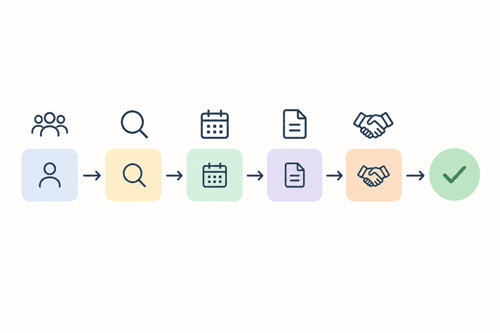
Before any report can calculate cost per signed case, the pipeline needs stages that mean something specific to a law firm, not a generic sales pipeline. A workable minimum: New Inquiry, Qualified, Consultation Scheduled, Consultation Completed, Retainer Sent, Retainer Signed.
Closed Won by itself is not specific enough, since a deal can close for reasons unrelated to signing a case, a referral fee arrangement or a flat-fee intake that never became a matter. Retainer Signed needs its own stage, changed only at the moment a client executes the engagement agreement.
Three custom properties do most of the work. A Practice Area property, a dropdown of personal injury, family law, immigration, and similar categories, lets the report segment by case type.
A Signed Date property, kept separate from the deal's close date, records exactly when the retainer was executed, since the two can drift apart in a busy intake queue.
A Lead Source property, populated from the original form submission or tracked call number, ties the signed case back to the channel that produced it. Without these three, the pipeline shows that a deal closed, not why or where it came from.
Building the Cost-Per-Signed-Case Report in HubSpot
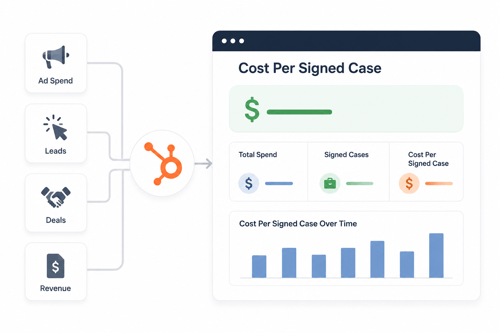
The report uses HubSpot's Custom Report Builder, not the Ads dashboard, and the calculation depends on where campaign spend actually lives.
- Enter spend at the Campaign level. Under Marketing, Campaigns, every campaign has a spend total field. Log every real cost here, ad spend, agency fees, the marketing share of payroll, so the total reflects true cost, not just media cost.
- Open Reports, Create Report, Custom Report Builder, and choose Deals as the primary data source with Campaigns as an additional source.
- Filter deals to Deal Stage equals Retainer Signed, and add Practice Area as a breakdown dimension for a per-case-type view.
- Build a formula field that counts signed deals: a count of deals where Deal Stage equals Retainer Signed.
- Build a second formula field dividing campaign spend by that count, the sum of campaign spend total divided by the count of signed deals (Source: "How to Calculate and Report on Cost Per Lead in HubSpot").
- Save the report to a dashboard filtered by month, so the number reflects a consistent period instead of an all-time average that hides recent changes.
This method works on any tier that includes the Custom Report Builder, producing a real cost-per-signed-case figure without an Enterprise upgrade. HubSpot's calculation properties feature, available at the object level, can also build a standing cost-per-acquisition property directly on the Deal or Company object, so the formula does not need rebuilding in every new report (Source: "Create Calculation and Rollup Properties").
Where Clio Breaks the Loop & How to Close It
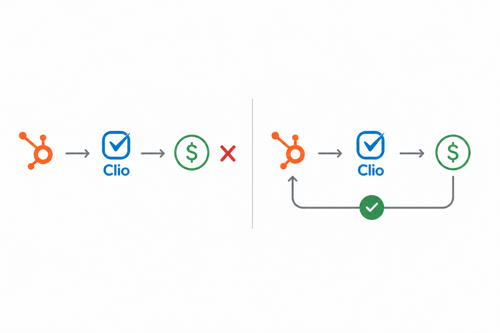
The report above depends on the Retainer Signed stage changing at the right moment, and this is where most firms lose accuracy. HubSpot's native Clio Manage integration syncs contacts, not deal status, and runs in one direction, from HubSpot into Clio. Changes made inside Clio, including a matter being opened, do not flow back into HubSpot automatically.
A signed retainer entered directly into Clio by an attorney or paralegal, without a matching stage change in HubSpot, never appears in the cost-per-signed-case report, regardless of how well the report itself is built.
There is no native fix for this. Firms have asked HubSpot for a deal-to-matter creation trigger since at least 2024, without resolution. The working fix is procedural, not technical. Whoever executes the engagement agreement & typically an intake coordinator or paralegal.
Moves the HubSpot deal to Retainer Signed as part of the same task, before or right after opening the matter in Clio. This single habit determines whether the report reflects reality more than any integration setting does, which connects directly to the distinction between a CRM and a practice management system.
What a Healthy Cost Per Signed Case Looks Like
Cost per signed case only means something next to case value. A firm spending $2,700 to sign a case worth $40,000 in fees is in strong shape. The same $2,700 against a $1,500 matter is not.
|
Channel or Practice Area |
Typical Cost Range |
|
Organic search, blended |
$200 to $750 per signed case |
|
Paid search, blended |
$1,700 to $3,300 per signed case |
|
Slip and fall (cost per lead) |
Around $312 |
|
Auto accident (cost per lead) |
Around $391 |
|
Product liability (cost per lead) |
Around $476 |
|
Medical malpractice (cost per lead) |
Around $512 |
(Source: "Law Firm Cost Per Client: What to Pay (2026)")
These ranges shift with market size and competition. Treat them as a starting comparison point, not a fixed target, and always weigh the number against average case value by practice area before judging a channel efficient or not.
A Worked Example
The math holds together better with a full walkthrough. The figures below are illustrative, not client data, built to show how the pieces connect.
- Monthly spend logged on the Google Ads campaign in HubSpot: $18,000
- Leads generated, form fills plus tracked calls: 140
- Consultations scheduled: 62
- Retainers signed this month (Deal Stage equals Retainer Signed): 21
- Cost per signed case: $18,000 divided by 21, or $857
At an average personal injury case value of $12,000 in fees, an $857 cost per signed case sits well inside a sustainable range. The same campaign, producing 140 leads but only 9 signed cases because of a slower intake response, would push the cost per signed case past $2,000, more than double, without a single change in ad spend or targeting.
The number moving is not a marketing problem. It is exactly what the deal pipeline is built to catch.
FAQs
What is cost per signed case in law firm marketing?
It is total marketing spend divided by the number of retainers actually signed as a result of that spend, usually broken out by channel or campaign. It measures the outcome that pays the firm, not just lead volume.
How is cost per signed case different from cost per lead?
Cost per lead stops at the top of the funnel and measures traffic cost. Cost per signed case carries the number through intake to the point a client retains the firm, which is why two campaigns with identical lead costs can carry very different real costs.
Can HubSpot calculate cost per signed case automatically?
Not through the built-in Ads ROI dashboard, which is hardcoded to deal amount. It can be calculated through the Custom Report Builder using a formula field that divides campaign spend by signed deal count, available on any tier that includes that reporting tool.
What HubSpot plan do I need for marketing ROI reporting?
The Custom Report Builder method works on Marketing Hub Starter and above. Native Revenue Attribution reporting requires Marketing Hub Professional, and full multi-touch attribution requires Enterprise.
Does HubSpot sync signed-case status with Clio automatically?
No. The native Clio Manage integration syncs contacts one way, from HubSpot into Clio, and does not sync deal stage or matter status back into HubSpot. The Retainer Signed stage has to be updated manually or through an internal workflow.
Founder & CEO @ Hubxpert. My goal is to make every company using HubSpot succeed in their marketing organisation and automation.

Ratul Rahman
Table of Contents:

Subscribe to our newsletter

Modern Website Design Examples & What Makes Them Work
Browse modern website design examples and modern looking websites, and see exactly what separates a fast, current site from one that already feels dated.

Interactive Web Design Templates & Examples to Study
See interactive web design templates and the best interactive web design inspiration, then compare interactive web page design examples before you build.

Interactive Elements in Web Design & Where to Stop
Add interactive elements in web design that earn their place, covering micro interactions, interactive maps, interactive timelines and knowing when to stop.

3D Web Design Templates & Examples You Can Reuse
Browse 3D web design templates and examples, plus where to find free downloads, and see how 3D web page design lifts a site without slowing the site down.

3D Web Design Tools & Software Compared for 2026
Compare 3D web design tools and web based 3D design software, and see where 3D models and 3D assets for web design fit your existing front-end build pipeline.

HubSpot Onboarding Cost: What the Fee Really Covers
See what HubSpot onboarding cost covers, how onboarding fees get quoted and how to compare implementation quotes line by line before you commit to a partner.
-
Modern Website Design Examples & What Makes Them Work
hello
-
Interactive Web Design Templates & Examples to Study
hello
-
Interactive Elements in Web Design & Where to Stop
hello
-
3D Web Design Templates & Examples You Can Reuse
hello
-
3D Web Design Tools & Software Compared for 2026
hello
-
HubSpot Onboarding Cost: What the Fee Really Covers
hello