





-2.png)


-2.png)



.png)


.webp)

.png)










.png)







-1.webp)
-1.webp)



.webp)

-1-1.webp)



-2.webp)

-1-1.webp)

-2-1.png)

-1-1.webp)
-1-1.webp)
-1-1.png)






Digital agencies running several clients through one HubSpot portal eventually ask the same question: can this platform actually keep Client A's contacts away from Client B's team.
The honest answer is partial. HubSpot gives you real tools, record permissions, content partitioning, Brands, but each one has a hard edge where separation stops. Miss that edge and you find out the wrong way. Usually that means an account manager sees a competitor's pipeline, or two clients' contact records collide on the same email address.
This post maps what actually separates client data in a shared portal, what does not, and how to tell which case applies before HubSpot's own limits catch you.
What "Data Separation" Actually Means Inside HubSpot
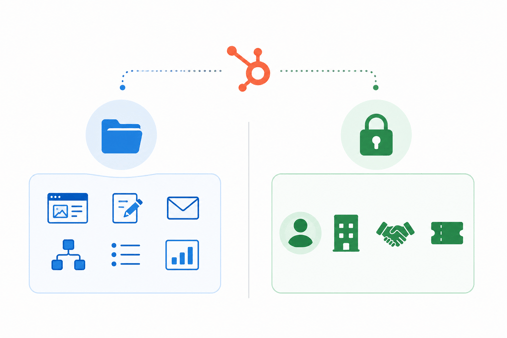
"HubSpot data separation" is not one setting. It is two separate systems that control different things, and agencies that treat them as the same end up with false confidence.
Content partitioning controls marketing assets: pages, blog posts, forms, emails, workflows, lists, and dashboards. It decides which team can see or edit a piece of content.
Record-level permissions control CRM data instead: contacts, companies, deals, and tickets. This is a separate setting, configured under Users & Teams, and it governs who can see a specific record rather than a specific asset (Source: "Mark contacts/companies/deals as private").
Locking down partitioning without also locking down record permissions leaves every client's contact and deal data fully visible across the portal. That gap is where most shared-portal leaks start.
Record-Level Permissions: What They Do and Where They Stop
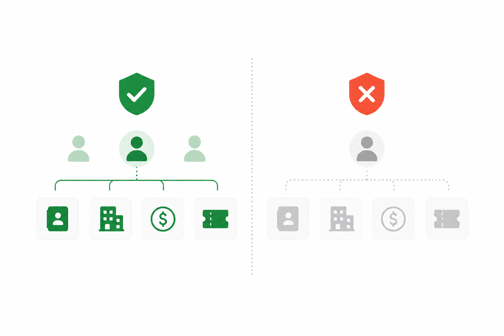
HubSpot controls who can see a contact, company, deal, or ticket through one setting, configured per user, with exactly four options.
|
Permission |
What it shows the user |
|
Everything |
Every record in the portal, regardless of owner or team |
|
Team only |
Records owned by anyone on the user's team |
|
Owned only |
Only records the user personally owns |
|
None |
No access to that object type at all |
Four settings sound like enough for a simple structure. They stop being enough the moment one person works across more than one client, which is the normal shape of a small agency. An Enterprise customer described this limitation directly in HubSpot's own community forum, calling it one of the most restrictive gaps in the platform (Source: "Mark contacts/companies/deals as private").
Picture an account manager assigned to two client teams, a common setup when one person covers several accounts. HubSpot requires every user to have one primary team. Any record that account manager creates saves to their primary team by default, and becomes visible to everyone else on it, whether or not the record has anything to do with that team's actual client. The two client teams were supposed to stay walled off. The primary-team default just connected them.
Content Partitioning for Marketing Assets
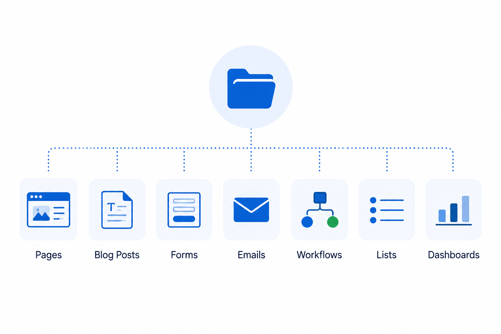
Partitioning is the separate system that governs marketing content, not CRM records. It controls who can see or edit pages, forms, emails, CTAs, workflows, lists, and dashboards (Source: "Team Partitioning").
Availability depends on subscription tier. Sales Professional includes partitioning for contacts, deals, tickets, and documents. The broader content partitioning set, covering CTAs, forms, emails, lists, workflows, and dashboards, requires Enterprise. Super admins can always see every partitioned asset regardless of tier, which matters if an agency's super admin list has grown larger than it should be.
Partitioning is genuinely useful for keeping one client's landing pages out of another client's asset list. It does nothing for contact, company, or deal visibility. That protection runs on the separate permissions system above, and confusing the two is the most common reason agencies believe their portal is locked down when it is not.
The Deduplication Problem No One Mentions
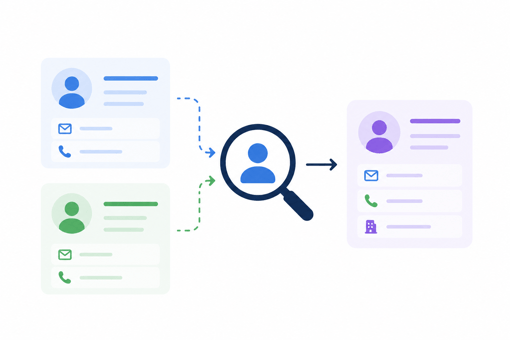
HubSpot enforces one global rule across an entire portal: a contact email address can exist on only one record. This rule applies regardless of teams, permissions, or partitioning.
Suppose two of an agency's clients, unrelated on paper, both run outbound campaigns into the same regional industry. If both campaigns reach the same person, the second client's team cannot create a fresh record for that email.
HubSpot either blocks the creation or forces a match to the existing one, meaning one client's contact becomes visible, or at minimum discoverable, to whoever already owns that record. No partitioning setting or team permission prevents this, since deduplication runs ahead of both systems.
This risk grows with the number of clients in one portal and the overlap between their target industries. It is the clearest sign that a shared portal is a spectrum, not a switch, and it needs to be part of the decision before clients get added, not after a collision happens.
Brands (Business Units): Built for One Business, Not True Separation
Brands, HubSpot's current name for Business Units, lets one portal present multiple brand identities, separate domains, separate email sending, separate visual assets, while keeping shared CRM data underneath. HubSpot's own positioning is direct about the intended use case: one business model, one CRM, one marketing organization, multiple public-facing brands.
That positioning rules out the use case most agencies actually have. Brands were not built for client confidentiality. HubSpot's own guidance states that when NDAs, regulatory obligations, or confidentiality clauses require hard data separation, permissions-based visibility controls.
Brands included, are not sufficient, and those entities belong in separate portals. Brands also cannot host data in different global regions, which rules it out for any client under regional data residency requirements (Source: "Business Units vs. Separate Portals in HubSpot").
When One Portal Genuinely Works & When It Doesn't
The decision comes down to specifics about the clients involved, not HubSpot's feature list in the abstract.
|
Situation |
One shared portal |
Separate portal per client |
|
Clients operate in unrelated industries with no overlap |
Workable with permissions and partitioning set up correctly |
Not required |
|
Clients compete directly or could plausibly target the same contacts |
Deduplication risk is real |
Recommended |
|
A client's contract includes an NDA or confidentiality clause |
Permissions alone will not satisfy it |
Required |
|
A client needs data hosted in a specific region |
Brands cannot provide this |
Required |
|
Staff regularly work across more than one client account |
Primary-team leakage risk is real |
Worth strong consideration |
When HubSpot's own support team fielded this exact question from a consultant managing many small clients from one account, the answer was direct: HubSpot is not built to be one shared tool across many clients, and a separate account per client is the setup that keeps data genuinely separate (Source: "Multiple Clients, Multiple U.S. Cities").
That guidance is worth weighing against the practical cost tradeoffs most hubxpert.com/hubspot-for-digital-agencies face the first time they set portal architecture for client work, where budget pressure and control pull in opposite directions.
Setting Up the Safest Version of a Shared Portal
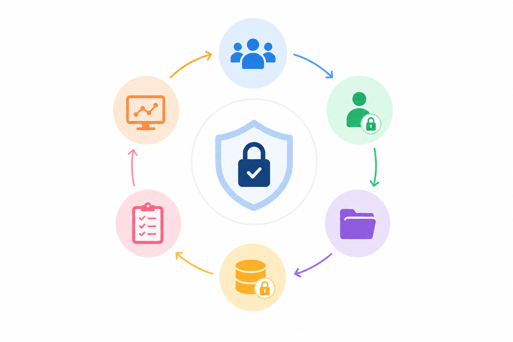
For agencies that decide one portal is the right call, these steps close most of the gaps above.
- Audit super admins first, and cut the list to two or three people. Every super admin bypasses every partitioning and permission setting by default.
- Set contact, company, deal, and ticket permissions to Owned only or Team only for every non-admin user. Build teams around individual clients, not internal departments.
- Give each account manager one primary team matching their main client, and add secondary team access only where genuinely needed, since the primary-team default decides where new records land.
- Turn on content partitioning for every asset type your tier supports, and assign existing assets to the correct client team before onboarding new clients.
- Search the portal for a prospective client's known contact domains before importing their list, to catch deduplication collisions before they happen.
- Document which clients cannot share a portal under any configuration, using the table above, before sales commits to onboarding them into the existing account.
FAQs
Can HubSpot fully isolate two clients inside one portal?
Not completely. Record permissions and content partitioning limit visibility, but portal-wide deduplication and primary-team defaults create gaps that persist regardless of settings.
What happens if two clients' contacts share the same email address?
HubSpot blocks the duplicate or merges it into the existing record, which can expose one client's contact data to the other client's team.
Is Brands the same as data partitioning?
No. Brands manages public-facing identity and shared CRM data across brands. Partitioning and record permissions are the separate systems that actually control who sees what.
Does upgrading to Enterprise fix the visibility gaps?
It expands partitioning coverage and adds more teams per user, but it does not remove the four-tier permission ceiling or the portal-wide deduplication rule.
When should a client move to their own HubSpot portal?
When an NDA or confidentiality clause is in play, when the client needs regional data hosting, or when the client competes directly with another portal member.
Founder & CEO @ Hubxpert. My goal is to make every company using HubSpot succeed in their marketing organisation and automation.

Ratul Rahman
Table of Contents:

Subscribe to our newsletter

Modern Website Design Examples & What Makes Them Work
Browse modern website design examples and modern looking websites, and see exactly what separates a fast, current site from one that already feels dated.

Interactive Web Design Templates & Examples to Study
See interactive web design templates and the best interactive web design inspiration, then compare interactive web page design examples before you build.

Interactive Elements in Web Design & Where to Stop
Add interactive elements in web design that earn their place, covering micro interactions, interactive maps, interactive timelines and knowing when to stop.

3D Web Design Templates & Examples You Can Reuse
Browse 3D web design templates and examples, plus where to find free downloads, and see how 3D web page design lifts a site without slowing the site down.

3D Web Design Tools & Software Compared for 2026
Compare 3D web design tools and web based 3D design software, and see where 3D models and 3D assets for web design fit your existing front-end build pipeline.

HubSpot Onboarding Cost: What the Fee Really Covers
See what HubSpot onboarding cost covers, how onboarding fees get quoted and how to compare implementation quotes line by line before you commit to a partner.
-
Modern Website Design Examples & What Makes Them Work
hello
-
Interactive Web Design Templates & Examples to Study
hello
-
Interactive Elements in Web Design & Where to Stop
hello
-
3D Web Design Templates & Examples You Can Reuse
hello
-
3D Web Design Tools & Software Compared for 2026
hello
-
HubSpot Onboarding Cost: What the Fee Really Covers
hello