





-2.png)


-2.png)



.png)


.webp)

.png)


.png)















-1.webp)
-1.webp)



.webp)

-1-1.webp)



-2.webp)

-1-1.webp)

-2-1.png)

-1-1.webp)
-1-1.webp)
-1-1.png)







Yes, HubSpot can be HIPAA compliant, but only under specific conditions. HubSpot began offering a Business Associate Agreement (BAA) as a public feature in October 2024, and it is now generally available. Signing one requires an Enterprise-tier subscription across the specific hubs your account uses, plus two account-level checkboxes confirming your organization handles Protected Health Information (PHI) (Source: "HubSpot Sensitive Data Terms").
A signed BAA does not cover every tool in HubSpot automatically. It only covers services HubSpot has explicitly authorized for PHI processing, and a meaningful list of features stays off-limits regardless of tier. The sections below walk through what is covered, what is not, and the specific gap most healthcare practices miss when they upgrade.
Does HubSpot Sign a BAA? Here Is What Actually Changed in 2024
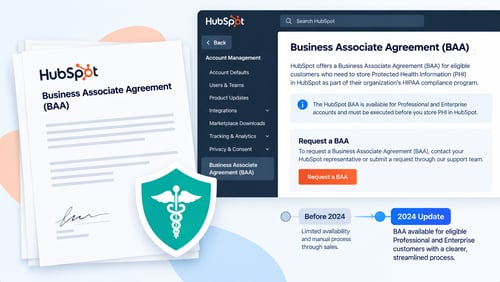
Several agency blogs still tell readers HubSpot refuses to sign BAAs. That was true before October 2024. Before then, HubSpot offered only general terms of service, with no path for healthcare-specific data handling. HubSpot rolled out sensitive data and HIPAA support as a public capability that month. It moved from beta status to general availability, with dated legal updates continuing through 2025 and 2026. If a page online claims HubSpot never signs a BAA, check its publish date. Anything written before late 2024 is describing a product that no longer works that way.
The BAA itself is not a contract you negotiate individually. It is incorporated by reference into HubSpot's customer agreement. It activates once an eligible account checks two boxes. One confirms the account will store PHI. The other confirms the organization is a HIPAA covered entity or business associate. The agreement then applies only to the services HubSpot has explicitly authorized, not to the account as a whole.
Which HubSpot Tier You Actually Need
BAA and sensitive-data support requires Enterprise tier (Source: "Sensitive Data in HubSpot Tools"). Free, Starter, and Professional plans do not support it in any hub, regardless of how the account is configured. This is a hard gate, not a setting you can enable at a lower tier.
|
Hub |
Tier |
BAA Eligible |
|
Marketing Hub |
Enterprise |
Yes |
|
Marketing Hub |
Free / Starter / Professional |
No |
|
Sales Hub |
Enterprise |
Yes |
|
Sales Hub |
Free / Starter / Professional |
No |
|
Service Hub |
Enterprise |
Yes |
|
Service Hub |
Free / Starter / Professional |
No |
|
Content Hub |
Enterprise |
Yes |
|
Data Hub |
Enterprise |
Yes |
|
Revenue Hub |
Enterprise |
Yes |
If your practice runs on a mix of tiers, for example Marketing Hub Professional paired with Sales Hub Enterprise, only the Enterprise-tier hub is eligible. PHI cannot legally sit in a hub that never signed the BAA. That holds even if the record links to a contact that also exists in an Enterprise hub elsewhere in the account.
What a Signed BAA Does Not Cover
A common misunderstanding is that Enterprise tier plus a signed BAA means the whole platform is now HIPAA-safe. It does not. HubSpot maintains a specific list of tools and workflow actions that stay excluded from PHI use, even on a fully HIPAA-configured Enterprise account.
|
Tool or Feature |
Status Under a Signed BAA |
|
Chatbots |
Excluded |
|
Personalization tokens |
Excluded |
|
Playbooks |
Excluded |
|
Sandboxes |
Excluded |
|
Workflow "copy property" actions on sensitive fields |
Excluded |
|
Event-based enrollment triggered by sensitive-property changes |
Excluded |
|
Multi-account data mirroring |
Excluded |
|
Standard CRM properties, deals, and tickets flagged as sensitive |
Covered |
|
Workflows that do not reference sensitive fields directly |
Covered |
In practice, this means a healthcare marketing team cannot drop a patient's name into a personalization token inside an email. It cannot route PHI through a chatbot, and it cannot use a sandbox account to test workflows that touch real patient records. Each of these needs a separate, non-PHI approach, usually de-identified test data or a general-audience version of the automation.
What Counts as PHI Inside a HubSpot Record
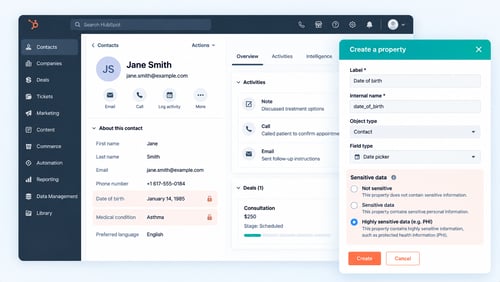
HubSpot does not scan your data and decide what counts as PHI for you. Each property has to be manually flagged as containing Protected Health Information during setup. A contact's name and email address alone are ordinary CRM data. The same name and email become PHI the moment they are linked to an identifiable health attribute. A diagnosis, a treatment type tied to a medical condition, or a health-plan ID number all qualify.
This self-declaration model puts the compliance judgment call on your team, not on HubSpot. Take a custom property like "Appointment Reason." If it gets filled in with "follow-up for hypertension," that property needs to be flagged as PHI. This applies even if the field itself was originally built as a generic scheduling note.
The Historical Data Gap Nobody Warns You About
A signed BAA protects PHI processed after the agreement takes effect. It does not retroactively cover records a practice already stored in HubSpot before upgrading to Enterprise or before checking the sensitive-data boxes. Practices that ran on Professional for months or years before going HIPAA-eligible are sitting on historical data. That data was never processed under contractual PHI protection in the first place.
The practical fix is an audit before the upgrade, not after. Pull every property that could plausibly contain a health-identifying detail. Confirm what was stored on the lower tier, then flag it correctly once the account moves to Enterprise. Skipping this step is the single most common mistake practices make during a HIPAA-readiness migration.
What Should Stay Out of HubSpot Even With a BAA Signed
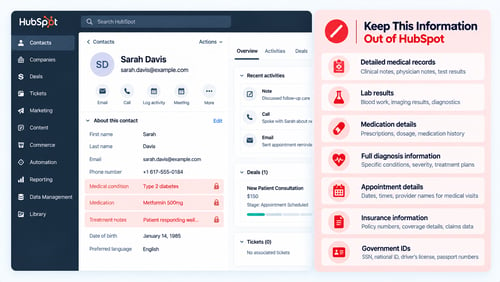
Some data belongs in the electronic health record (EHR) or practice management system, not in the CRM. This holds true regardless of tier or BAA status. Clinical records and detailed treatment information should generally remain in the EHR. A HIPAA-conscious CRM setup for healthcare practices keeps HubSpot focused on marketing, sales, and service workflows instead of clinical recordkeeping. A useful rule for scoping this cleanly: HubSpot should know that a patient exists, when they last engaged, and what marketing or outreach touched them.
It should not hold the clinical detail behind why they were seen. Drawing that boundary matters most at the integration layer. A loose HubSpot EHR integration can pull clinical fields into HubSpot by accident, instead of keeping the two systems cleanly separated.
The Real Risk of Skipping the BAA
Storing PHI in HubSpot without a signed BAA in place removes the contractual protection the agreement provides. HubSpot's own terms state the BAA applies only to services it has explicitly authorized for PHI processing. That protection simply does not exist until the agreement is active on an eligible account. A practice that stores PHI anyway is carrying that compliance exposure alone.
This is not a hypothetical cost. IBM's 2026 Cost of a Data Breach Report puts the average healthcare data breach at $6.64 million (Source: "IBM Cost of a Data Breach Report 2026"). That figure fell year over year, and healthcare still ranks as the costliest industry tracked. Healthcare has held that top spot for over a decade. The Enterprise-tier cost of enabling a BAA is a small fraction of what an unprotected breach runs.
A Pre-Launch Compliance Checklist
- Confirm every hub touching PHI is on Enterprise tier, not just one hub in a mixed-tier account.
- Check both required boxes during setup: PHI storage and covered-entity or business-associate status.
- Review HubSpot's list of permitted sensitive data types before entering anything new, and confirm each property matches an approved category.
- Flag every property that could contain a health-identifying detail as PHI individually. Do not rely on a blanket account setting.
- Audit historical records stored before the upgrade, since the BAA does not apply retroactively.
- Route chatbots, personalization tokens, playbooks, and sandbox testing away from any PHI-flagged data.
- Keep clinical records and treatment detail in the EHR, and use HubSpot only for the marketing, sales, and service layer.
Frequently Asked Questions
Does HubSpot's Free or Professional plan support HIPAA compliance?
No. BAA and sensitive-data support is available only on Enterprise-tier hubs. Free, Starter, and Professional plans do not offer it at any price point.
Can I use HubSpot's AI tools with patient data?
No. Sensitive-data properties are automatically excluded from AI model training, and PHI should never be entered into AI prompts, call summaries, or chatbot conversations, even on an Enterprise account with a signed BAA.
What happens to PHI I stored in HubSpot before I had a BAA?
It was never covered under contractual PHI protection. Audit and correctly flag that historical data once you upgrade, since the BAA only applies going forward from the date it takes effect.
Is HubSpot considered a HIPAA covered entity or a business associate?
HubSpot becomes a business associate once a BAA is signed and PHI processing begins. Before that, using HubSpot to store PHI leaves the practice without HubSpot's contractual compliance protections.
Does signing a BAA make my entire HubSpot account HIPAA compliant?
No. The BAA only covers services HubSpot has explicitly authorized for PHI use. Chatbots, personalization tokens, playbooks, and sandboxes stay excluded regardless of tier or BAA status.
Founder & CEO @ Hubxpert. My goal is to make every company using HubSpot succeed in their marketing organisation and automation.

Ratul Rahman
Table of Contents:

Subscribe to our newsletter
Do You Need a Healthcare-Specific CRM, or HubSpot?
Some practices outgrow HubSpot. Most don't. Here is the real threshold test, and where a healthcare-specific CRM actually wins.
Referral Tracking Software or Your CRM? A Healthcare Guide
HubSpot has no native referral object. Here is how referral tracking actually gets built inside a CRM, and when you need dedicated software instead.

HubSpot at Enterprise Scale: Fix Pipeline Velocity First
Slow pipeline velocity often gets blamed on HubSpot outgrowing enterprise needs. Here's how to diagnose the real cause before a costly Salesforce migration.
Syncing Invoices Between HubSpot & Your Accounting Software
A healthcare CRM tracks inquiries as records, moves them through a visible pipeline, and automates the follow-up. Here is how.

CRM for Healthcare: How It Actually Works Day to Day
A healthcare CRM tracks inquiries as records, moves them through a visible pipeline, and automates the follow-up. Here is how.

HubSpot EHR CRM Integration: What Actually Syncs
No native HubSpot EHR connector exists yet. Here is how EHR CRM integration really works, and what should never sync.
-
Do You Need a Healthcare-Specific CRM, or HubSpot?
hello
-
Referral Tracking Software or Your CRM? A Healthcare Guide
hello
-
HubSpot at Enterprise Scale: Fix Pipeline Velocity First
hello
-
Syncing Invoices Between HubSpot & Your Accounting Software
hello
-
CRM for Healthcare: How It Actually Works Day to Day
hello
-
HubSpot EHR CRM Integration: What Actually Syncs
hello