





-2.png)


-2.png)



.png)


.webp)

.png)


.png)















-1.webp)
-1.webp)



.webp)

-1-1.webp)



-2.webp)

-1-1.webp)

-2-1.png)

-1-1.webp)
-1-1.webp)
-1-1.png)






A healthcare CRM captures a patient inquiry as a record the moment it arrives. That record moves through a visible pipeline, from first contact to scheduled visit to retained patient. Reminders and follow-up run automatically in the background.
Reporting then shows which channel actually produced booked visits, not just inquiries. That is the mechanical core, and most explanations of a healthcare CRM stop before describing any of it concretely.
How HubSpot's Invoice Sync Actually Works
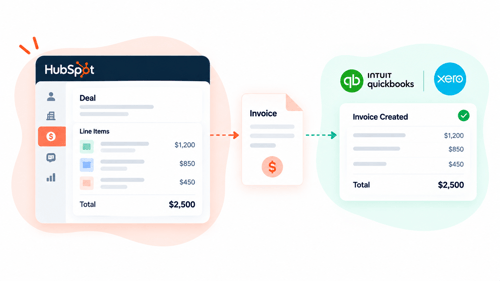
“Invoice sync” means something slightly different depending on which accounting platform you're connecting. HubSpot has a native Invoice object, part of Commerce Hub, and a separate Data Sync framework that maps that object, along with contacts, products, and payments, to and from an external system.
QuickBooks Online and Xero both connect through this Data Sync layer, but each one has its own app, its own field mappings, and its own gaps, which is why “does invoice sync work” needs a platform-specific answer rather than one blanket yes.
One-Way Versus Two-Way Sync
Before comparing platforms, one setting decides more than most people realize: which direction data actually flows.
- Bi-directional: data flows both ways, and a change in either system updates the other
- One-way to HubSpot only: the accounting platform is the source of truth, HubSpot reflects it
- One-way to the accounting platform only: HubSpot is the source of truth, the accounting platform reflects it
Syncing HubSpot & QuickBooks Online
This is the stable side of this article. The QuickBooks Online Data Sync integration is native, two-way, and doesn't carry a HubSpot tier restriction to use at a basic level (Source: HubSpot Knowledge Base). What it doesn't do natively is worth knowing before building a process around it.
What Syncs and What Doesn't
|
Data / Field |
Syncs to QuickBooks |
Notes or Limitation |
|---|---|---|
|
Invoices |
Yes, two-way |
Created in either app, edits sync |
|
PO number |
No, by default |
Must be added as a custom field |
|
Invoice-level taxes and fees |
Partial |
Order-level discounts sync; invoice-level taxes and fees don't, since QBO models tax differently |
|
Payment processing fees |
No |
Stripe or HubSpot payments fees don't create an accounting expense automatically |
|
Refunds |
No |
Refunds against payments don't sync automatically |
|
Custom fields (Tracking Number, Shipping Method) |
Yes, with setup |
Requires Data Hub Starter, Professional, or Enterprise |
Every limitation in that table is documented directly by HubSpot, not inferred (Source: HubSpot Knowledge Base). The PO number gap in particular catches firms off guard, since it looks like a standard field until you try to map it and find out QuickBooks doesn't treat it as one.
Syncing HubSpot & Xero After the March 2026 Retirement
What Actually Stopped Working
On March 13, 2026, the original Xero-owned HubSpot integration, listed in the marketplace as “Xero by Xero,” was retired and automatically disconnected for any account still running it (Source: ScaleXP) (Source: Cyberclick).
Invoices stopped auto-creating from closed-won deals, and contact syncing between the two systems simply stopped, with no automatic migration for accounts that hadn't already moved off it. The retirement follows HubSpot's deprecation of the older Accounting API the legacy integration was built on.
Worth a direct note here: HubSpot's own replacement app, listed simply as “Xero” and built by HubSpot, currently sits at a 2.2-star rating from 40 reviews on HubSpot's own marketplace, with recent reviews describing a rough installation process and invoices landing in the wrong section of Xero (Source: HubSpot Marketplace). That's a different claim than “the old integration had a poor rating,” it's the current replacement, and it's worth factoring into expectations rather than assuming the new app solved the reputation problem along with the technical one.
The Current Replacement Path
The current path forward is “Data Sync by HubSpot” for Xero, a different app from the retired one, configurable one-way or two-way per object.
|
Data / Field |
Syncs to Xero |
Notes or Limitation |
|---|---|---|
|
Contacts |
Yes, one-way or two-way |
Configurable per object |
|
Products |
Yes, one-way or two-way |
Xero items map to HubSpot products |
|
Invoices |
Yes, one-way or two-way |
Once created in HubSpot, must be edited there, not in Xero |
|
Payments |
Yes |
Applied payments sync |
|
Currency |
Limited |
Only USD, CAD, EUR, GBP, AUD, NZD supported |
|
HubSpot automated sales tax invoices |
No |
Won't sync from HubSpot to Xero |
|
Sync speed |
Delayed from Xero side |
HubSpot changes sync within minutes; Xero changes are detected roughly every 30 minutes |
When A Third-Party Tool Makes More Sense
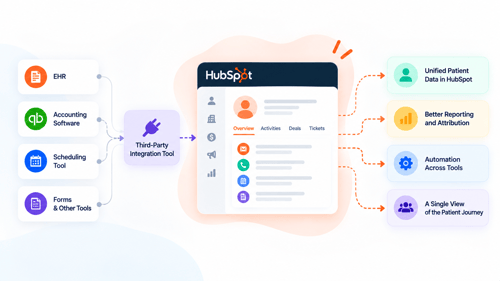
The native Data Sync apps move contacts, products, invoices, and payments. What they don't do is generate an invoice automatically the moment a deal closes, or handle more complex revenue recognition across a subscription or milestone-billed engagement.
That gap is where tools like Invoice Stack and ScaleXP come in, not as a replacement for the native sync, but as a layer on top of it for firms whose billing process is more involved than a straightforward invoice per deal. Worth treating these as options to evaluate against your own billing complexity, not a default upgrade every firm needs.
Common Invoice Sync Problems Accounting Firms Actually Hit
A few issues come up often enough across both platforms to name directly.
Duplicate Invoices or Contacts
This usually happens when a contact or invoice is created manually in both systems before the sync catches up, or when the matching field, typically email address, doesn't match exactly between the two records.
The fix is deciding one system as the point of entry for new contacts and invoices, and treating the other as a mirror, rather than letting either team create records wherever is convenient.
Tax and Currency Mismatches
QuickBooks and Xero each model tax and currency slightly differently from HubSpot's invoice object, which is why invoice-level taxes and fees don't always carry over cleanly, and why Xero sync is capped to six supported currencies. The fix is checking which fields are actually confirmed to sync before assuming a number matches on both sides, and reconciling tax lines manually where the sync explicitly doesn't cover them, rather than discovering the gap at month end.
Reconciliation Lag From Sync Delay
HubSpot-side changes sync in near real time, but Xero-side changes are only detected roughly every 30 minutes, which means a payment logged in Xero can take a short window to reflect back in HubSpot. For most firms this is a non-issue, but for a team reconciling same-day, it's worth building the delay into the process rather than treating a temporary mismatch as a sync failure.
FAQs
Does HubSpot invoicing replace QuickBooks or Xero?
No. HubSpot's invoice object is built to connect your CRM activity to your accounting platform, not to replace it. QuickBooks and Xero remain the system of record for actual bookkeeping, tax filing, and financial statements.
Can you sync HubSpot with both QuickBooks and Xero at once?
Not for the same set of records. A firm generally runs one accounting platform as its system of record, so while HubSpot can technically have both apps installed, running live two-way sync with both against the same invoices isn't a supported or sensible setup.
What happens to invoices that were synced through Xero's old integration?
Existing synced records aren't deleted when the old integration is retired, but the connection that kept them updating stops. New activity won't sync until the account is migrated to the current Xero Data Sync app, so historical invoices stay as they were at the moment the legacy connection was disconnected.
Does invoice sync work on HubSpot's free tier?
The core QuickBooks Online sync works without a HubSpot tier restriction at a basic level, but features like custom field mappings for PO numbers or tracking numbers need a Data Hub Starter, Professional, or Enterprise subscription. Xero's sync setup and its custom field mapping options carry their own subscription requirements worth checking directly against the app listing before assuming free-tier access covers everything.
Final Thought
The honest state of play is this: QuickBooks sync has been reliable enough for years that most firms stop thinking about it, and Xero sync just went through a forced migration that caught some firms off guard. Whichever platform you're on, the sync is only as trustworthy as the fields you've actually confirmed move correctly, not the ones you've assumed do. Check the table, not the marketing copy, before you build a reconciliation process around either one.
Maximize Your HubSpot Investment With HubXpert
Getting invoice sync right isn't really about installing an app, it's about deciding which system is the source of truth for which field, before the first invoice goes out the door. HubXpert has moved accounting firms through exactly this kind of transition, including the forced Xero migration this piece covers, without losing invoice history or breaking reconciliation along the way.
See our HubSpot integration services for how this fits into a broader HubSpot setup, our HubSpot admin and technical support service for ongoing sync troubleshooting once it's live, or for the fuller picture of how we work with accounting practices like yours.
As a Hubspot Automation Developer at Hubxpert, I specialize in API integration, seamlessly connecting HubSpot with third-party applications. My role encompasses understanding client needs, crafting custom code solutions, and ensuring the smooth operation of our automation workflows. I actively address any HubSpot integration challenges and stay updated with the platform's latest advancements. My dedication ensures clients harness the full potential of HubSpot.

Tanzinul Kabir
Table of Contents:

Subscribe to our newsletter

Do You Need a Healthcare-Specific CRM, or HubSpot?
Some practices outgrow HubSpot. Most don't. Here is the real threshold test, and where a healthcare-specific CRM actually wins.
Referral Tracking Software or Your CRM? A Healthcare Guide
HubSpot has no native referral object. Here is how referral tracking actually gets built inside a CRM, and when you need dedicated software instead.

HubSpot at Enterprise Scale: Fix Pipeline Velocity First
Slow pipeline velocity often gets blamed on HubSpot outgrowing enterprise needs. Here's how to diagnose the real cause before a costly Salesforce migration.
Syncing Invoices Between HubSpot & Your Accounting Software
A healthcare CRM tracks inquiries as records, moves them through a visible pipeline, and automates the follow-up. Here is how.

CRM for Healthcare: How It Actually Works Day to Day
A healthcare CRM tracks inquiries as records, moves them through a visible pipeline, and automates the follow-up. Here is how.

HubSpot EHR CRM Integration: What Actually Syncs
No native HubSpot EHR connector exists yet. Here is how EHR CRM integration really works, and what should never sync.
-
Do You Need a Healthcare-Specific CRM, or HubSpot?
hello
-
Referral Tracking Software or Your CRM? A Healthcare Guide
hello
-
HubSpot at Enterprise Scale: Fix Pipeline Velocity First
hello
-
Syncing Invoices Between HubSpot & Your Accounting Software
hello
-
CRM for Healthcare: How It Actually Works Day to Day
hello
-
HubSpot EHR CRM Integration: What Actually Syncs
hello