





-2.png)


-2.png)



.png)


.webp)

.png)










.png)







-1.webp)
-1.webp)



.webp)

-1-1.webp)



-2.webp)

-1-1.webp)

-2-1.png)

-1-1.webp)
-1-1.webp)
-1-1.png)







Three travel brands. Three spreadsheets. Three different ways of managing the same customer.
A travel group runs a package-tour brand, a boutique villa business, and a B2B destination management arm. Each has its own data, processes, and half-finished HubSpot setup. Nobody has a clear view of the full customer relationship.
Now the group wants to consolidate.
But that raises a bigger question: should all three brands live in one HubSpot portal, or should each have its own account?
The answer affects everything from data structure and permissions to automation, reporting, and customer communication. Getting that architecture wrong can turn one consolidation project into a much bigger CRM problem.
What “Multi-Brand” Actually Means Inside HubSpot's Data Model
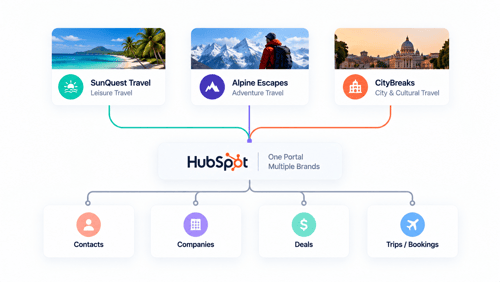
Before picking a structure, it helps to know what a HubSpot portal actually is underneath the branding, because the word “brand” gets used two different ways in this conversation, and they lead to different answers.
A HubSpot portal is one CRM database. Every contact, company, deal, and email sits in that one database regardless of how many logos your marketing team is juggling.
HubSpot's Brands feature, an add-on sold on top of Marketing Hub Enterprise, lets you organize that shared database by brand: tag contacts and companies with a brand property, keep forms and pages and emails filtered by brand, and manage subscription preferences separately per brand. See HubSpot's guide to managing brands.
What Brands doesn't do is separate the data itself. A contact tagged to your budget-tour brand still lives in the same table as a contact tagged to your luxury villa brand, and a team member with the right permissions can see across both.
If your brands need to stay genuinely walled off from each other, different legal entities, different data obligations, a client who'd be uncomfortable learning their villa booking and a budget tour inquiry sit in the same database, Brands is the wrong tool, and it's worth knowing that before buying it.
Why Language Adds A Second Axis To This Decision
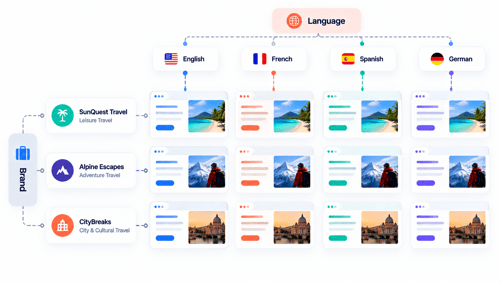
Multi-brand and multi-language get talked about as one problem, but inside HubSpot they're two separate mechanisms that happen to need coordinating.
Brands organizes assets and contacts by which part of the business they belong to. Language is handled separately, through multi-language content groups on pages, blog posts, and emails, plus a language preference usually tracked as a contact property to drive segmentation and workflow branching.
A single brand can run in three languages. Three brands can all run in the same one. Neither structure implies the other, so building them as if they're the same setting is a common early mistake.
Worth being direct about a real gap here too: HubSpot's AI-powered automatic translation, currently built on DeepL through Breeze, is a Content Hub Professional or Enterprise feature, and even then it translates page and email content, not everything. See HubSpot's guide to automatic translation.
Subscription and unsubscribe pages in particular have a long-standing gap: multi-language support for them has been an open request in HubSpot's own community for years without a full native fix. For a travel brand collecting consent and managing communication preferences across languages, that's worth planning around rather than assuming HubSpot handles it end to end.
One Portal Or Many? The Real Decision Framework
HubSpot actually publishes a clean three-way framework for exactly this decision. Built for multi-brand businesses generally, and it maps onto a travel group almost without modification.
One Portal With Teams
Teams group users for permissions and reporting inside a single brand. It's the right structure if there's really only one brand, and the only thing that varies is which department someone sits in.
It's explicitly not built for multiple brands, HubSpot's own comparison names multiple brands or business units under what Teams doesn't cover. If your travel brands are genuinely distinct in the market, Teams alone isn't the answer, no matter how tempting it is to just create three teams and call it done.
One Portal With Brands
This fits when the brands share a business model, all travel, all running through a similar inquiry-to-booking process, the same people build and maintain the tech, customers realistically overlap or you want them to, and cross-brand reporting and cross-sell matter to the business.
A travel group where the villa brand and the budget brand might genuinely want to email a past villa guest about a family-friendly budget trip fits this description well.
It's the wrong fit when the brands are legally distinct in a way that matters, need separate billing, need different integrations per brand, or a client relationship depends on data staying visibly separate.
Multiple Portals With Multi-Account Management
This keeps each brand's data genuinely separate, while still letting an admin see and report across accounts, and connect workflows between them, through a management layer that currently supports up to thirty connected accounts.
This is the right call for a travel group formed through acquisition, where each acquired brand came with its own legal structure, its own supplier contracts, and a real reason to keep the CRM data apart even while the parent company still wants visibility across all three.
|
Structure |
Fits When |
Doesn't Fit When |
|---|---|---|
|
One portal, Teams |
There's really one brand, and users just need grouping by department or permission level |
There's more than one real brand in the market |
|
One portal, Brands |
Brands share a business model, the same team builds the tech, customers overlap, cross-sell and cross-brand reporting matter |
Brands need legal separation, separate billing, separate integrations, or strict data isolation |
|
Multiple portals, Multi-Account Management |
Each brand needs genuinely separate data, its own legal footing, or its own integrations, but the parent company still wants visibility |
A small team wants the simplicity of managing just one login and one setup |
What Actually Breaks When Brands Share Currency & Pipeline Data
Even inside the right structure, a multi-currency, multi-brand setup has a specific, well-documented failure mode worth knowing about before it happens to you.
Multi-currency deals are available from a Starter subscription up, see HubSpot's guide to account currencies, so pricing isn't the barrier. The barrier is reporting: a deal's Amount property displays in whatever currency was set on that deal.
And default reports or forecast views can end up mixing raw amounts across currencies unless they're built against the Amount in company currency property instead.
Which converts every deal using the exchange rate in effect at close. Agencies running currencies side by side, a villa brand priced in euros alongside a package-tour brand priced in dollars, for instance, have described exactly this in HubSpot's own community forum: forecast reports that became close to unusable once multiple currencies went live.
Building brand-specific and currency-aware reports from the start avoids rebuilding the whole reporting layer later, which is the same lesson our piece on building sales dashboards for a travel agency team covers for a single-brand agency, just compounded here by a second variable.
A Practical Structure For A Multi-Brand Travel Group
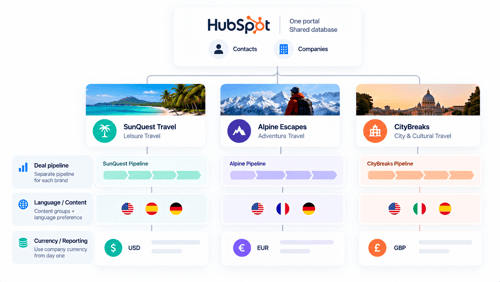
Putting the pieces together, here's what a genuinely workable setup tends to look like for a group that's decided one portal fits.
Contacts and companies stay in one shared database, tagged with a Brand property, so repeat customers and cross-brand opportunities stay visible. Each brand gets its own deal pipeline rather than sharing one, since a B2B DMC sales process and a B2C package-tour process rarely share meaningful stages, the same structural question our piece on deals vs custom objects for trip tracking covers for trip data specifically, just applied per brand here instead of per trip type.
Language is handled independently through content groups and a language-preference property, coordinated with brand but not dependent on it.
And currency and reporting get built against company-currency properties from day one, not retrofitted once the forecast report stops making sense.
None of this requires guessing. It requires deciding brand, language, and currency each as their own axis, in that order, before a single pipeline or property gets built.
Where This Connects To What We've Already Covered
This piece sits on top of the other three in this series rather than replacing any of them. The deals vs custom objects decision still applies per brand, a multi-brand group might reasonably use Deals for one brand's simpler process and a Trip custom object for another's repeat-heavy one.
Sales dashboards extend the same way, with brand added as a report filter alongside deal stage and source. And booking abandonment reminder workflows need a brand and language filter built into their enrollment criteria from the start, since a Spanish-language villa guest shouldn't receive an English deposit reminder written for the budget brand.
FAQs
Can I run multiple travel brands in one HubSpot account without paying for the Brands add-on?
Yes, with real limits. You can tag contacts, companies, and deals with a custom brand property and filter reports and lists by it manually, which works for a small setup.
What you lose without the add-on is native asset organization, separate subscription preferences, and an additional brand domain, so it becomes more manual as the number of brands or the marketing volume grows.
Does HubSpot automatically translate my website and emails into other languages?
Not by default. HubSpot's AI-powered automatic translation is a Content Hub Professional or Enterprise feature, and even with it enabled, some custom modules and page types aren't covered automatically.
Multi-language content groups exist to organize the translated variants once they're created, but the translation itself, or the decision to use HubSpot's AI translation, is a separate step.
If I keep separate HubSpot accounts for each brand, can I still see combined reporting across all of them?
Yes, through Multi-Account Management, which connects up to thirty HubSpot accounts and supports cross-account reporting and workflows while keeping each account's underlying data separate. This is the middle path between a full merge and full isolation.
Will multi-currency deals mess up my revenue reporting across brands?
Only if the reports are built against the raw deal Amount property instead of the Amount in company currency property. The second one converts every deal into your primary currency using the exchange rate in effect at close, which is what makes cross-brand, cross-currency reporting actually usable.
Can one contact belong to more than one of our brands at once?
Yes. Since contacts live in one shared database under the Brands structure, a single contact record can be associated with activity across multiple brands, which is exactly what makes cross-sell reporting possible.
If that overlap isn't something the business wants, that's a sign Multi-Account Management fits better than Brands.
Maximize Your HubSpot Investment With HubXpert
Getting a multi-brand, multi-language structure right the first time saves a genuinely painful re-migration later, since moving contacts, deals, and history between separate portals after the fact is real, time-consuming work.
HubXpert has built both patterns for travel and hospitality clients directly, brands sharing one portal, and separate portals connected through Multi-Account Management, depending on what each business actually needed rather than what looked simplest to set up.
See our HubSpot Marketing Hub implementation service for how Brands and multi-language content fit into a broader build, or our HubSpot for travel agencies page for the fuller traveler-journey picture.
Founder & CEO @ Hubxpert. My goal is to make every company using HubSpot succeed in their marketing organisation and automation.

Ratul Rahman
Table of Contents:

Subscribe to our newsletter

3D Web Design Templates & Examples You Can Reuse
Browse 3D web design templates and examples, plus where to find free downloads, and see how 3D web page design lifts a site without slowing the site down.

3D Web Design Tools & Software Compared for 2026
Compare 3D web design tools and web based 3D design software, and see where 3D models and 3D assets for web design fit your existing front-end build pipeline.

HubSpot Onboarding Cost: What the Fee Really Covers
See what HubSpot onboarding cost covers, how onboarding fees get quoted and how to compare implementation quotes line by line before you commit to a partner.

HubSpot Enterprise Onboarding (What Changes by Tier)
See how HubSpot enterprise onboarding differs from Professional and Starter, covering advanced onboarding scope, admin training and what each tier includes.

Best HubSpot CRM Implementation Consulting Agencies for B2B
Compare 6 HubSpot partners for B2B with pros, cons, and pricing. Learn how to judge companies offering HubSpot implementation services and spot red flags.

How to Build a HubSpot Implementation Plan That Holds Up
Follow a HubSpot implementation plan covering scoping, data cleanup and go-live. Includes an implementation checklist and a realistic 60-day timeline.
-
3D Web Design Templates & Examples You Can Reuse
hello
-
3D Web Design Tools & Software Compared for 2026
hello
-
HubSpot Onboarding Cost: What the Fee Really Covers
hello
-
HubSpot Enterprise Onboarding (What Changes by Tier)
hello
-
Best HubSpot CRM Implementation Consulting Agencies for B2B
hello
-
How to Build a HubSpot Implementation Plan That Holds Up
hello