





-2.png)


-2.png)



.png)


.webp)

.png)










.png)







-1.webp)
-1.webp)



.webp)

-1-1.webp)



-2.webp)

-1-1.webp)

-2-1.png)

-1-1.webp)
-1-1.webp)
-1-1.png)







A travel agency owner opens HubSpot on a Monday morning. The default dashboard says twelve open deals and eighty four thousand dollars in the pipeline. Neither number tells her anything she can act on. She doesn't know which of those twelve deals have gone quiet, which agent is behind on follow-ups, or whether the Bali inquiry from two weeks ago ever got a callback. The dashboard exists. It just isn't answering the questions that actually run the business.
That's the real gap this piece is about. Not how to click “Create dashboard,” HubSpot walks you through that in about ninety seconds, but which reports actually belong on a travel agency's dashboard, and why most default setups miss the two or three numbers that matter most for a team selling trips. This picks up directly where our piece on automating a travel agency's business in HubSpot leaves off, once inquiries are flowing into one place and a real pipeline is built, reporting is the next thing worth getting right.
What A HubSpot Dashboard Actually Reports On
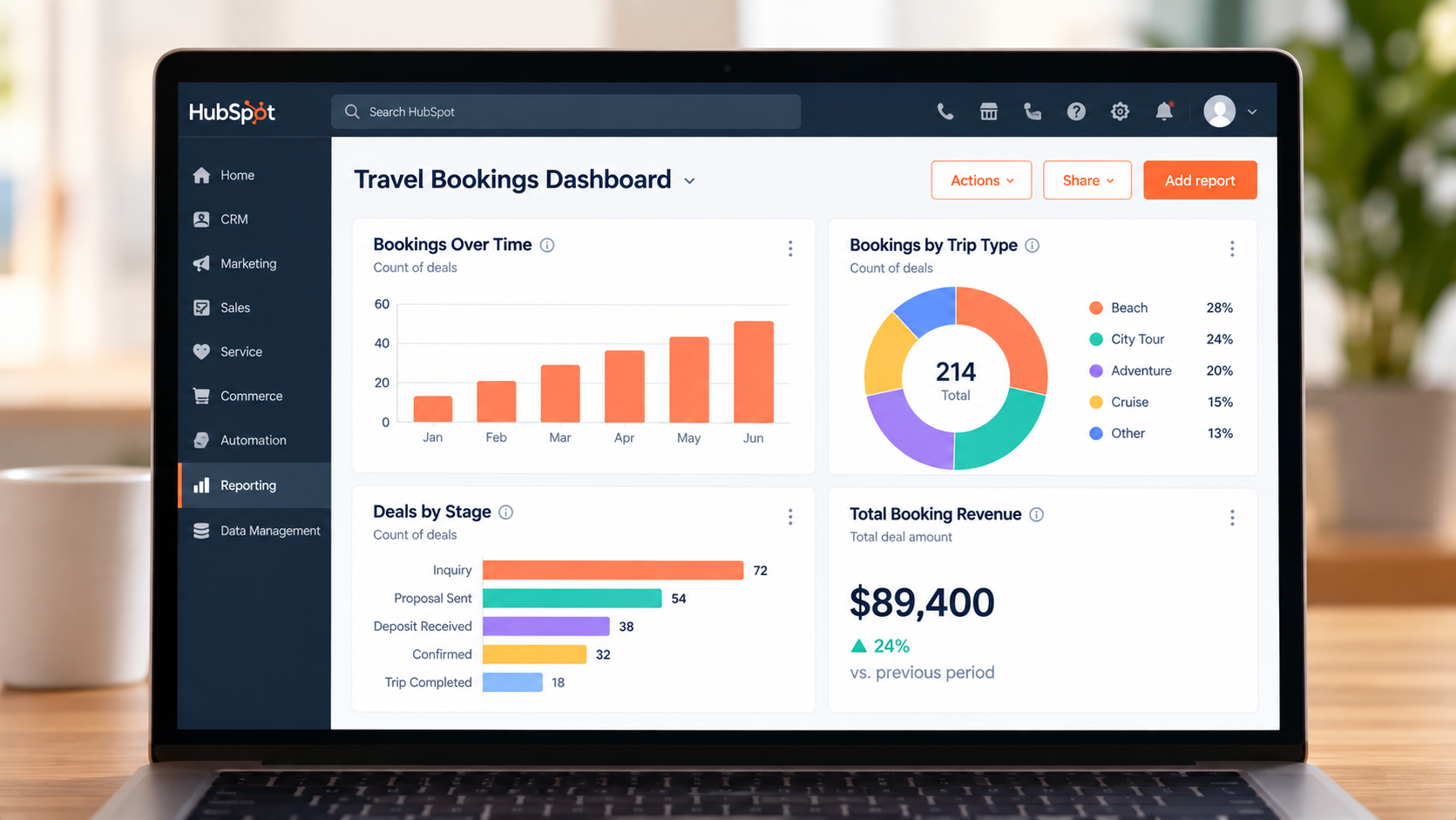
Before building anything, it helps to know what a dashboard is drawing from, since a dashboard is only a window onto reports, and reports are only as useful as the data underneath them.
A dashboard in HubSpot is a collection of individual reports pinned to one screen. Each report queries a data source, usually deals, contacts, tickets, or a custom object, and displays it as a chart, table, or number. Change the underlying deal stages or properties, and every report built on them changes too, which is why a messy pipeline produces a messy dashboard no matter how it's arranged. If your team hasn't settled how trip and booking data should be structured in the first place, that decision comes before this one, see our breakdown of deals vs custom objects for trip tracking before building reports on top of either.
For a travel agency specifically, that usually means deals, or a Trip custom object if one's been built, as the core data source, with contacts holding traveler details and Commerce Hub holding payment history if deposits run through HubSpot directly.
The Questions A Travel Sales Dashboard Needs To Answer
Most default dashboards get built once, during onboarding, around generic sales questions. A travel team's real questions are more specific than that.
An owner or sales manager usually wants to know how many new inquiries came in this week, and from where. How long it's taking the team to make first contact. Which open deals have gone quiet, and for how long.
How much revenue is realistically going to close this month versus what's still speculative. And, specific to travel, which trips are departing in the next thirty, sixty, and ninety days, since that's an operational question a generic sales dashboard was never built to answer.
An individual agent wants something narrower: their own open deals, their own overdue tasks, and how they're tracking against whatever target they've been given. Building one dashboard that tries to answer both sets of questions at once usually satisfies neither person well, which is the subject of a later section here.
Building The Core Reports For A Travel Sales Dashboard
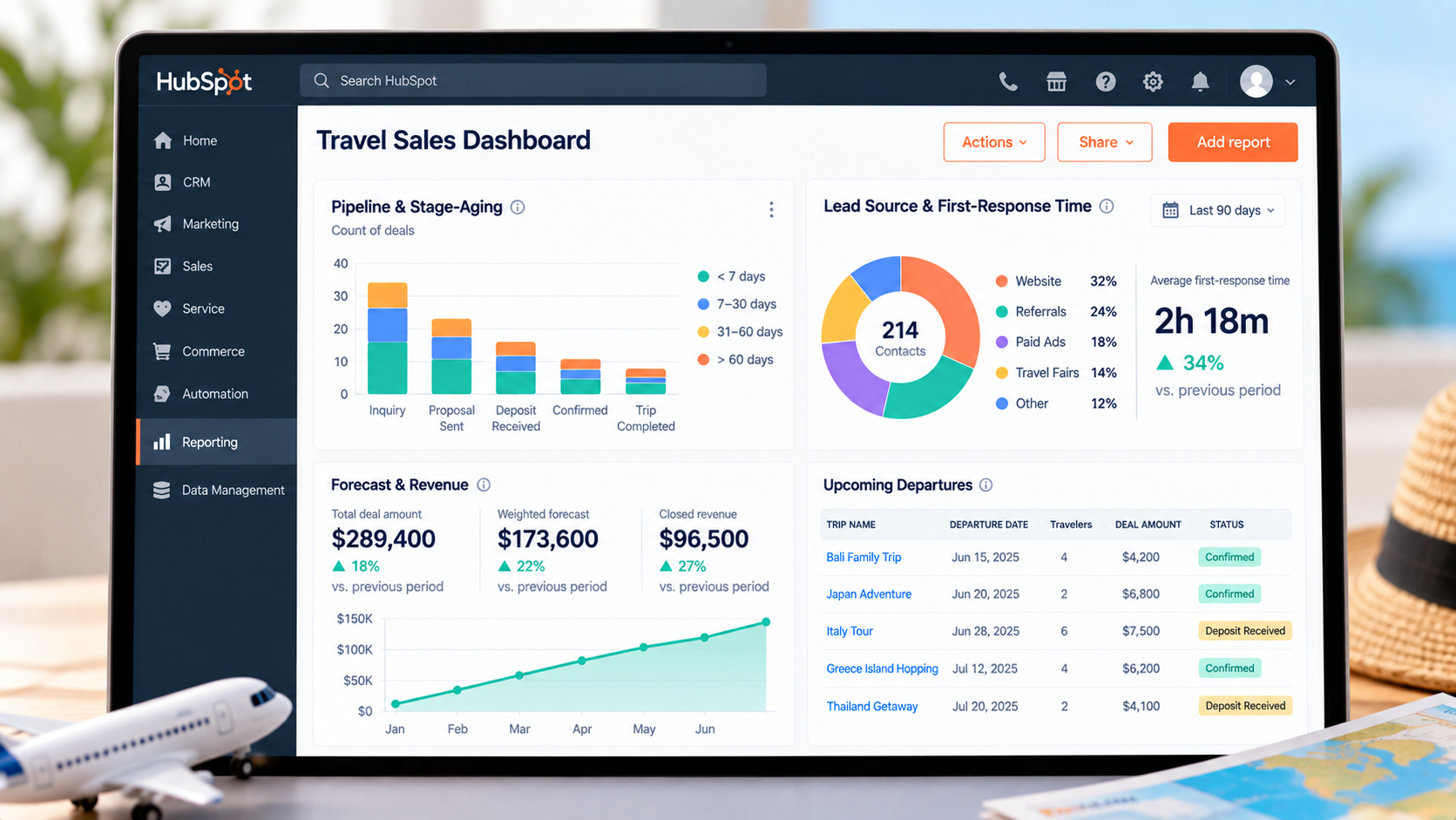
With the real questions defined, here's what actually goes into answering them, report by report.
Pipeline & Stage-Aging Reports
A basic deal pipeline report, deals by stage, comes with every HubSpot account, including the free CRM. What most default dashboards skip is time in stage: how long a deal has actually sat in “Quote Sent” or “Deposit Pending” without moving. That's the number that catches a stalled booking before it dies quietly. We've written separately about why HubSpot deals go cold and how to build follow-up reminders around exactly this problem, and the same logic applies directly to a travel pipeline.
Lead Source & First-Response Time
Every inquiry that comes into HubSpot, through a form, live chat, or a logged call, carries an original source property. A report grouping deals by source shows which channel is actually producing booked trips, not just inquiries, which matters more for ad spend decisions than raw lead volume. First-response time is trickier to report on natively and usually needs a custom property capturing the timestamp of first contact, since response speed is one of the clearest predictors of whether an inquiry turns into a booking.
Forecast & Revenue Reports
HubSpot's built-in forecast tool uses deal stage and close date to project revenue, and lets a manager adjust individual deals based on real confidence rather than stage alone. See HubSpot's guide to the forecast tool. This one requires a Sales Hub or Service Hub Professional or Enterprise subscription, with a seat assigned to whoever's using it, it isn't available on Starter or the free CRM. For agencies not yet on that tier, a simpler stand-in is a report of open deal amount by expected close date, which won't weight by probability but still gives a rough monthly view.
Upcoming Departures & Operational Visibility
This is the report most generic HubSpot dashboards never include, because it isn't a sales concept. Build a custom property for departure date on the deal or Trip record, then a report filtered to closed-won records with a departure date in the next thirty, sixty, or ninety days. It answers a genuinely operational question, how many trips are we delivering this quarter, that a standard sales pipeline report was never built to answer, and it's one of the clearest arguments for keeping departure date a clean, consistent property rather than something buried in deal notes.
|
Report or Tool |
Typical Minimum Tier |
What It Tells You |
|---|---|---|
|
Deal stage pipeline report |
Free CRM |
Where every open deal sits right now |
|
Source or channel report |
Free CRM |
Which channel is actually producing booked trips, not just inquiries |
|
Departure-date operational report |
Free CRM, plus a custom property |
Which trips are departing in the next 30, 60, or 90 days |
|
Forecast tool |
Sales Hub or Service Hub Professional, seat required |
A weighted revenue projection based on deal stage and close likelihood |
|
Custom report builder (cross-object) |
Professional and up |
Reports joining deals with contacts, line items, or a custom object together |
|
Revenue attribution reporting |
Marketing Hub Enterprise |
Which source or campaign actually drove revenue, not just leads |
Two Dashboards, Not One: Manager View vs Agent View
The single most common mistake we see in travel agency HubSpot setups isn't a missing report. It's building one dashboard and asking it to serve two different jobs.
A manager's dashboard should lead with pipeline health, forecast, aging, and source performance, the numbers that describe the business as a whole. An individual agent's dashboard should lead with their own open deals, their own overdue tasks, and their own response time, filtered to just them.
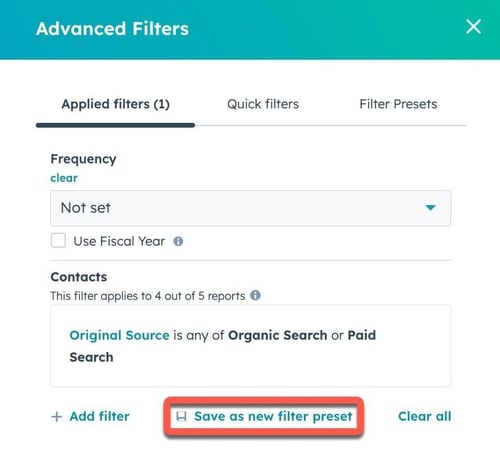
HubSpot supports this through dashboard filters and permissions rather than building two entirely separate reports from scratch, the same underlying reports can often power both views, just filtered differently by deal owner.
Skipping this split tends to produce a dashboard agents stop checking, because the top-level numbers aren't actually theirs to act on, and a manager's view cluttered with every individual agent's task list instead of the patterns across the whole team.
Reporting Is Only As Good As The Data Feeding It
None of the reports above work if the underlying deal or trip data is inconsistent, and this is where most dashboard projects actually stall.
A destination property that's sometimes “Bali,” sometimes “bali indonesia,” and sometimes left blank breaks every report grouped by destination. A departure date filled in on some deals and not others breaks the upcoming-departures report before it's useful. If your team hasn't settled how trip data should live in HubSpot, deals alone, a second pipeline, or a dedicated custom object, that decision is worth making before investing time in dashboards built on top of it, since restructuring later usually means rebuilding the reports too.
Our piece on automating a travel agency's business in HubSpot covers getting inquiry data into one clean structure in the first place. Dashboards are the natural next step once that foundation is actually in place, not before.
Setting Permissions So The Right People See The Right Numbers
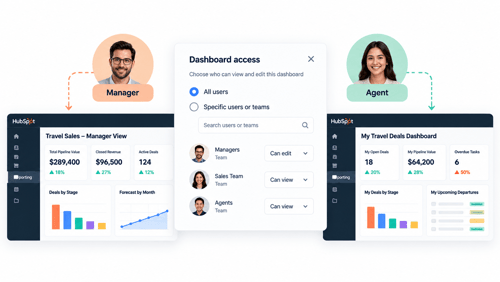
Dashboard visibility in HubSpot is a permissions setting, not an afterthought, and it's worth deciding deliberately rather than defaulting to everyone seeing everything.
Super Admins and anyone with Reports & dashboards permission can create, view, and edit every dashboard regardless of who owns it. Below that, dashboards can be shared with specific users, teams, or kept private to whoever built them. For a travel agency, a common pattern is a company-wide dashboard visible to everyone showing overall booking volume and upcoming departures, alongside a manager-only dashboard with forecast and individual rep performance that isn't broadcast to the whole team.
Worth knowing before you build: the number of dashboards an account can hold is tied to the highest subscription tier across all its Hubs, not just Sales Hub specifically. HubSpot's free CRM currently includes ten dashboards with fifty reports each, and that rises with each paid tier. If dashboard sprawl is already a problem, that's usually a sign reports need consolidating rather than a sign more dashboards are needed. For current numbers against your own setup, HubXpert's HubSpot pricing breakdown is worth checking, since these figures move.
FAQs
Do I need HubSpot Enterprise to build a sales dashboard for my team?
No. Basic dashboards, deal-stage reports, and source reports are available starting on the free CRM. What requires a paid tier is the forecast tool and the custom report builder for cross-object reports, Sales Hub or Service Hub Professional and up, plus advanced attribution reporting on Marketing Hub Enterprise. Most travel agencies can build a genuinely useful dashboard well before reaching for Enterprise.
Can I build a dashboard that only shows my own deals, not the whole team's?
Yes. Dashboard reports can be filtered by deal owner, so an individual agent's dashboard can show just their pipeline, their tasks, and their numbers, while a manager's dashboard shows the full team. This is usually set up as two separate dashboards rather than one dashboard everyone customizes for themselves.
How do I track how many days a deal has been stuck in one stage?
HubSpot has a built-in time-in-current-stage property you can report on directly, or build a report filtered to deals with high stage duration. This is the number most default dashboards skip, and it's usually the single most useful addition for catching stalled bookings early.
Can I see upcoming trip departures on a dashboard, not just open deals?
Yes, but it takes a bit of setup. Add a departure date property to the deal or Trip record, then build a report filtered to closed-won records with a departure date in a chosen future window. HubSpot doesn't ship this as a default report, since departure dates aren't a concept in the standard CRM, so it has to be built once and then reused.
Why does my dashboard show different numbers than what my team says is happening?
This is almost always a data problem, not a dashboard problem. Deals sitting in the wrong stage, properties left blank, or duplicate records will throw off every report built on top of them. Before adding more reports, it's worth auditing whether the underlying deal data is actually being kept current by the team using it day to day.
Maximize Your HubSpot Investment With HubXpert
A dashboard is only as good as the pipeline and property structure underneath it, which is usually the part that gets rushed during a DIY setup. HubXpert builds both pieces together for travel agencies and tour operators: a pipeline that actually matches how trips get booked, and the reporting on top of it that a manager can trust without double-checking it against a spreadsheet.
We've built this exact combination for travel and visa clients directly, including Express Vietnam, a state-owned visa company where the starting problem was inquiry data scattered across systems before it ever reached a dashboard. See our HubSpot Sales Hub implementation service or our HubSpot for travel agencies page for the fuller picture.
As a Hubspot Automation Developer at Hubxpert, I specialize in API integration, seamlessly connecting HubSpot with third-party applications. My role encompasses understanding client needs, crafting custom code solutions, and ensuring the smooth operation of our automation workflows. I actively address any HubSpot integration challenges and stay updated with the platform's latest advancements. My dedication ensures clients harness the full potential of HubSpot.

Tanzinul Kabir
Table of Contents:

Subscribe to our newsletter

3D Web Design Templates & Examples You Can Reuse
Browse 3D web design templates and examples, plus where to find free downloads, and see how 3D web page design lifts a site without slowing the site down.

3D Web Design Tools & Software Compared for 2026
Compare 3D web design tools and web based 3D design software, and see where 3D models and 3D assets for web design fit your existing front-end build pipeline.

HubSpot Onboarding Cost: What the Fee Really Covers
See what HubSpot onboarding cost covers, how onboarding fees get quoted and how to compare implementation quotes line by line before you commit to a partner.

HubSpot Enterprise Onboarding (What Changes by Tier)
See how HubSpot enterprise onboarding differs from Professional and Starter, covering advanced onboarding scope, admin training and what each tier includes.

Best HubSpot CRM Implementation Consulting Agencies for B2B
Compare 6 HubSpot partners for B2B with pros, cons, and pricing. Learn how to judge companies offering HubSpot implementation services and spot red flags.

How to Build a HubSpot Implementation Plan That Holds Up
Follow a HubSpot implementation plan covering scoping, data cleanup and go-live. Includes an implementation checklist and a realistic 60-day timeline.
-
3D Web Design Templates & Examples You Can Reuse
hello
-
3D Web Design Tools & Software Compared for 2026
hello
-
HubSpot Onboarding Cost: What the Fee Really Covers
hello
-
HubSpot Enterprise Onboarding (What Changes by Tier)
hello
-
Best HubSpot CRM Implementation Consulting Agencies for B2B
hello
-
How to Build a HubSpot Implementation Plan That Holds Up
hello