





-2.png)


-2.png)



.png)


.webp)

.png)










.png)







-1.webp)
-1.webp)



.webp)

-1-1.webp)



-2.webp)

-1-1.webp)

-2-1.png)

-1-1.webp)
-1-1.webp)
-1-1.png)






A family requests a $9,000 Costa Rica package. They open the quote, but never sign it or pay the deposit. The agency sends one follow-up email, gets no reply, and moves on.
Three weeks later, someone checks the pipeline and realizes the booking is still sitting there. By then, the family has already booked the same trip with a competitor who followed up at the right time.
Nothing went badly wrong. The agency simply had no system watching the abandoned booking.
That is where HubSpot reminder workflows can make a difference. The right automation can spot stalled quotes, trigger timely follow-ups, and keep potential bookings from quietly disappearing.
What “Abandonment” Actually Means For A Travel Booking
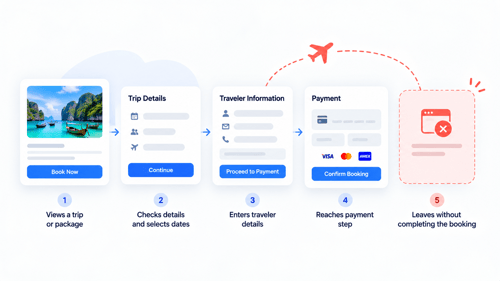
The word borrows from e-commerce, but a travel booking doesn't abandon the same way a shopping cart does, and that distinction matters for how you build around it.
An online store knows the exact moment someone adds an item and leaves without paying, because the whole thing happens inside one checkout session. A travel booking doesn't have one drop-off point, it has several, spread across days or weeks: an inquiry that never gets a reply, a quote that gets opened and goes quiet, a deposit link that's sent but never paid, a balance that's due and not collected before departure.
HubSpot doesn't have a single built-in “abandoned booking” trigger for this, because there isn't one event to hook into. What it does have is enough property and stage data to build a separate, small reminder workflow for each of those drop-off points, which turns out to work better than trying to catch all of them with one workflow anyway.
Why Most Reminder Workflows Fail Even When They're Built
Before building anything new, it's worth naming why the reminder workflows agencies already have tend not to work, because the fix usually isn't more automation, it's fixing what's already there.
The most common failure is a workflow that never stops. It fires off three follow-up emails on a fixed schedule regardless of whether the deposit got paid on day one, which means a customer who already booked gets a “don't forget to pay” email two days later. That's not just wasted send volume, it actively undermines trust in the business sending it.
The second failure is treating every stalled quote the same way. A two hundred dollar day tour and a fifteen thousand dollar honeymoon package get the identical three-email sequence, when the second one probably deserves a phone call from the agent by day two, not a fourth automated email by day ten.
The third is no visibility into whether the reminders are even working. A workflow gets built once, turned on, and never checked again, so nobody notices when the open rate drops to nothing, or when people start unsubscribing from every future message because the cadence was too aggressive in the first place.
Building Reminder Workflows For Each Drop-Off Point
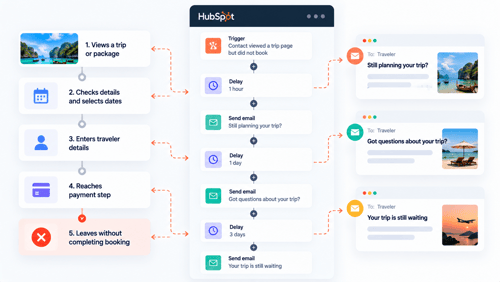
With the real failure points named, here's what an actual reminder setup looks like for each one.
Quote Sent, No Response
HubSpot's own documentation for quotes gives a close to ready-made pattern here: build a segment of quotes where the accepted date is unknown, the status is Published, and the expiration date is within a set number of days, then use that segment to trigger a reminder email to the buyer. See HubSpot's guide to using quote data in workflows.
For a higher-value quote, pair that with a second segment, quote amount above a set threshold with no acceptance after a week. That creates a task for the quote owner instead of another automated email, since a fifteen thousand dollar booking usually deserves a phone call over a fourth reminder email.
Worth knowing before building this: quotes require a Commerce Hub seat to use at all, and using quote properties inside workflows or custom reports needs a Professional or Enterprise subscription.
Deposit Link Sent, No Payment
If deposits collect through a HubSpot payment link tied to a deal, the deal itself is usually the cleanest trigger: a workflow enrolling deals that sit in a “Deposit Pending” stage for more than a set number of days, sending a reminder to the traveler and creating a task for the agent in parallel.
This is the same territory our piece on automating a travel agency's business in HubSpot covers for deposit and balance reminders generally, applied here specifically to the abandonment angle: catching it before the deal goes fully cold rather than after.
Balance Due, Not Yet Paid
This one runs on a custom departure date property rather than a deal stage, since the trigger isn't time since the deal moved, it's proximity to a real date. A workflow enrolling closed-won deals where departure date is a set number of days away and a balance-paid property isn't marked true sends an escalating reminder, starting as an email and moving to a task for the agent as the departure date gets closer.
This is the same departure date property our piece on building sales dashboards for a travel agency team uses for the upcoming-departures report, so building it once for reminders means that dashboard report comes almost for free afterward.
The earliest drop-off point, an inquiry that never gets a first response at all, is covered in more depth in our travel agency automation piece, since first-response automation is really its own topic rather than a reminder in the sense this article means.
The Part Everyone Skips: Making Sure Reminders Stop
This is the single most important mechanic in this whole piece, and it's the one most DIY workflows get wrong.
HubSpot's unenrollment triggers let a workflow remove a record the moment it meets a defined condition: a suppression segment, a workflow goal, or simply no longer matching the enrollment criteria. See HubSpot's guide to unenrollment triggers.
For a deposit reminder, the goal is straightforward: the deal moves to “Booked” or the balance-paid property flips to true, and the record should come out of the workflow immediately, not after whatever step it happened to be on when that happened.
Skipping this isn't a small bug. It's the difference between a system that looks thoughtful and one that embarrasses the business in front of a customer who already handed over their money.
Workflow Or Sequence? Choosing The Right Tool For Each Reminder
HubSpot has two different tools that both look like they could handle this, and picking the wrong one is a common mistake.
A workflow is system-level automation, built once and running for everyone who meets its criteria, and it's the right fit for the automated email and task-creation side of a reminder. A sequence is a personal, rep-led outreach cadence, built around one agent's voice and enrolled contact by contact. And it's the better fit once a booking is worth a real human follow-up rather than another templated email.
In practice, the higher-value quote example above often ends with a task that prompts the agent to manually enroll that specific traveler in a sequence, rather than trying to force a personal touch out of a system-level workflow.
What This Actually Requires In Your HubSpot Subscription
None of this is Enterprise-only, but it isn't all free either, and it's worth knowing exactly where the line sits before building around it.
|
Capability |
Minimum Tier |
Note |
|---|---|---|
|
Simple, single-step reminder email |
Marketing, Sales, or Service Hub Starter |
No branching, one trigger, one action |
|
Full workflow with branching and unenrollment triggers |
Marketing, Sales, or Service Hub Professional |
What most of the setups in this piece actually need |
|
Quote properties used in workflows or reports |
Professional or Enterprise, plus a Commerce Hub seat |
Needed for the quote-based reminder pattern |
|
Deal-based workflow on custom properties (departure date, balance paid) |
Sales Hub or Service Hub Professional |
Same tier as branching generally |
FAQs
Does HubSpot have a built-in “abandoned booking” trigger like an abandoned cart email?
No, not as a single built-in feature. HubSpot has abandoned cart functionality tied to connected e-commerce platforms, but a travel booking usually doesn't run through that kind of checkout. The workaround is building a small, targeted workflow around each real drop-off point instead, quote sent, deposit unpaid, balance due, rather than waiting for one feature to catch all of them.
How do I stop a reminder workflow from emailing someone after they've already paid?
Set an unenrollment trigger tied to a workflow goal, typically the deal reaching a certain stage or a balance-paid property becoming true. Without this, the workflow keeps running its full sequence regardless of what actually happened, which is the most common reason reminder automations end up embarrassing a business instead of helping it.
What HubSpot tier do I need to build quote reminder workflows?
Using quote properties inside a workflow needs a Professional or Enterprise subscription, plus a Commerce Hub seat to use quotes at all. A simpler, single-step reminder without branching or quote data can run on a Starter subscription, but it won't have the conditional logic that makes these reminders actually useful.
Should reminder emails come from an automated workflow or from the agent personally?
Both, at different points. Early, low-stakes reminders work fine as automated workflow emails. Once a quote is high value or has gone quiet past a reasonable point, a task prompting the agent to send a personal note, or a sequence enrollment, usually converts better than another automated message.
How many reminders is too many?
There's no universal number, but if open rates are dropping across a sequence or people are unsubscribing mid-series, that's the signal to cut it back before adding another step. Two or three well-timed touches, spaced days apart rather than hours, usually outperforms a longer sequence sent on a tighter cadence.
Maximize Your HubSpot Investment With HubXpert
A reminder workflow is easy to build and easy to build badly, and the difference usually isn't the email copy, it's the enrollment and unenrollment logic underneath it. HubXpert builds these systems for travel agencies and tour operators with the stop conditions built in from the start, not bolted on after something goes wrong.
This kind of workflow work sits naturally alongside the pipeline and reporting structure covered in our other travel pieces: deals vs custom objects for the data foundation, and sales dashboards for the reporting layer on top of it. We've built variations of this exact communication automation for travel and hospitality clients directly, including WhiteVillas, a resort and villa operator where the work covered the full pre-trip, in-trip, and post-trip reminder pattern. See our HubSpot Sales Hub implementation service for the fuller picture.
Senior RevOps Strategist at Hubxpert

Fazle Rabbi
Table of Contents:

Subscribe to our newsletter

3D Web Design Templates & Examples You Can Reuse
Browse 3D web design templates and examples, plus where to find free downloads, and see how 3D web page design lifts a site without slowing the site down.

3D Web Design Tools & Software Compared for 2026
Compare 3D web design tools and web based 3D design software, and see where 3D models and 3D assets for web design fit your existing front-end build pipeline.

HubSpot Onboarding Cost: What the Fee Really Covers
See what HubSpot onboarding cost covers, how onboarding fees get quoted and how to compare implementation quotes line by line before you commit to a partner.

HubSpot Enterprise Onboarding (What Changes by Tier)
See how HubSpot enterprise onboarding differs from Professional and Starter, covering advanced onboarding scope, admin training and what each tier includes.

Best HubSpot CRM Implementation Consulting Agencies for B2B
Compare 6 HubSpot partners for B2B with pros, cons, and pricing. Learn how to judge companies offering HubSpot implementation services and spot red flags.

How to Build a HubSpot Implementation Plan That Holds Up
Follow a HubSpot implementation plan covering scoping, data cleanup and go-live. Includes an implementation checklist and a realistic 60-day timeline.
-
3D Web Design Templates & Examples You Can Reuse
hello
-
3D Web Design Tools & Software Compared for 2026
hello
-
HubSpot Onboarding Cost: What the Fee Really Covers
hello
-
HubSpot Enterprise Onboarding (What Changes by Tier)
hello
-
Best HubSpot CRM Implementation Consulting Agencies for B2B
hello
-
How to Build a HubSpot Implementation Plan That Holds Up
hello