





-2.png)


-2.png)



.png)


.webp)

.png)










.png)







-1.webp)
-1.webp)



.webp)

-1-1.webp)



-2.webp)

-1-1.webp)

-2-1.png)

-1-1.webp)
-1-1.webp)
-1-1.png)







HubSpot onboarding is the initial structured setup process that turns a new portal into a working CRM with the right settings, clean data, connected tools, and workflows your team can use. A clear onboarding checklist helps you cover every setup step and avoid costly mistakes later.
HubSpot requires onboarding for its Professional and Enterprise plans. You can work directly with HubSpot or choose a Solutions Partner, depending on your needs.
HubSpot offers a structured, guided process where your team handles the implementation. A Solutions Partner can provide tailored, done-for-you support, including portal configuration, data cleanup, migration, integrations, and workflow setup.
This checklist covers the essential steps to configure HubSpot around your business needs and prepare your team to use it effectively.
Key Takeaways
- HubSpot requires onboarding on Professional and Enterprise plans. Free and Starter plans have no onboarding fee.
- HubSpot's onboarding is guidance. Someone on your side, or a partner, still builds the portal.
- Settle your goals, your portal owner, and your sales process before you configure anything.
- Clean your data first. HubSpot matches contacts by email and companies by domain, and a row with no identifier becomes a new record.
- A 30-day plan fits a small team on one or two hubs. Professional multi-hub and Enterprise rollouts take longer.
- Review adoption at day 30, then plan the next round of improvements.
What Does HubSpot's Own Onboarding Cover?
HubSpot requires onboarding on Professional and Enterprise plans, and what you get is guidance, not a finished build. Free and Starter plans carry no onboarding fee. (Source: "HubSpot's Marketing Hub pricing guide")
HubSpot's own onboarding page says the same in plain terms. You get technical and strategic guidance, and if you need someone to carry out the work, you should hire a certified Solutions Partner. (Source: "HubSpot Marketing Hub Onboarding")
For Marketing Hub Professional, the guidance covers how data lives in HubSpot, lead capture, segmentation, email, and analytics. It also covers content strategy, lead nurturing, and advice on importing CRM data. Enterprise adds calculated properties, custom reporting, permissions, team setup, and multiple brands.
The one-time fees are below, in US dollars. Our HubSpot pricing page lists them next to plan costs.
|
Hub |
Professional |
Enterprise |
|
Marketing Hub |
$3,000 |
$7,000 |
|
Sales Hub |
$1,500 |
$3,500 |
|
Service Hub |
$1,500 |
$3,500 |
A Solutions Partner can run onboarding in place of HubSpot. HubSpot expects the partner to hold live, private sessions tailored to you. It also expects work to start within 10 business days of your subscription start date, unless you set another timeline. (Source: "Solutions Partner Program Rules of Engagement") Ask any partner how they meet both points.
What Is the HubSpot Onboarding Process, Step by Step?
The HubSpot onboarding process runs in six phases, and each one depends on the one before it.
Step 01: Goals, owner & process
Every later choice needs a target and someone who decides.
Step 02: Data preparation
A row imported without a unique identifier becomes a new, duplicate record.
Step 03: Portal foundation
Users, properties, and pipelines must exist before data or workflows can use them.
Step 04: Import, integrations & automation
These need both the foundation and a clean file.
Step 05: Reports & training
Dashboards show whether the build works, and training shows people how to use it.
Step 06: Go-live and review
The first weeks reveal gaps that no test caught.
Phases 1 and 2 can overlap. Mapping your process and cleaning your data do not depend on each other, so run them in the same week. Do not start the portal build until the process is written down, or you will rebuild your pipelines.
HubSpot Onboarding Checklist You Need by Phase
Use these lists as a working HubSpot onboarding guide. Finish each phase before you start the next one.
Phase 1: Goals, owner & process
- Write down the problems HubSpot must solve, in priority order.
- Name one portal owner who joins every session and makes the decisions.
- Draft your sales process: the stages, what a deal needs to enter each one, and who moves it.
- Pick the hubs and tier to onboard first. Add the rest later.
- Collect access to the email, calendar, ad, and social accounts you will connect.
- Confirm the budget for the subscription, the onboarding fee, and any partner work.
Phase 2: Data preparation
- List every system that holds contacts, companies, deals, or tickets, and who owns each one.
- Pick the unique identifier for each object. HubSpot matches contacts by email and companies by domain name, and a row with neither becomes a new record.
- Remove duplicates and blank rows. Standardize dates, phone numbers, currencies, and dropdown values.
- Map each column to a HubSpot property, and create any custom properties first.
- Import a small sample file and check the result before the full load.
- To update existing records, export them first and add the Record ID column to your file.
An import only updates the properties you map, and it never deletes existing records. (Source: "Deduplicate records in HubSpot")
Phase 3: Portal foundation
- Set account defaults: company name, time zone, currency, branding, and the tracking code.
- Add users and set permissions by role. Give each person the least access that lets them do the job.
- Create lifecycle stages and lead statuses that match your process.
- Build deal pipelines and set the required properties for each stage.
- Add custom properties and the associations between contacts, companies, and deals.
- Connect your email sending domain and set up SPF, DKIM, and DMARC.
Phase 4: Import, integrations & automation
- Run the full import once the sample passes.
- Check the App Marketplace for a native integration before you plan a custom one.
- Automate lead routing, owner assignment, and task creation.
- Add lifecycle updates and internal notifications.
- Test each workflow on a test record before you turn it on.
Phase 5: Reports & training
- Build one dashboard per role, so each manager sees the numbers they own.
- Check that tracking data lands in the right properties.
- Hold live training by role and record every session.
- Write a short playbook for daily moves, such as how to advance a deal or escalate a ticket.
- Give each team one place to ask questions after training.
Phase 6: Go-live & review
- Validate the imported data, the workflows, and the reports before you switch over.
- Confirm user access one more time.
- Decide which old processes stay and which end, and set the date.
- Schedule adoption reviews at day 30 and day 60.
- Log gaps and fixes in one shared list.
HubSpot Onboarding Template You Can Copy
Copy this HubSpot onboarding template into a sheet or your task tool, then swap the roles for real names. Dates assume a kickoff on day 1 and a small team on one or two hubs.
|
Task |
Owner |
Due (day) |
Done when |
|
Sign off goals and success measures |
Portal owner |
3 |
One-page goal sheet is approved |
|
Write the sales process: stages and entry rules |
Sales lead |
5 |
Process document is shared |
|
List data sources and pick unique identifiers |
Data owner |
5 |
Source list shows an identifier per object |
|
Clean and map data, run a sample import |
Data owner |
10 |
Sample rows land in the right properties |
|
Set account defaults, users, and permissions |
Portal admin |
10 |
Every user has the right access |
|
Build properties, pipelines, and lifecycle stages |
Portal admin |
14 |
Pipelines match the written process |
|
Authenticate the email sending domain |
Portal admin |
14 |
SPF, DKIM, and DMARC checks pass |
|
Run the full import |
Data owner |
18 |
Record counts match the source |
|
Connect integrations |
Portal admin |
21 |
Test records sync both ways |
|
Build and test workflows |
Portal admin |
24 |
Each workflow passes a test record |
|
Build one dashboard per role |
Team managers |
24 |
Each manager signs off on their numbers |
|
Hold role-based training and record it |
Portal owner |
27 |
Recordings and a playbook are shared |
|
Validate data, workflows, and reports, then go live |
Portal owner |
30 |
Go-live checklist is complete |
|
Hold the first adoption review |
Portal owner |
30 |
Gap list has an owner for each item |
What Does a 30-Day HubSpot Onboarding Plan Look Like?
A 30-day HubSpot onboarding plan has four weeks, and each week ends with a check you must pass before the next one starts.
Four weeks, four gates: no phase starts until its check passes:
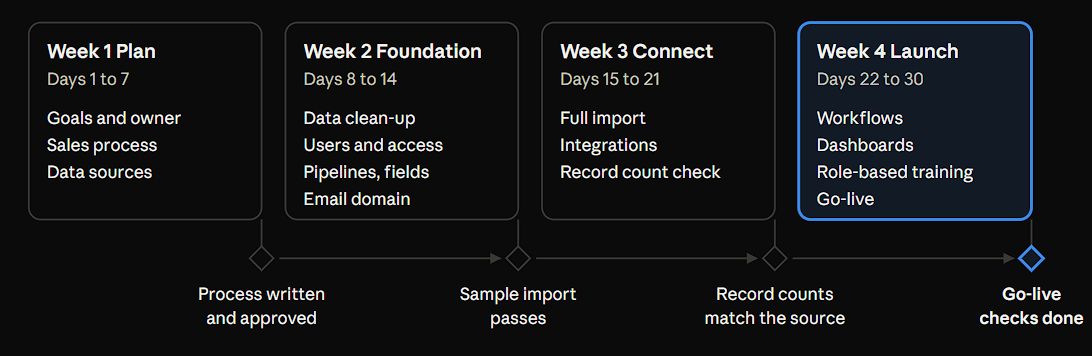
Weeks 1 and 2 are mostly decisions and clean data. Weeks 3 and 4 are building, testing, and training. That order keeps you from rebuilding pipelines or importing twice.
Thirty days fits a small team on one or two hubs. Bigger rollouts need more time. Our HubSpot onboarding packages put Starter at 2 to 3 weeks and Professional at 4 to 6 weeks. Enterprise takes longer, because custom objects, advanced permissions, and multiple brands add work.
Which Mistakes Slow a HubSpot Onboarding Down?
Any HubSpot onboarding guide should warn you about five choices that cost the most time. All five happen in the first two weeks.
- Importing before you pick unique identifiers. A row with no email or domain becomes a new record, so one person or company can appear twice. (Source: "Deduplicate records in HubSpot")
- Building pipelines before the process is written. The stages keep changing while the team debates them, and each change means rework.
- Running the portal without one owner. Every open question then waits for a meeting.
- Expecting HubSpot's onboarding to build the portal for you. It guides you, so someone on your side has to configure it, or you hire a partner.
- Buying every hub at once. Start with the hubs your team will use this quarter and add the rest later.
Should You Onboard With HubSpot, a Partner or Your Own Team?
Pick the route that matches who will do the configuring. The checklist above works for all three.
|
Route |
Who builds |
Cost to plan for |
Fits when |
|
Self-setup on Free or Starter |
Your own team |
No onboarding fee |
You are a small team with simple needs |
|
HubSpot onboarding on Professional or Enterprise |
Your team, guided by a HubSpot specialist |
$1,500 to $7,000 one time, by hub and tier |
You have an admin with the time and the HubSpot skills |
|
Partner-led onboarding |
The partner's team |
The partner's package price. HubXpert's start at $2,000 (Starter), $3,000 (Professional), and $6,000 (Enterprise) |
You want the portal built, not only explained |
If you are weighing a partner, our page on why businesses work with HubSpot partners explains what a partner adds. Ask every partner four things:
- Who does the work, and are they certified?
- Can I see the scope in writing before work starts?
- How is training delivered: live, recorded, or both?
- What support do I get after go-live?
FAQs
How long does HubSpot onboarding take?
It depends on your plan, your hubs, and how clean your data is. A small team on one or two hubs can finish in 30 days with the plan above. HubXpert quotes Starter at 2 to 3 weeks and Professional at 4 to 6. The HubSpot pages we reviewed give no fixed length for HubSpot's own program, so ask your specialist for a dated plan at kickoff.
How much time will my team need to give during onboarding?
Plan for a few hours a week, plus one accountable owner. That is what HubXpert asks for during kickoff, reviews, and testing. Each team also names one contact who can confirm decisions only your business can make. Put those hours on the calendar before kickoff.
What file formats and limits apply to a HubSpot import?
Use a .csv, .xlsx, or .xls file with one sheet and a header row. Keep it under 1,000 columns, and save it as UTF-8 if it has non-English characters. On Starter, Professional, and Enterprise plans, a file can hold up to 512 MB and 1,048,576 rows. Free tools cap files at 20 MB. (Source: "Format import files")
Will blank cells in my import file clear existing data?
No. The import tool ignores blank cells, so a blank never clears a value that already exists in HubSpot. To clear values in bulk, use bulk edit or the Edit records workflow action. Leave cells blank only for records that have no value yet. (Source: "Format import files")
Does HubSpot onboarding include data migration?
It includes advice, not the move itself. HubSpot's Professional onboarding offers consulting on migrating or importing data from your CRM, and a partner does the hands-on work. HubXpert scopes complex CRM-to-CRM migrations separately from its onboarding packages, so ask what your quote covers before you sign. (Source: "HubSpot Marketing Hub Onboarding")
Who owns the portal and data after a partner finishes?
You own both. HubSpot's partner agreement says the customer keeps the right to use its portal and owns its data, whoever placed the order. HubXpert says the subscription and account stay yours, and the work lives inside your portal if you later change providers. (Source: "HubSpot Solutions Partner Program Agreement")
Can a partner take over an onboarding that is half built?
Yes, and many partners audit it first. HubXpert reviews what is there, tells you what is usable, and picks up from that point. It bills custom onboarding at $40 an hour for cases like a half-built portal. Ask for the audit findings in writing before you approve new work.
Is there free training I can do before onboarding starts?
Yes. HubSpot Academy offers free online training, and you can try features in a 14-day free trial before you buy. Paid plans also include 24/7 customer support. Use the trial to practice the import and pipeline steps from this HubSpot onboarding checklist before your first call. (Source: "HubSpot's Marketing Hub pricing guide")
Final Thoughts
Work through this HubSpot onboarding checklist in order. Do not skip the two cheap steps: writing your process down before the build, and importing a small sample before the full file. Both are quick, and both prevent the rework that stretches an onboarding.
Put the day-30 review on the calendar on day 1. That is when you will see which workflows nobody uses and which fields reps skip. Fix those first.
Want a partner to build while you make the decisions? Book a 30-minute call with our team and bring your goal sheet.
As a Hubspot Automation Developer at Hubxpert, I specialize in API integration, seamlessly connecting HubSpot with third-party applications. My role encompasses understanding client needs, crafting custom code solutions, and ensuring the smooth operation of our automation workflows. I actively address any HubSpot integration challenges and stay updated with the platform's latest advancements. My dedication ensures clients harness the full potential of HubSpot.

Tanzinul Kabir
Table of Contents:

Subscribe to our newsletter

Is HubSpot CRM Logistics Integration Free for Your Business?
Wondering if a HubSpot CRM logistics integration is free? See what native tools cover and when carrier, insurance or hotel PMS systems need custom work.
HubSpot ERP Integration & Ecommerce Data Sync
Plan HubSpot ERP integration so orders, invoices and stock stay aligned, then compare ecommerce integrations with the cases that genuinely need custom work.
Is HubSpot CRM Natively Integrated in Marketing Hub?
Yes, the HubSpot CRM sits inside Marketing Hub, so both share one database. Compare native integrations with custom builds and the third-party CRM options.

HubSpot SMS Integration for Reminders & Replies
Compare HubSpot SMS integration options and set up text messaging for appointment reminders, delivery alerts and two-way replies from one shared team inbox.

The Best HubSpot Integrations & What Each One Fixes
See the best HubSpot integrations grouped by the problem they solve, from billing and CPQ to webinar and commission tracking, and know what to add first.
.webp)
Choosing Webinar Platforms That Integrates With HubSpot
Pick a webinar platform that integrates with HubSpot and keep registrations, attendance and follow-up in one place. Compare sync depth and reporting quality.
-
Is HubSpot CRM Logistics Integration Free for Your Business?
hello
-
HubSpot ERP Integration & Ecommerce Data Sync
hello
-
Is HubSpot CRM Natively Integrated in Marketing Hub?
hello
-
HubSpot SMS Integration for Reminders & Replies
hello
-
The Best HubSpot Integrations & What Each One Fixes
hello
-
Choosing Webinar Platforms That Integrates With HubSpot
hello