





-2.png)


-2.png)



.png)


.webp)

.png)










.png)







-1.webp)
-1.webp)



.webp)

-1-1.webp)



-2.webp)

-1-1.webp)

-2-1.png)

-1-1.webp)
-1-1.webp)
-1-1.png)







Ever seen an order total in your store, a different amount on the invoice in your ERP, and a third number on the deal in HubSpot?
That's not a bug in any one tool. It's what happens when nobody decides which system owns which record. Every tool keeps its own version of the truth, and without rules the versions drift apart.
In this guide, I'll walk you through HubSpot ERP integration, from deciding who owns what to the records worth syncing. Then I'll cover ecommerce data sync, including marketing platforms like Klaviyo, and the cases that genuinely need custom work.
Key Takeaways
-
Decide which system owns each record before you pick a tool.
-
HubSpot has Orders and Carts objects with public APIs, so stores and ERPs can sync orders without forcing them into deals.
-
HubSpot's Shopify app brings orders in one way only. You can't edit them in HubSpot.
-
Marketing platforms like Klaviyo connect through paid third-party apps, so watch consent and marketing contact counts.
-
Custom work pays off when no app fits. Check a partner's accreditation on HubSpot's directory.
How Does HubSpot ERP Integration Work?
You pick one of three routes: a marketplace app, an integration platform (iPaaS), or a custom build on HubSpot's API. Whichever you pick, answer one question first: which system owns each record?
A marketplace app is the quickest start, but it only covers the tools it was built for. An iPaaS sits between the two systems and gives you more connectors, at the cost of another subscription. A custom build gives you full control, and you own the upkeep.
The ownership question matters more than the route. Here's a common split, not the only one:
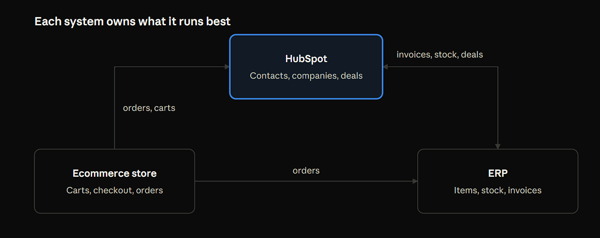
HubSpot isn't an ERP, and an ERP isn't a CRM. Let each system own what it runs best, and let the others read it.
Which Records Should Sync Between HubSpot and Your ERP?
Sync the records both teams touch, and keep each one editable in only one place. Here's the map I'd start from:
|
Record |
Owner |
Direction |
Why |
|
Contacts and companies |
HubSpot |
Two-way |
Sales and marketing edit them daily |
|
Deals |
HubSpot |
HubSpot to ERP when won |
A won deal can start an order |
|
Orders |
ERP or store |
Into HubSpot, read-only |
HubSpot reports on them but doesn't change them |
|
Items and prices |
ERP |
ERP to HubSpot |
One catalog, never edited twice |
|
Stock levels |
ERP |
ERP to HubSpot, read-only property |
Reps can see it, nobody can type over it |
|
Invoices and payments |
ERP |
Into HubSpot |
Finance stays the source of truth |
Add a shared ID to every synced record, such as the ERP customer number stored on the HubSpot company. Matching on email alone breaks when two customers share an address.
HubSpot now has public APIs for its Orders and Carts objects. Its changelog says ecommerce platforms can sync transactions straight to HubSpot, and ERP systems can sync sales orders. That ends the old workaround of stuffing orders into deals. (Source: "New public APIs for Orders and Carts objects")
What Does a HubSpot Ecommerce Integration Sync?
For Shopify, HubSpot's own data sync app moves customers, companies, products, orders, and carts. Customers and products sync both ways. Orders and abandoned checkouts come into HubSpot one way.
|
Shopify |
HubSpot |
Direction |
|
Customers |
Contacts |
Both ways |
|
Products |
Products |
Both ways |
|
Orders |
Orders |
Shopify to HubSpot |
|
Abandoned checkouts |
Carts |
Shopify to HubSpot |
The strings matter as much as the table. Orders can't be changed in HubSpot, because they sync one way. Shopify metafields aren't supported. And you need at least Data Hub Starter to create custom field mappings. (Source: "Connect HubSpot and Shopify (Data Sync)")
Other HubSpot ecommerce integrations differ, so read each app's direction table before you plan around it. HubXpert's SemiProbe project is a WooCommerce example. The store and HubSpot were synced so purchases and inquiries logged against the contact record. Dashboards then tracked order status, stock availability, and fulfillment.
Can You Integrate HubSpot With Ecommerce Marketing Automation Platforms?
Can you integrate HubSpot with ecommerce marketing automation platforms? Yes, and the connection usually comes from a third party. HubSpot's Klaviyo listing shows how. The app is built by KAV Labs, a Klaviyo partner, and it needs a Klaviyo plan plus a KAV Labs subscription. It syncs contacts both ways and shows Klaviyo email activity on the HubSpot contact timeline. (Source: "Klaviyo on the HubSpot Marketplace")
Two things can go wrong. First, two systems may email the same person. Decide which one sends what, and write it down. Second, synced contacts can raise your HubSpot bill. HubSpot says some tools set contacts as marketing contacts automatically, and you can change that tool setting. (Source: "Understand marketing contacts billing")
Test consent before you go live. Sync one contact, unsubscribe in each tool in turn, and see whether the other tool follows.
When Does Ecommerce Need Custom Work?
When the native app can't carry a field, a platform, or a rule you depend on. The table shows where that usually happens.
|
Your situation |
Native app enough? |
What custom looks like |
|
A standard Shopify store with standard fields |
Usually |
Nothing to build |
|
Data you keep in Shopify metafields |
No, the sync doesn't support them |
A build that moves those fields |
|
A platform with no HubSpot-built app |
Check the marketplace first |
A build on the Orders and Carts APIs, or the ecommerce bridge |
|
Orders or invoices made in an ERP that HubSpot should show |
Rarely |
A build that writes sales orders through the Orders API |
|
B2B quotes with fees or one-time discounts at quote level |
No, HubSpot quotes don't support those at quote level |
A third-party CPQ or custom quoting |
The ecommerce bridge is HubSpot's older route for custom stores. You install it in a portal, map your properties to HubSpot's, and sync. Ask your developer which path they plan to use before you scope the work. (Source: "Ecommerce Bridge: where to start")
HubSpot's quotes API says one-time discounts, taxes, fees, and payment schedules aren't supported on quotes. You set discounts and tax rates on line items instead. (Source: "Quotes API")
When custom is the answer, build it around your fields and your owners. That's the job of a custom HubSpot integration, and it should start from the ownership map above.
How Do You Compare HubSpot Integration Specialists for Ecommerce Platforms?
Check HubSpot's own directory first, then ask for proof on your platform. HubSpot's Solutions Directory lets you filter partners by accreditation. The Custom Integration Accreditation is for partners who custom-build integrations with HubSpot's developer tools. (Source: "HubSpot solutions partner accreditations")
The bar is real. HubSpot's February 2024 preparation guide says an applicant had to show a custom integration project from the prior 12 months, built with custom code or an iPaaS other than Zapier. Marketplace connectors and native solutions didn't count, and the applicant had to be a Platinum, Diamond, or Elite partner. HubSpot may have changed the rules since, so confirm on the directory who holds it today. (Source: "Custom Integration Accreditation preparation guide")
An accreditation shows a partner has built custom work. It doesn't show they've synced your platform. When you compare HubSpot integration specialists for ecommerce platforms, ask each one these questions:
|
Question |
A good answer sounds like |
|
Which ecommerce platform have you synced, and which objects? |
It names the platform and the objects: orders, carts, products, customers |
|
Do orders go to the Orders object or into deals, and why? |
A reasoned choice tied to your reporting |
|
How do you handle retries and duplicates? |
A queue and a shared matching ID |
|
Who watches the sync after launch? |
A named owner and a monitoring plan |
|
Can I see a field map from a similar project? |
A sample with client details removed |
If the storefront is part of the project, the same team can build it as a HubSpot ecommerce store, so the site and the sync are designed together.
What Breaks After the Sync Goes Live?
Ownership, limits, and one-way rules. These are the failures to test for first:
|
What you see |
Likely cause |
What to check |
|
A rep can't change an order in HubSpot |
Shopify orders sync one way, and HubSpot doesn't let you edit them |
Make order changes in the store or ERP, and let them flow in |
|
Custom product data is missing |
Shopify metafields aren't supported by the data sync |
Decide whether a custom build should carry those fields |
|
Cart workflows stopped working |
Custom cart mappings added before April 1, 2025 need manual reconfiguration |
The cart sync mappings in the app settings |
|
Two systems keep overwriting one field |
Both are allowed to write to it |
Name one owner per field and make the other read-only |
|
Calls fail with 429 errors |
The shared daily API pool ran out |
API usage in your account, and every app that draws from it |
The API pool deserves a second look. Every app and custom build in your account draws from one daily limit. HubSpot's limits depend on your plan, from 250,000 calls a day on Free and Starter to 1,000,000 on Enterprise, and past a limit HubSpot returns 429 errors. A busy ERP sync can use up calls your store app needs. (Source: "API usage guidelines and limits")
Test in a safe account first. HubSpot offers a free developer test account with sample data, so you can break things without touching live orders.
FAQs
Do I Need Data Hub for an ERP Integration?
It depends on the route. For HubSpot-built data sync apps, custom field mappings need at least Data Hub Starter. Custom code actions in workflows need Data Hub Professional or Enterprise. A build on HubSpot's APIs has its own plan requirements for each object, and the API reference for that object lists them.
Where Should Stock Levels Live?
In the ERP. Treat it as the source for stock. If reps need to see it, sync it into a read-only HubSpot property so nobody edits it by hand.
Can HubSpot Create Orders in My ERP?
Only with an integration. A closed-won deal can start an order in the ERP, and the ERP's order can come back to HubSpot through the Orders API. HubSpot doesn't create ERP orders on its own, so something has to carry the data and own the retries.
Do Shopify Orders Become Deals?
No. HubSpot's data sync brings Shopify orders into the Orders object, linked to the customer and the products, and you can't edit them in HubSpot. If your sales process needs a deal, you build that link yourself.
Will Old Orders Sync Too?
For Shopify, HubSpot's marketplace listing says the app includes an automatic historical data sync. For an ERP or a custom store, past orders are a data move, not a sync setting. Scope them in an ecommerce data HubSpot migration so orders, customers, and products arrive together. (Source: "Shopify on the HubSpot Marketplace")
Final Thoughts
Start with the ownership map, not the app. A HubSpot ERP integration holds up when every record has one owner, every sync has a direction, and someone watches the log.
Before launch, push five orders through: a normal one, a canceled one, a changed one, one for a new customer, and one for a customer who already exists. Open the store, the ERP, and HubSpot after each. If all three agree, you're ready.
Senior RevOps Strategist at Hubxpert

Fazle Rabbi
Table of Contents:

Subscribe to our newsletter
HubSpot ERP Integration & Ecommerce Data Sync
Plan HubSpot ERP integration so orders, invoices and stock stay aligned, then compare ecommerce integrations with the cases that genuinely need custom work.

Is HubSpot CRM Natively Integrated in Marketing Hub?
Yes, the HubSpot CRM sits inside Marketing Hub, so both share one database. Compare native integrations with custom builds and the third-party CRM options.

HubSpot SMS Integration for Reminders & Replies
Compare HubSpot SMS integration options and set up text messaging for appointment reminders, delivery alerts and two-way replies from one shared team inbox.

The Best HubSpot Integrations & What Each One Fixes
See the best HubSpot integrations grouped by the problem they solve, from billing and CPQ to webinar and commission tracking, and know what to add first.
.webp)
Choosing Webinar Platforms That Integrates With HubSpot
Pick a webinar platform that integrates with HubSpot and keep registrations, attendance and follow-up in one place. Compare sync depth and reporting quality.

HubSpot Phone Integration for VoIP & Call Logging
Compare HubSpot phone integration options for VoIP, answering services and call logging, and see how phone system integration keeps calls on the CRM record.
-
HubSpot ERP Integration & Ecommerce Data Sync
hello
-
Is HubSpot CRM Natively Integrated in Marketing Hub?
hello
-
HubSpot SMS Integration for Reminders & Replies
hello
-
The Best HubSpot Integrations & What Each One Fixes
hello
-
Choosing Webinar Platforms That Integrates With HubSpot
hello
-
HubSpot Phone Integration for VoIP & Call Logging
hello