





-2.png)


-2.png)



.png)


.webp)

.png)










.png)







-1.webp)
-1.webp)



.webp)

-1-1.webp)



-2.webp)

-1-1.webp)

-2-1.png)

-1-1.webp)
-1-1.webp)
-1-1.png)







Is HubSpot CRM natively integrated in Marketing Hub? Yes. But the word "integrated" hides what really happens, and that's where teams get stuck.
Marketing Hub doesn't connect to the CRM. It runs on it. HubSpot's Smart CRM is the one database underneath every hub, so a form filled in Marketing Hub lands on the same record your sales team sees. There's no sync to set up, because there's nothing to sync.
In this guide, I'll walk you through what "native" means in HubSpot, what Marketing Hub adds on top of the CRM, and when a custom build beats a native app. I'll also cover what changes if your CRM is Salesforce, because that's where "native" gets complicated.
Key Takeaways
-
Yes. Marketing Hub runs on HubSpot's Smart CRM. There's nothing to connect.
-
Only marketing contacts count toward Marketing Hub billing and marketing tools.
-
A native integration is a prebuilt app. A custom one is built for your data.
-
Marketing Hub on top of another CRM means two databases and a sync to manage.
-
If the sync costs more than a move, consider migrating.
Is HubSpot CRM Natively Integrated in Marketing Hub?
Yes. HubSpot describes its free Smart CRM as the underlying database that powers each HubSpot product, Marketing Hub included. (Source: "HubSpot services descriptions")
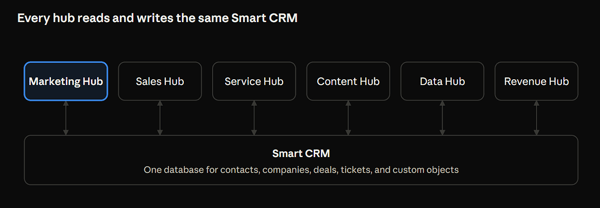
That design has a plain consequence. When a visitor fills in a Marketing Hub form, HubSpot writes the contact to the CRM. A rep opens the same record in Sales Hub, and a support agent sees it in Service Hub. No connector moves data between them, so nothing can fall out of step.
One naming note. Older articles call the hubs Operations Hub, Commerce Hub, and CMS Hub. HubSpot's current product menu lists Data Hub, Revenue Hub, and Content Hub. They run on the same CRM under the new names.
What Does Marketing Hub Add to the CRM?
Marketing tools, and one billing rule. The CRM holds every contact you have. Marketing Hub bills you only for the ones you market to, which HubSpot calls marketing contacts. Only marketing contacts count toward your contact tier and affect your subscription cost.
That status also decides which tools work for a contact:
|
Tool or email type |
Works for non-marketing contacts? |
|
Marketing emails, including follow-ups after form submissions |
No |
|
Contact segments used as ad audiences |
No |
|
Marketing actions in workflows, such as Send email |
No |
|
Sales one-to-one emails and sequences |
Yes |
|
Transactional emails and customer feedback surveys |
Yes |
So "natively integrated" does not mean every record gets marketing treatment. The database is shared. The marketing tools run only on the contacts you mark for them. (Source: "Understand marketing contacts")
What Are HubSpot Native Integrations?
They're prebuilt connections between HubSpot and another tool. The word "native" gets used loosely, so look at who built the app and how it moves data.
HubSpot native integrations come in a few kinds. Some are built by HubSpot itself, such as its QuickBooks Online app, and the marketplace listing says so. Some are built by the other vendor and carry a HubSpot Certified App badge. Others are plain third-party apps with no badge. (Source: "QuickBooks Online on the HubSpot Marketplace")
Many of HubSpot's own apps run on data sync, which moves records between HubSpot and the other tool in one or both directions. HubSpot said in 2022 that it had built more than 100 data sync apps. (Source: "HubSpot's App Ecosystem Surpasses 1,000 Integrations")
Here's the point to remember. A native integration connects HubSpot to something else. Marketing Hub and the CRM aren't two things, so they don't need one.
Custom vs. Native HubSpot Integrations: Which Do You Need?
Use a native app when one covers your tool and your fields. Build custom when it doesn't. That's the whole rule, and the table shows where the line usually falls.
|
Your situation |
Better fit |
Why |
|
A marketplace app covers your tool and the data you need |
Native |
Nothing to build or maintain |
|
The app syncs, but misses a field or object you need |
Custom |
A custom build maps exactly what you name |
|
You need logic between systems, such as conditions or transformations |
Custom code action, or a custom build |
Native apps ship with their own mappings |
|
No marketplace app exists for the tool |
Custom |
There is no native option to choose |
|
The sync is simple and rarely changes |
Native |
Less to go wrong |
Native apps have limits you can find before you commit. HubSpot's QuickBooks Online app, for example, warns that QuickBooks allows at most three custom fields on invoices, and that changing default field mappings needs Data Hub Starter or higher.
Custom doesn't always mean a full build. Data Hub Professional and Enterprise accounts can add a custom code action to a workflow, which runs JavaScript or Python inside HubSpot. (Source: "Custom code actions") When the need goes past a workflow, a custom HubSpot integration connects HubSpot to your systems through its APIs.
HubSpot CRM Integration with Other CRMs vs Native: What Changes?
The database stops being shared. You can run Marketing Hub on top of another CRM, such as Salesforce, but then you have two databases and a sync between them. That sync is HubSpot's native Salesforce integration.
Here's what HubSpot says about it. It's available with Professional or Enterprise subscriptions of Marketing Hub, Sales Hub, Service Hub, Content Hub, and Data Hub, and with Smart CRM Professional or Enterprise. You need a Salesforce edition with API access, or Salesforce Professional. HubSpot doesn't support Salesforce Group Edition. And records don't sync on their own after install. You import them, or let them sync gradually as triggers fire. (Source: "Connect HubSpot and Salesforce")
The comparison is simple. With the native CRM, one record exists and marketing and sales both edit it. With a HubSpot CRM integration with other CRMs, two records exist for each person. The integration decides which one wins, when, and for which fields.
What Breaks When Marketing Hub Sits on Another CRM?
Sync rules do, because now you own them. These are the failures to test for first, using HubSpot's Salesforce integration as the example:
|
What you see |
Likely cause |
What to check |
|
Leads never appear in HubSpot |
The connected Salesforce user can't view the lead object |
That user's Salesforce permissions |
|
A contact never reaches Salesforce |
It isn't in the inclusion list |
The inclusion list in HubSpot |
|
Older records are missing after setup |
Records don't sync automatically after install |
Import them, or let triggers sync them over time |
|
Marketing email history is missing in Salesforce |
Only email events within 30 days of the contact's first sync are sent |
The timeline sync rules |
|
Activities show on one side only |
The activity sync may run one way |
The sync direction setting |
The connected user's permissions are the quiet one. HubSpot can only do in Salesforce what that user can do. If the permissions are narrow, the sync is narrow, and records can go missing without an obvious reason. The 30-day email rule and the sync direction setting come from HubSpot's activity sync article. (Source: "Sync activities and tasks between HubSpot and Salesforce")
Should You Go Native, Build Custom, or Move to HubSpot CRM?
Pick by where your sales team works and what your data needs. Here's how I'd sort the common cases:
|
Your situation |
Best path |
Watch for |
|
You have no CRM yet, or you run on spreadsheets |
HubSpot's free CRM with Marketing Hub |
Set marketing contact status on purpose, because it drives cost |
|
Sales lives in Salesforce and marketing wants HubSpot |
The native Salesforce integration |
The inclusion list, the connected user's permissions, and sync direction |
|
Your tool has no native app, or the app misses data you need |
A custom integration |
API limits and a named owner for the build |
|
You pay for two CRMs and fight sync errors |
Consider moving to HubSpot's CRM |
What history and fields must come across |
|
Another system holds years of contact history you want in HubSpot |
A migration |
Scope activity history, not only contacts |
If the sync costs more in time and errors than a move would, treat a HubSpot migration as the real alternative to the integration. Decide what must come across before you start: records, fields, and the activity history your team relies on.
FAQs
Is the HubSpot CRM Free With Marketing Hub?
The CRM is free, and Marketing Hub is what you pay for. HubSpot describes its Smart CRM functionality as free, with paid hub editions on top. HubSpot also sells Smart CRM as its own Professional and Enterprise subscriptions. Either way, you never buy the CRM database separately to use Marketing Hub.
Do All My Contacts Count Toward Marketing Hub Billing?
No. Only marketing contacts count toward your contact tier. A change to non-marketing takes effect on the next monthly update date, and HubSpot doesn't lower a tier mid-term. Downgrades happen at renewal. Watch your count so an automatic tier upgrade doesn't surprise you. (Source: "Understand marketing contacts billing")
Do Native Integrations Sync in Real Time?
It depends on the app. HubSpot's QuickBooks Online listing says invoices created in HubSpot reach QuickBooks within minutes. The Salesforce integration syncs records when triggers fire, such as a form submission or a marketing email event. Ask each vendor how long a change takes, then time one yourself.
Can One HubSpot Account Connect to Two Salesforce Instances?
No. HubSpot allows one Salesforce instance per HubSpot account. To link several HubSpot accounts to one Salesforce instance, install the integration in each HubSpot account.
Does the HubSpot Salesforce Integration Cost Extra?
HubSpot's article lists it with Professional and Enterprise subscriptions. You also need a Salesforce edition with API access, or Salesforce Professional, and that cost sits on the Salesforce side. Confirm with HubSpot whether any add-on applies to your plan before you budget the project.
Can I Use Marketing Hub Without Sales Hub?
Yes. Marketing Hub has its own Starter, Professional, and Enterprise editions, and it runs on the CRM whether or not you buy Sales Hub.
Final Thoughts
HubSpot CRM is built into Marketing Hub, so you can manage contacts, track interactions, and connect marketing activities without setting up a separate CRM. The real work is making sure your data, properties, lists, and workflows are organized around how your team operates.
Start with your contact structure, define how leads move through your funnel, and connect the tools you already use. If your setup involves multiple teams, complex processes, or custom integrations, getting the configuration right early can save you a lot of cleanup later.
Founder & CEO @ Hubxpert. My goal is to make every company using HubSpot succeed in their marketing organisation and automation.

Ratul Rahman
Table of Contents:

Subscribe to our newsletter
Is HubSpot CRM Natively Integrated in Marketing Hub?
Yes, the HubSpot CRM sits inside Marketing Hub, so both share one database. Compare native integrations with custom builds and the third-party CRM options.

HubSpot SMS Integration for Reminders & Replies
Compare HubSpot SMS integration options and set up text messaging for appointment reminders, delivery alerts and two-way replies from one shared team inbox.

The Best HubSpot Integrations & What Each One Fixes
See the best HubSpot integrations grouped by the problem they solve, from billing and CPQ to webinar and commission tracking, and know what to add first.
.webp)
Choosing Webinar Platforms That Integrates With HubSpot
Pick a webinar platform that integrates with HubSpot and keep registrations, attendance and follow-up in one place. Compare sync depth and reporting quality.

HubSpot Phone Integration for VoIP & Call Logging
Compare HubSpot phone integration options for VoIP, answering services and call logging, and see how phone system integration keeps calls on the CRM record.

How HubSpot API Integration Handles Form Submissions
Learn how HubSpot API integration handles form submissions, how to catch validation errors and when a custom build beats the native form embed in production.
-
Is HubSpot CRM Natively Integrated in Marketing Hub?
hello
-
HubSpot SMS Integration for Reminders & Replies
hello
-
The Best HubSpot Integrations & What Each One Fixes
hello
-
Choosing Webinar Platforms That Integrates With HubSpot
hello
-
HubSpot Phone Integration for VoIP & Call Logging
hello
-
How HubSpot API Integration Handles Form Submissions
hello