





-2.png)


-2.png)



.png)


.webp)

.png)










.png)







-1.webp)
-1.webp)



.webp)

-1-1.webp)



-2.webp)

-1-1.webp)

-2-1.png)

-1-1.webp)
-1-1.webp)
-1-1.png)







On HubSpot's own community forum, a travel agency owner described a problem that will sound familiar to a lot of agencies. Their team asks each traveler to fill out a form for every trip. But their CRM view only ever shows the most recent one.
Book someone in March and again in October, and by November nobody can pull up what happened in March without digging back through old emails.
That's not really a HubSpot problem. It's what happens when a system built around one deal per contact runs into a business where the same traveler books three or four times a year, and every one of those trips has its own dates, its own price, and its own paperwork.
Why Travel Agencies Need Automation
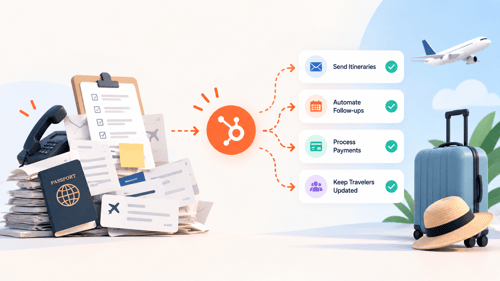
A travel agency's day doesn't run on one process. It runs on dozens of small, repeatable ones happening at once. A form comes in for a Bali honeymoon. A deposit is due on a group ski trip in nine days.
A family that traveled with you last summer hasn't heard from you since. None of these are hard problems individually. They become a problem when a two-person team is the only thing keeping track of all of them by memory.
The failure pattern is usually quiet. A $12,000 itinerary quote goes out on a Tuesday afternoon. Nobody follows up because the agent who sent it is now on the phone with three other inquiries.
Three weeks later, that family has booked the same trip with a competitor who called them back the same day. Nothing dramatic happened. There was just no system forcing a second touch.
Automation in this context isn't about replacing agents with bots. Travel is still a relationship-driven sale, most people want to talk to a human about a five-figure vacation.
What automation actually does is guarantee that the boring, time-based parts (the confirmation email, the deposit reminder, the "it's been six days and nobody replied" flag) happen every time, so agents spend their hours on the parts that need a human: understanding what a traveler actually wants and closing the sale.
6 Ways HubSpot Benefits Travel & Hospitality Businesses
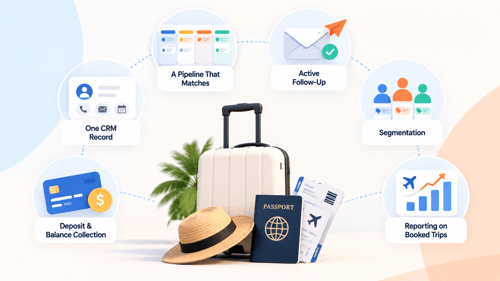
These 6 things will help you concentrate with clarity to understand your business opportunities. Let’s start with:
One Crm Record Per Traveler, Regardless Of Channel
Inquiries that come in through your website form, live chat, a phone call your agent logs, or a Facebook ad all land on the same contact record instead of scattered across an inbox, a spreadsheet, and someone's notebook.
A Pipeline That Matches How You Actually Book Trips
Instead of a generic sales pipeline, you build stages around your real process, New Inquiry, Quote Sent, Deposit Pending, Booked, Traveling, Post-Trip. Anyone on the team can see at a glance where a specific trip is stuck.
Follow-Up That Doesn't Depend On Someone Remembering
A quote that's gone quiet for five days can automatically trigger a task for the agent and a nurture email to the traveler, instead of just sitting there.
Segmentation By What Actually Predicts A Booking
Destination interest, budget range, past trips, group size. This is what lets you send a Kenya safari offer to people who've actually shown interest in Kenya, not a blast to your entire list.
Deposit & Balance Collection Tied To The Deal
HubSpot's Commerce Hub lets you send a payment link straight from a deal record, and payments sync back automatically, so the deal status updates itself instead of someone manually checking a bank statement.
Reporting That Tells You Which Channel Produces Booked Trips
A lot of agencies can tell you where their leads come from. Fewer can tell you which of those sources actually convert to paid bookings, which is the number that matters for ad spend decisions.
If you want the fuller picture of how these pieces fit together for travel specifically, HubXpert's HubSpot for travel agencies page breaks down the traveler journey stage by stage.
How to Automate Travel Agency Business in HubSpot
Let’s see how to automate travel agency workflow in HubSpot step by step.
Step 1: Get Every Inquiry Into One Place First
Before any automation makes sense, every channel needs to feed the same CRM. Connect your website forms, your shared inbox, and your live chat. If your agents take calls, get logging a quick note into the habit before you automate anything on top of it. Automation built on top of scattered data just automates the scattering.
Step 2: Build A Pipeline Around Your Real Booking Stages
Map what genuinely happens between "someone asks about a trip" and "they're back home and happy."
Most agencies land somewhere around six to eight stages, something like New Inquiry, Quote Sent, Proposal Review, Deposit Pending, Booked, Traveling, Post-Trip Follow-Up. Fewer stages and you can't see where things stall. More than that and agents stop updating it carefully.
Step 3: Decide Between Deals Alone Or Dedicated Trip Object
This is the exact question a travel agency asked on HubSpot's community forum, and the answer holds up well: start with deals, plus custom properties for destination, travel dates, group size, and flight or hotel details.
A separate custom object for trips gives you a cleaner history when the same traveler books repeatedly, but custom objects require an Enterprise subscription on at least one Hub, account-wide, not per seat. For most agencies under 20 or so people, deals with well-built custom properties cover the job without that upgrade.
Step 4: Automate The First Response
The moment a form comes in, HubSpot can send an instant acknowledgment, notify the right agent, and assign the lead, either to a specific person or in round-robin rotation. This is the single highest-leverage automation on this list, because response speed is usually what decides whether a traveler keeps shopping around.
Step 5: Automate Nurture Sequence For Quotes
Build a workflow: if a deal sits in "Quote Sent" for more than five days with no reply logged, create a task for the agent and enroll the contact in a short nurture sequence with destination content or a gentle check-in. We've written more on why deals stall in the first place in Why HubSpot Deals Go Cold (And How To Stop It), which applies just as directly to a travel pipeline as it does to a services one.
Step 6: Automate Deposit And Balance Reminders
Send the deposit payment link from the deal itself once a quote is accepted. For the remaining balance, use a workflow tied to a custom "departure date" property, so a reminder task and email fire automatically a set number of days before travel, instead of an agent trying to track thirty different departure dates by hand.
Step 7: Automate The Post-Trip Stage
When a deal moves to "Post-Trip," trigger a review or feedback request, then enroll the traveler in a re-engagement segment based on the destination or trip type they just booked. This is the step most agencies skip, and it's usually the cheapest way to generate a repeat booking, since you're marketing to someone who already trusts you.
How to Utilize the HubSpot Hubs That Suit Your Business
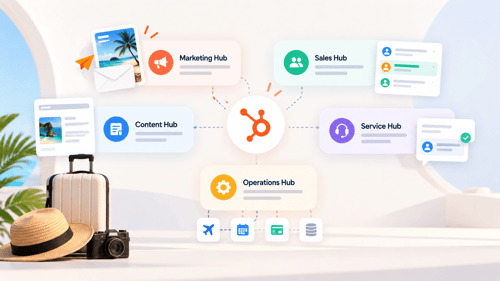
Not every agency needs every Hub, and buying more than your process calls for is a common way agencies overspend on HubSpot. What you need generally scales with what your team actually does day to day.
A solo agent or a small boutique shop running mostly on inquiries and follow-up can often get real value out of Sales Hub alone, pipeline, task automation, and email sequences.
Once you're actively generating leads through ads, landing pages, and content rather than referrals alone, Marketing Hub earns its place, for lead capture forms, list segmentation, and nurture campaigns at a volume a single agent can't manage by hand.
If your team handles post-booking support, itinerary changes, complaints, or documentation requests, Service Hub's ticketing gives that work its own queue instead of burying it in the same inbox as new sales inquiries.
Multi-branch agencies or tour operators juggling data across a booking engine, a GDS, and HubSpot itself tend to hit a wall that only Operations Hub solves cleanly, keeping traveler records in sync instead of drifting apart.
And any agency collecting deposits and balances directly, rather than through a third-party booking platform, benefits from Commerce Hub's payment links and invoicing tied straight to the deal record.
The honest starting point for most independent agencies is Marketing Hub Starter or Professional paired with Sales Hub Professional, then adding Service, Operations, or Commerce Hub as the operational pain shows up rather than upfront. HubXpert's HubSpot pricing breakdown is worth reading before you commit to a tier.
How HubXpert Builds These Systems for Travel Agencies
We've built variations of this setup for travel and hospitality clients directly. For Express Vietnam, a state-owned visa company handling high volumes of applicant inquiries, the work was onboarding and integration, getting inquiry data flowing cleanly into HubSpot instead of scattered across the systems they'd used before.
For WhiteVillas, a resort and villa operator, we built end-to-end guest experience automation, covering the exact pre-trip, in-trip, and post-trip communication pattern described in Step 7 above, just applied to a hospitality booking rather than a package tour.
The pattern across both engagements is the same one this article walks through: get the data into one place first. Build a pipeline that reflects the real process instead of a generic template, then layer automation on top in the order that actually removes work from someone's plate, not in the order that looks impressive in a demo.
As a HubSpot implementation partner, that's the part of the HubSpot onboarding process we spend the most time on with travel clients specifically, because a beautifully automated pipeline built on the wrong stage structure just automates confusion faster.
FAQs
Should I track each trip as its own deal, or do I need a custom object?
Start with deals. An international travel agency asked this exact question on HubSpot's community forum, and the answer that held up was to use deals for each trip opportunity, with custom properties covering flights, hotel, and group size, and to only consider a dedicated custom object once you're on an Enterprise-eligible Hub and have enough repeat travelers that a full historical trip record actually pays for itself.
Can I run an agency that sells in two languages from one HubSpot account?
Yes, though it takes some setup. A travel agency owner running both English-language consumer bookings and Japanese-language B2B sales asked about this directly on HubSpot's community, and the practical path is one CRM with language-specific workflows, email templates, and if needed, separate teams or permission sets, rather than two separate HubSpot accounts.
Can I trigger a set of tasks automatically when a deal reaches a certain stage, like "Book Travel"?
Yes. Workflows can create multiple tasks the moment a deal enters a stage, useful when one stage genuinely means four or five things need to happen at once, flight booking, hotel confirmation, travel insurance, visa paperwork. HubSpot users have raised this exact travel-booking scenario on the community forum, and the tasks HubSpot creates from a workflow associate automatically with the deal that triggered them.
Can HubSpot move a deal automatically after a set number of days, like when a deposit is due?
Yes, with a caveat. Basic time-based automation, move a deal after X days in a stage, works natively through workflows. Where it gets harder, based on a real thread in HubSpot's community, is precise calendar-month logic (exactly 90 days when months have different lengths), which some users solved using custom code actions available on Operations Hub Professional rather than out-of-the-box workflow steps.
What HubSpot plan do I actually need to automate a small travel agency's booking process?
For most independent agencies, Sales Hub Professional is the practical floor, since Starter doesn't include the workflow automation that makes stage-based reminders and task creation possible. Add Marketing Hub once lead volume outpaces what one or two agents can nurture manually.
Final Thought
None of this requires ripping out how your agency already sells trips. It requires deciding, deliberately, which parts of your process are actually repeatable (the confirmation, the five-day check-in, the deposit reminder, the post-trip thank-you) and building those once instead of doing them by memory for every single traveler.
Start with Step 1 through 4 above before you touch anything else. Getting inquiries into one place and automating the first response alone usually fixes the most expensive leak in an agency's process: the good lead that nobody got back to in time.
As a Hubspot Automation Developer at Hubxpert, I specialize in API integration, seamlessly connecting HubSpot with third-party applications. My role encompasses understanding client needs, crafting custom code solutions, and ensuring the smooth operation of our automation workflows. I actively address any HubSpot integration challenges and stay updated with the platform's latest advancements. My dedication ensures clients harness the full potential of HubSpot.

Tanzinul Kabir
Table of Contents:

Subscribe to our newsletter

3D Web Design Templates & Examples You Can Reuse
Browse 3D web design templates and examples, plus where to find free downloads, and see how 3D web page design lifts a site without slowing the site down.

3D Web Design Tools & Software Compared for 2026
Compare 3D web design tools and web based 3D design software, and see where 3D models and 3D assets for web design fit your existing front-end build pipeline.

HubSpot Onboarding Cost: What the Fee Really Covers
See what HubSpot onboarding cost covers, how onboarding fees get quoted and how to compare implementation quotes line by line before you commit to a partner.

HubSpot Enterprise Onboarding (What Changes by Tier)
See how HubSpot enterprise onboarding differs from Professional and Starter, covering advanced onboarding scope, admin training and what each tier includes.

Best HubSpot CRM Implementation Consulting Agencies for B2B
Compare 6 HubSpot partners for B2B with pros, cons, and pricing. Learn how to judge companies offering HubSpot implementation services and spot red flags.

How to Build a HubSpot Implementation Plan That Holds Up
Follow a HubSpot implementation plan covering scoping, data cleanup and go-live. Includes an implementation checklist and a realistic 60-day timeline.
-
3D Web Design Templates & Examples You Can Reuse
hello
-
3D Web Design Tools & Software Compared for 2026
hello
-
HubSpot Onboarding Cost: What the Fee Really Covers
hello
-
HubSpot Enterprise Onboarding (What Changes by Tier)
hello
-
Best HubSpot CRM Implementation Consulting Agencies for B2B
hello
-
How to Build a HubSpot Implementation Plan That Holds Up
hello