





-2.png)


-2.png)



.png)


.webp)

.png)










.png)







-1.webp)
-1.webp)



.webp)

-1-1.webp)



-2.webp)

-1-1.webp)

-2-1.png)

-1-1.webp)
-1-1.webp)
-1-1.png)







A HubSpot implementation plan defines how your business will configure the CRM, migrate existing data, connect tools and prepare your team to use the system. Without a clear plan, small setup decisions can lead to messy data, broken workflows, and reports your team can't trust.
A solid plan connects every implementation task to a business goal, assigns clear ownership, and sets realistic milestones. It also accounts for data quality, integrations, testing, and team adoption before the portal goes live.
This guide explains how to build a HubSpot implementation plan that keeps your project organized, handles common roadblocks, and supports your team's needs as your business grows.
Key Takeaways
- A plan is a dated scope: what you build, in what order, who signs off, and what must be true at each gate.
- Scope choices move the schedule more than setup clicks do. Hubs, plan tier, data sources, integrations, and custom objects all change the days.
- Write down your process and the reports you need before anyone builds a pipeline.
- End every phase with a pass-or-fail gate, and do not start the next phase until it passes.
- 60 days is realistic for a Professional build with one or two hubs, one CRM migration, and a few integrations.
- Budget for HubSpot's onboarding fee on Professional and Enterprise plans. It runs from $1,500 to $7,000 by hub and tier.
What Goes in a HubSpot Implementation Plan?
A plan answers seven questions, and each one becomes a section. Any HubSpot implementation guide that skips them leaves you with steps and no plan.
|
Section |
The question it answers |
A sample entry |
|
Goals and measures |
What must change once HubSpot is live? |
Reps log every deal in one pipeline |
|
Scope |
Which hubs, plan tier, and objects are in? |
Sales Hub Professional, with contacts, companies, and deals |
|
People |
Who decides, who builds, and who tests? |
Portal owner, admin, one lead per team |
|
Data |
Where does data live today, and what identifies each record? |
CRM export, with email as the contact identifier |
|
Integrations |
Which systems connect, and how? |
Accounting tool through the App Marketplace |
|
Timeline and gates |
What is finished by when, and who approves it? |
Process sign-off before the build starts |
|
Risks |
What could slip, and what is the fallback? |
Data cleanup runs long, so the import moves |
Keep the plan to two pages so the people who approve it will read it. Add a decision log at the back. Each time scope changes, write down what changed, who agreed, and what it did to the dates.
What is the HubSpot Implementation Process: Step by Step
The HubSpot implementation process has eight steps, and each one ends with something you can inspect.
Step 01: Define Goals & Reports
Create a one-page goal sheet and list the reports leaders need. Get approval from the project sponsor before moving forward.
Step 02: Set the Scope & Plan
Document the HubSpot hubs, plan tier, data sources, task owners, and project dates in a plan approved by all stakeholders.
Step 03: Clean & Map Your Data
Prepare a clean data file and map each source column to its corresponding HubSpot property.
Step 04: Build the Foundation
Set up users, permissions, properties, pipelines, and an authenticated email-sending domain.
Step 05: Import Data & Connect Integrations
Import your records, verify record counts, and confirm that connected tools sync correctly.
Step 06: Configure Automation & Reporting
Build and test workflows, then create dashboards tailored to each team's role.
Step 07: Test with Real Users
Have each team test its workflows and document the results in an approved test script.
Step 08: Train, Launch & Review
Provide training recordings and a user playbook, confirm the go-live date, and document gaps identified during the first review.
Steps 3 and 4 can run side by side once step 2 is signed. Everything else runs in order, because each step uses what the one before it produced.
How to Implement HubSpot: Start With Scope
To implement HubSpot without a rebuild, settle your scope drivers first. Each one changes the plan, and some change the plan tier you need.
|
Scope choice |
What HubSpot requires |
What it adds to your plan |
|
Lead qualification with the Leads object |
Sales Hub Professional or Enterprise |
A lead pipeline and routing rules, designed before the build |
|
Sequences and the forecast tool |
Sales or Service Hub Professional or Enterprise |
Sales training time and forecast setup |
|
Help desk and tickets |
Service Hub Professional or Enterprise |
Ticket pipelines, routing, and support-team training |
|
Custom association labels |
Professional or Enterprise |
Data model design for how records relate |
|
Custom objects |
Enterprise, created by a Super Admin |
A data model workshop before any build |
|
Importing deals or tickets |
Pipeline and stage values must match existing options |
Pipelines built before the import step |
(Source: "How to use objects for business processes" and "Format import files")
Plan your identifiers early. HubSpot matches contacts on email, companies on domain name, and deals and tickets on Record ID. Your data map should name the identifier for every object before you export a single file.
Then start from the report, not the setup screen. If a sales director needs win rate by lead source, every deal needs a source property and a lost reason. Work backward from each report to the properties and pipeline stages that feed it.
HubSpot Implementation Checklist: What Must Be True Before Each Phase
Each gate below lists what must be true, not what to do. If one line is false, the phase is not finished. This HubSpot implementation checklist matches the gates on the timeline in the next section.
Gate 1: Plan Signed Off
- The sponsor approved the goal sheet and the report list.
- Hubs and plan tier are confirmed against the features you need.
- Every data source has an owner and an identifier.
- The portal owner, the admin, and one lead per team are named.
- Dates and the decision log are shared.
Gate 2: Foundation & Clean Data Ready
- The cleaned file has no duplicate emails or domains.
- Every source column maps to a HubSpot property.
- Custom properties and pipelines exist in the portal.
- Users and permissions match the roles in the plan.
- A sample import landed in the right properties.
- The email sending domain passes authentication checks.
Gate 3: Import & Integrations Verified
- Record counts in HubSpot match the cleaned source file.
- Associations between contacts, companies, and deals look right on a sample of records.
- Each integration syncs a test record in the right direction.
- Owners and lifecycle stages are set on imported records.
Gate 4: User Testing Passed
- Each team ran its test script on realistic records and signed it.
- Every workflow fired on a test record and did what the plan says.
- Each dashboard matches a number the team already trusts.
- Every open defect has an owner and a fix date.
Gate 5: Ready To Go Live
- Training is done and the recordings are shared.
- The cutover date and the plan for the old system are announced.
- A support contact and the first review date are set.
- A fix plan exists for the first week after launch.
What Does a Realistic 60-Day HubSpot Implementation Timeline Look Like?
Sixty days works for a Professional build with one or two hubs, one source CRM, and a few integrations. Each gate from the checklist sits on the day it must pass.
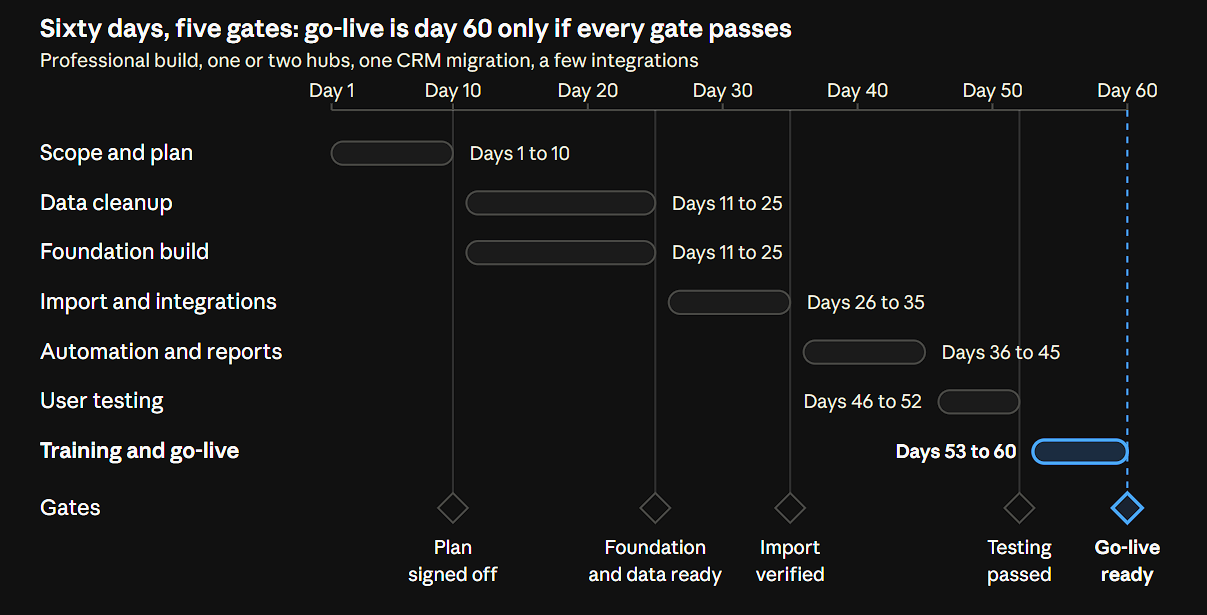
Scoping takes the first 10 days because nothing else can start without a signed plan. Data cleanup and the foundation build then run side by side. User testing gets its own week, so defects are found before go-live, not after.
This is a plan for a standard scope. Add custom objects or a second source system and the dates move. Our HubSpot onboarding packages quote Professional at 4 to 6 weeks for a standard scope. The 60 days here also cover a CRM migration, a few integrations, and a full round of user testing.
What Does a HubSpot Implementation Cost?
The cost has six lines, and only three of them come from HubSpot. Budget all six before you ask for approval.
|
Budget line |
What drives it |
Where to find the number |
|
HubSpot subscription |
Hubs, plan tier, seats, and marketing contacts |
HubSpot's pricing pages |
|
HubSpot onboarding fee |
Required on Professional and Enterprise plans, $1,500 to $7,000 one time by hub and tier |
HubSpot's pricing pages |
|
Add-ons & overages |
Extra seats, contact tiers, and usage-based features |
HubSpot's pricing pages |
|
Partner or consultant fees |
How much of steps 3 to 8 you hand off |
A written scope |
|
Data cleanup time |
How many sources you have and how messy they are |
Your own audit |
|
Internal hours |
Owner, admin, testers, and trainees |
Your plan's people list |
HubSpot says Marketing Hub pricing grows with your marketing contact count, and that extra seats and usage-based add-ons cost more. (Source: "HubSpot's Marketing Hub pricing guide") Check any fee range you find online against HubSpot's own pages, because published ranges do not always match.
Our HubSpot pricing page lists the onboarding fee for each hub and tier.
Should You Implement HubSpot Yourself or With a Partner?
Match the route to the plan you wrote. The more boxes you tick in the right-hand column, the more a partner saves you.
|
Plan factor |
Do it yourself |
Bring in a partner |
|
Data |
One clean source |
Several sources, or messy data |
|
Scope |
One hub with standard objects |
Several hubs, or custom objects |
|
Skills |
An admin with HubSpot experience and time |
No one with time to configure and test |
|
Deadline |
Flexible |
A fixed launch date |
|
Risk |
Mistakes are cheap to fix |
Revenue reports or billing depend on it |
HubSpot's own onboarding page draws the same line. It offers guidance, and a certified Solutions Partner carries out the work. (Source: "HubSpot Marketing Hub Onboarding") Our page on why businesses work with HubSpot partners covers what a partner adds.
If you hand off only part of the plan, hand off the data cleanup and the foundation build. Every later step depends on them.
FAQs
How long does a HubSpot implementation take?
It depends on scope, not on HubSpot's setup screens. Three things stretch the schedule most: more data sources, more hubs, and slow approvals at each gate. A Professional build with one CRM migration fits the 60-day plan above. Write your own dates after you list your data sources, because cleanup often takes the longest.
Is HubSpot easy to implement?
Setup is easy, and migration is the hard part. Creating an account, connecting email, and building a form takes little time. Mapping messy data into the right properties, pipelines, and automation takes the plan. Start with HubSpot's free tools if you only need contacts and email, and add paid hubs when a process needs them.
What is the difference between HubSpot implementation and onboarding?
Onboarding is guidance, and implementation is the whole project. HubSpot's own onboarding gives you technical and strategic guidance, and a certified Solutions Partner carries out the work. Implementation covers scope, data, build, testing, training, and go-live, whoever does the clicking. Onboarding sits inside it. (Source: "HubSpot Marketing Hub Onboarding")
Can I implement HubSpot in phases?
Yes, but plan the data model for every hub on day one. All HubSpot objects sit on the same data platform, so the contacts, companies, and deals you create for one hub are what the next hub uses. Start with the hub that serves your most important report. Add the rest once the first is in daily use. (Source: "How to use objects for business processes")
Who should be on the implementation team?
Name a sponsor, a portal owner, an admin, and one lead per team that will use HubSpot. The sponsor approves each gate, and the owner makes daily decisions. The admin builds and tests. Team leads write the test scripts and sign them. Add IT if you need domain changes or integrations.
Who needs Super Admin access during implementation?
At least one person, usually the admin. Super Admins can create custom objects and activate extra objects such as appointments and services. Give that level to as few people as you can, and set everyone else's permissions by role from your plan. (Source: "How to use objects for business processes")
What should happen to my old CRM at go-live?
Set a cutover date in the plan and tell everyone. On that date, freeze edits in the old system and import any records changed since your last import. Then switch the old system to read-only. Keep read-only access for a set period so people can check old data, then retire it.
How do I know the implementation worked?
Check four things 30 days after go-live: active users, duplicate records, dashboards that match trusted numbers, and required fields filled on new deals. Compare each against the goal sheet from step 1. A gap in any one of them tells you which step to repeat.
Wrapping Up
A HubSpot implementation plan earns its keep at the gates. Write the process and the reports first, scope against the plan tier you actually need, and do not start a phase until the one before it passes. Those three habits cut the odds of a rebuild.
Send your plan to whoever approves the budget before you buy hubs, not after. A scope change costs a line in a decision log on paper and a lot more in a live portal.
Want a second pair of eyes on yours? Book a 30-minute call with our team and bring your goal sheet and your data source list.
Senior RevOps Strategist at Hubxpert

Fazle Rabbi
Table of Contents:

Subscribe to our newsletter

Is HubSpot CRM Logistics Integration Free for Your Business?
Wondering if a HubSpot CRM logistics integration is free? See what native tools cover and when carrier, insurance or hotel PMS systems need custom work.

HubSpot ERP Integration & Ecommerce Data Sync
Plan HubSpot ERP integration so orders, invoices and stock stay aligned, then compare ecommerce integrations with the cases that genuinely need custom work.

Is HubSpot CRM Natively Integrated in Marketing Hub?
Yes, the HubSpot CRM sits inside Marketing Hub, so both share one database. Compare native integrations with custom builds and the third-party CRM options.

HubSpot SMS Integration for Reminders & Replies
Compare HubSpot SMS integration options and set up text messaging for appointment reminders, delivery alerts and two-way replies from one shared team inbox.

The Best HubSpot Integrations & What Each One Fixes
See the best HubSpot integrations grouped by the problem they solve, from billing and CPQ to webinar and commission tracking, and know what to add first.
.webp)
Choosing Webinar Platforms That Integrates With HubSpot
Pick a webinar platform that integrates with HubSpot and keep registrations, attendance and follow-up in one place. Compare sync depth and reporting quality.
-
Is HubSpot CRM Logistics Integration Free for Your Business?
hello
-
HubSpot ERP Integration & Ecommerce Data Sync
hello
-
Is HubSpot CRM Natively Integrated in Marketing Hub?
hello
-
HubSpot SMS Integration for Reminders & Replies
hello
-
The Best HubSpot Integrations & What Each One Fixes
hello
-
Choosing Webinar Platforms That Integrates With HubSpot
hello