





-2.png)


-2.png)



.png)


.webp)

.png)










.png)







-1.webp)
-1.webp)



.webp)

-1-1.webp)



-2.webp)

-1-1.webp)

-2-1.png)

-1-1.webp)
-1-1.webp)
-1-1.png)







An accounting firm we've worked with runs tax prep, audit, and advisory out of the same HubSpot portal. Someone before us had built three separate deal pipelines, one per service line, because it felt organized.
Eighteen months later, the partner couldn't answer a simple question: what's total pipeline value across the firm this quarter? Getting that number meant pulling three reports and adding them by hand, every time, because HubSpot doesn't total across pipelines on its own.
That's the actual cost of getting this decision wrong. Not that multiple pipelines are broken. It's that nobody warns you what they cost in reporting time until you're two years and forty workflows deep.
When One HubSpot Deal Pipeline Actually Works
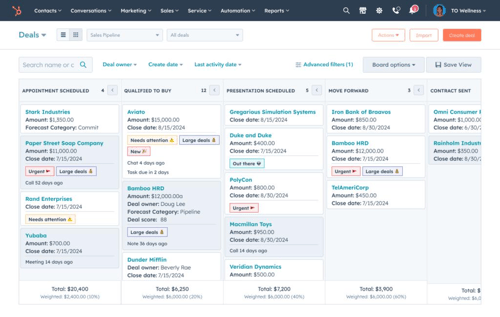
Use one pipeline when your service lines close deals the same way. Even if what you're selling is different. If tax prep, audit, and advisory all move through roughly the same steps (initial consult, proposal sent, contract signed, engagement started), the service line is a detail about the deal, not a different process for winning it.
In that case, a single pipeline with a required "Service Line" property does everything separate pipelines would do, without the maintenance.
You filter reports by that property instead of switching between pipelines. You build one set of workflows instead of duplicating them three times. When someone asks for total pipeline value across the firm, you get one number without doing math by hand.
HubSpot's own documentation gives a version of this exact scenario: a business selling multiple brands through the same sales process is told directly not to create separate pipelines, and to use team-based permissions on one shared pipeline instead (Source: HubSpot Knowledge Base).
When You Need Multiple HubSpot Deal Pipelines Instead
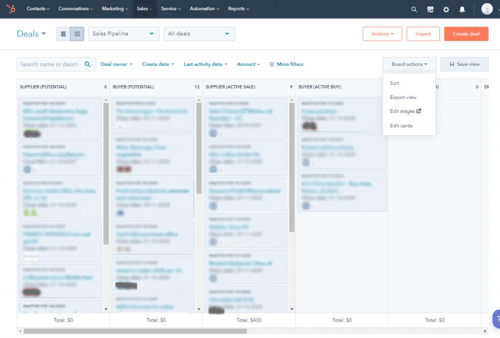
Split into separate pipelines when the stages themselves are genuinely different, not just the label on what's being sold.
A consultancy selling strategy engagements and implementation projects is the clearest version of this. Strategy work might close in three stages over two weeks. Implementation might run through six stages, a scoping call, a technical review, and a procurement approval, over two months.
Force both into one pipeline and you get a pipeline with stages half your deals skip entirely, which wrecks conversion rate reporting for everyone.
The same logic applies to renewals versus new business, and to service lines that require different approval steps. If your audit practice needs a partner sign-off before a proposal goes out and your tax practice doesn't, that's a pipeline rule, and pipeline rules apply to an entire pipeline, not conditionally to deals with a certain property value inside it.
That's a real technical limit, not a preference. One pipeline literally cannot enforce two different approval processes at once.
A useful gut check from a HubSpot partner on this exact question: more pipelines always means more maintenance, more complexity, and more room for error, so the bar for creating a new one should be that the process is different, not just the product (Source: HubSpot Community).
Building One Pipeline With a Service Line Property
When your service lines follow the same sales process, one pipeline can keep things simpler. Build it step by step:
Step 01: Create a Service Line Property
Create a dropdown property for Service Line instead of free text. Use fixed options such as Tax, Audit, and Advisory to keep data consistent and reportable.
Step 02: Make Service Line Required
Require the Service Line when a deal is created. This makes sure every deal can be filtered and reported on later.
Step 03: Use Generic Pipeline Stages
Choose stages that work across every service line. For example, “Proposal Sent” works better than a stage tied to one specific service.
Step 04: Control Visibility With Permissions
When teams need separate views, use team permissions instead of creating another pipeline. Pipeline visibility controls are available with Professional and Enterprise subscriptions.
Step 05: Automate by Service Line
Build one workflow and branch it by the Service Line property. This lets Tax, Audit, and Advisory follow different automation paths without maintaining separate workflows for each pipeline.
HubSpot Pipeline Limits, Rules & Permissions By Service Line
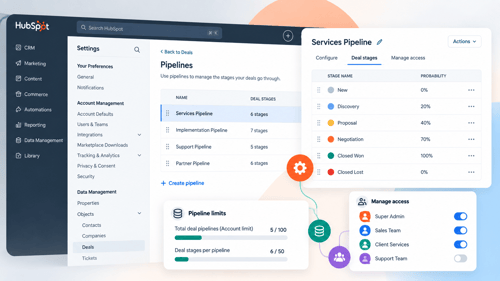
Before deciding, it helps to know what's actually available on your plan.
Custom pipeline limits currently run 15 on Starter, 100 on Professional (or 350 for accounts on HubSpot's newer Flexible Seats & Credits pricing), and 350 on Enterprise.
This is a shared pool across every object with pipelines, not just deals, so tickets and custom object pipelines draw from the same count. Check Data Management, then Data Model, then the Limits tab to see your current usage before assuming you have room.
Team-based pipeline permissions need Professional or Enterprise. Pipeline rules, like blocking stage skips or requiring manager approval before a deal closes, need Professional or Enterprise too, and a deal approval process specifically requires Enterprise.
Required properties per stage (HubSpot calls this conditional stage logic) can be set differently on each pipeline you create, which is the real lever for enforcing different data requirements per service line.
If you connect an ecommerce integration, HubSpot adds its own pipeline automatically that you can't edit. Worth knowing before you plan your pipeline count around a number that assumes full control over every pipeline in the account.
Reporting Across Multiple Pipelines Without Losing Accuracy
If your firm genuinely needs multiple pipelines, the reporting problem from the opening story is avoidable, it just takes deliberate setup.
Custom report builder can pull deals across multiple pipelines into one report, as long as the property you're reporting on (deal amount, close date) exists identically on every pipeline involved.
Build this report once, rather than building one report per pipeline and manually adding totals. That single habit is the difference between a five-minute quarterly number and the three-report scramble the accounting firm from the intro was stuck doing.
Keep a shared "Deal Type" or "Practice Area" property even across separate pipelines, so you can filter a cross-pipeline report the same way you would inside a single-pipeline setup.
This gives you most of the reporting simplicity of one pipeline while still getting the separate stages and rules each service line actually needs.
FAQs
How Many Deal Pipelines Can I Create In HubSpot?
It depends on your subscription. Starter accounts get 15 custom pipelines, Professional accounts get 100 (or 350 on newer Flexible Seats & Credits pricing), and Enterprise accounts get 350. This limit is shared across all objects with pipelines, not just deals, so check your current usage in Data Management before assuming you have room to add more.
Can I Restrict A HubSpot Pipeline To One Team Only?
Yes, with a Professional or Enterprise subscription. This is usually the better fix for firms who split into multiple pipelines just to keep one service line's deals private from another, since it solves the visibility problem without duplicating stages, workflows, and reports.
Does HubSpot Automatically Total Deal Value Across Multiple Pipelines?
No. Each pipeline reports on its own by default. To get a combined total, build a custom report using the report builder and pull in deals from every pipeline you want included, using a property that exists identically across all of them.
What's The Real Difference Between A Service Line Property And A Separate Pipeline?
A property is a label on a deal. A pipeline is a distinct process with its own stages, rules, and required fields. If your service lines close the same way and just need to be labeled differently for reporting, use a property. If they genuinely move through different steps or need different approvals, you need a separate pipeline, because pipeline rules can't vary by property within a single pipeline.
Should Renewals Use The Same Pipeline As New Business?
Usually not. Renewal deals typically skip most of the discovery and qualification stages that new business deals need, which means forcing both into one pipeline leaves a pipeline full of stages a large share of deals never touch, and that breaks conversion rate reporting for both groups.
Maximize Your HubSpot Investment With HubXpert
Getting this decision right the first time saves a firm from the exact rebuild we described at the start, three pipelines that made sense on day one and became a reporting headache two years later.
As a white-label HubSpot partner, this is the kind of structural call we make before a single stage gets built: mapping whether your service lines actually need separate processes or just better properties, then setting up the permissions, pipeline rules, and cross-pipeline reporting to match.
If you already work under an agency or consultancy's own brand, we build this under your name, not ours.
If your firm is deciding how to structure pipelines for the first time, or untangling a setup that's already grown past what it should be, talk to our HubSpot implementation team.
Senior RevOps Strategist at Hubxpert

Fazle Rabbi
Table of Contents:

Subscribe to our newsletter

3D Web Design Templates & Examples You Can Reuse
Browse 3D web design templates and examples, plus where to find free downloads, and see how 3D web page design lifts a site without slowing the site down.

3D Web Design Tools & Software Compared for 2026
Compare 3D web design tools and web based 3D design software, and see where 3D models and 3D assets for web design fit your existing front-end build pipeline.

HubSpot Onboarding Cost: What the Fee Really Covers
See what HubSpot onboarding cost covers, how onboarding fees get quoted and how to compare implementation quotes line by line before you commit to a partner.

HubSpot Enterprise Onboarding (What Changes by Tier)
See how HubSpot enterprise onboarding differs from Professional and Starter, covering advanced onboarding scope, admin training and what each tier includes.

Best HubSpot CRM Implementation Consulting Agencies for B2B
Compare 6 HubSpot partners for B2B with pros, cons, and pricing. Learn how to judge companies offering HubSpot implementation services and spot red flags.

How to Build a HubSpot Implementation Plan That Holds Up
Follow a HubSpot implementation plan covering scoping, data cleanup and go-live. Includes an implementation checklist and a realistic 60-day timeline.
-
3D Web Design Templates & Examples You Can Reuse
hello
-
3D Web Design Tools & Software Compared for 2026
hello
-
HubSpot Onboarding Cost: What the Fee Really Covers
hello
-
HubSpot Enterprise Onboarding (What Changes by Tier)
hello
-
Best HubSpot CRM Implementation Consulting Agencies for B2B
hello
-
How to Build a HubSpot Implementation Plan That Holds Up
hello