





-2.png)


-2.png)



.png)


.webp)

.png)










.png)







-1.webp)
-1.webp)



.webp)

-1-1.webp)



-2.webp)

-1-1.webp)

-2-1.png)

-1-1.webp)
-1-1.webp)
-1-1.png)






.png)
A proposal goes out on a Tuesday. The rep means to follow up Thursday. Thursday gets busy, Friday is worse, and by the following Wednesday the rep has moved on to three newer conversations.
The deal is still sitting in "Proposal Sent," still showing as open, still counted in the pipeline forecast. Nobody marked it lost. Nobody touched it either. It's just quietly dead, and HubSpot has no idea, because nothing in the platform is watching for this on its own.
This is the actual failure mode behind most cold deals. It's rarely a bad proposal or a lost-cause prospect. It's a follow-up that depended on someone remembering, and memory is a bad system to run revenue on.
Why HubSpot Deals Actually Go Cold
Three patterns account for almost every stalled deal, and none of them are about the prospect losing interest.
No Next Step Was Ever Defined
A deal moves to "Proposal Sent" and the task list is empty. There's nothing telling the rep what happens next or when, so the deal just sits until someone happens to look at it.
Ownership Gets Blurry Mid-Cycle
A deal that started with a business development rep and got handed to an account manager for the proposal stage often loses momentum right at the handoff, since neither person is fully sure whose job the follow-up is.
Nobody's Watching Last Activity, Only Pipeline Value
Most pipeline reviews look at total dollar amount and deal count. A deal that hasn't been touched in three weeks looks identical to one that was updated yesterday, if all you're scanning is the board view. The information to catch it exists on the deal record. Nobody's looking at that specific property.
None of these need a smarter tool to fix. They need the follow-up to stop depending on someone remembering.
How To Spot A Stalled Deal Before It Dies
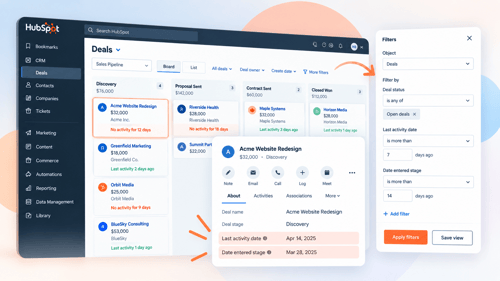
HubSpot already tracks what you need, it's just not surfaced anywhere by default.
Last Activity Date is a standard property on every deal, updated automatically whenever a call, email, meeting, or note gets logged against it. This is your actual staleness signal, not deal stage or deal age.
Date Entered Stage shows how long a deal has sat in its current stage specifically. A deal that's three months old but only two days into "Contract Sent" isn't stalled. A deal that's been in "Proposal Sent" for three weeks is.
Build a saved view or a simple report filtering for open deals where Last Activity Date is more than a set number of days ago, say 7 for early stages and 14 for later ones, since the acceptable gap changes as a deal gets closer to closing.
This alone, checked weekly, catches most of what automation will later handle for you. It's worth setting up even before you build any workflow, since it's how you'll verify the automation is actually working once it's live.
Building Automated Follow-Up Reminders In HubSpot Workflows
Here's the actual build, using a deal-based workflow and native properties, no separate app required.
Step 1: Create A Deal-Based Workflow With A Time-Based Enrollment Trigger
Set the trigger to Deal Stage is any of your target stages, combined with Time since property last updated (using Last Activity Date) set to your threshold, 7 days for early stages, longer for stages where multi-week gaps are normal, like waiting on legal review.
Step 2: Add A Create Task Action, Not Just An Email
A reminder email to the rep gets buried in an inbox. A task shows up in their daily task list inside HubSpot, with the deal name and a due date attached, which is harder to ignore than another unread email.
Step 3: Set Re-Enrollment On, Based On The Same Property
If the rep logs an activity and Last Activity Date updates, the deal should drop out of the stalled state automatically. Re-enrollment means the workflow keeps checking rather than running once and going stale itself.
Step 4: Use Different Thresholds Per Stage
A deal sitting quiet for 5 days right after a discovery call is a different problem than one sitting quiet for 5 days while a client's legal team reviews a contract. Build separate branches or separate workflows per stage group so the reminder timing actually matches how deals really move at each point.
Step 5: Write The Task Instruction Specifically
Not "follow up on this deal." Something like "Check if the proposal was reviewed, call don't email" gives the rep an actual next action instead of another vague to-do they'll defer again.
Escalating Deals That Still Don't Move
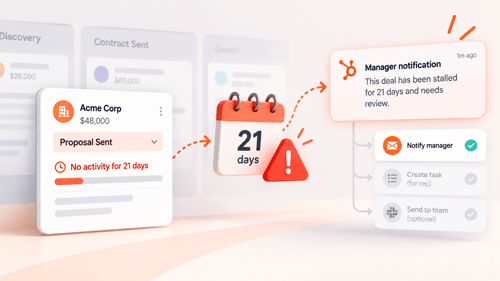
A task the rep ignores twice isn't a task problem anymore. It's a visibility problem for whoever manages the pipeline.
Add a second stage to the same workflow logic: if a deal remains stalled for a longer window, say double the original threshold, notify the deal owner's manager directly rather than creating another task for the rep.
HubSpot workflows support internal notifications to a specific user or team, separate from the task assigned to the rep, so the manager sees it without needing to dig through someone else's task list.
This isn't about catching reps doing something wrong. Most of the time a deal stalls because the rep is juggling twelve other things, not because they're avoiding the prospect.
A manager notification at the right threshold turns an invisible problem into a two-minute pipeline review conversation, which is usually all it takes to get the deal moving again or to have an honest conversation about whether it's actually still alive.
Knowing When To Mark A Deal Lost Instead Of Chasing It Forever
Not every stalled deal should get chased indefinitely. Some of them are actually dead, and leaving them open just inflates your forecast with revenue that isn't coming.
Set a final threshold, longer than the escalation point, where the workflow prompts a decision rather than another reminder: has this deal been genuinely re-engaged, or should it move to Closed Lost?
Use a required Closed Lost Reason property (Budget, Timing, Competitor, No Response) so marking a deal dead produces useful data instead of just clearing it off the board. Over a few months, that reason field tells you far more about where deals actually die than a pipeline full of technically-open deals ever will.
A forecast full of zombie deals isn't optimistic, it's just wrong. Letting the workflow force a real decision at a defined point keeps your pipeline numbers honest, which matters more than keeping the count high.
FAQs
Does HubSpot Automatically Flag Deals That Are Going Cold?
No. HubSpot doesn't have a built-in staleness alert. It does track Last Activity Date and Date Entered Stage automatically on every deal, which is what you build a workflow around to create the alert yourself.
What HubSpot Property Should I Use To Detect A Stalled Deal?
Last Activity Date, combined with a time-based workflow trigger like Time since property last updated. Date Entered Stage is useful too, but it only tells you how long a deal has been in its current stage, not whether anyone has actually worked on it recently.
Do I Need Sales Hub To Build Deal Follow-Up Reminders?
You need a Professional or Enterprise subscription to something that includes workflows, but it doesn't have to be Sales Hub specifically. Marketing Hub, Service Hub, Data Hub, and a few other Professional-tier hubs also include deal-based workflows.
Should Every Deal Stage Use The Same Follow-Up Timing?
No. A stage where clients are typically fast to respond needs a shorter threshold than a stage that normally involves a slow internal approval process on the client's side, like legal or procurement review. One blanket rule across every stage either fires too often in slow stages or too late in fast ones.
What Should Happen After A Deal Gets Flagged As Stalled Multiple Times?
At some point the workflow should stop just creating another task and instead force a decision: notify a manager, or prompt whoever owns the deal to either genuinely re-engage the prospect or mark it Closed Lost with a reason. Endless reminders without an eventual decision point just train reps to ignore the reminders.
Maximize Your HubSpot Investment With HubXpert
A pipeline full of stalled deals can look fine until the forecast is wrong. The issue is often not the stages themselves, but the lack of clear rules for knowing when a deal is still active.
HubXpert helps professional services firms build those rules into HubSpot through practical pipeline design, follow-up automation, escalation workflows, and cleaner forecasting. Our HubSpot solutions for professional services are built around how your team actually sells and delivers work.
We also work as a white-label HubSpot partner for agencies and consultants. Your client gets the implementation expertise they need, while you keep the client relationship and your brand front and center. We handle the HubSpot build behind the scenes, from CRM structure and automation to reporting and ongoing admin support.
So if your agency needs a reliable HubSpot team without adding more delivery overhead, connect with HubXpert. We can work as an extension of your team, under your brand.
As a Hubspot Automation Developer at Hubxpert, I specialize in API integration, seamlessly connecting HubSpot with third-party applications. My role encompasses understanding client needs, crafting custom code solutions, and ensuring the smooth operation of our automation workflows. I actively address any HubSpot integration challenges and stay updated with the platform's latest advancements. My dedication ensures clients harness the full potential of HubSpot.

Tanzinul Kabir
Table of Contents:

Subscribe to our newsletter

3D Web Design Templates & Examples You Can Reuse
Browse 3D web design templates and examples, plus where to find free downloads, and see how 3D web page design lifts a site without slowing the site down.

3D Web Design Tools & Software Compared for 2026
Compare 3D web design tools and web based 3D design software, and see where 3D models and 3D assets for web design fit your existing front-end build pipeline.

HubSpot Onboarding Cost: What the Fee Really Covers
See what HubSpot onboarding cost covers, how onboarding fees get quoted and how to compare implementation quotes line by line before you commit to a partner.

HubSpot Enterprise Onboarding (What Changes by Tier)
See how HubSpot enterprise onboarding differs from Professional and Starter, covering advanced onboarding scope, admin training and what each tier includes.

Best HubSpot CRM Implementation Consulting Agencies for B2B
Compare 6 HubSpot partners for B2B with pros, cons, and pricing. Learn how to judge companies offering HubSpot implementation services and spot red flags.

How to Build a HubSpot Implementation Plan That Holds Up
Follow a HubSpot implementation plan covering scoping, data cleanup and go-live. Includes an implementation checklist and a realistic 60-day timeline.
-
3D Web Design Templates & Examples You Can Reuse
hello
-
3D Web Design Tools & Software Compared for 2026
hello
-
HubSpot Onboarding Cost: What the Fee Really Covers
hello
-
HubSpot Enterprise Onboarding (What Changes by Tier)
hello
-
Best HubSpot CRM Implementation Consulting Agencies for B2B
hello
-
How to Build a HubSpot Implementation Plan That Holds Up
hello