





-2.png)


-2.png)



.png)


.webp)

.png)










.png)







-1.webp)
-1.webp)



.webp)

-1-1.webp)



-2.webp)

-1-1.webp)

-2-1.png)

-1-1.webp)
-1-1.webp)
-1-1.png)







HubSpot gives sales, service, and finance teams a shared view of every customer relationship, which is exactly what a support contract business needs. Few CRMs let a service ticket, a renewal date, and a recurring revenue number live on the same record without a developer stitching three separate tools together.
Managed service providers run on that connection. A support contract is rarely a single transaction. It renews every one, two, or three years, carries service level terms that change over time, and quietly represents the largest share of predictable revenue most MSPs depend on to plan hiring, vendor commitments, and cash flow.
The trouble shows up the moment an MSP tries to automate that renewal process. HubSpot workflows can chase a renewal date beautifully. Automate the follow-up without watching the data, and a renewal pipeline that looks busy on the surface can quietly go blind on the numbers underneath.
Why Renewal Automation Usually Breaks Revenue Visibility
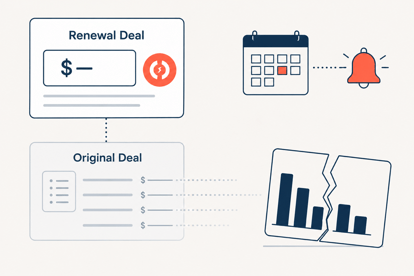
HubSpot's workflow tool does one job very well: watch a date and take an action when it arrives. It does not, by default, carry deal value, line items, or recurring revenue classification forward when a renewal deal gets created from a closed won deal.
This is well documented in HubSpot's own partner community. Renewal deals created through a workflow do not inherit line items from the source deal, which means the amount field on a freshly created renewal deal is often wrong or empty until someone fixes it by hand (Source: "HubSpot Contract Management: Renewals, Reminders, Reporting").
For an MSP, this matters more than it would for a simple monthly SaaS subscription. Support contracts staple together several line items: a base retainer, per device or per seat fees, sometimes a security add-on.
When a renewal deal drops those line items, any MRR or ARR dashboard built on deal level recurring revenue fields becomes wrong the day the automation fires, not months later.
What HubSpot Actually Gives You for Contract Renewals
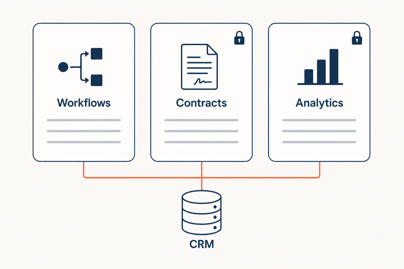
Most articles on this topic describe one HubSpot system and call it the whole picture. There are actually three separate systems involved, they sit on different subscription tiers, and confusing them is the fastest way to promise an MSP something HubSpot will not deliver on the plan they already own.
Deal Level Automation
Sales Hub Professional and above lets you build workflows that watch a date property and act on it.
The common pattern is a set of triggers at 90, 60, and 30 days before contract end, each one moving the deal stage, creating a task, or sending a reminder email (Source: "Renewal Pipeline in HubSpot: Handling Expansions, Downgrades, and Churn Alerts").
This is the layer most MSPs already have access to and the one worth building first.
The Native Contracts Object & Renewal Quotes
HubSpot launched Revenue Hub on June 16, 2026, folding a native Contracts object, CPQ, and renewal quotes into what was previously Commerce Hub. Creating and editing contracts, along with change and renewal quotes, now requires a Revenue Hub seat (Source: "Set up contracts").
This is the part most existing content gets wrong, since a lot of it still points MSPs toward Operations Hub or Sales Hub Enterprise for this exact feature.
The advantage of this route is that a renewal quote generated from a contract pulls its line items and terms straight from that contract, so the amount problem from the section above does not happen the same way (Source: "Create a renewal quote on a contract").
Revenue Analytics Reporting
Separately from Revenue Hub, HubSpot's MRR and ARR dashboard, found under Reporting, Sales, Forecast and Revenue, requires Sales Hub Enterprise or Service Hub Enterprise. It reads from the same deal level recurring revenue properties that break when renewal automation drops line items, which is why the pipeline fix has to come before the reporting layer, not after.
|
System |
Tier required |
Handles |
Does not handle |
|
Deal level workflows |
Sales Hub Professional or higher |
Date triggers, tasks, stage moves |
Line items, recurring revenue amount |
|
Native Contracts and renewal quotes |
Revenue Hub Professional or Enterprise seat |
Renewal alerts, renewal quotes, auto-created deals tied to a contract |
MRR or ARR dashboards |
|
Revenue Analytics |
Sales Hub or Service Hub Enterprise |
MRR and ARR reporting from deal properties |
Contract level renewal mechanics |
Building the Renewal Pipeline Without Losing Line Items
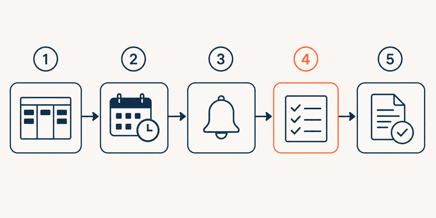
Once the tier question is settled, the pipeline itself follows a fairly consistent build order regardless of which route an MSP takes.
- Create a dedicated renewal pipeline, separate from new business, so reporting and forecasting do not mix new logo deals with existing contract renewals.
- Store the contract end date as a property on the Company or Contract record rather than relying on the original deal's close date, since an early renewal or a mid term extension would otherwise trigger the workflow at the wrong time (Source: "Setting Up an Automated Renewal Funnel for Support Contracts").
- Trigger the workflow at 90, 60, and 30 days before that end date, moving the deal into the renewal pipeline and assigning a task to the account owner at each stage.
- On Sales Hub Professional, treat line item and recurring revenue amount entry as a required manual step at deal creation, not an assumption. Build a task specifically for this, since HubSpot will not populate it for you.
- On Revenue Hub, generate the renewal quote directly from the existing contract instead of creating a bare deal, since the quote pulls line items and terms from the contract automatically.
Keeping Data That Feeds Revenue Visibility Clean
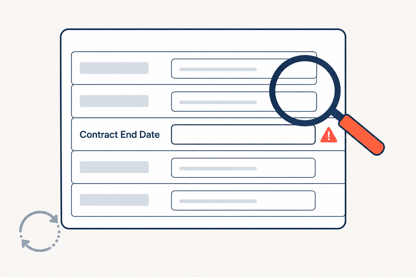
An empty contract end date is the single biggest threat to every workflow described above. If that field is blank on a closed won deal, no renewal workflow ever fires, and the deal simply disappears from view until a customer calls asking why service stopped.
A cheap, high value workflow to add alongside the renewal pipeline enrolls any deal marked closed won where contract end date is unknown, then tasks the deal owner or a dedicated contract admin to fill it in. This single check catches the majority of renewal blind spots before they become missed renewals (Source: "HubSpot Contract Management: Renewals, Reminders, Reporting").
MSPs running multi-year support contracts should also watch for a specific technical limit. Chaining successive renewal deals year after year through the same workflow can trip HubSpot's loop protection, which silently stops the automation rather than throwing an obvious error. Test any multi-year chain across at least three renewal cycles before trusting it in production.
When HubSpot Alone is Not Enough
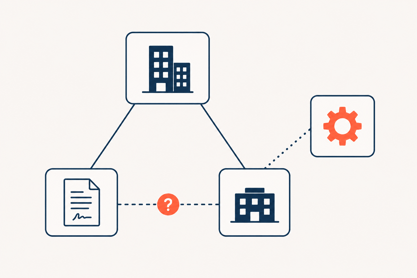
HubSpot's native model assumes a fairly simple two-party relationship between your business and the customer. Some MSP support contracts do not fit that shape. Multi-party agreements involving an MSP, a reseller, and an end customer, or contracts with per-seat license tracking where each seat carries its own status, generally require a Custom Object build, and Custom Object workflows are restricted to Enterprise.
This is also where the line between HubSpot and a PSA gets real. Usage-based elements tied to RMM data, like per-device monitoring fees that change monthly, need a system of record for that usage before HubSpot can bill or renew against it accurately, a topic covered in more depth in connecting your PSA and RMM stack to HubSpot.
A Realistic Rollout Order for MSPs
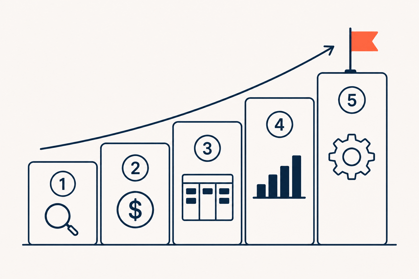
Revenue leakage from renewal mismanagement is not a small line item. Mid-market MSPs lose an estimated 5 to 15 percent of annual revenue this way, much of it services already delivered but never billed or renewed on schedule (Source: "Revenue Leakage in Mid-Market Managed Service Providers"). MSPs that run a disciplined renewal process report renewal rates near 92 percent, against an industry average churn range of 8 to 12 percent (Source: "Msp Statistics | 2026 Edition").
-
Audit existing support contracts for missing or unreliable end dates before building anything else.
-
Decide whether the Revenue Hub seat cost is justified by contract volume and renewal complexity, or whether deal level automation on your current tier covers it.
-
Build the dedicated renewal pipeline and the data hygiene workflow together, in the same project, not as separate initiatives months apart.
-
Layer Revenue Analytics or a custom MRR dashboard on top only once the underlying deal data is trustworthy.
-
Revisit multi-party or per-seat license needs only if the native model genuinely does not fit, since a Custom Object build is real engineering effort, not a checkbox.
Conclusion
HubSpot can automate support contract renewals for most MSPs without a PSA sitting in the middle of the process. The catch is sequencing, not capability. Renewal automation and revenue visibility have to get built as one project. Build the workflow first and bolt reporting on later, and the numbers will already be wrong by the time anyone checks them.
For most support-contract MSPs on Sales Hub Professional, that means a dedicated renewal pipeline, a hard rule about manually confirming line items on every renewal deal, and a data hygiene workflow that catches missing end dates before they become missed renewals.
Revenue Hub and Revenue Analytics are worth the added seat cost once contract volume makes manual line item checks a real bottleneck, not before.
FAQ
Does HubSpot have a native contract object?
Yes. As of the June 2026 Revenue Hub launch, HubSpot's native Contracts object includes renewal alerts and renewal quotes, though creating or editing contracts requires a Revenue Hub seat (Source: "Set up contracts").
What HubSpot tier do I need to automate support contract renewals?
Basic deal level automation works on Sales Hub Professional. Renewal quotes and the native Contracts object need a Revenue Hub seat, and MRR or ARR dashboards need Sales Hub or Service Hub Enterprise. These are three separate purchases, not one tier upgrade.
Why do automated HubSpot renewal deals show the wrong amount?
Workflow-created renewal deals do not automatically carry line items or recurring revenue amounts from the original deal, so the field either stays empty or copies a stale total value until someone corrects it.
Can HubSpot replace a PSA for contract renewal management?
For straightforward, two-party support contracts, yes for most MSPs. For per-seat licensing or multi-party agreements, HubSpot's native model does not fit cleanly, and a PSA or a Custom Object build is usually the better route.
Founder & CEO @ Hubxpert. My goal is to make every company using HubSpot succeed in their marketing organisation and automation.

Ratul Rahman
Table of Contents:

Subscribe to our newsletter

Modern Web App Design & UI Patterns That Scale
See how modern web app design differs from a marketing site, covering modern web application design and modern web app UI design for dense data dashboards.

Modern Responsive Web Design Techniques for 2027
Apply modern responsive web design techniques in 2026. Review modern web design best practices and why responsive design still decides your conversions.

Modern Website Design Examples & What Makes Them Work
Browse modern website design examples and modern looking websites, and see exactly what separates a fast, current site from one that already feels dated.

Interactive Web Design Templates & Examples to Study
See interactive web design templates and the best interactive web design inspiration, then compare interactive web page design examples before you build.

Interactive Elements in Web Design & Where to Stop
Add interactive elements in web design that earn their place, covering micro interactions, interactive maps, interactive timelines and knowing when to stop.

3D Web Design Templates & Examples You Can Reuse
Browse 3D web design templates and examples, plus where to find free downloads, and see how 3D web page design lifts a site without slowing the site down.
-
Modern Web App Design & UI Patterns That Scale
hello
-
Modern Responsive Web Design Techniques for 2027
hello
-
Modern Website Design Examples & What Makes Them Work
hello
-
Interactive Web Design Templates & Examples to Study
hello
-
Interactive Elements in Web Design & Where to Stop
hello
-
3D Web Design Templates & Examples You Can Reuse
hello