





-2.png)


-2.png)



.png)


.webp)

.png)










.png)







-1.webp)
-1.webp)



.webp)

-1-1.webp)



-2.webp)

-1-1.webp)

-2-1.png)

-1-1.webp)
-1-1.webp)
-1-1.png)







MSP tool stacks rarely start as a problem. A PSA gets added first, then an RMM, then HubSpot for sales and marketing. Each addition solves a real problem at the time it happens.
The trouble shows up later. The same client fact gets edited in three places. A contact's title changes in HubSpot but not in the PSA. A device count updates in the RMM but never reaches the CRM. Nobody planned for three systems of truth. It happened one tool at a time.
This post is not about whether to adopt a PSA, an RMM, and HubSpot. Anyone reading this already has all three. It is about which facts should sync, which shouldn't, and why forcing everything to sync usually makes the problem worse, not better.
What Actually Syncs Today & What Doesn't

PSA-to-HubSpot sync is workable today. ConnectWise has a native, two-way connector. Autotask needs a third-party bridge, but it works.
RMM-to-HubSpot is a different story. No major RMM platform, including NinjaOne, Datto RMM, or N-able, has a native HubSpot connector as of this research. The only path runs through generic workflow-automation tools built for a thousand different app pairs, not MSP-specific logic.
That gap matters for planning. Build the PSA connection first. Treat RMM-to-HubSpot as a workaround with real limits, not a finished integration.
Let's Connect Your PSA to HubSpot
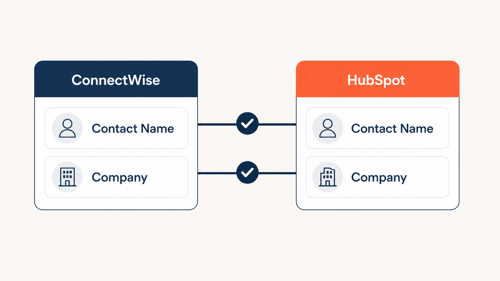
ConnectWise: What the Native Sync Covers
ConnectWise maintains its own listing on the HubSpot App Marketplace. It syncs contacts, companies, and custom fields both ways. Default field mappings come built in, so setup does not start from zero (Source: "HubSpot | ConnectWise Marketplace").
Custom field mappings, beyond the defaults, require Operations Hub Starter or Professional. Confirm which Operations Hub tier is active before assuming a custom field will map correctly.
Autotask: The Third-Party Bridge
Autotask has no first-party HubSpot connector. MSPs bridge the two using third-party tools such as Integrates.io, built by SyncMatters, a certified HubSpot integration partner.
Autotask's own built-in integrations often push data one direction only, out to other tools, rather than syncing both ways (Source: "How to Integrate Autotask"). Confirm the sync direction with any Autotask connector before relying on it for two-way updates.
What to Confirm Before Turning Sync On
Three questions apply to either PSA. Which fields sync, not just whether "integration" exists. Which direction data flows, one way or both. What happens when the same field changes in both systems at once.
Get these answers in writing from the connector vendor before turning sync on. A demo showing data appearing once is not the same as a stable, two-way, field-level sync running in production.
Run a sync on a small batch of test records first. Ten contacts, one company, a handful of tickets. Confirm the data lands correctly in both directions before connecting the full client list. A sync that looks right on day one can still corrupt records at scale if a field mapping is wrong.
Why RMM-to-HubSpot is The Unsolved Half
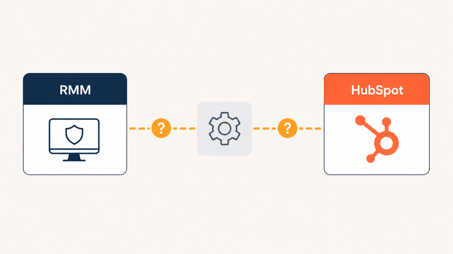
This gap is not theoretical. A HubSpot Community thread requesting a native NinjaOne integration for Service Hub has stayed open with repeated MSP demand. One participant states they moved their PSA to a different platform, DeskDay, specifically because the integration was not a priority for HubSpot's team (Source: "NinjaRMM Integration for Service Hub").
NinjaOne's own guide to connecting an RMM to a PSA or ticketing system lists ConnectWise, Autotask, ServiceNow, and Zendesk as supported native targets. HubSpot does not appear on that list (Source: "How to Integrate RMM with PSA and Ticketing Systems"). Datto RMM and N-able show the same pattern: deep native integration with their own ecosystem partners, nothing built for HubSpot directly.
The workaround that exists today runs through generic automation platforms. Albato, for example, connects NinjaOne's API to HubSpot alongside more than a thousand other apps it supports (Source: "NinjaOne Integrations"). This works, but it is not purpose-built for MSP data. Field mapping, error handling, and data validation all need manual setup, and updates to either platform's API can break the connection without warning.
For most MSPs, the realistic answer today is limited RMM-to-HubSpot sync. Push high-value summary data, like device count or last-patch date, into a custom HubSpot property. Do not attempt a full, live, two-way sync of every RMM field. The tooling to support that reliably does not exist yet for any major RMM platform.
Why bother at all. Device count and patch status are the kind of detail that changes a renewal conversation. A sales rep who can see a client is running twenty unpatched machines has a real upsell reason, not a guess. That is the value on the other side of a limited, well-scoped RMM sync, even a partial one.
This could change. RMM vendors add PSA integrations regularly, and HubSpot's own marketplace grows every year. Re-check each RMM vendor's integration list before building anything, since a native connector could close this gap without much notice. Nothing in this section should be treated as permanent.
The Real Rule: Field Ownership, Not Full Sync
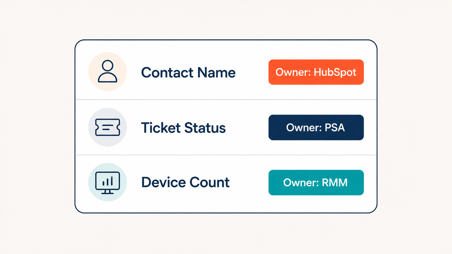
Full, bidirectional sync sounds like the fix. In practice, it often creates a new problem instead of solving the old one. When two systems can both edit the same field, duplication is already built into the setup, not eliminated by it (Source: "How to Connect CRM, PSA, and Accounting Without Duplicate Data").
The pattern shows up the same way across professional services tooling generally. A one-way integration that pushes data out but cannot pull changes back leaves the receiving system permanently out of date. Even a working sync can fail silently when naming conventions do not match between systems (Source: "How Integrations Eliminate Duplicate Data Entry Across Professional Services Systems").
The fix is not more sync. It is deciding, field by field, which system owns the fact and which systems only receive it.
|
Data Type |
System of Record |
HubSpot's Role |
|
Contact name, title, email |
HubSpot |
Owns it, pushes to PSA |
|
Ticket status, resolution time |
PSA |
Receives read-only summary in HubSpot |
|
Device count, patch status |
RMM |
Receives read-only summary in HubSpot |
|
Contract renewal date |
PSA or HubSpot, pick one |
The other reads it, never edits it |
Pick one owner per fact. Every other system reads that fact. None of them edit it. This single rule prevents most of the drift that a full two-way sync creates.
The Honest Alternative: All-in-One PSA/RMM Platforms
There is a different way to solve this problem entirely: stop running a separate PSA and RMM. Platforms like Syncro, SuperOps, and Atera sell PSA and RMM as one unified database.
So the sync problem disappears because there is only one system holding the data (Source: "All-in-One MSP Software: 7 Unified Platforms for 2026"). Industry data cited in that comparison links leaner, more consolidated MSP stacks to meaningfully higher profitability than tool-sprawling peers.
This is a legitimate option, not a lesser one. It solves the PSA and RMM half of the problem completely.
It does not solve the other half. None of these platforms replace HubSpot's marketing automation, lead nurture, or inbound tooling. An MSP that wants operational simplicity and real marketing capability still needs to decide where HubSpot fits, even after consolidating PSA and RMM into one tool.
How HubXpert Builds This the Right Way
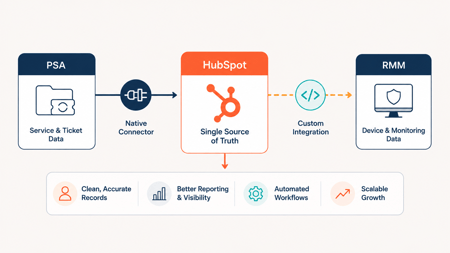
HubXpert starts with the field-ownership map from the section above, built specifically for each MSP's actual PSA and RMM, before any connector gets turned on. Guessing at field mapping after the fact is where most sync problems start.
For ConnectWise, that means configuring the native two-way sync correctly the first time, with custom field mappings scoped to what the sales team actually needs to see, not every field the API exposes.
For Autotask, HubXpert sets up the third-party bridge with sync direction confirmed and tested on a small batch before the full client list gets connected.
For RMM data, HubXpert builds a limited, one-way push of the specific fields that matter for sales conversations, like device count and last-patch date, instead of attempting a full sync that no RMM vendor currently supports well.
MSPs deciding whether to consolidate PSA and RMM entirely, or keep them separate and connect what matters into HubSpot, should weigh both paths against their actual sales and marketing needs, a decision covered more fully in HubSpot for IT Services and MSPs.
Sync setups also need revisiting. HubXpert checks each connector against vendor changes on a regular cycle, since API updates on either side can break a mapping without warning.
The Verdict: What to Connect, What to Leave Alone

Connect the PSA to HubSpot now. ConnectWise's native sync and Autotask's third-party bridge are both real, working options today.
Treat RMM-to-HubSpot as a limited, scoped workaround, not a full integration. Push a handful of high-value fields one way. Do not attempt a live, bidirectional sync of every RMM data point, since the tooling to support that reliably does not exist yet.
Apply field ownership everywhere, regardless of which systems are connected. One system owns each fact. Every other system reads it. This single decision prevents more duplicate-data problems than any sync tool can fix after the fact.
If the actual goal is eliminating PSA and RMM sprawl specifically, an all-in-one platform may be the better fit than syncing separate tools into HubSpot at all.
FAQs
Does HubSpot integrate with ConnectWise?
Yes, through ConnectWise's own listing on the HubSpot App Marketplace. It syncs contacts, companies, and custom fields both ways, with default mappings included.
Does HubSpot integrate with NinjaOne or Datto RMM?
Not natively. Both require third-party workflow automation tools, and neither vendor currently lists HubSpot as a supported integration target.
What happens if two systems both edit the same record?
The field drifts. Each system pushes its own version and neither stays accurate for long. Assign one system as the owner of each fact instead.
Is an all-in-one PSA/RMM platform better than syncing to HubSpot?
It depends on the goal. All-in-one platforms solve PSA and RMM sprawl completely but don't replace HubSpot's marketing and sales tooling.
How much manual work does this actually eliminate?
PSA-to-HubSpot sync removes most manual re-entry for contacts and companies. RMM-to-HubSpot today only reduces manual work for the specific fields pushed deliberately into a scoped sync.
As a Hubspot Automation Developer at Hubxpert, I specialize in API integration, seamlessly connecting HubSpot with third-party applications. My role encompasses understanding client needs, crafting custom code solutions, and ensuring the smooth operation of our automation workflows. I actively address any HubSpot integration challenges and stay updated with the platform's latest advancements. My dedication ensures clients harness the full potential of HubSpot.

Tanzinul Kabir
Table of Contents:

Subscribe to our newsletter

Modern Web App Design & UI Patterns That Scale
See how modern web app design differs from a marketing site, covering modern web application design and modern web app UI design for dense data dashboards.

Modern Responsive Web Design Techniques for 2027
Apply modern responsive web design techniques in 2026. Review modern web design best practices and why responsive design still decides your conversions.

Modern Website Design Examples & What Makes Them Work
Browse modern website design examples and modern looking websites, and see exactly what separates a fast, current site from one that already feels dated.

Interactive Web Design Templates & Examples to Study
See interactive web design templates and the best interactive web design inspiration, then compare interactive web page design examples before you build.

Interactive Elements in Web Design & Where to Stop
Add interactive elements in web design that earn their place, covering micro interactions, interactive maps, interactive timelines and knowing when to stop.

3D Web Design Templates & Examples You Can Reuse
Browse 3D web design templates and examples, plus where to find free downloads, and see how 3D web page design lifts a site without slowing the site down.
-
Modern Web App Design & UI Patterns That Scale
hello
-
Modern Responsive Web Design Techniques for 2027
hello
-
Modern Website Design Examples & What Makes Them Work
hello
-
Interactive Web Design Templates & Examples to Study
hello
-
Interactive Elements in Web Design & Where to Stop
hello
-
3D Web Design Templates & Examples You Can Reuse
hello