





-2.png)


-2.png)



.png)


.webp)

.png)










.png)







-1.webp)
-1.webp)



.webp)

-1-1.webp)



-2.webp)

-1-1.webp)

-2-1.png)

-1-1.webp)
-1-1.webp)
-1-1.png)






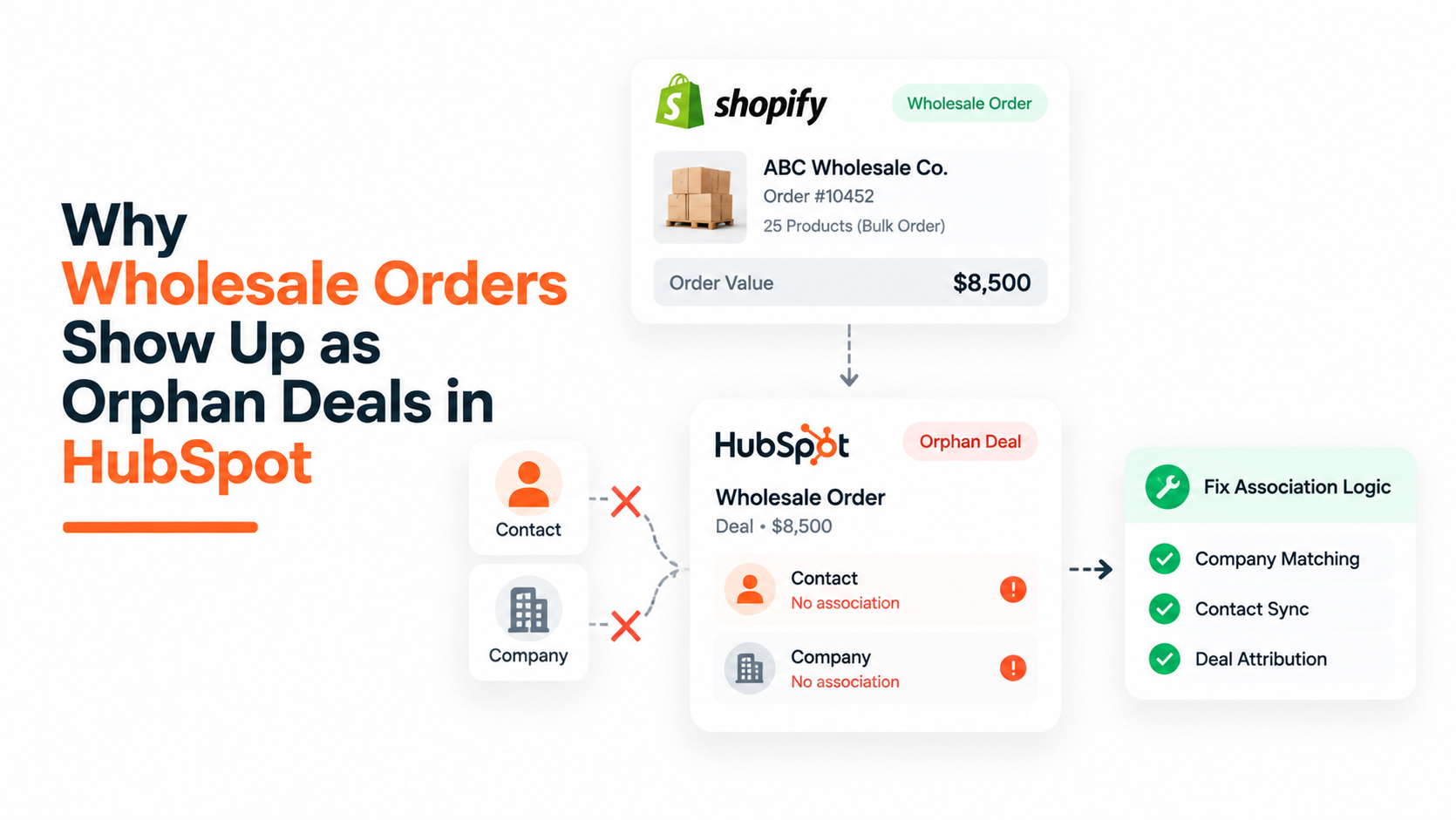
A wholesale order comes through Shopify, HubSpot creates a deal for it, and the deal never touches a company record. Three reorders later, the same wholesale account is sitting in the pipeline as three unrelated deals with no account history connecting them.
This happens for two separate reasons, not one. The Shopify-to-HubSpot sync was built to map an order to a deal, not an account to a deal. Wholesale orders themselves often arrive through draft or quote-based checkout paths that the sync was never designed to watch.
HubSpot has a real fix for the first problem and almost nothing for the second. Knowing which is which, and what each option actually associates, is what keeps a wholesale pipeline usable past the first few dozen orders, and it's one of the gaps that shows up most often once a HubSpot for ecommerce setup starts carrying B2B orders alongside standard checkout.
Why Wholesale Orders Drift Into Orphan Deals
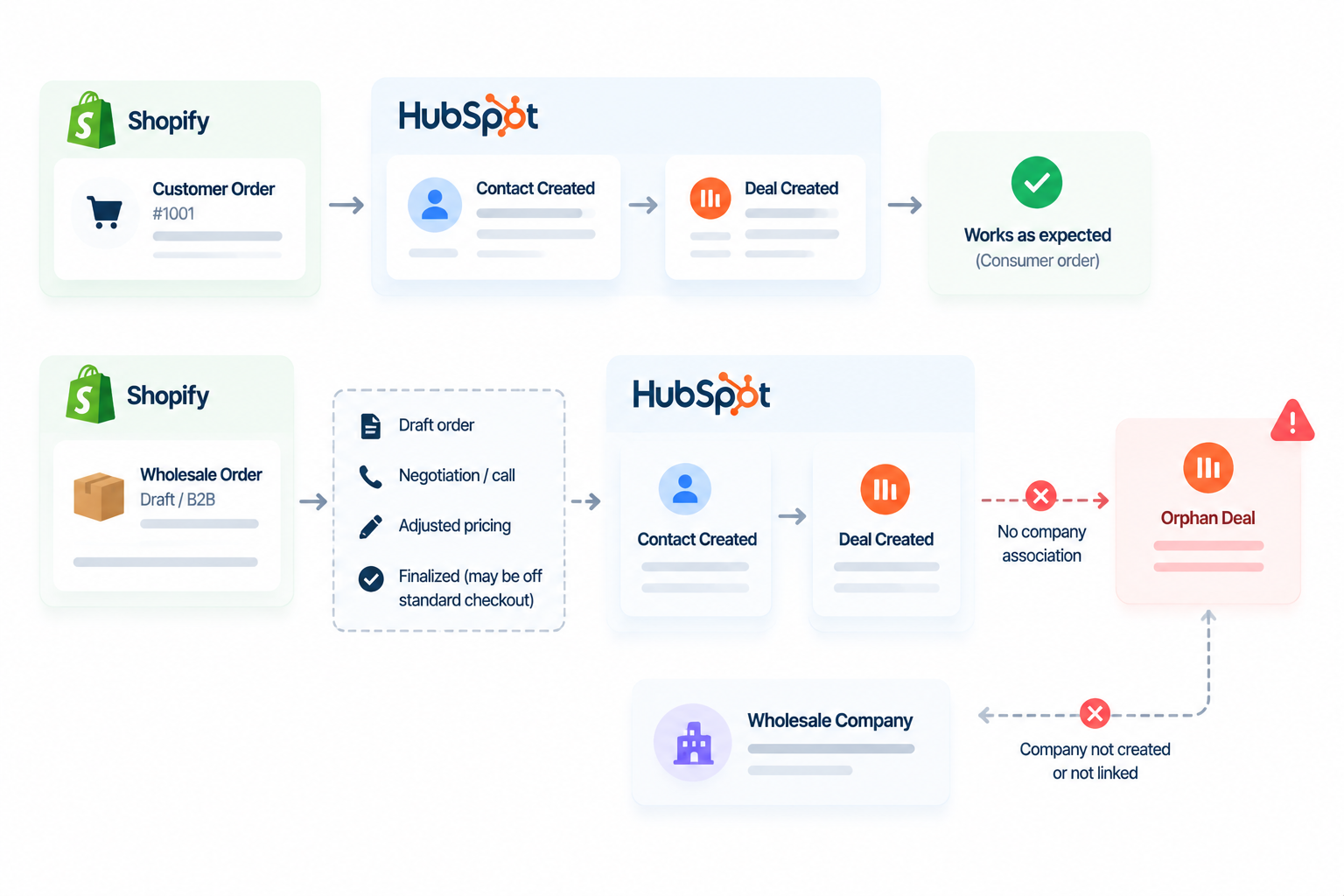
The native Shopify integration syncs Shopify Orders into HubSpot as Deals, and Shopify Customers into HubSpot as Contacts (Source: HubSpot Native Shopify Integration 101: How Data Syncs From Shopify to HubSpot, HubSpot Solutions Engineer post). That mapping covers a single transaction. It was never built to create or attach a Company record to the resulting deal.
For a one-time consumer order that's fine. For a wholesale order it isn't, because a wholesale relationship is a company relationship by definition, and the deal lands in your pipeline without the one object that would tell you which account it belongs to.
Multiple HubSpot Community threads describe this exact gap independently, including a user who called the resulting deals "orphaned" and noted there's no company field mapping available in the integration settings to fix it (Source: Please Bring the Deals Object Back Into the Shopify Integration).
The second cause gets less attention in most integration guides. Wholesale orders rarely move through a single clean checkout pass. They get built as drafts, revised on a call, adjusted for a negotiated price, and finalized later, sometimes outside the standard checkout flow the sync is watching.
One HubSpot Community thread on this exact scenario found that Shopify only creates an order, and the deal that follows from it, once a visitor completes checkout details and clicks "Continue to Shipping." Stop short of that step and no deal, and no contact association, gets created at all (Source: HubSpot Native Shopify Integration 101: How Data Syncs From Shopify to HubSpot). A wholesale order finalized by hand, off the standard checkout path, hits this same wall.
Pick the Right Sync Path First: Standard Checkout
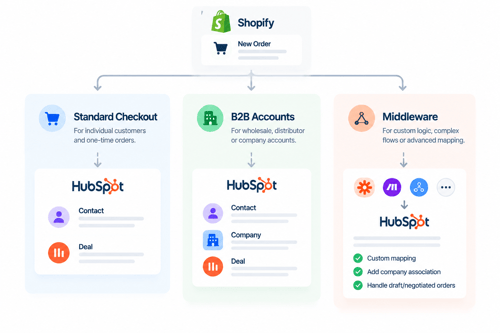
Before troubleshooting individual deals, decide which path is actually creating your wholesale deals. The three options below associate companies differently, and picking the wrong default is why the same fix gets re-applied every few weeks.
|
Approach |
Best for |
What it actually associates |
|
Standard Shopify checkout, native sync |
Smaller wholesale operations running through a regular storefront |
Creates the deal and contact automatically, but the company has to be added by hand every time, since the standard sync has no company mapping (Source: Please Bring the Deals Object Back Into the Shopify Integration) |
|
Shopify B2B company accounts with two-way company sync |
Stores already running Shopify's dedicated B2B checkout |
Maps company accounts to HubSpot companies according to integration vendor documentation, though this is unverified against HubSpot's own knowledge base and the feature is still in beta (Source: Shopify HubSpot Integration: How Data Sync & Automation Work; treat as directional, not confirmed) |
|
Middleware or Operations Hub custom code that sets the company at deal creation |
Teams with development resources or an Operations Hub Professional subscription |
The only route with a confirmed, automatic company association, since HubSpot workflows cannot create new associations on records that already exist. |
For most wholesale operations still running standard checkout, the third row is the more realistic fix. Waiting on the B2B beta to mature, or re-keying company associations by hand every week, both cost more over a year than building the association once at deal creation.
What HubSpot Can Actually Enforce & What It Can't
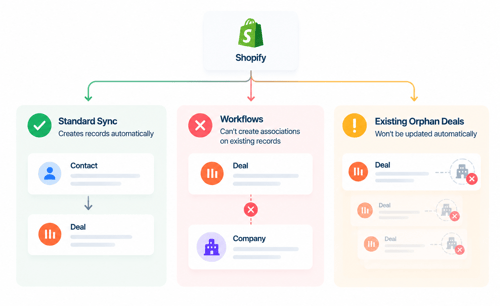
This is where most integration advice oversells the platform. There's a real capability here and a real gap, and confusing the two is what leads teams to build a fix that quietly does nothing.
The standard sync
It can create Orders as Deals and Customers as Contacts automatically, on Shopify's own sync schedule, without manual entry. It can move a deal through pipeline stages based on the order's status in Shopify.
It cannot attach a Company record to that deal, and it cannot retroactively link a new order to an already-open deal for the same account, so a repeat wholesale buyer generates a new, disconnected deal every time instead of adding to a running thread.
Workflows
Workflows look like the obvious place to patch this, and they can't do it. HubSpot workflows do not support establishing new associations on records that already exist. Doing it correctly requires either custom code available in Operations Hub Professional, or a third-party matching app (Source: Associating a Company with a Deal Based Upon a Contact's Primary Company).
The Gap Both Options Share
Even a working association rule only covers deals created going forward. Neither the standard sync nor a workflow-based fix touches deals that already synced without a company. A similar failure mode shows up outside Shopify too: one HubSpot Community thread describes an integration creating deals with a contact attached but no company.
And confirms the fix has to happen after the fact since the integration itself won't create the missing link (Source: Automated Deals Created on Contacts but Not Associated to Their Respective Company). Whatever you build to prevent new orphan deals still leaves you with a backlog to clear separately.
Designing an Association Rule That Actually Holds
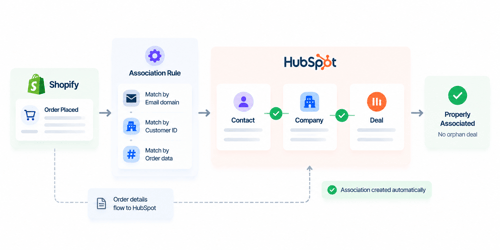
Build the fix in this order, not in whatever order the backlog makes urgent first:
- Confirm which field reliably identifies the account. Company domain from the contact's email address is usually the strongest match; a generic or personal email address won't match cleanly and needs a manual fallback.
- Set the rule to run at deal creation, not on a schedule. A rule that only runs nightly still leaves same-day orders sitting unassociated when a rep looks at the pipeline that afternoon.
- Match on the contact's primary company, not a freeform company name typed at checkout. Freeform text creates duplicate company records instead of linking to the one you already have.
- Route unmatched orders to a queue instead of leaving them silently orphaned. If the domain doesn't match anything in HubSpot, a human still needs to see it, not lose it.
- Log which deals were auto-associated versus manually associated. That distinction tells you whether the rule is actually holding or whether someone is still doing this by hand.
The Draft Order Problem
This is the half most integration guides skip. A draft order that goes through several revisions, or that never completes through the standard checkout flow, often doesn't create or update a HubSpot deal the way a completed order does (Source: Shopify HubSpot Integration: Setup Guide & B2B Sync, vendor commentary rather than HubSpot's own documentation, flagged as the best available source on draft-order sync behavior).
Wholesale buying works this way by default. A rep negotiates pricing, revises the draft twice, and finalizes it days later, which means the order that eventually ships may never have passed through the checkout event the sync depends on.
Forcing wholesale reps to run every order through a clean, single-pass standard checkout to keep the sync happy usually fails, since that's not how a negotiated bulk order gets built.
The workable fix is treating draft or quote-based orders as a separate intake path from the start, with their own deal-creation trigger, rather than expecting the same sync that handles a normal storefront purchase to also catch orders that were never meant to look like one.
What to Do Once Orphan Deals Have Already Piled Up
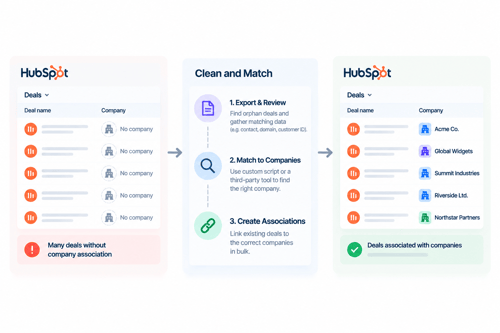
If a backlog of unassociated wholesale deals already exists, there's no way to bulk-associate them inside HubSpot natively (Source: Automatically Associate Deals with Company). Realistically:
Identify the backlog first instead of fixing deals one at a time as you notice them. Filter deals in the ecommerce or wholesale pipeline with no associated company, so you're working from a defined list.
Match on company domain as the primary sort method, and accept that contacts using a personal email or a shared team inbox won't match automatically. Those need a human to look at them.
Fix the intake pattern before clearing the backlog a second time. If reps are still quick-adding a second deal from the pipeline board to patch around an orphaned Shopify deal, clearing the backlog once just resets the clock until the same habit creates the next one.
Treat deals that predate any fix as a known gap in historical reporting rather than something to quietly reconcile. Backfilling a company association after the fact restores the record going forward, but any reporting run before the fix already counted that revenue as unattached, and that number doesn't change retroactively.
FAQs
Does the HubSpot-Shopify integration create a company record for wholesale orders?
Not by default. The standard integration syncs orders as deals and customers as contacts, with no company object created or attached (Source: Please Bring the Deals Object Back Into the Shopify Integration).
Why does one wholesale account end up as several unrelated deals instead of one ongoing thread?
Each Shopify order generates its own HubSpot deal, and the sync has no mechanism to check whether a deal already exists for that account before creating a new one. A repeat buyer's second order starts a new, disconnected deal rather than extending the first.
Can a HubSpot workflow associate a deal with a company automatically?
Not on its own. Workflows cannot establish new associations on records that already exist. Doing this reliably requires Operations Hub custom code or a third-party matching app (Source: Associating a Company with a Deal Based Upon a Contact's Primary Company).
Are draft or quote-based wholesale orders as reliable as standard checkout orders for syncing to HubSpot?
In practice, no. Orders that go through revisions as drafts, or that never complete a standard checkout flow, often don't create or update a HubSpot deal the way a completed order does, and negotiated wholesale orders are rarely built through a single clean checkout pass.
Can I bulk-fix existing orphan deals in HubSpot?
Not natively. There's no built-in bulk action to attach companies to a batch of unassociated deals. Clearing a backlog requires either a third-party matching app or custom development.
Senior RevOps Strategist at Hubxpert

Fazle Rabbi
Table of Contents:

Subscribe to our newsletter

Modern Web App Design & UI Patterns That Scale
See how modern web app design differs from a marketing site, covering modern web application design and modern web app UI design for dense data dashboards.

Modern Responsive Web Design Techniques for 2027
Apply modern responsive web design techniques in 2026. Review modern web design best practices and why responsive design still decides your conversions.

Modern Website Design Examples & What Makes Them Work
Browse modern website design examples and modern looking websites, and see exactly what separates a fast, current site from one that already feels dated.

Interactive Web Design Templates & Examples to Study
See interactive web design templates and the best interactive web design inspiration, then compare interactive web page design examples before you build.

Interactive Elements in Web Design & Where to Stop
Add interactive elements in web design that earn their place, covering micro interactions, interactive maps, interactive timelines and knowing when to stop.

3D Web Design Templates & Examples You Can Reuse
Browse 3D web design templates and examples, plus where to find free downloads, and see how 3D web page design lifts a site without slowing the site down.
-
Modern Web App Design & UI Patterns That Scale
hello
-
Modern Responsive Web Design Techniques for 2027
hello
-
Modern Website Design Examples & What Makes Them Work
hello
-
Interactive Web Design Templates & Examples to Study
hello
-
Interactive Elements in Web Design & Where to Stop
hello
-
3D Web Design Templates & Examples You Can Reuse
hello