





-2.png)


-2.png)



.png)


.webp)

.png)










.png)







-1.webp)
-1.webp)



.webp)

-1-1.webp)



-2.webp)

-1-1.webp)

-2-1.png)

-1-1.webp)
-1-1.webp)
-1-1.png)







Modern retro web design has its value for a long time. This combines nostalgic visual elements with the usability standards people expect from today's websites. Vintage typography, bold colors, pixel-inspired graphics, and classic layouts can give your website a distinctive personality. However, these elements still need to support readability, navigation and accessibility.
Let’s explore how to use modern retro web design effectively, choose the right visual elements, and balance old-school aesthetics with responsive layouts and smooth interactions. You’ll also learn how to create a retro-inspired website that feels memorable without making everyday tasks harder for visitors.
What is Modern Retro Web Design?
Modern retro web design borrows a few recognizable cues from earlier digital eras and builds them on a current foundation. Own.page describes it as a remix of the 1980s, 1990s and early 2000s. It says the idea is to borrow a few recognizable signals, not to make a page look old. (Source: "Retro Website Design: A Practical Guide to the Look")
UX Pilot says retro styles connect with Gen Z and Millennials, and that the challenge is blending nostalgia with usability. (Source: "14 Web Design Trends to Keep up with in 2026")
Modern vintage web design is a close cousin. My distinction: retro borrows from earlier web and computer eras, and vintage borrows from print and product eras. The table sorts five styles, using the cues the sources describe.
|
Style |
Borrows from |
Typical cues |
Main risk |
|
90s homepage |
Early web |
Tiled backgrounds, badges, rainbow links |
Clutter |
|
Y2K portal |
Early 2000s |
Glassy gradients, metallic accents, rounded buttons |
Glare and low contrast |
|
80s synthwave |
Arcades and neon signs |
Neon grids, purple and cyan, scanlines |
Effects over content |
|
Terminal look |
Early computing |
Black screens, monospaced text, pixel type |
Readability |
|
Modern vintage |
Print and product eras |
Cream backgrounds, serif type, textured images |
Faint text |
The first three rows come from own.page. The terminal look is how Eleken describes the Overrrides site: black, terminal-style, with bright yellow monospaced text. Modern vintage is how Eleken describes Gemnote: cream backgrounds, serif text and slightly textured images. (Source: "50 Best Website Design Examples")
VistaPrint adds that its Y2K-style "Dial-Up Delight" suits music, fashion and subculture brands. (Source: "8 top web design trends for 2026")
Which Modern Retro Web Design Examples Are Worth Studying?
Six sites show retro, dark and minimalist ideas at work. I describe each as Eleken does, and I did not test them. Open each one on a phone before you copy anything.
Overrrides: The Terminal Look
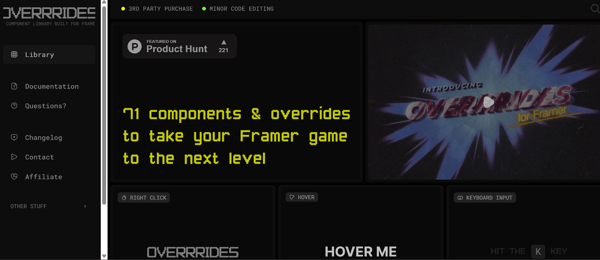
Overrrides sets bright yellow monospaced text on black and opens with a VHS-style intro video. Visitors can try its components with hover effects, keyboard input and right-click triggers. Copy the single, committed theme. Check the yellow-on-black contrast, and keep the intro video skippable.
Can't Unsee: Retro Gaming
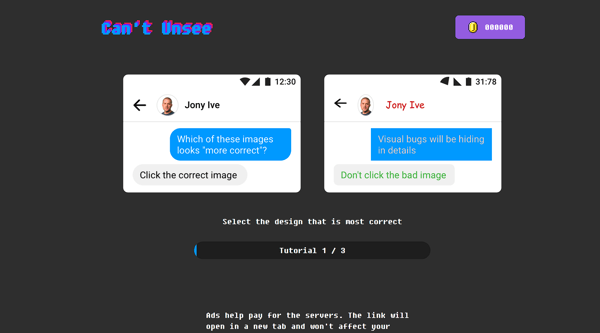
Can't Unsee turns design practice into a game. It has a neon, glitchy logo, pixel-style type, a progress bar and a coin counter, with subtle animations when you pick an answer. Copy the instant feedback. Keep any glitch effect under three flashes a second.
Mode: Retro Type on a Modern Layout

Mode uses a playful, slightly irregular serif, deep greens and neon lime accents. A bright green "Try for free" button contrasts with the darker background. Copy the idea of retro type in the headlines while the layout stays modern.
Gemnote: Modern Vintage

Gemnote mixes high-contrast serif type, wavy image frames, cream backgrounds and slightly textured images. Copy the editorial type and the organic frames. Test the contrast of text on cream.
Arrow Dynamics: Dark and Interactive
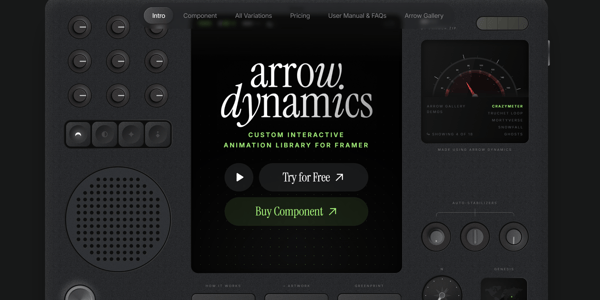
Arrow Dynamics styles its page as an instrument panel with buttons, dials and meters, in a dark interface with neon green accents. Copy the idea of making the theme part of the product story. Make sure every control works by keyboard.
Teenage Engineering: Minimalist and Dark
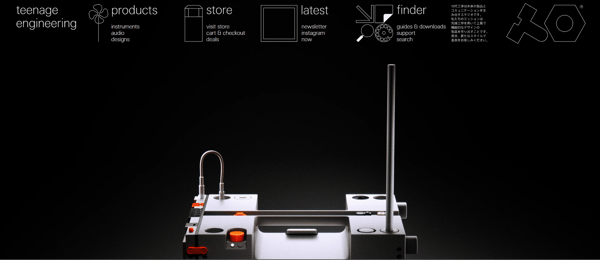
Teenage Engineering uses a dark theme, clean type, negative space and icon-based navigation. It shows how little styling you need: one design language, applied calmly. Add text labels to the icons.
What Are the Clean Modern Web Design Rules That Stay Fixed?
Clean modern web design is a set of rules, not a look. The table lists six and the retro trap each one catches. The last row is my own check.
|
Rule |
Target |
Retro trap |
|
Readable text |
Contrast of 4.5:1 for body text, 3:1 for large text |
Neon over patterns, dark text on dark |
|
No flashing |
Nothing flashes more than three times in one second |
Blinking badges, strobing GIFs |
|
Controlled motion |
Anything that moves on its own for over 5 seconds can be paused |
Marquees, looping GIFs |
|
Reflow |
Content works at 320 CSS pixels without two-way scrolling |
Table layouts, dense framed boxes |
|
Fast response |
Input response under 200 milliseconds for at least 75% of visits |
Heavy textures, large GIFs |
|
Clear offer |
The first screen says what you offer |
The joke outruns the message |
The sources: contrast comes from WCAG. (Source: "Contrast (Minimum)") The flashing rule is a Level A requirement, meant to avoid seizures in people with photosensitivity. (Source: "Three Flashes or Below Threshold") The pause rule covers moving content. (Source: "Pause, Stop, Hide")
The reflow rule allows two-way scrolling only where content needs it, such as data tables. (Source: "Reflow") The response target is Google's. (Source: "Interaction to Next Paint is officially a Core Web Vital")
LogRocket's retro guide names the same trouble spots: clutter, low contrast, excessive motion and poor responsiveness. It also says to avoid HTML tables for layout. (Source: "How can designers use retro web aesthetics without hurting usability?")
How Do You Mix Retro With Modern Minimalist Web Design?
Use one era and a small number of cues, and keep everything else quiet. Own.page advises two eras at most, and says to treat decoration like seasoning, not the main course. Its other tip is to keep the retro typeface for headings and pair it with a clean body font.
LogRocket suggests limiting bright elements to focal points, such as headers and buttons, and calls its framework Attract, Orient, Simplify.
A modern minimalist web design needs restraint to work. One 2026 roundup puts it this way:
"Restraint, in other words, is still the trend that never goes out of style."
Sagar Patel, The Plus Addons
(Source: "Web Design Trends 2026") My working rule is two retro cues per page, such as a heading font and one accent. Teenage Engineering, per Eleken, shows the idea: a minimal, dark, high-tech layout with a distinct design language.
How To Mix Retro With Modern Dark Web Design?
Dark suits retro, because neon, terminal text and synthwave colors all live on dark backgrounds. Eleken describes several dark sites. Umbrel uses a dark interface with neon purple accents and a blurred-glass card.
Arrow Dynamics pairs a dark interface with neon green accents and instrument-panel controls. Overrrides sets bright yellow monospaced text on black.
Modern dark web design is not a color flip, though. UX Pilot says dark mode needs thoughtful contrast, accessible typography and consistent branding. The contrast rule above still applies.
Check every pairing, including text over gradients and images. Own.page warns that pushing dark-on-dark styling too far can leave a page hard to read on a phone.
How Do You Build Modern Retro Web Design on HubSpot?
Keep the retro layer in one place, so you can dial it back. HubSpot's developer docs describe themes, templates and modules as layers, and say editors work inside style and layout guardrails. (Source: "HubSpot CMS overview")
Put the retro heading font, accent color and texture in the theme. Build repeating blocks, such as a hero or a card grid, as reusable HubSpot modules that read from those settings. That is my suggestion.
Then a redesign changes the theme, not every page. It also lets you turn the retro layer down on pages that need calm, such as pricing or forms.
Where Does 3D Fit in Modern Retro Web Design?
Retro and 3D mix well, because many retro looks come from games and early computing. Modern vintage web design can use 3D too, as long as the scene stays quiet. Speckyboy's roundup lists Ethereal, a one-page template with a 3D gradient background. Eleken describes Stripe Press's floating, rotating book covers on a dark, cinematic page.
Overrrides, per Eleken, lets visitors try its Framer components through hover effects, keyboard input and right-click triggers, and it opens with a VHS-style intro video. Arrow Dynamics, per Eleken, styles its page as an instrument panel with buttons, dials and meters. Both treat retro as an interactive stage, which is where the rules matter most. Four rules keep a retro 3D scene usable, and they are my view:
-
Add a cue, such as "Drag to rotate."
-
Keep feedback instant, under the response target above.
-
Offer a motion switch. The W3C explains that scroll and interaction motion can trigger vestibular disorders, and its Level AAA criterion asks that such motion can be disabled. (Source: "Understanding SC 2.3.3: Animation from Interactions")
-
Ship a 2D fallback. Our 3D interactive UI/UX design work pairs each 3D scene with a 2D fallback and builds to WCAG 2.2 AA.
How To Test Retro Design Before Launch?
-
Open the page on a phone in bright light. Can you still read it?
-
Check contrast for every text and button pairing.
-
Look for anything that flashes or loops on its own.
-
Narrow the window to 320 pixels and look for sideways scrolling.
-
Tab through the page with the keyboard.
-
Read the first screen out loud. Does it say what you offer?
FAQs
What Is the Difference Between Retro and Vintage Web Design?
Retro borrows from earlier web and computer eras, such as 90s homepages or synthwave. Vintage borrows from print and product eras, such as cream paper and serif type. That split is my framing, and the terms overlap in practice.
Is Retro Web Design Still Modern in 2026?
It is still in the roundups. UX Pilot's 2026 guide lists retro and nostalgia-driven design, and VistaPrint's 2026 guide lists Dial-Up Delight. I found no measured data on how long it will last, so use it as an accent.
Can Retro Web Design Be Accessible?
Yes, if it passes the same checks as any other design: contrast, flashing, moving content and reflow. Retro cues are style choices. The checks are about people.
Does Retro Work for a B2B or Regulated Site?
Use it lightly. Own.page says banking and healthcare pages need calm clarity more than nostalgia. A single retro heading font on an otherwise modern page is a safer start.
Can I Use Pixel Fonts for Body Text?
I would not. Own.page advises keeping the retro face for headings and pairing it with a clean body font. Small decorative type gets muddy on phones.
Are Animated GIFs Okay in Retro Design?
Sparingly. A GIF must not flash more than three times in one second, and one that moves for over five seconds needs a pause control. A still image can do the job.
How Many Retro Elements Are Too Many?
I found no research-backed number. Two cues per page is my working rule, and own.page makes a similar point by advising one or two motifs.
Can I Build Retro Design on HubSpot?
Yes. Put the retro fonts and colors in the theme, and use modules for the blocks. To see module patterns working, open the demos in the HubXpert module showcase. Custom 3D or interactive scenes need development work and a 2D fallback.
Final Thoughts
Modern retro web design works best when nostalgia supports the user experience. Use vintage fonts, colors, textures, and graphics with a clear visual hierarchy, readable text, and familiar navigation.
Make sure your design adapts to mobile screens and remains accessible to different users. With the right balance, you can create a distinctive website that captures the charm of the past while meeting modern usability expectations.
Founder & CEO @ Hubxpert. My goal is to make every company using HubSpot succeed in their marketing organisation and automation.

Ratul Rahman
Table of Contents:

Subscribe to our newsletter
Modern Retro Web Design & How to Keep It Accessible
Mix modern retro web design with modern minimalist web design and modern dark web design, while keeping the clean modern web design rules firmly intact.

Modern Homepage Design for Layouts, Dashboards & Forms
Rework a modern homepage design with intent, covering modern web dashboard design, modern web menu design and the modern web form design choices that convert.

Modern Web Design Templates & Layout Patterns
Compare modern web design templates and layout patterns, see modern website layout ideas you can reuse, and know when a custom layout beats a stock template.

Human Computer Interaction Web Design Principles
Learn how human computer interaction web design decisions shape usability, covering interaction design frameworks, interface patterns and building rich web UI.

Modern Web App Design & UI Patterns That Scale
See how modern web app design differs from a marketing site, covering modern web application design and modern web app UI design for dense data dashboards.

Modern Responsive Web Design Techniques for 2027
Apply modern responsive web design techniques in 2026. Review modern web design best practices and why responsive design still decides your conversions.
-
Modern Retro Web Design & How to Keep It Accessible
hello
-
Modern Homepage Design for Layouts, Dashboards & Forms
hello
-
Modern Web Design Templates & Layout Patterns
hello
-
Human Computer Interaction Web Design Principles
hello
-
Modern Web App Design & UI Patterns That Scale
hello
-
Modern Responsive Web Design Techniques for 2027
hello