





-2.png)


-2.png)



.png)


.webp)

.png)










.png)







-1.webp)
-1.webp)



.webp)

-1-1.webp)



-2.webp)

-1-1.webp)

-2-1.png)

-1-1.webp)
-1-1.webp)
-1-1.png)






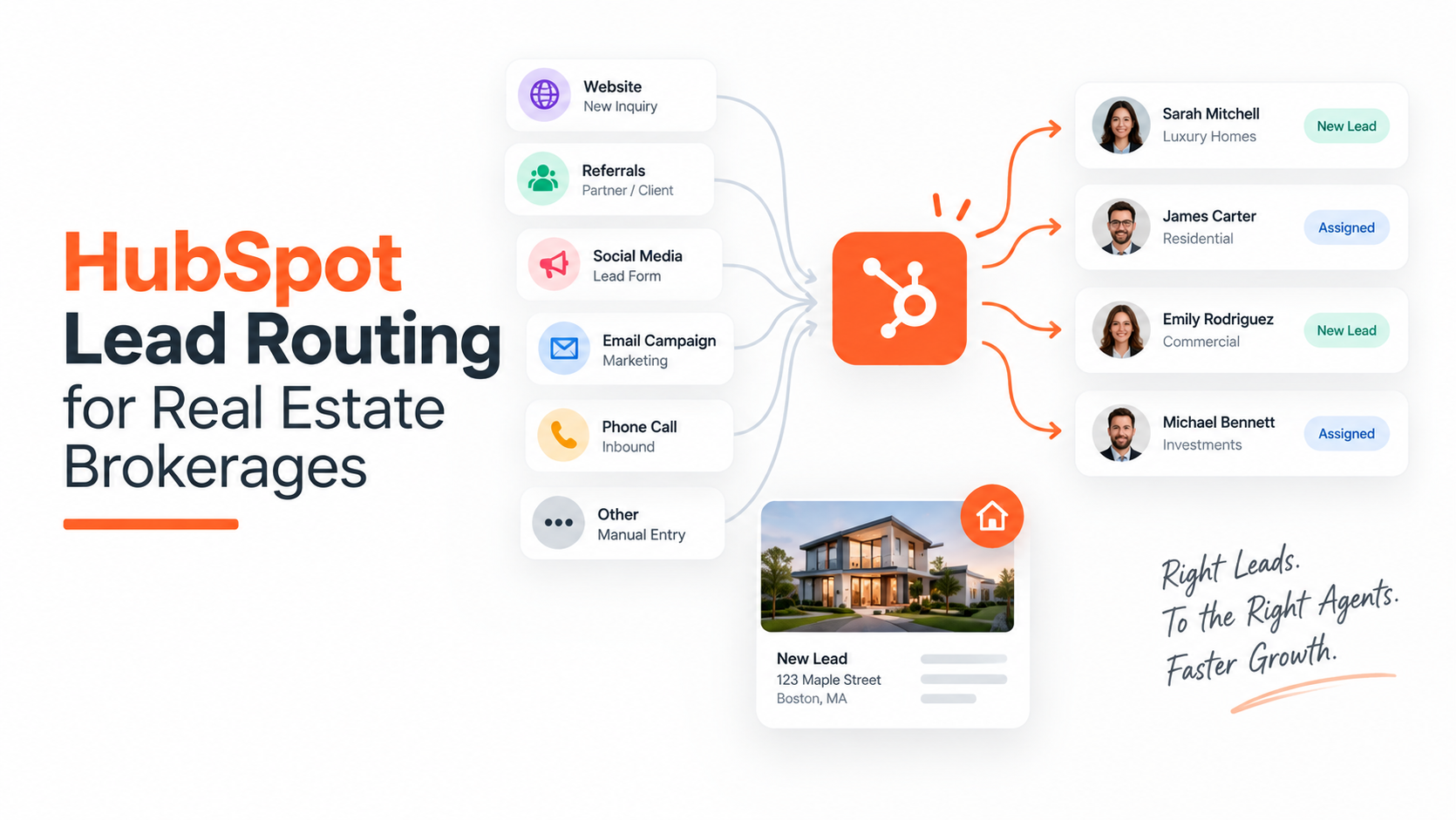
If you run a brokerage with three or more agents sharing one HubSpot account, you already know the symptom. A lead comes in at 2pm, and by 4pm nobody has called them.
Meanwhile your top producer is buried in fifteen leads because they happen to check their phone constantly, and your newest agent hasn't been assigned anything in two days.
This isn't a lead volume problem. You have enough leads. What you don't have is a system that gets each lead to the right person fast enough to matter, and that keeps working when everyone is asleep, at a showing, or on vacation.
This post covers what HubSpot actually does out of the box, where that breaks down for a real estate team specifically, and what you have to build yourself to close the gap.
The Problem is Response Distribution, Not Lead Volume
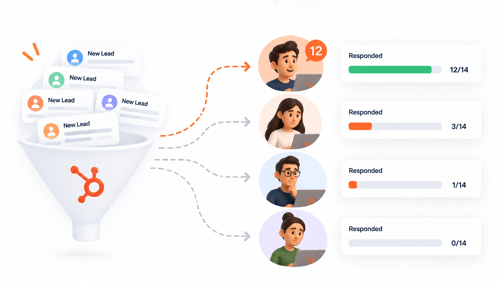
Most brokerages that struggle with conversion don't have a lead generation problem. They have a distribution problem. Leads either sit in a queue nobody is watching, get dumped on whichever agent happens to be logged in, or land with an agent who is mid-showing and doesn't see the notification for six hours.
The industry-wide numbers back this up directionally, even if some of the specific figures deserve a closer look (more on that below). Inman's 2025 Real Estate Technology Survey put the average agent response time at over 15 hours. NAR's 2025 Home Buyers and Sellers report found that 78% of buyers end up working with whichever agent responded first, not necessarily the best agent, just the fastest one.
A 2024 audit by Roof AI of the top 74 US brokerages found that 41% didn't respond to a test inquiry at all within three days, and only 9% hit the 5-minute window. If a study of the top brokerages in the country produces those numbers, a smaller independent brokerage running on manual lead assignment is not doing better.
None of this is solved by generating more leads. It's solved by making sure every lead that already exists in your HubSpot account reaches a human, fast, in a way that doesn't depend on which agent happens to be paying attention that hour.
What The Stats Actually Say & Where They Come From

Before building anything, it's worth untangling the stat soup this topic usually comes wrapped in, because a few of the most-repeated numbers are either misattributed or unverifiable, and using them uncritically undercuts your credibility with anyone who checks.
The MIT/InsideSales study is real, and it's the one everyone means when they say "5 minutes." Dr. James Oldroyd's research with InsideSales.com, based on roughly 1.25 million sales leads, found that contacting a lead within 5 minutes made a rep about 21 times more likely to qualify that lead, and about 100 times more likely to connect at all, compared to waiting 30 minutes. This is the source of the 21x and 100x figures, later popularized by Harvard Business Review.
There is no McKinsey study behind the "78% pick the first responder" claim. It gets attributed to McKinsey constantly across real estate content, and no traceable McKinsey publication actually says that. The 78% figure that does have a real citation traces back to NAR's buyer survey data, not McKinsey.
The "62% of real estate inquiries happen after hours" figure needs a caveat. It's repeated across dozens of 2025 and 2026 marketing blogs, almost always attributed to "NAR and Zillow Group research" without a link to an actual report. That's a pattern worth being suspicious of.
A comparable audit in the UK property market found the same issue with out-of-hours enquiry stats there, with vendor-cited figures ranging anywhere from 26% to 91% depending on whose internal dataset was being quoted, and no independent study behind any of them.
The direction of the claim is almost certainly correct, real estate inquiries do skew heavily toward evenings and weekends, but if you're citing a specific percentage, know that you're repeating an unsourced number, not an audited one.
The more defensible move is to pull your own HubSpot form-submission timestamps and look at your actual distribution before you build anything around a number you can't trace.
Routing Rules vs Plain Round Robin
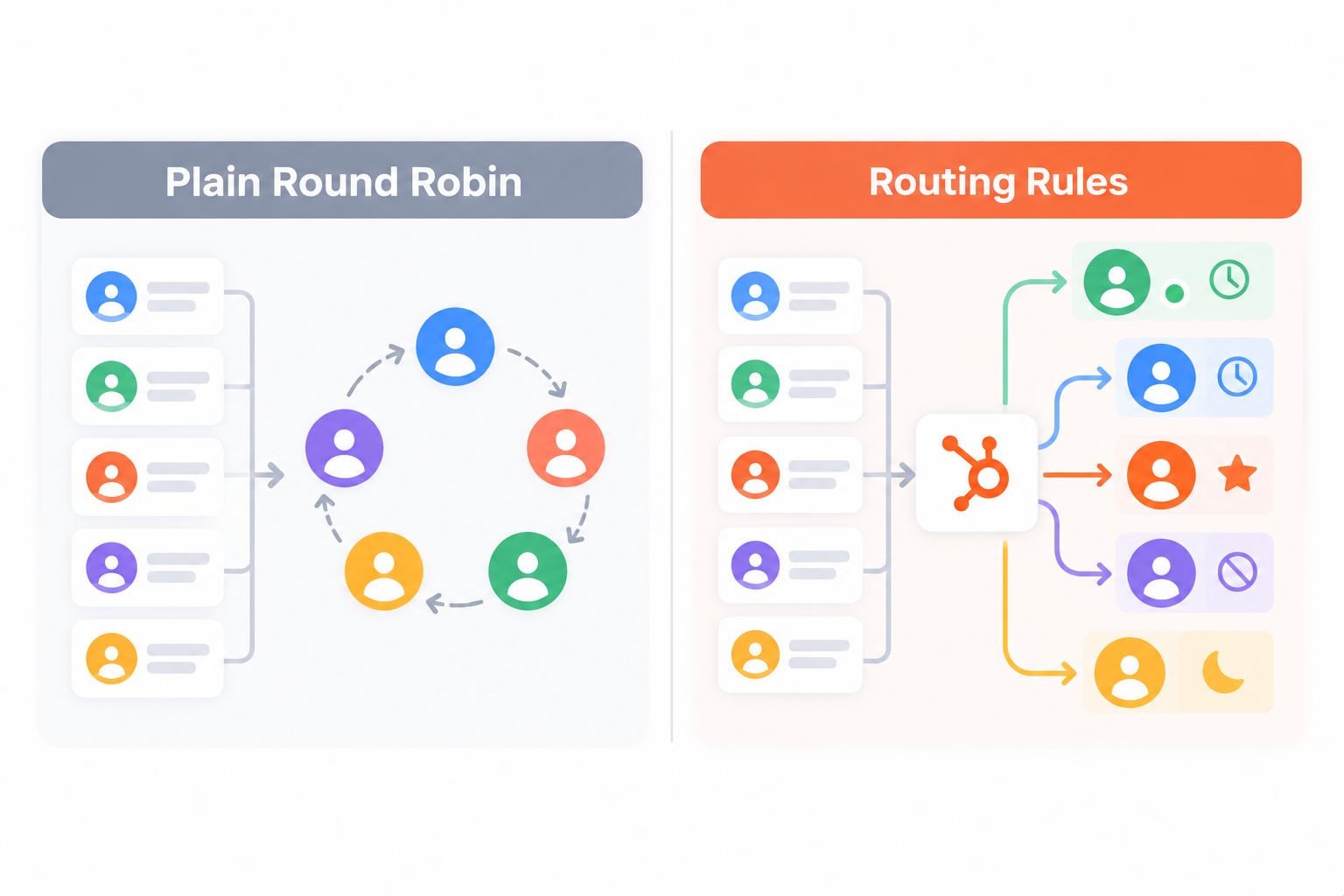
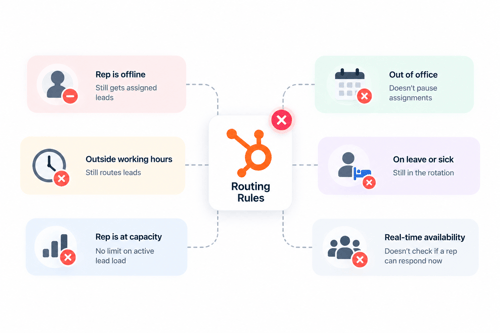
HubSpot's native round robin, the "Rotate record to owner" workflow action, requires Sales Hub or Service Hub Professional or Enterprise, and every rep in the rotation needs a paid Professional or Enterprise seat. It cycles leads sequentially through a list of reps. It does not look at whether a rep is logged in, on a call, at a showing, or asleep. It just moves to the next name.
HubSpot has since added weighted rotation on top of plain round robin, so you can give a senior closer a higher share of the rotation than a rep who's still ramping up. Instead of the old workaround of adding the same name to the list multiple times.
That's a real improvement and worth using if your team has a meaningful skill or tenure spread. But weighting who gets the lead is a different problem from whether that rep is actually available to respond right now. A weighted rotation still assigns leads to an agent who's out sick or off the clock; it just changes how often that agent's name comes up in the queue.
The Real Gap: HubSpot Has No Native Availability-Based Routing For Leads

This is the part that gets glossed over in almost every "just set up round robin" guide, and it's the actual reason a lead sits for six hours after being assigned.
HubSpot's own community forum confirms this directly: Marketing Hub alone doesn't support round-robin assignment at all, and even with Sales Hub, true round-robin distribution among reps requires Sales Hub Professional or a third-party tool, because the native workflow logic has no concept of who's currently on shift.
Here's the nuance your outline needs to hold up under scrutiny: as of March 2026, HubSpot added an availability check to ticket rotation, letting Service Hub Professional and Enterprise accounts route support tickets based on a rep's current availability or open ticket count. That's a real capability, but it applies to ticket ownership specifically. It has not extended to contact or deal rotation, which is what a brokerage actually needs for buyer and seller leads.
So the accurate claim isn't "HubSpot has no availability routing anywhere." It's narrower and still true: HubSpot has no native way to route a sales lead based on which agent is currently on shift, in the field, or off for the day. The only native workaround is manually editing the rotation's member list when someone goes on vacation or clocks out, which is a process someone has to remember to do, not a system.
If your brokerage runs shifts, on-call rotations, or "whoever's covering the after-hours line this week," that gap is where leads actually die. Not because nobody wants to respond, but because the lead got assigned to someone who wasn't there to see it.
Building an SLA That Enforces Itself
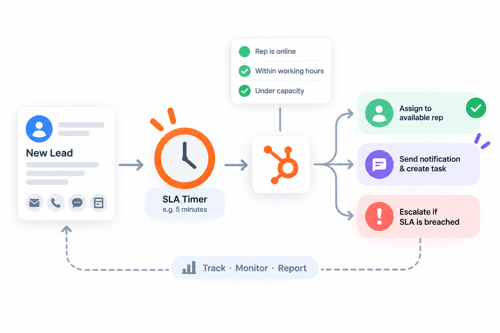
HubSpot has genuine native SLA functionality, but it lives in Help Desk and the conversations inbox. Built around support tickets: time-to-first-response, due soon, overdue, SLA completed on time or late.
None of that applies automatically to an inbound buyer lead landing on a contact record. For sales leads, an SLA has to be built manually around contacts or deals, and the mechanics matter:
Use a dedicated timestamp, not a generic one
HubSpot's built-in "first conversion date" or "last contacted" properties can get overwritten if a contact submits a second form, or can include marketing email sends that aren't real outreach.
Create a specific property that captures the moment the inquiry you actually care about came in, and a second property for when a human sales action happened in response. The gap between those two is your real response time.
Business hours are the hard part
A workflow can delay an action for a fixed number of hours. But a flat delay doesn't know the difference between a lead that came in at 9am on a Tuesday and one that came in at 11:55pm on a Friday.
The community's standard workaround is a property that records the lead's creation time, paired with an if/then branch to check whether that falls inside your defined business hours. But this only approximates true business-hours logic.
For an actually accurate SLA target timestamp, one that correctly pushes a 4:30pm inquiry to 9:30am the next business day instead of 5:30pm the same day, you need a custom code action in Operations Hub, which requires Operations Hub Professional or Enterprise and basic JavaScript or Python.
Escalate on breach & stop the alert from firing twice
Once the SLA clock is running, the workflow should check whether the response timestamp got populated in time. If not, fire an internal alert to the assigned rep, then a second alert to their manager if the first goes unanswered.
Use a dedicated "SLA escalation sent" property as a flag so the same lead doesn't spam the same manager every time the workflow re-evaluates.
Know the technical ceiling
Custom code actions in HubSpot workflows must finish running within 20 seconds and 128MB of memory. That's plenty for a business-hours calculation, but it means you're not going to run anything computationally heavy in that step. Keep the logic simple: check the day, check the hour, output a target timestamp.
The After-Hours Problem Routing Rules Can't Fix Alone
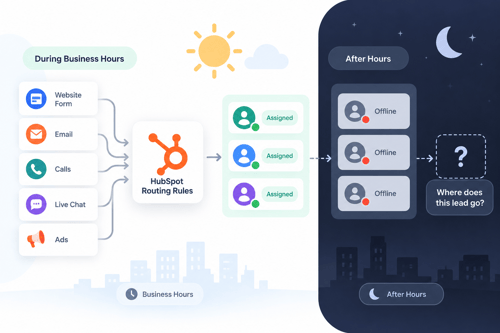
Even a perfectly built SLA workflow has a ceiling: it can escalate, but it can't force a sleeping human to answer their phone at 11pm. If your brokerage genuinely gets a meaningful share of inquiries outside business hours (and it almost certainly does, even if the exact percentage circulating online is unverified), routing rules alone hit a wall.
This is where an actual after-hours layer matters more than another routing rule. HubSpot's Breeze Customer Agent can engage an inbound visitor immediately, qualify them against criteria you set.
And either book a showing or hand a structured summary to the right rep the next morning, which at minimum means the lead got a real-time response instead of silence until 9am.
It's not a replacement for a human agent, and it requires Marketing Hub or Sales Hub Professional depending on setup, but it closes the specific gap that a routing workflow cannot: something has to respond in the window when nobody on your team is working.
A Sample Routing Model For A Brokerage
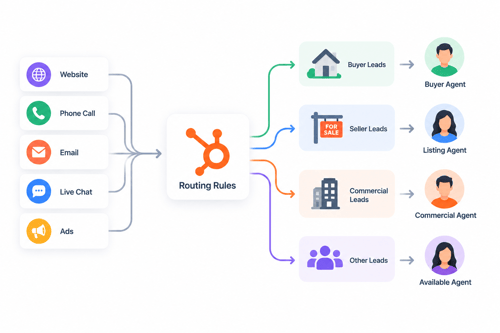
Putting this together, a workable model for a brokerage with mixed seat tiers and independent contractor agents looks something like this:
-
Source-based first split. Portal leads (Zillow, Realtor.com), website form leads, and referrals often warrant different first responders, since portal leads tend to be colder and higher volume.
-
Weighted rotation within each source pool. Give experienced closers a higher share, new agents a smaller share while they ramp, using HubSpot's native weighted distribution rather than duplicate list entries.
-
A maintained on-call property, checked before assignment. A simple custom property listing who is currently covering leads (updated manually or via a shift schedule sync) that the workflow checks before finalizing an owner, so a lead never lands with someone who clocked out. This is the manual patch for the availability gap described above.
-
SLA clock starts at assignment, not at form submission, so you're measuring what your reps actually control.
-
Escalation ladder: primary rep, then team lead, then the brokerage owner or ops manager, each with its own breach window.
-
After-hours handoff to an AI intake layer for anything arriving outside the covered schedule, with a same-morning handoff to the appropriate rep.
None of this requires exotic tooling. It requires a handful of custom properties, two or three workflows, and someone who owns keeping the on-call list current.
What Routing Rules Cannot Be Fixed
Routing gets a lead to the right person. It does not make that person good at follow-up. Industry data on this is fairly consistent: a large share of agents never attempt a second follow-up call after the first, and the widely cited (if imprecise) rule of thumb is that most sales take five or more touches to close.
A perfectly routed lead assigned to an agent who gives up after one call is still a lost lead. Routing and SLAs fix a distribution problem. They don't fix a persistence problem, and no workflow will.
There's also a real constraint worth naming honestly: agents at most brokerages are independent contractors, not W2 employees, and mandating rigid shift coverage the way you would for salaried staff carries its own considerations around how much control a brokerage exercises over an independent contractor's schedule.
That's a conversation for your broker and legal counsel, not something a HubSpot workflow can resolve, but it's a real reason "just require everyone to be on call 24/7" isn't actually a clean answer even where it's technically buildable.
And finally, automation amplifies whatever is already true of your data. If contact ownership is messy, if duplicate records exist, if lead sources aren't tagged consistently, adding routing rules and SLA workflows on top just automates that mess faster and with more confidence than before. Clean data first, then route.
FAQs
Does HubSpot have native round-robin lead routing?
Yes, through the "Rotate record to owner" workflow action, but it requires Sales Hub or Service Hub Professional or Enterprise, and every rep in the rotation needs a paid Professional or Enterprise seat. It distributes leads sequentially or, with weighted rotation, in custom proportions. It does not check whether a rep is currently available.
Can HubSpot route leads based on which agent is currently working?
Not for contacts or deals. HubSpot added availability-based routing for support ticket assignment in March 2026, but that update applies to Service Hub tickets, not sales leads. For lead routing, the only native option is manually updating the rotation's member list when someone is off shift.
Does HubSpot's SLA feature work for real estate leads, or only support tickets?
Only tickets and conversations natively. A sales-lead SLA, tracking how fast a buyer inquiry gets a real response, has to be built manually with custom properties and workflows built around contacts or deals.
Do I need Operations Hub to build an accurate SLA?
Not strictly, a basic if/then business-hours check can be built with standard workflow tools and gets you an approximation. But an SLA that correctly handles a lead arriving at 4:30pm on a Friday and targets the next business morning, rather than treating every hour as equal, needs a custom code action, which requires Operations Hub Professional or Enterprise.
What percentage of real estate leads actually come in after hours?
Directionally, a meaningful share, evenings and weekends are consistently cited as peak inquiry windows. The specific percentage you'll see quoted (commonly 50 to 62%) traces back to unverified vendor-sourced claims rather than a single traceable NAR or Zillow report, so treat any exact figure with some skepticism and check your own form-submission timestamps if the number matters to a budget decision.
Is the "5 minute rule" real, or marketing hype?
The underlying research is real. Dr. James Oldroyd's MIT study with InsideSales.com, based on 1.25 million leads, found meaningfully better connect and qualification rates for leads contacted within 5 minutes versus 30 minutes. Where the hype creeps in is in blending that study with a separate 2011 Harvard Business Review study, or attributing figures to sources (like McKinsey) that never published the claim being cited.
Final Thought
The fix here isn't a bigger stat or a more urgent-sounding blog post about how fast you need to respond. It's a handful of unglamorous build steps: a custom timestamp property, a workflow that actually accounts for your business hours, an escalation path that doesn't fire the same alert five times, and a maintained on-call list that a workflow checks before it assigns anyone anything.
None of that is difficult. It's just tedious enough that most brokerages skip it and rely on plain round robin instead, which is exactly why the leads that go cold, go cold. If you build the boring version, you'll be ahead of most of the market before you ever touch a stat about response time.
Founder & CEO @ Hubxpert. My goal is to make every company using HubSpot succeed in their marketing organisation and automation.

Ratul Rahman
Table of Contents:

Subscribe to our newsletter

Modern Website Design Examples & What Makes Them Work
Browse modern website design examples and modern looking websites, and see exactly what separates a fast, current site from one that already feels dated.

Interactive Web Design Templates & Examples to Study
See interactive web design templates and the best interactive web design inspiration, then compare interactive web page design examples before you build.

Interactive Elements in Web Design & Where to Stop
Add interactive elements in web design that earn their place, covering micro interactions, interactive maps, interactive timelines and knowing when to stop.

3D Web Design Templates & Examples You Can Reuse
Browse 3D web design templates and examples, plus where to find free downloads, and see how 3D web page design lifts a site without slowing the site down.

3D Web Design Tools & Software Compared for 2026
Compare 3D web design tools and web based 3D design software, and see where 3D models and 3D assets for web design fit your existing front-end build pipeline.

HubSpot Onboarding Cost: What the Fee Really Covers
See what HubSpot onboarding cost covers, how onboarding fees get quoted and how to compare implementation quotes line by line before you commit to a partner.
-
Modern Website Design Examples & What Makes Them Work
hello
-
Interactive Web Design Templates & Examples to Study
hello
-
Interactive Elements in Web Design & Where to Stop
hello
-
3D Web Design Templates & Examples You Can Reuse
hello
-
3D Web Design Tools & Software Compared for 2026
hello
-
HubSpot Onboarding Cost: What the Fee Really Covers
hello