





-2.png)


-2.png)



.png)


.webp)

.png)










.png)







-1.webp)
-1.webp)



.webp)

-1-1.webp)



-2.webp)

-1-1.webp)

-2-1.png)

-1-1.webp)
-1-1.webp)
-1-1.png)






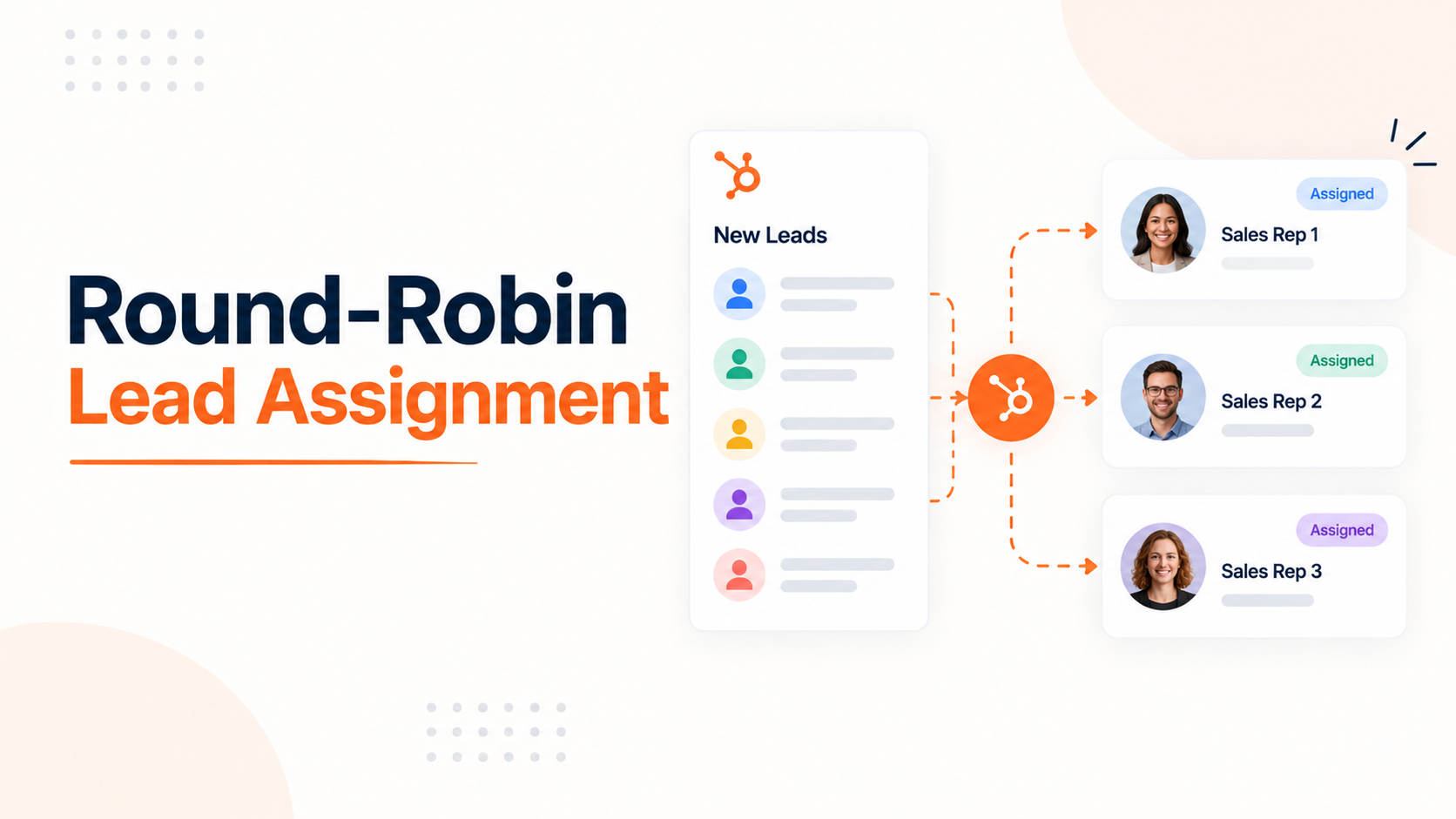
A lead that waits an hour for a response is already at a disadvantage. Firms that make contact within that first hour are nearly seven times more likely to qualify the lead than firms that wait longer, based on a Harvard Business Review audit of 2,241 companies (Source: "Lead Response Time: Every Study"). For a small agency new-business team, that hour disappears fast when leads sit unclaimed or land unevenly across reps.
HubSpot's round-robin tools solve part of this. They also break in specific, documented ways, especially the moment a rep goes on vacation. This post covers how native round robin actually works, why it floods returning reps, and how to build something that holds up for a small team.
How HubSpot's Native Round Robin Actually Works

Round robin in HubSpot runs through the "Rotate record to owner" workflow action, available to Sales Hub or Service Hub Professional and Enterprise accounts. Every user included in the rotation needs a paid Professional or Enterprise seat.
The action keeps a running assignment count for each owner, starting at zero. When two or more owners are tied on count, the next lead goes to one of them at random. Once the tie breaks, new leads go to whoever has the lowest count until the counts even out again (Source: "How to Assign Ownership of HubSpot Records"). This produces a genuinely even split over time, as long as the list of owners never changes.
That last condition is the entire problem. Most teams change the owner list constantly, usually because someone is out of office.
Why Reps Coming Back From PTO Get Flooded

This is the failure mode nearly every HubSpot user reports eventually: a rep takes a week off, gets removed from the rotation so leads don't pile up, comes back, gets added again, and is immediately buried in leads.
HubSpot's own documentation explains exactly why. Adding or removing an owner from the rotation action resets the established count for that action entirely. Random assignment starts over from zero, the same as if the workflow had just been turned on (Source: "Assign ownership of records").
That reset does not favor the returning rep specifically. It just means the count no longer reflects reality, so the next several leads get assigned close to randomly among everyone in the pool, including the person who just came back with zero recent leads.
On a two-to-five-person team, a few random assignments in a row can look and feel like a flood, even though the mechanism itself is just a reset, not a targeted overload.
Setting Up Round Robin Step by Step
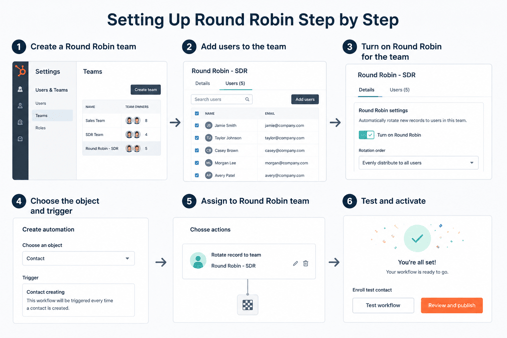
Step 01:
Go to Automation, then Workflows, and create a new contact-based or deal-based workflow.
Step 02:
Set the enrollment trigger. A common choice is "Contact owner is unknown" combined with a lead source or lifecycle stage filter, so only genuinely new leads enter the rotation.
Step 03:
Add the "Rotate record to owner" action and select the property to assign, typically Contact owner or Deal owner.
Step 04:
Choose the full list of reps who should receive leads. Confirm every listed user holds a paid Sales Hub or Service Hub seat, since unpaid seats cannot be included.
Step 05:
Add a follow-up action immediately after rotation, such as a task or a Slack notification, so the assignment triggers fast action rather than sitting unopened.
Step 06:
Turn the workflow on and monitor the first batch of assignments closely, since the initial round starts from a zero count for everyone.
Handling Out-of-Office Reps Without Breaking the Count
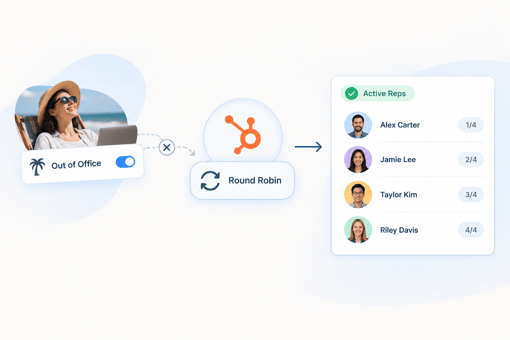
HubSpot support has confirmed directly that automating rep availability inside a rotation workflow is not currently possible for contact or deal rotation. The documented answer to a user asking about this was that reps must be removed from the rotation manually when they are out (Source: "Round Robin Lead | Vacation Days & OOO").
Since removing a rep resets the count, the safer version of that manual process uses a separate availability list instead of editing the rotation action itself. Maintain a static list, named something like "Reps Currently Available," and update it when someone goes out.
Build the workflow to check that list before rotating, rather than changing who sits inside the rotation action itself. This adds one manual step, updating the list, but avoids triggering the reset that a direct edit causes.
Weighting the Rotation When Reps Aren't Equal

The "Rotate record to owner" action has no native weighting. Every included rep receives an equal share regardless of tenure, close rate, or current capacity.
A documented workaround chains multiple rotate actions together with branching logic on the result of the first action. For example, running three reps through a first rotation, then splitting one of those three results into a second rotation between two additional reps, produces an approximate weighted split without custom code. This gets complicated quickly past a handful of reps, but works for the team sizes most agencies are actually running.
Native weighting does already exist, just not here. HubSpot's Meetings tool has a separate weighted rotation setting, under Settings, Meetings, Meeting Rotations, that lets one rep receive a higher share of booked meetings than another (Source: "Custom Weighting for Round Robin Meetings"). If your rotation problem is specifically about booked meetings rather than lead ownership, that setting solves it natively without any workaround.
Tickets Got Availability-Based Routing. Leads Didn't (Yet)
As of March 2026, HubSpot added a real availability check to ticket rotation. Service Hub Professional and Enterprise accounts can now route tickets based on a rep's current availability or their number of open tickets, in addition to random assignment (Source: "Assign and rotate ticket owners using workflows").
This update applies to ticket ownership specifically. It has not extended to contact or deal rotation, meaning the manual list-based workaround above remains the only option for actual lead assignment as of this writing. Worth checking HubSpot's product updates periodically, since this gap has already closed for one object type this year and could close for contacts and deals next.
A Round-Robin Setup That Holds Up for a Small Agency Team

Team size changes how badly these gaps hurt. A 50-person sales floor barely notices one rep's vacation. A two-to-five-person agency new-business team loses 20 to 50 percent of its rotation capacity every time someone is out, which is exactly the scale where the reset-on-removal problem does real damage.
For a team this size, skip editing the rotation action for day-to-day availability changes entirely. Keep the full team permanently listed in the rotation, maintain the separate availability list described above, and gate assignment on that list inside the workflow logic.
This keeps the underlying rotation count stable and accurate for the long run, which matters more for a small team, since a bad reset takes longer to average back out when there are only three or four people to spread leads across. Agencies working through this decision as part of a broader operations setup should treat rotation stability as a permanent build, not a one-time workflow.
FAQs
How can we use HubSpot to track user signups, onboarding steps, and first meaningful actions without duplicating our product database?
Use HubSpot as the engagement and lifecycle layer, while keeping clinical and product-level data in your existing application database. Sync only the events and attributes needed for marketing, sales, onboarding, and reporting such as signup, onboarding completion, activation, and key engagement milestones.
How should we map patients, providers, employers, and payers in HubSpot?
Create a clear data model that distinguishes each user and organization type using standardized properties, associations, and lifecycle stages. This allows patients, providers, employers, and payers to follow different journeys while still being managed within one connected CRM.
Can HubSpot support experiments for onboarding flows, pricing pages, and trial-to-paid conversion?
Yes. HubSpot can support experimentation through segmented campaigns, landing pages, forms, workflows, and conversion reporting. For more advanced product experiments, keep the experiment logic in your application and send the relevant cohorts and outcomes to HubSpot for analysis and follow-up.
How can we manage B2B sales and B2C patient journeys in one HubSpot portal without mixing them up?
Use separate lifecycle logic, pipelines, properties, and automation for organizational buyers and individual users, while connecting them through HubSpot associations. This keeps enterprise sales activity separate from patient engagement while preserving the relationship between the two.
How should we track enterprise deals, pilots, and rollouts when our end users are patients but our buyers are organizations?
Model the organization as the commercial account and use deals to track the sales, pilot, contracting, and rollout process. Associate relevant contacts and, where appropriate, patient/member records with the organization so you can connect commercial progress with adoption without turning HubSpot into the system of record for clinical data.
How should we structure pipelines and properties when we offer multiple programs or products?
Keep pipelines focused on distinct business processes rather than creating a separate pipeline for every product. Use standardized properties such as Program/Product, Customer Type, Sales Motion, Contract Type, and Deployment Stage to segment reporting and automation across remote monitoring, virtual therapy, chronic care, and other programs.
How can we track provider adoption, member engagement, and employer outcomes in the same HubSpot setup?
Define separate engagement and outcome metrics for each audience, then connect them through consistent associations and shared reporting dimensions. HubSpot can provide the commercial and engagement view, while your product or clinical systems remain the source of truth for detailed patient and clinical outcomes.
Senior RevOps Strategist at Hubxpert

Fazle Rabbi
Table of Contents:

Subscribe to our newsletter

Modern Website Design Examples & What Makes Them Work
Browse modern website design examples and modern looking websites, and see exactly what separates a fast, current site from one that already feels dated.

Interactive Web Design Templates & Examples to Study
See interactive web design templates and the best interactive web design inspiration, then compare interactive web page design examples before you build.

Interactive Elements in Web Design & Where to Stop
Add interactive elements in web design that earn their place, covering micro interactions, interactive maps, interactive timelines and knowing when to stop.

3D Web Design Templates & Examples You Can Reuse
Browse 3D web design templates and examples, plus where to find free downloads, and see how 3D web page design lifts a site without slowing the site down.

3D Web Design Tools & Software Compared for 2026
Compare 3D web design tools and web based 3D design software, and see where 3D models and 3D assets for web design fit your existing front-end build pipeline.

HubSpot Onboarding Cost: What the Fee Really Covers
See what HubSpot onboarding cost covers, how onboarding fees get quoted and how to compare implementation quotes line by line before you commit to a partner.
-
Modern Website Design Examples & What Makes Them Work
hello
-
Interactive Web Design Templates & Examples to Study
hello
-
Interactive Elements in Web Design & Where to Stop
hello
-
3D Web Design Templates & Examples You Can Reuse
hello
-
3D Web Design Tools & Software Compared for 2026
hello
-
HubSpot Onboarding Cost: What the Fee Really Covers
hello