





-2.png)


-2.png)



.png)


.webp)

.png)










.png)







-1.webp)
-1.webp)



.webp)

-1-1.webp)



-2.webp)

-1-1.webp)

-2-1.png)

-1-1.webp)
-1-1.webp)
-1-1.png)







Post a form to HubSpot through the API and one of two things happens. The data lands on a contact record, or HubSpot sends back a 400 error that lists what it rejected. The trouble sits in the gap between them: a cookie nobody passed, a field missing from HubSpot's form, a retry that fires twice.
This guide covers the HubSpot forms API submissions v3 integration submit endpoint from HubSpot's side of the call. It shows what HubSpot does with a submission, which errors come back, and when a custom HubSpot API integration beats the native embed. It skips the basics of what an API is and how app authorization works.
What Does HubSpot Do With a Form Submission Sent Through the API?
By default, it matches the submission to a contact by email address, then updates that contact or creates a new one. The endpoint answers right away with a 200 or a 400, so you know at once whether the data was accepted.
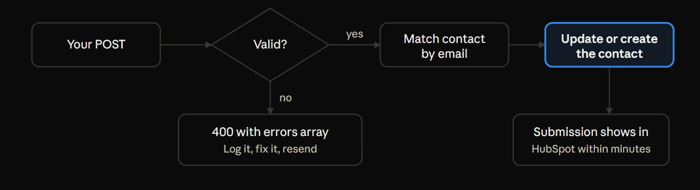
A valid submission reaches the record and shows up in HubSpot within a few minutes. An invalid one stops at the endpoint with a list of errors.
The matching rules decide what ends up on the record. A known email means the new details are added to the existing contact. A visitor who enters a secondary email address overwrites the contact's email. A submission with company properties and a company domain updates the company that owns that domain. HubSpot also has form deduplication settings, so look at them before you test. (Source: "How HubSpot deduplicates records")
How Does the HubSpot Forms API Submissions v3 Integration Submit Endpoint Work?
You send a JSON POST with the portal ID and form ID in the URL. HubSpot replies with the form's thank-you message or a list of errors.
The form has to exist in HubSpot first. The endpoint writes into that form, so a custom website form needs a matching HubSpot form behind it. HubSpot rejects fields that are not in the form definition. Adding a contact property alone is not enough.
Both endpoints live on api.hsforms.com:
|
Endpoint |
Path |
Auth |
Use it from |
Limit |
|
Unauthenticated |
/submissions/v3/integration/submit/{portalId}/{formGuid} |
None |
Browser code |
50 requests per 10 seconds |
|
Secure |
/submissions/v3/integration/secure/submit/{portalId}/{formGuid} |
Private app token with the forms scope |
Your server |
Standard API limits |
(Source: "Submit data to a form (supporting authentication)")
Keep the token out of browser code. HubSpot's older reference also said the secure endpoint does not support CORS, so a browser cannot call it directly. Pages that post straight to HubSpot should use the unauthenticated endpoint. Servers should use the secure one.
Watch the limit on the unauthenticated endpoint. Past it, HubSpot returns 429 errors. The changelog describes a second guard too: ten 429 responses in one second block the sending IP address for a minute. That guard counts per IP, so a server that forwards many visitors' submissions can trip it even when each visitor submits once. (Source: "Additional rate limit protection for Form Submissions API")
What Does hutk Do & What Happens Without It?
The hutk value ties the submission to the visitor's earlier page views. Without it, HubSpot still creates the contact, but it cannot say where the visitor came from.
Hutk is the value of the hubspotutk cookie, which HubSpot's tracking code sets in the visitor's browser. You pass it in the context object, next to the page URI, the page name, and the visitor's IP address. A HubSpot employee answering a developer's question put the rule plainly: the source comes from data tied to that cookie. So the tracking code must be installed and working on the page, and the form call must send the cookie value. (Source: "HubSpot Community: API not passing source information")
A bad value comes back as an INVALID_HUTK error. A missing value does not, and that is the dangerous one. Test it once on purpose: browse your site, copy the cookie from your browser, send it in a test POST, and check the new contact's original source.
How Do You Catch Validation Errors Before They Cost You Leads?
Read the errors array in every 400 responses. Call the HubSpot forms API submissions v3 integration submit endpoint with bad data and HubSpot returns each problem with an error type and a message. A 200 means HubSpot accepted the data. Anything else means a lead may be missing.
HubSpot's reference lists many error types. These are the ones a custom form is most likely to hit:
|
Error type |
What it means |
Fix |
|
REQUIRED_FIELD |
A field the form requires is missing or empty |
Check required fields on your side before you send |
|
FIELD_NOT_IN_FORM_DEFINITION |
The field is not on the HubSpot form |
Add it to the form, or drop it from the payload |
|
VALUE_NOT_IN_FIELD_DEFINITION |
The value is not one of the field's allowed options |
Send the option's internal value, not its label |
|
INVALID_EMAIL or BLOCKED_EMAIL |
The email is malformed, or the form blocks it |
Validate the format, then check the form's blocked addresses |
|
INVALID_NUMBER or NUMBER_OUT_OF_RANGE |
The value is not a number, or it is outside the allowed range |
Send plain digits within the range |
|
INPUT_TOO_LARGE |
A value is longer than the field allows |
Trim it before you send |
|
FORM_HAS_RECAPTCHA_ENABLED |
CAPTCHA is turned on for that HubSpot form |
Turn it off for that form and add bot checks upstream |
The other status codes carry less detail. A 401 means the credentials are wrong. A 403 means the credentials are right but the account cannot submit forms. A 429 means you hit a rate limit. These error bodies include a correlation ID, so save it.
Log every response next to the payload you sent. HubSpot's older reference said these endpoints do not log API calls, so your own log may be the only record. Retry 429s and server errors. Do not retry a 400, because it will fail the same way until you change the data.
Can a HubSpot Free CRM API Access Integration Handle Form Submissions?
Yes, as far as HubSpot's documentation shows. A HubSpot free CRM API access integration runs through a private app, and HubSpot lists private app limits for Free accounts. The submit endpoint's reference names no paid-plan requirement, but test it in your own account before you build anything on it.
Free accounts get the lowest caps: 100 calls per 10 seconds per app, and 250,000 calls a day shared by every app in the account. That daily pool matters if the account also runs a sync or a BI connector. Only a Super Admin can manage private apps. HubSpot now lists them under Development, then Legacy apps, although many older guides still say Settings, then Integrations, then Private Apps. (Source: "API usage guidelines and limits")
For testing, HubSpot offers a free developer test account with sample data, which keeps test submissions out of your live portal. (Source: "HubSpot developer platform basics")
When Does a Custom HubSpot API Integration Beat the Native Form Embed?
A custom build wins when the form lives somewhere a HubSpot embed cannot go, or when you need checks that HubSpot's form does not run. For a standard page you control, the native embed is usually the better choice.
|
Your situation |
Best fit |
Watch for |
|
A normal page with normal fields |
Native HubSpot form embed |
Little to build or maintain |
|
An existing HTML form and no developer time |
Non-HubSpot forms tool |
Hidden fields, iframes, and single-page apps break it |
|
A form inside an app, a single-page site, or a checkout |
Custom build on the submit endpoint |
You own validation, retries, and logs |
|
A submission that starts outside a browser, such as a partner system |
Custom build on the submit endpoint |
There may be no cookie to send as hutk |
The non-HubSpot forms tool is available on all plans, but its limits are hard. It needs a static HTML form with an email input, and it ignores hidden fields. It records a submission on every click of the submit button, so a visitor who fixes a missing field creates one partial and one complete submission.
It also depends on the tracking code. A script conflict or a script blocker means a missed submission. Submissions from the same browser cookie go to one contact, even when the emails differ. HubSpot itself points to the submit API as the alternative. (Source: "Use non-HubSpot forms")
A custom build gives you control, and it gives you code to keep running: validation, retries, a log, and a person who owns all three. Teams that would rather not carry that code can hand it to a HubSpot integration partner.
What Breaks Once Real Traffic Arrives?
Retries, bots, and duplicates break first. The endpoint accepts anything that passes validation, so the careful part has to be your code.
Store each submission before you send it. If HubSpot returns a 429 or a server error, retry from that stored copy with a growing delay. A burst of instant retries can trip the IP guard described earlier and block your server for a minute.
Retries also create duplicates. If a request times out after HubSpot already accepted it, the retry adds a second submission. HubSpot still matches one contact by email, but that contact now has two submissions. The request schema has no idempotency field, so keep your own record of what you already sent.
Bots need your attention too. The endpoint rejects any form that has CAPTCHA turned on, so bot defense has to live in your code. A hidden honeypot field that you never send to HubSpot, plus per-IP limits, will stop simple bots before they reach the API.
What Does a Broken Form Integration Look Like in Practice?
HubSpot's docs tell you what the API accepts. A client project shows what goes wrong around it. HubXpert worked as a white-label partner on a two-week project for a financial services company, on Sales Hub Professional and Operations Hub Enterprise. Form submissions from a third-party system, Redflag, were not updating HubSpot records consistently. Workflows sent repeat alerts, and submissions had no clear naming, so the team could not sort them.
We traced the integration issues behind the gaps and re-mapped the integration. We then set up custom properties and changed the workflows to stop duplicate alerts. Every submission got a name that shows its source and purpose. The case study reports that 100% of submissions updated accurately in HubSpot afterward.
The case study does not say which HubSpot endpoint the integration uses, so read it as a sync-quality example, not an API tutorial. The pattern still applies here. Field mapping, naming, and duplicate alerts decide whether a lead lands cleanly or gets lost in the inbox.
FAQs
Where Do I Find the Portal ID and Form GUID?
The portal ID is your HubSpot account ID, and it appears in your account's URL. The form GUID is the long ID in the URL when you open the form in the editor. Keep both in configuration, not in code. Copy them from HubSpot and test with one real submission before you build anything else.
What Does a Successful Response Contain?
A 200 response can include the form's redirect URL, its inline thank-you message as HTML, or neither, depending on how the form is set up in HubSpot. Your code decides what the visitor sees next. Show the message or follow the redirect, and treat an empty 200 as a plain success.
Is There a Limit on Fields per Submission?
Yes. HubSpot's reference allows up to 1,000 fields in one submission. Most forms are far smaller, so the limit matters mainly for generated forms or payloads that add many hidden tracking values. If you get close, review which fields HubSpot really needs.
Can I Send Company or Custom Object Fields?
Each field carries an objectTypeId. HubSpot's reference gives 0-1 for contacts and 0-2 for companies as examples. For a custom object, look up its ID in your portal and test with one submission, because the reference does not walk through that case. Send only fields that exist on the HubSpot form.
How Do I Send Consent Details?
Add a legalConsentOptions object. Use consent when the visitor ticked a box, and include the checkbox text and any subscription type IDs. Use legitimateInterest, with a legal basis of LEAD or CUSTOMER, when consent does not apply. If the form has a GDPR notice turned on, HubSpot's older reference says the notice details must be in the submission.
Why Is My Conversion Rate Wrong for API Submissions?
HubSpot does not count views for submissions made through the forms API. Conversion rate compares submissions with views, so a form with many API submissions and few recorded views can look better than it is. Track form views in your own analytics and use that number instead. (Source: "Analyze form submissions data")
Can I Backdate Older Submissions?
Only by about a month. The submittedAt field takes a millisecond timestamp, and a time more than one month old returns an error. Treat older history as a data question, and scope it in a HubSpot migration.
Final Thoughts
Treat the HubSpot forms API submissions v3 integration submit endpoint as the last step of a longer chain. Before you blame HubSpot, check the form definition, the field names, the cookie, and your own log. The same checks apply to HubSpot free CRM API access integrations and paid ones.
Before launch, send three test submissions: one with a real hutk, one with a bad email, and one that retries after a timeout. If all three behave the way you expect, the rest is traffic.
As a Hubspot Automation Developer at Hubxpert, I specialize in API integration, seamlessly connecting HubSpot with third-party applications. My role encompasses understanding client needs, crafting custom code solutions, and ensuring the smooth operation of our automation workflows. I actively address any HubSpot integration challenges and stay updated with the platform's latest advancements. My dedication ensures clients harness the full potential of HubSpot.

Tanzinul Kabir
Table of Contents:

Subscribe to our newsletter

HubSpot Phone Integration for VoIP & Call Logging
Compare HubSpot phone integration options for VoIP, answering services and call logging, and see how phone system integration keeps calls on the CRM record.
How HubSpot API Integration Handles Form Submissions
Learn how HubSpot API integration handles form submissions, how to catch validation errors and when a custom build beats the native form embed in production.

HubSpot CRM Integration With Business Intelligence Tools
Connect HubSpot CRM integration with business intelligence tools so reporting lives in your warehouse. Compare reverse ETL and database integration routes.

How to Set Up HubSpot Email Integration With Gmail or Outlook
Connect HubSpot CRM integration with business intelligence tools so reporting lives in your warehouse. Compare reverse ETL and database integration routes.

Modern Retro Web Design & How to Keep It Accessible
Mix modern retro web design with modern minimalist web design and modern dark web design, while keeping the clean modern web design rules firmly intact.

Modern Homepage Design for Layouts, Dashboards & Forms
Rework a modern homepage design with intent, covering modern web dashboard design, modern web menu design and the modern web form design choices that convert.
-
HubSpot Phone Integration for VoIP & Call Logging
hello
-
How HubSpot API Integration Handles Form Submissions
hello
-
HubSpot CRM Integration With Business Intelligence Tools
hello
-
How to Set Up HubSpot Email Integration With Gmail or Outlook
hello
-
Modern Retro Web Design & How to Keep It Accessible
hello
-
Modern Homepage Design for Layouts, Dashboards & Forms
hello