





-2.png)


-2.png)



.png)


.webp)

.png)










.png)







-1.webp)
-1.webp)



.webp)

-1-1.webp)



-2.webp)

-1-1.webp)

-2-1.png)

-1-1.webp)
-1-1.webp)
-1-1.png)







Your best pick among 3D web design tools depends on who builds the scene and where it has to run. Designers who want an interactive hero scene without code usually start with Spline. Developers who need full control use Three.js. Product teams that want AR previews look at Vectary. Most 3D projects stall on file weight and delivery, not on the tool itself.
This guide compares seven tools on price, output, and limits, using each vendor's pricing page in October 2026. It also explains the types of 3D web design software and which ones run in the browser. You will see how 3D models and assets behave, and how all of it fits a front-end build, including HubSpot CMS.
Quick Pick
|
You need |
Start with |
What you get |
Code needed |
|
An interactive hero scene |
Spline |
Hosted or embedded scene |
No |
|
Full control and custom shaders |
Three.js with React Three Fiber |
Your own code |
Yes |
|
A product viewer with AR |
Vectary |
Embed and AR view |
No |
|
Fast modeling and AI starting points |
Womp |
Exported 3D models |
No |
|
Detailed models and textures |
Blender |
GLB export |
No, but a steep learning curve |
|
Animated backgrounds and scroll effects |
Unicorn Studio |
Embed or hosted effect |
No |
|
Interactive UI motion |
Rive |
Runtime file for web and apps |
Minimal |
Key Takeaways
-
Pick 3D web design tools by who builds the scene. Spline suits designers, Three.js with React Three Fiber suits developers, and Vectary suits product and AR views.
-
Tool prices are small. Spline starts at $12 per seat per month, Womp at $9.99, and Unicorn Studio at $168 a year. Blender and Three.js are free. Design, modeling, and engineering time is the real cost.
-
Ship 3D models as GLB files. Compress geometry with Draco or Meshopt, and set a file-weight target before you build.
-
Check every asset's license. Poly Haven is CC0, while Sketchfab licenses differ per model.
-
Spline lists code and self-hosted exports only on Enterprise. On lower plans, scenes load from Spline's hosting.
-
In HubSpot CMS, put 3D in a custom module. HubSpot loads module.js once per page, and a poster image should show first.
-
Aim for an LCP of 2.5 seconds or less, an INP of 200 milliseconds or less, and a CLS of 0.1 or less. Test on a mid-range phone.
What is 3D Web Design Software & Which Types Do You Need?
3D web design software covers five jobs: modeling, authoring, coding, effects, and 2D motion. Most projects need two or three of them, not all five.
|
Job |
What it does |
Examples |
|
Modeling |
Builds the shapes, materials, and textures |
Blender, Womp |
|
Authoring |
Composes the scene, lighting, and interactions without code |
Spline, Vectary |
|
Coding |
Renders the scene in your own site code |
Three.js, React Three Fiber, Babylon.js |
|
Effects |
Adds shader and scroll effects to a page |
Unicorn Studio |
|
2D motion |
Animates interface elements with state logic |
Rive |
Pick tools by job, not by brand. A designer might model in Blender, author in Spline, and publish through a site builder. A developer might skip authoring and load a GLB file straight into Three.js.
Which 3D Web Design Tools Are Worth Using in 2026?
These seven tools cover most real projects. Prices come from each vendor's pricing page in October 2026 and are billed annually unless noted. Plans change often, so confirm before you buy.
Spline
Spline is a browser-based 3D editor for interactive scenes, with real-time collaboration. It suits designers who want to ship a hero scene or product moment without writing code.
The Free plan adds a watermark to web exports. Starter costs $12 per seat per month and removes it. Professional costs $20 per seat per month and adds video export and unlimited scenes per file. AI features cost $5 more per seat. (Source: "Spline pricing") Visual editors give you less control over file weight than hand-written code, so test a scene on a mid-range phone early.
Three.js & React Three Fiber
Three.js is the open-source JavaScript library behind much of the 3D you see in browsers. It is free under the MIT license. React Three Fiber brings it into React projects. Babylon.js is the main open-source alternative.
There is no visual editor, so a developer owns the work. In return you control loading, shaders, and file weight. Choose this route when performance is critical or when the scene needs custom logic, such as a configurator.
Vectary
Vectary is a browser-based 3D and AR design tool built around product visuals. Its Pro plan costs $180 a year, about $15 a month, after a 30-day trial. Vectary says everything you create can be used commercially, and its plans list app-free AR. (Source: "Vectary pricing")
It is a strong fit for e-commerce and product pages. It is a weaker fit for open-ended creative scenes.
Womp
Womp is a browser-based 3D modeling tool with AI generation and real-time collaboration. The free plan includes 300 daily AI credits. Pro costs $9.99 a month, and Team costs $19.99 per seat per month. (Source: "Womp pricing")
It builds models, not websites. Treat it as an asset source, then publish through another tool or your own code.
Blender
Blender is the free, open-source desktop app for detailed models, textures, and animation. It does not run in the browser, and the learning curve is steep. Its value for web work is export: you build a model once, then export it as a GLB file for any tool or codebase.
Unicorn Studio
Unicorn Studio is a no-code editor for WebGL effects such as animated gradients, distortion, and scroll or cursor reactions. The Free plan allows up to 8 publishes with Unicorn branding, for personal and non-commercial use. Legend costs $168 a year, or $20 billed monthly. It adds a commercial license, unlimited publishes, hosting, JSON export, and custom 3D models. (Source: "Unicorn Studio pricing")
It is an effects layer. It will not replace a full scene builder.
Rive
Rive is mainly a 2D tool for interactive animation. Its state machines let designers define how an element reacts to input without code. Include it when the brief is interface motion, not depth.
The Free plan is limited. Cadet costs $108 a year, about $9 a month, for up to three seats. Voyager costs $32 per seat per month billed annually. (Source: "Rive pricing")
Which Web Based 3D Design Software Runs Fully in the Browser?
Spline, Vectary, Womp, and Unicorn Studio run in the browser. Blender runs on your desktop, and Three.js is a library you add to your own project.
|
Tool |
Runs in browser |
Team features |
Main output |
|
Spline |
Yes |
Real-time collaboration |
Hosted scene or embed |
|
Vectary |
Yes |
Business workspaces |
Embed and AR view |
|
Womp |
Yes |
Real-time collaboration |
Exported models, images, video |
|
Unicorn Studio |
Yes |
Cloud projects and versioning |
Embed or hosted effect |
Web based 3D design software removes installs and makes sharing easy. The trade-off is dependence on the vendor. Check where your published scene is hosted, what happens if you cancel, and which exports your plan allows.
How Do 3D Models for Web Design Work?
Ship 3D models as GLB files, keep them small, and test them on a phone before you commit. GLB is the single-file form of glTF, an open Khronos format built for delivery, not editing. A-Frame's documentation compares it to saving a layered image as a JPG for the web. (Source: "A-Frame glTF model docs")
For 3D models for web design, size decides speed. These steps do most of the work:
- Compress geometry with Draco or Meshopt. A-Frame's docs say Draco often cuts geometry size by 90 to 95 percent, and Meshopt also handles animation and morph targets.
- Compress and resize textures. Size them to how large they appear on screen, and use KTX2 where your renderer supports it.
- Remove hidden geometry, and use simpler versions for objects far from the camera.
- Configure the decoders. Draco, KTX2, and Meshopt files need decoder files on your site, or the model will not load.
- Set a weight target before you start. A common goal for product pages is under 5 MB per model, and your page budget may be tighter.
Keep older formats such as OBJ and FBX as source files. For AR on iPhones, the format is USDZ, and AR-focused tools such as Vectary can export AR views for you.
Where Do You Find 3D Assets for Web Design?
You can build assets in Blender, Spline, or Womp, generate a starting point with AI, or download from libraries. Whatever the source, check the license before the file goes live.
Two libraries cover most needs. Poly Haven publishes every asset under CC0, so you can use it commercially with no credit. Sketchfab has far more variety, but licenses differ per model: some need credit, and some forbid commercial use. (Source: "Sketchfab vs Poly Haven vs Kenney")
Before you use 3D assets for web design, answer four questions:
- Is commercial use allowed?
- Does the license require a credit line, and where will it appear?
- Can you modify the model?
- Can you serve the file publicly? A GLB on your page can be downloaded by anyone.
Check the terms of any AI generator before you ship what it creates. Keep the source file and the license text together, so the next person can see where the asset came from.
How Does 3D Fit Your Front-End Build Pipeline?
3D enters your build at one of three points. It can be a hosted embed, a component from a tool's package, or a GLB file your own code loads. The path decides who owns performance and what happens if a vendor changes its plans.
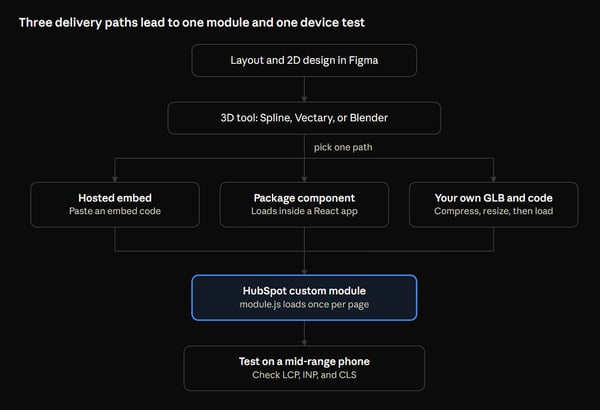
Whichever path you pick, the scene lands in one module, and one device test decides whether it ships.
|
Path |
How it works |
Best when |
Watch for |
|
Hosted embed |
The tool hosts the scene, and you paste an embed |
Marketing pages and fast launches |
An extra runtime per embed, and vendor dependence |
|
Package component |
A tool's component loads a scene inside a React app |
React or Next.js sites |
The scene may still load from the vendor's servers |
|
Your own GLB and code |
You host the file and load it with Three.js |
Performance-critical work |
You need a developer |
On Spline, code and self-hosted exports are listed only on the Enterprise plan. On lower plans, expect scenes to load from Spline's hosting.
How Do You Add 3D to a HubSpot CMS Page?
Put the 3D scene inside a custom module. HubSpot custom modules can carry their own module.js and module.css files. When a page uses the same module more than once, HubSpot loads those files only once. By default they do not load asynchronously, but the module's meta.json can change that with js_render_options and css_render_options. Shared libraries can be attached with js_assets. (Source: "HubSpot module files")
A practical module has fields for the scene or GLB URL, a poster image, and alt text. The poster loads first as plain HTML. The 3D runtime loads after it. Email modules do not support JavaScript, so this pattern works for pages, not emails.
HubXpert built Imaginate Your Space this way. The project used custom 3D web development integrated directly into the HubSpot CMS. The work ran from 3D modeling and creative design through WebGL coding and deployment. Our HubSpot module library shows the same reusable approach on a smaller scale. It includes scroll and interactive modules that content editors can drop into a page.
Test one more thing before launch: confirm your file host serves .glb files with the right content type and caching headers.
What Does 3D Do to Page Speed, Accessibility & SEO?
A heavy scene can pass or fail Core Web Vitals depending on how you load it. Google sets three targets, measured at the 75th percentile of real visits. LCP should be 2.5 seconds or less. INP should be 200 milliseconds or less, and CLS should be 0.1 or less. (Source: "Web Vitals")
Use this checklist:
- Make the largest element on screen light, such as a poster image or headline, not the scene itself.
- Lazy-load scenes below the fold, and use one scene per page where you can. Each embed can bring its own runtime.
- Reserve the scene's space with a set width and height, so the page does not shift when it loads.
- Pause rendering when the scene is off screen or the tab is hidden.
- Offer a still image fallback for browsers without WebGL, and respect the reduced-motion setting.
- Keep headings, product facts, and calls to action in HTML text. Crawlers and screen readers do not read a canvas.
- Make any control keyboard-reachable, and describe the scene in text.
Then test. Lighthouse runs in a lab and cannot measure INP, because it has no user input. Also check field data in PageSpeed Insights or Search Console. Test on a mid-range Android phone, not only on your laptop.
How Do You Choose the Right Tool or Skip 3D?
Match your 3D web design tools to who builds the scene and what the 3D must do.
|
Your situation |
Pick |
Why |
|
A designer with no developer, shipping a hero scene |
Spline |
Visual editor and fast publishing |
|
A developer building a configurator |
Three.js with React Three Fiber |
Full control over loading and weight |
|
A product page that needs AR |
Vectary |
Built for product views and AR |
|
Only a lively background |
Unicorn Studio |
Effects without a full scene |
|
Custom models and textures |
Blender, then GLB |
Best modeling depth, free |
|
Interface micro-interactions |
Rive |
State-based 2D motion |
Skip 3D when it does not make the product clearer or more wanted. Skip it when your audience is on older phones, or when nobody will own the file after launch. A CSS perspective card or a short video is often enough. Before you decide how interactive to go, preview how a component behaves on the live demos in our module showcase.
What Does a 3D Web Build Cost?
3D web design tools are the small part of the cost. Spline starts at $12 per seat per month, Womp at $9.99, and Unicorn Studio at $168 a year. Blender and Three.js are free. The real cost is design, modeling, and engineering time.
HubXpert's Interactive 3D Website package is a design engagement at $10,000. It includes:
- UX research and an audit for 3D elements
- An 8-page site map that marks the 3D elements
- Art direction for up to three scenes
- Figma designs with a 2D fallback
- An interactive prototype and a reusable design system
- A motion spec for your 3D or WebGL developer
It ends with a handoff file, so the 3D build is a separate line in your budget.
FAQs
Do I need WebGPU to run 3D on the web?
No. WebGL still works in current browsers, and most tools use it. WebGPU is newer and faster for heavy scenes. It now ships in Chrome and Edge, and in Safari 26. Firefox has it on Windows and Apple silicon Macs. Linux and Android are still rolling out. Keep a WebGL fallback. (Source: "WebGPU is now supported in major browsers")
Can I export code from Spline?
Only on Enterprise. Spline's pricing page lists code and self-hosted exports there. Professional adds Apple and Android exports, but web scenes on lower plans load from Spline's hosting. If you need to host everything yourself, plan for Enterprise or use Three.js with your own GLB files.
How long does a 3D web design project take?
HubXpert's Interactive 3D Website design package runs 8 to 12 weeks from kickoff to final files. Build time comes after that and depends on the number of scenes, the models, and the CMS. A single embedded hero scene is much quicker than a custom WebGL build.
What is the difference between a 3D modeling tool & a 3D web design tool?
A modeling tool, such as Blender or Womp, creates the 3D asset. A web design tool puts interactive 3D on a page and handles rendering, interaction, and publishing. Spline and Vectary do both to some degree. Many projects use one tool of each kind.
Can I add 3D to Webflow or Framer?
Yes, with different levels of effort. Framer handles Spline scenes well as embedded components, while its own 3D support is limited. Webflow has no deep native 3D, but it accepts embeds and custom code, so you can drop in a Spline scene or a Three.js script. In both cases, apply the same poster-first loading and weight limits from this guide.
What is the difference between CSS 3D & WebGL?
CSS 3D transforms tilt, rotate, and layer flat page elements, such as cards, using only CSS. WebGL draws real 3D geometry, lighting, and materials on a canvas. Use CSS for a perspective card or a flip effect, because it needs no library and stays light. Use WebGL when you need a model, lighting, or a camera the visitor can move.
How do I convert an OBJ or FBX file to GLB?
Import the file into Blender, then export it as glTF 2.0 and choose the GLB format. Next, shrink it. Open-source tools such as glTF-Transform can compress geometry with Draco or Meshopt, and resize or compress textures, from the command line. Open the result in your own scene to confirm that materials and scale look right before you publish.
Can AI generate 3D models good enough for a website?
They are a starting point, not a finished asset. Womp's Pro plan lists about 48 3D models a month from its monthly AI credits, and Spline sells AI features as a $5 per seat add-on. Expect to clean up shapes, reduce polygons, compress textures, and check the commercial terms before the file goes live.
What is a scroll-driven 3D website?
It is a page where scrolling moves the scene, such as a product that rotates as the visitor reads. Spline lists scroll-based animation, and Unicorn Studio supports scroll-triggered effects. These sites carry extra risk on phones. Keep the headline and key facts in HTML, show a poster first, and test on a mid-range device.
Does Figma support 3D design?
Figma is built for 2D layout and prototyping, so most teams build the 3D scene in a dedicated tool. A common workflow lays out the page in Figma, marks where the 3D goes, and designs a 2D fallback. Then a tool such as Spline or Blender produces the scene. HubXpert's 3D package follows this pattern, with Figma designs and a 2D fallback.
Does 3D improve conversion rates?
Not by default. None of the sources checked for this guide shows a reliable lift, and a heavy scene can hurt speed. Treat it as a test. Run the 3D hero against a poster-only version, and compare click-through, scroll depth, and Core Web Vitals. Keep 3D only where it explains the product or earns attention without slowing the page.
How does AR work on a product page?
The visitor taps a button and sees the product in their room through their phone camera. On iPhones, that view uses a USDZ file. Keep a GLB for the web viewer, and test the AR view on real iOS and Android devices. Label the AR button clearly, and keep a plain image view for visitors whose devices cannot open it.
Wrapping Up
Set three limits before you pick among 3D web design tools. They are a file-weight target, a device you must support, and a named owner for the scene after launch. Then build one scene with a real asset and test it on a mid-range phone.
Choose the tool that passes with the least code, and ship the poster image and HTML text first. HubXpert is a HubSpot Platinum Partner with a UI/UX team that designs interactive 3D websites, including 2D fallbacks and motion specs for your developers. If you want a second opinion on a 3D idea before you build, start with our UI/UX design services.
As a Hubspot Automation Developer at Hubxpert, I specialize in API integration, seamlessly connecting HubSpot with third-party applications. My role encompasses understanding client needs, crafting custom code solutions, and ensuring the smooth operation of our automation workflows. I actively address any HubSpot integration challenges and stay updated with the platform's latest advancements. My dedication ensures clients harness the full potential of HubSpot.

Tanzinul Kabir
Table of Contents:

Subscribe to our newsletter
3D Web Design Tools and Software Compared for 2026
Compare 3D web design tools and web based 3D design software, and see where 3D models and 3D assets for web design fit your existing front-end build pipeline.

HubSpot Onboarding Cost: What the Fee Really Covers
See what HubSpot onboarding cost covers, how onboarding fees get quoted and how to compare implementation quotes line by line before you commit to a partner.

HubSpot Enterprise Onboarding (What Changes by Tier)
See how HubSpot enterprise onboarding differs from Professional and Starter, covering advanced onboarding scope, admin training and what each tier includes.

Best HubSpot CRM Implementation Consulting Agencies for B2B
Compare 6 HubSpot partners for B2B with pros, cons, and pricing. Learn how to judge companies offering HubSpot implementation services and spot red flags.

How to Build a HubSpot Implementation Plan That Holds Up
Follow a HubSpot implementation plan covering scoping, data cleanup and go-live. Includes an implementation checklist and a realistic 60-day timeline.

A HubSpot Onboarding Checklist That Covers Every Setup Step
Work through a HubSpot onboarding checklist covering portal setup, data import and team training. You get an onboarding plan and a 30-day timeline.
-
3D Web Design Tools and Software Compared for 2026
hello
-
HubSpot Onboarding Cost: What the Fee Really Covers
hello
-
HubSpot Enterprise Onboarding (What Changes by Tier)
hello
-
Best HubSpot CRM Implementation Consulting Agencies for B2B
hello
-
How to Build a HubSpot Implementation Plan That Holds Up
hello
-
A HubSpot Onboarding Checklist That Covers Every Setup Step
hello