Cornerstone: 33,638+ Records Migrated to HubSpot

Cornerstone ran its CRM data in Microsoft Dynamics 365 and needed it moved to HubSpot without losing a single record or disrupting daily work. HubXpert migrated contacts, companies, deals, activities, and attachments while keeping every relationship between them intact.
1b8c328a84b3b7380563248422cfa5f66d2952fa

33,638+

Records migrated

48+

Hours of continuous migration, zero downtime

100%

Data accuracy after migration

A LICENSING SERVICE COMPANY

About Cornerstone

Cornerstone managed a large volume of CRM data inside Microsoft Dynamics 365, including contacts, companies, deals, activities, and attachments. The company needed all of it moved into HubSpot while keeping the same data structure, the same relationships, and the same usability it already had.

What You Will Learn:

  • 1 How to move tens of thousands of CRM records between platforms without losing a relationship between them
  • 2 How to keep a migration running for 48 straight hours without downtime
  • 3 How to migrate SharePoint attachments into HubSpot in a structured, usable way
Thousands of records, no room for a broken bond

The Challenges

Cornerstone's Dynamics 365 environment held years of CRM history. Moving it to HubSpot meant solving three problems at once: the size of the data, the accuracy of every connection inside it, and the length of time the migration itself would take.

  1. 1

    The data set was large and highly connected.

    Enterprise ABM tooling is priced for enterprise budgets. A mid-market company evaluating it is asked to commit a six-figure annual line item before running a single play, which is why most of them never start.

  2. 2

    Every relationship had to survive the move.

    Contacts, companies, and deals needed to stay precisely connected, which meant building custom properties in HubSpot that matched Dynamics 365 field by field.

  3. 3

    The volume demanded a long, continuous run.

    The migration needed more than 48 hours of processing with no downtime, and attachments stored in SharePoint had to be reorganized before they could move at all.

"Before HubSpot, we were living kind of in chaos with Post-it notes. Every lead, every patient type, and every renewal had to be tracked manually, and our front desk was spending more time managing spreadsheets than focusing on patients."

Dr. Jean-Paul Leva
Dr. Jean-Paul Leva Board-Certified Cosmetic & General Surgeon, FACS
Secure access, clean data, and a migration for two days

Our Solutions

HubXpert built the migration in four connected stages: secure access into Dynamics 365, clean and mapped data, the migration itself, and the cloud infrastructure needed to run it without stopping.

  1. 1

    Registered a secure OAuth connection into Dynamics 365.

    An Azure App with OAuth 2.0 authentication supplied the Client ID, Client Secret, and Tenant ID needed for secure

  2. 2

    Configured the exact permissions the migration needed.

    API permissions under the Microsoft Graph API and Dynamics 365 API were set up to reach both CRM and SharePoint data.

  3. 3

    Built custom scripts to pull the data out safely.

    JavaScript scripts authenticated through OAuth 2.0, pulled data from Dynamics 365, and handled pagination across the full data set.

  4. 4

    Cleaned every record before it moved.

    Python scripts processed the raw CRM data for consistency, accuracy, and proper formatting ahead of migration.

  5. 5

    Mapped custom properties field by field.

    Custom properties were created in HubSpot to mirror the original Dynamics 365 fields, so no relationship in the data was lost.

  6. 6

    Corrected time zones and financial figures.

    Deal closing dates converted from Bangladesh Standard Time to Eastern Standard Time, and deal amounts were normalized for accuracy.

  7. 7

    Migrated contacts and companies in bulk.

    21,307 contacts and 12,331 companies transferred with their full set of properties, with no data lost in the process.

  8. 8

    Migrated deals and their full activity history.

    More than 300 deal properties moved over, including tasks, emails, notes, and appointments, all with their original associations intact.

  9. 9

    Ran the migration on a dedicated cloud VM.

    A Google Cloud VM handled more than 48 hours of continuous processing without disruption.

  10. 10

    Rebuilt the attachment structure from SharePoint.

    SharePoint folders were reorganized, attachments extracted, and everything uploaded into HubSpot in a structured way.

  11. 11

    Built in retries and validation checks.

    Retry mechanisms and validation steps caught errors along the way and kept the migration running efficiently.

Access first, then data, migration, and infrastructure.

How We Got There

The migration ran across four connected stages over 2.5 months, with the actual data transfer running continuously once it started.

Phase 1

Secure Data Access Setup

Registered the Azure App and configured OAuth 2.0 and API permissions for Dynamics 365.

Phase 2

Data Cleaning and Field Mapping

Cleaned CRM data in Python and mapped custom properties to match Dynamics 365 fields.

Phase 3

Bulk Migration and Relationship Linking

Migrated contacts, companies, and deals, then linked relationships with Node.js scripts.

Phase 4

Cloud Processing and Attachment Migration

Ran the 48-hour cloud migration and moved SharePoint attachments into HubSpot.

From Dynamics 365 to a structured HubSpot CRM

The Outcomes

Cornerstone's full CRM history moved into HubSpot with every record, relationship, and attachment intact, and with no meaningful downtime along the way.

33,638+

Records migrated

48+

Hours of continuous migration, zero downtime

100%

Data accuracy after migration

Every record moved with 100% accuracy. All CRM data migrated successfully with no loss or corruption, and the correct relationships among contacts, deals, and companies stayed intact.

HubSpot is more usable than the system it replaced. Structured data and automation cut down on manual work and reduced the chance of errors going forward.

The migration ran fast and stayed reliable. Cloud automation kept downtime to a minimum and processing times low, even while moving data at this scale.

Before

Manual
  • CRM data locked inside Microsoft Dynamics 365
  • 21,000+ contacts and 12,000+ companies to remap
  • No custom properties matching Dynamics 365 fields
  • Attachments scattered and unorganized in SharePoint
  • No migration path that avoided downtime

After

Automatic
  • 33,638+ records live in HubSpot with 100% accuracy
  • Contacts, companies, and deals correctly linked
  • Custom properties matching the original data fields
  • Attachments migrated in a structured, usable format
  • 48+ hours of migration with no meaningful downtime

"HubXpert made our D365-to-HubSpot migration smooth, fast, and stress-free. They handled the complexity professionally, stayed within budget, and communicated exceptionally well. Highly recommended."

Liffrig, J. Cornerstone
HubSpot Logo-2 5.0 (26 reviews)
2c9a0ddc1975de3dff2f0902763f2c6e613c13da
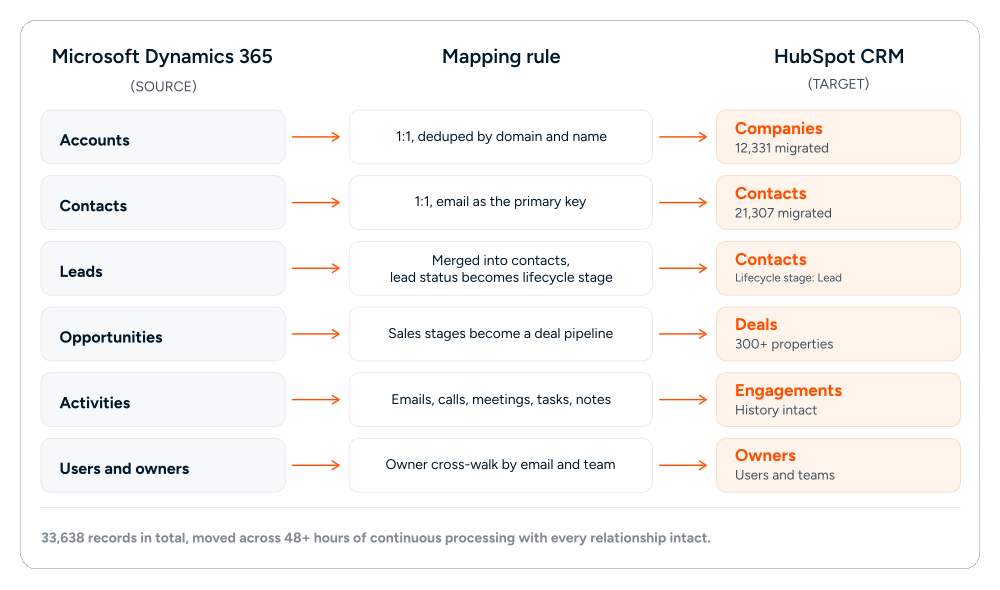
EVERY OBJECT HAD A RULE BEFORE IT MOVED.

Mapping Chart

Table
What a company migrating off Dynamics 365 asks first

Frequently Asked Questions

  • Not in this case. The 48-plus hour migration ran on a dedicated Google Cloud VM, which kept the process continuous without disrupting daily CRM use.

  • Custom properties in HubSpot were mapped to mirror the original Dynamics 365 fields, and Node.js scripts handled the relationship linking automatically.

  • SharePoint folders were reorganized first, then attachments were extracted and uploaded into HubSpot in a structured way, rather than moved as-is.

  • 33,638-plus total records, including 21,307 contacts, 12,331 companies, and more than 300 deal properties covering tasks, emails, notes, and appointments.

  • About 2.5 months from setup to completion, including the 48-plus hour continuous processing window for the core data transfer.

Book a consultation

Ready to Build the Engine

Behind Your Growth?

We build the systems underneath growth. CRM, website, search, outbound, and automation, connected so your team stops doing the work software should do.

Icon-Apr-08-2026-10-02-31-8097-AM Takes 30 minutes
Icon-Apr-08-2026-10-02-31-8097-AM Delivered by certified HubSpot expert
Ratul-Rahman