





-2.png)


-2.png)



.png)


.webp)

.png)










.png)







-1.webp)
-1.webp)



.webp)

-1-1.webp)



-2.webp)

-1-1.webp)

-2-1.png)

-1-1.webp)
-1-1.webp)
-1-1.png)







A modern website needs more than an attractive design. Visitors should understand what a business offers, find the information they need and know what to do next without any extra effort. Small details like page speed, clear headings, easy navigation and well-placed buttons can make a big difference in how people use a site.
Looking at modern website design examples can help you understand which choices work and why. You can learn how different businesses use layouts, colors, images, and interactive features to improve the visitor experience.
Let’s explore modern website design examples, explain what makes each one effective, and share practical ways to apply those ideas to your own website.
What Makes a Website Design Modern Looking?
A modern website loads fast, reads clearly, lets visitors control motion, says what it offers, and behaves like the sites visitors already know. HubSpot's own roundup defines the look differently: eye-catching animations, new fonts, playful colors and horizontal navigation. (Source: "25+ Best Modern Website Design Examples We Love") Those are style choices, and style dates fast. The five checks below date slowly.
|
Check |
Target |
|
Speed |
Largest content in 2.5 seconds or less, interaction response under 200 milliseconds, layout shift 0.1 or less, for at least 75% of visits |
|
Readability |
Contrast of 4.5:1 for body text, 3:1 for large text |
|
Motion |
Anything that moves on its own for over 5 seconds has a pause, stop or hide control |
|
Clarity |
The first screen says what you offer in one sentence |
|
Familiarity |
Menus, buttons and forms work the way visitors expect |
The speed targets come from Google. (Sources: "Largest Contentful Paint", "Interaction to Next Paint", "Cumulative Layout Shift")
The contrast levels and the motion rule come from WCAG. (Sources: "Contrast (Minimum)", "Pause, Stop, Hide")
The last check is Jakob's law: visitors spend most of their time on other sites. (Source: "Laws of UX") The clarity check is mine.
Our UI/UX design team checks speed and WCAG 2.2 AA accessibility during design.
Which Modern Website Design Examples Are Worth Studying?
I grouped up these modern web design examples by what they teach. Nine sites come from HubSpot's roundup, and one, Stripe, I checked myself. I did not test any site's speed, and no roundup shares conversion data.
So "worth studying" means each site shows one clear lesson, per its description. If you want modern website design inspiration, look for the lesson first and the style second.
Examples With a Clear First Screen
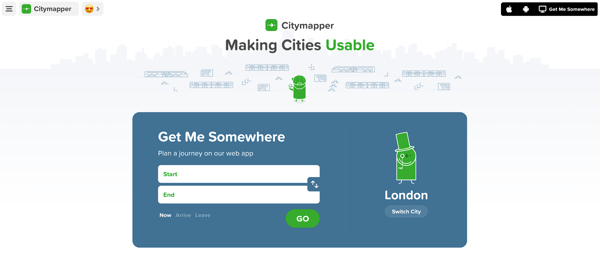
Citymapper, per HubSpot, asks for your location and destination as soon as the page opens. The page is the tool. Copy the idea of putting the main task first.
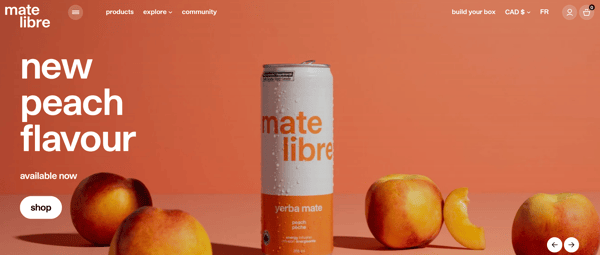
Mate Libre, a drink brand, shows the product's benefits without scrolling, according to HubSpot. Its typography is consistent and its call-to-action buttons are large. Copy the plain promise.
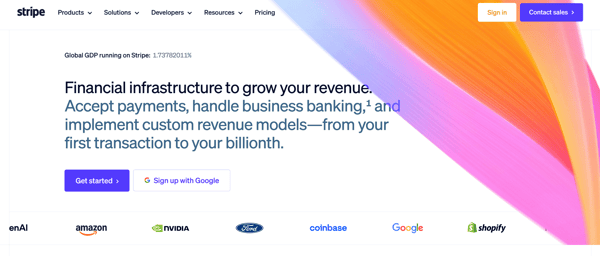
Stripe's homepage leads with one sentence: "Financial infrastructure to grow your revenue." It then splits into sections for enterprises, startups and platforms. That is the page as of October 2026. Copy the one-line offer.
Examples Where Purpose Beats Decoration

The Choose Kindness Project keeps crisis helplines on every page, one click away, per HubSpot. The fonts are clear and the buttons stand out. Copy the habit of asking what a visitor most needs, then never hiding it.
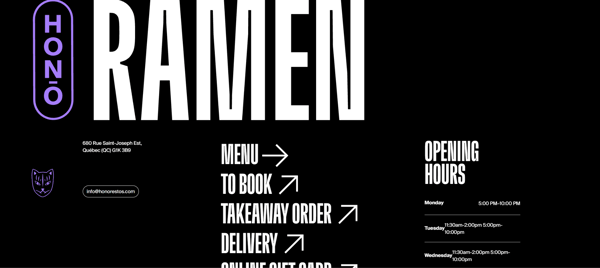
Hono Ramen, a restaurant, puts the menu, hours, ordering and shop on one short site. A small site that answers every question beats a large one that hides answers.
To see reusable components in action, open the demos in the HubXpert module showcase.
Examples That Use Space & Hierarchy
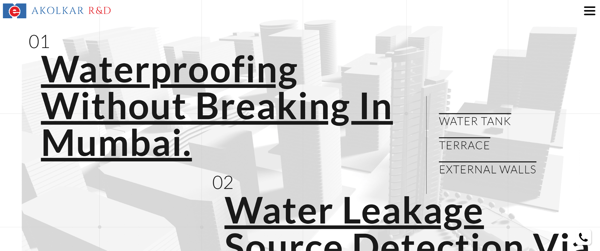
Akolkar Waterproofing is a company in a field where HubSpot says most sites use boring templates. It uses generous white space and animations that expand into building blueprints. Copy the space.
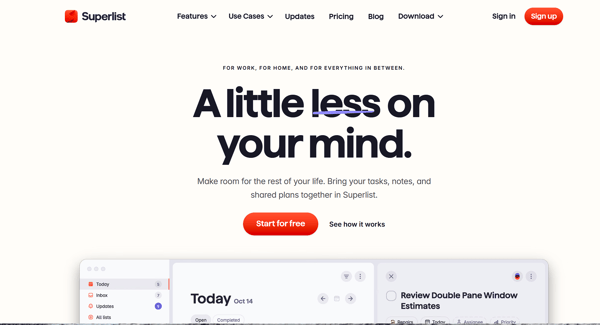
Superlist, a task tool, lets visitors find each section's core message quickly through white space, according to HubSpot. Short copy sits beside large demo animations.

Hyer, a private jet booking service, stays clean and minimal despite a luxury product. Its homepage focuses on the chartering service.
Examples That Make the Next Step Obvious
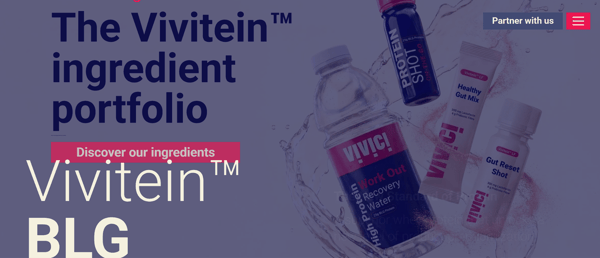
Vivici uses large call-to-action buttons in a color different from the background, per HubSpot, so they look unique from another.
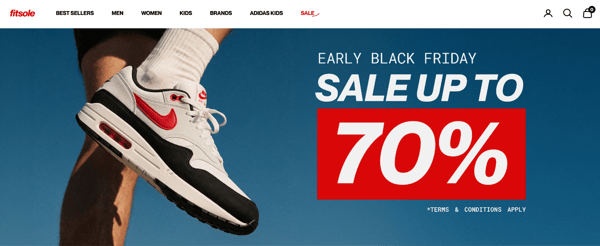
Fitsole, a sneaker store, arranges products in neat rows with white space so shoppers can browse. Copy contrast on the button, and copy order in the grid.
What Separates a Current Site From a Dated One?
Most modern looking websites pass the five checks. Dated sites tend to fail one or more:
-
The page jumps while it loads. That is a layout shift above 0.1.
-
Body text is light gray on white and falls below 4.5:1.
-
A banner or carousel advances by itself with no pause control.
-
Menus, buttons and forms look and act differently from page to page.
-
The first screen shows a slogan, not an offer.
-
The layout needs pinching or sideways scrolling on a phone.
Dated is not the same as old. A 2015 site that passes these checks can serve visitors better than a 2026 site that fails them. That is my view, and it is why the checks matter more than the look.
What Does a Modern Site Look Like on HubSpot?
Here is one HubXpert project. Predictive Safety, a workplace safety software company, moved from WordPress to HubSpot CMS in three weeks. The first week produced a custom Figma design with a scalable design system.
The second built global navigation, footers and responsive templates in HubSpot. The third migrated landing pages and blogs. (Source: "Website Redesign & Migration of Predictive Safety")
The project's goals were minimal, clear layouts, a modular and responsive design system, and better mobile responsiveness and page performance. The case study lists no speed numbers, so read those as goals, not measured results. It also notes that a child theme kept the benefits of a purchased theme while allowing full customization.
That structure supports the five checks. HubSpot's developer docs describe themes, templates and modules as layers, and say editors work inside style and layout guardrails. (Source: "HubSpot CMS overview")
Guardrails keep menus and buttons consistent as pages multiply. Our work page also lists Lurian Interior, a luxury interior web experience, and Swept Works, designed for workforce management at cleaning businesses.
How Do You Audit Your Own Site? (Important)
Run these steps on your home page and one product or service page:
-
Run a speed test on mobile and write down the three numbers: largest content, interaction response and layout shift.
-
Check the contrast of body text and buttons against 4.5:1 and 3:1.
-
Watch for anything that moves by itself. Look for a pause control.
-
Read the first screen out loud. Does it say what you offer?
-
Compare the menu, buttons and forms on five different pages. Then compare your site with two examples of modern websites from this guide. Reusable HubSpot modules keep menus and buttons identical across pages.
-
Fix in this order: speed, readability, then clarity.
FAQs
What Is the Difference Between Modern and Trendy?
Modern describes how a site works. Trendy describes how it looks this year. A site can follow every trend and still load slowly or hide its offer.
Do Modern Websites Need Animations?
No. Many modern web design examples use motion. HubSpot's roundup says The Sip has no animations and still feels modern, thanks to its color combinations and sharp images. Use motion only when it helps a visitor, and give a way to pause it.
Are Minimalist Websites Always Modern?
No. Minimal and modern overlap, but plain is not the same as clear. A sparse page that fails the contrast or speed checks is still dated. That is my view.
How Can I Find Examples of Modern Websites in My Industry?
Start with your competitors and the customers they share with you. Roundups give you modern website design inspiration too. HubSpot's includes studios, food brands, a charity, a restaurant and software tools. Then run each site through the five checks.
How Do I Know if My Site Is Too Slow?
Check three numbers for at least 75% of visits. Largest content should take 2.5 seconds or less. Interaction response should be under 200 milliseconds. Layout shift should be 0.1 or less. Missing any one is a sign to fix speed first.
Is a Hamburger Menu Modern?
HubSpot's roundup lists hamburger menus as a modern element. They save space, but they also hide options. Keep your two or three most important links visible. That is my view.
Can I Get a Modern Site on HubSpot Without a Custom Build?
Yes, for many sites. Start from a theme and add ready-made components from our library of reusable HubSpot modules. A custom build makes sense when your layout or flow is unusual.
How Long Does a Website Redesign Take?
It depends on scope. The Predictive Safety redesign and migration took three weeks, from design through content migration. Larger sites take longer.
Final Thought
Pick one of the modern looking websites you admire and run it through the five checks. Then run your own. The gap between the two is your redesign list, in order of importance. Browse our work page for more redesign examples.
Try this today: open your home page on a phone and read the first screen. If it does not say what you offer, fix that line before anything else. HubXpert designs and builds HubSpot sites with these checks in the process.
Founder & CEO @ Hubxpert. My goal is to make every company using HubSpot succeed in their marketing organisation and automation.

Ratul Rahman
Table of Contents:

Subscribe to our newsletter
Modern Website Design Examples & What Makes Them Work
Browse modern website design examples and modern looking websites, and see exactly what separates a fast, current site from one that already feels dated.

Interactive Web Design Templates & Examples to Study
See interactive web design templates and the best interactive web design inspiration, then compare interactive web page design examples before you build.

Interactive Elements in Web Design & Where to Stop
Add interactive elements in web design that earn their place, covering micro interactions, interactive maps, interactive timelines and knowing when to stop.

3D Web Design Templates & Examples You Can Reuse
Browse 3D web design templates and examples, plus where to find free downloads, and see how 3D web page design lifts a site without slowing the site down.

3D Web Design Tools & Software Compared for 2026
Compare 3D web design tools and web based 3D design software, and see where 3D models and 3D assets for web design fit your existing front-end build pipeline.

HubSpot Onboarding Cost: What the Fee Really Covers
See what HubSpot onboarding cost covers, how onboarding fees get quoted and how to compare implementation quotes line by line before you commit to a partner.
-
Modern Website Design Examples & What Makes Them Work
hello
-
Interactive Web Design Templates & Examples to Study
hello
-
Interactive Elements in Web Design & Where to Stop
hello
-
3D Web Design Templates & Examples You Can Reuse
hello
-
3D Web Design Tools & Software Compared for 2026
hello
-
HubSpot Onboarding Cost: What the Fee Really Covers
hello