





-2.png)


-2.png)



.png)


.webp)

.png)










.png)







-1.webp)
-1.webp)



.webp)

-1-1.webp)



-2.webp)

-1-1.webp)

-2-1.png)

-1-1.webp)
-1-1.webp)
-1-1.png)






HubSpot has become one of the most widely adopted CRM and marketing platforms for growing businesses, known for its ease of use, strong automation, and a genuinely useful free tier that scales as a company grows. For IT services companies and MSPs, that reputation is a real draw.
MSPs run on a different rhythm than most businesses using HubSpot. A PSA handles tickets and billing. An RMM watches every endpoint across every client. Contracts renew on multi-year terms, not one-time sales. Each tool does its job well on its own.
The trouble starts when these systems stop talking to each other. This post looks at what it actually takes to connect a PSA and RMM stack to HubSpot, instead of running three disconnected systems that quietly drift apart.
Why MSPs Keep Asking This Question
MSP sales do not work like typical B2B sales. Deals often start inside a PSA tool, not a CRM. Contracts renew every 12 to 36 months, not once. A CRM that ignores this pattern adds work instead of removing it.
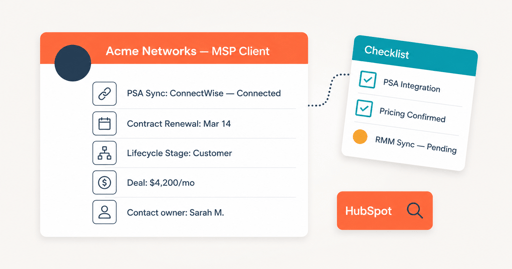
HubSpot markets itself as an all-in-one sales, marketing, and service platform. That claim needs checking before an MSP commits budget and staff time to it.
This post checks four things first: PSA integration, real pricing at MSP scale, contract renewal handling, and reporting built for recurring revenue. Then it gives a straight verdict, not a blanket yes.
What an MSP Needs From a CRM, In Plain Terms
A Managed Service Provider, or MSP, sells ongoing IT support under contract. Clients pay monthly or annually for network monitoring, help desk support, cybersecurity, and infrastructure management. Revenue comes from renewals, not one-time sales.
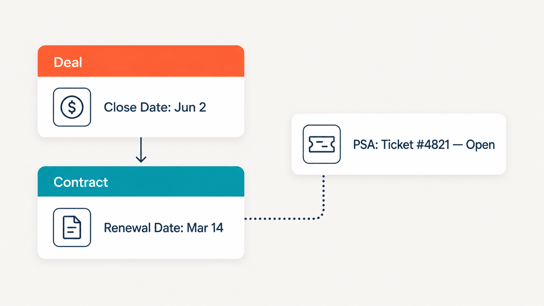
That structure changes what a CRM has to do. It needs to track a contract's renewal date, not just a deal's close date. It needs to connect to the PSA tool running day-to-day service tickets, since that is where the operational relationship actually lives. It also needs a sales cycle built for consideration periods that can run three to nine months, common for MSP contracts.
A CRM built for one-time transactions misses all three. That is the frame for evaluating HubSpot below.
What to Check Before You Switch CRM for MSP Sales
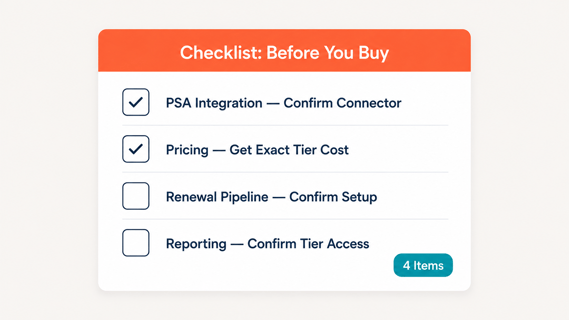
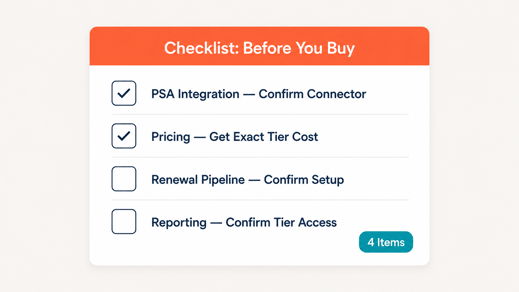
Here is a complete list of what you should check before you switch to any CRM. These are the core things that will help you decide.
PSA Integration Reality
HubSpot has no native ConnectWise or Autotask sync. Check this first. Both integrations run through a third party.
ConnectWise maintains its own listing on the HubSpot App Marketplace. It syncs contacts, companies, and custom fields both ways. Default field mappings come built in. Custom mappings require Operations Hub Starter or Professional.
Autotask has no first-party HubSpot connector at all. MSPs bridge the two using third-party tools such as Integrates.io, built by SyncMatters, a certified HubSpot integration partner. Autotask's own built-in integrations often push data one direction only, out to other tools, rather than syncing both ways (Source: "How to Integrate Autotask").
A smaller share of MSPs run HaloPSA instead of ConnectWise or Autotask. The same rule applies: check for a live connector before assuming HubSpot fits into that workflow.
Two-way sync matters more than it sounds. A one-directional sync means new deals push out from HubSpot, but ticket or contract updates in the PSA never come back. Sales reps end up working from stale data without knowing it. Ask any connector vendor directly which direction data flows, not just whether "integration" exists.
Confirm which PSA the MSP runs. Then confirm the specific connector, its cost, and whether the sync runs both ways, before signing anything.
Real Cost at MSP Scale
HubSpot's core CRM is free indefinitely, for unlimited users. That is real, not a trial (Source: "HubSpot Pricing in 2026: The Real Cost of Every Plan").
The cost jump happens above that. Sales Hub and Service Hub Professional run roughly $90 to $100 per seat per month. Marketing Hub Professional starts around $890 a month.
Onboarding is a separate, one-time fee, typically $1,500 to $7,000 depending on scope. A five-person sales team on Sales Hub Professional lands around $500 a month before onboarding, plus that one-time fee in year one (Source: same). Run this math against the current PSA and marketing tool budget before assuming HubSpot is the cheaper option.
Contract Renewal & Long Sales Cycles
HubSpot's deal pipeline is built for one-time close dates by default. MSP contracts need a second kind of pipeline: renewal tracking, tied to the contract term, not the original sale date.
HubSpot supports this through custom deal pipelines and properties, but it takes setup. It is not automatic. A working setup usually means a second pipeline, separate from new business, with stages built around the renewal date instead of a close date. Each contract needs its own record moving through that pipeline months before the term ends, not a single line item buried inside the original deal.
Confirm during any demo that a renewal pipeline can run alongside a new-business pipeline without merging the two.
Reporting for Recurring Revenue
Standard HubSpot reporting tracks deals won and lost. MSP leadership usually needs a different number: monthly recurring revenue, tracked by client, with renewal risk flagged ahead of the date.
That reporting exists in HubSpot's Professional and Enterprise tiers, through custom reports and properties. It does not exist in the free tier or Starter. Confirm which tier includes it before budgeting.
Where HubSpot Genuinely Works for MSPs
HubSpot fits a specific kind of MSP well. Three sourced, first-hand reviews point to the same pattern: fit depends on marketing capacity, not company size alone. None of the three sources reviewed here sell HubSpot implementation services, which makes them more useful than the agency content that dominates most search results on this topic.
|
MSP Profile |
Fit |
Why |
|---|---|---|
|
Has a full-time marketer |
Strong fit |
Full value requires someone running campaigns daily (Source: "Should Your MSP Get HubSpot? A Review") |
|
Inbound-focused, content-heavy |
Strong fit |
Content, SEO, and lead nurture tools are HubSpot's core strength (Source: "Could This Be the Best CRM for MSPs?") |
|
Under 10 leads a month, no marketing budget |
Weak fit |
Practitioner guidance advises waiting until lead volume and consultant budget exist (Source: "Best CRM for MSPs?") |
|
Owner running sales and marketing solo |
Weak fit |
Same source above: overkill without dedicated time to run it |
The pattern across all three sourced reviews is consistent. HubSpot rewards MSPs that already have marketing capacity. It does not create that capacity on its own.
Where It Falls Short
Two gaps stand out, and both were flagged directly by the sources above, not invented for balance.
PSA integration is not native, as covered above. Every MSP evaluating HubSpot needs to budget for a connector, not assume the sync exists out of the box.
The price jump past the free tier is steep for a business without dedicated marketing headcount. One direct practitioner review describes moving from $400 a month on a previous tool to $2,000 a month on HubSpot (Source: "Should Your MSP Get HubSpot? A Review"). That is a real number from a real switch, not a worst-case estimate.
There is also a lock-in cost worth naming. Once CRM data, email history, and team habits live inside HubSpot, the features that force the jump to Professional (real automation, custom reporting) sit right on top of data that is expensive to move. Weigh that switching cost now, not after two years of contacts and deal history pile up.
Neither gap is disqualifying. Both are things to price out and staff for before signing, not after.
How HubXpert Closes These Gaps
HubXpert sets up the ConnectWise or Autotask connector as part of onboarding. That way the sync works correctly from day one, instead of getting patched together after data problems show up.
On pricing, HubXpert scopes the right tier for actual MSP sales volume, instead of defaulting to Professional because it is the tier most demos run on. Some MSPs genuinely need Starter with a well-built renewal pipeline, not Professional.
HubXpert also builds the renewal pipeline and recurring-revenue reporting during setup, not as an afterthought. That part is usually skipped, since it is not part of HubSpot's default configuration.
MSPs weighing this decision against other platforms should also weigh HubSpot's marketing and service tooling, not CRM features alone, a fuller comparison covered in HubSpot for IT Services and MSPs.
The Verdict: Who Should Use HubSpot & Who Shouldn't
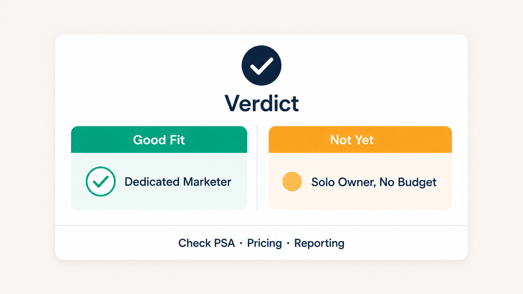
HubSpot is a good CRM for MSPs that already have, or plan to hire, dedicated marketing capacity. It is not a good fit for an MSP owner trying to run sales and marketing alone with no budget for setup or a connector.
Check three things before buying: which PSA connector is needed and its cost, which tier actually includes renewal and recurring-revenue reporting, and whether current lead volume justifies the jump past the free tier.
If those three check out, HubSpot's marketing and sales tooling outperforms most MSP-specific alternatives. If they do not, the free tier or a lighter tool may serve better until the business is ready to grow into it.
Size is not the deciding factor by itself. A 15-person MSP with one dedicated marketer can get more out of HubSpot than an 80-person MSP running sales and marketing through a single overloaded owner. Capacity to run the tool matters more than headcount on the org chart.
FAQs
Does HubSpot integrate with ConnectWise?
Yes, through ConnectWise's own listing on the HubSpot App Marketplace. It syncs contacts, companies, and custom fields both ways, with default mappings included.
Does HubSpot integrate with Autotask?
Not natively. MSPs use third-party connectors such as HubXpert or Integrates.io to sync HubSpot with Autotask.
How much does HubSpot cost for an MSP?
The core CRM is free. Sales and Service Hub Professional run roughly $90 to $100 per seat monthly, plus a separate one-time onboarding fee of $1,500 to $7,000 (Source: "HubSpot Pricing in 2026: The Real Cost of Every Plan").
Can HubSpot replace a PSA?
No. HubSpot handles sales and marketing. Ticketing, service delivery, and asset management still need a PSA like ConnectWise or Autotask running alongside it.
Is HubSpot worth it for a small MSP?
Only with dedicated marketing time or budget. Practitioner reviews advise smaller MSPs to wait until lead volume and setup budget exist (Source: "Best CRM for MSPs?").
Founder & CEO @ Hubxpert. My goal is to make every company using HubSpot succeed in their marketing organisation and automation.

Ratul Rahman
Table of Contents:

Subscribe to our newsletter

Modern Website Design Examples & What Makes Them Work
Browse modern website design examples and modern looking websites, and see exactly what separates a fast, current site from one that already feels dated.

Interactive Web Design Templates & Examples to Study
See interactive web design templates and the best interactive web design inspiration, then compare interactive web page design examples before you build.

Interactive Elements in Web Design & Where to Stop
Add interactive elements in web design that earn their place, covering micro interactions, interactive maps, interactive timelines and knowing when to stop.

3D Web Design Templates & Examples You Can Reuse
Browse 3D web design templates and examples, plus where to find free downloads, and see how 3D web page design lifts a site without slowing the site down.

3D Web Design Tools & Software Compared for 2026
Compare 3D web design tools and web based 3D design software, and see where 3D models and 3D assets for web design fit your existing front-end build pipeline.

HubSpot Onboarding Cost: What the Fee Really Covers
See what HubSpot onboarding cost covers, how onboarding fees get quoted and how to compare implementation quotes line by line before you commit to a partner.
-
Modern Website Design Examples & What Makes Them Work
hello
-
Interactive Web Design Templates & Examples to Study
hello
-
Interactive Elements in Web Design & Where to Stop
hello
-
3D Web Design Templates & Examples You Can Reuse
hello
-
3D Web Design Tools & Software Compared for 2026
hello
-
HubSpot Onboarding Cost: What the Fee Really Covers
hello