





-2.png)


-2.png)



.png)


.webp)

.png)










.png)







-1.webp)
-1.webp)



.webp)

-1-1.webp)



-2.webp)

-1-1.webp)

-2-1.png)

-1-1.webp)
-1-1.webp)
-1-1.png)






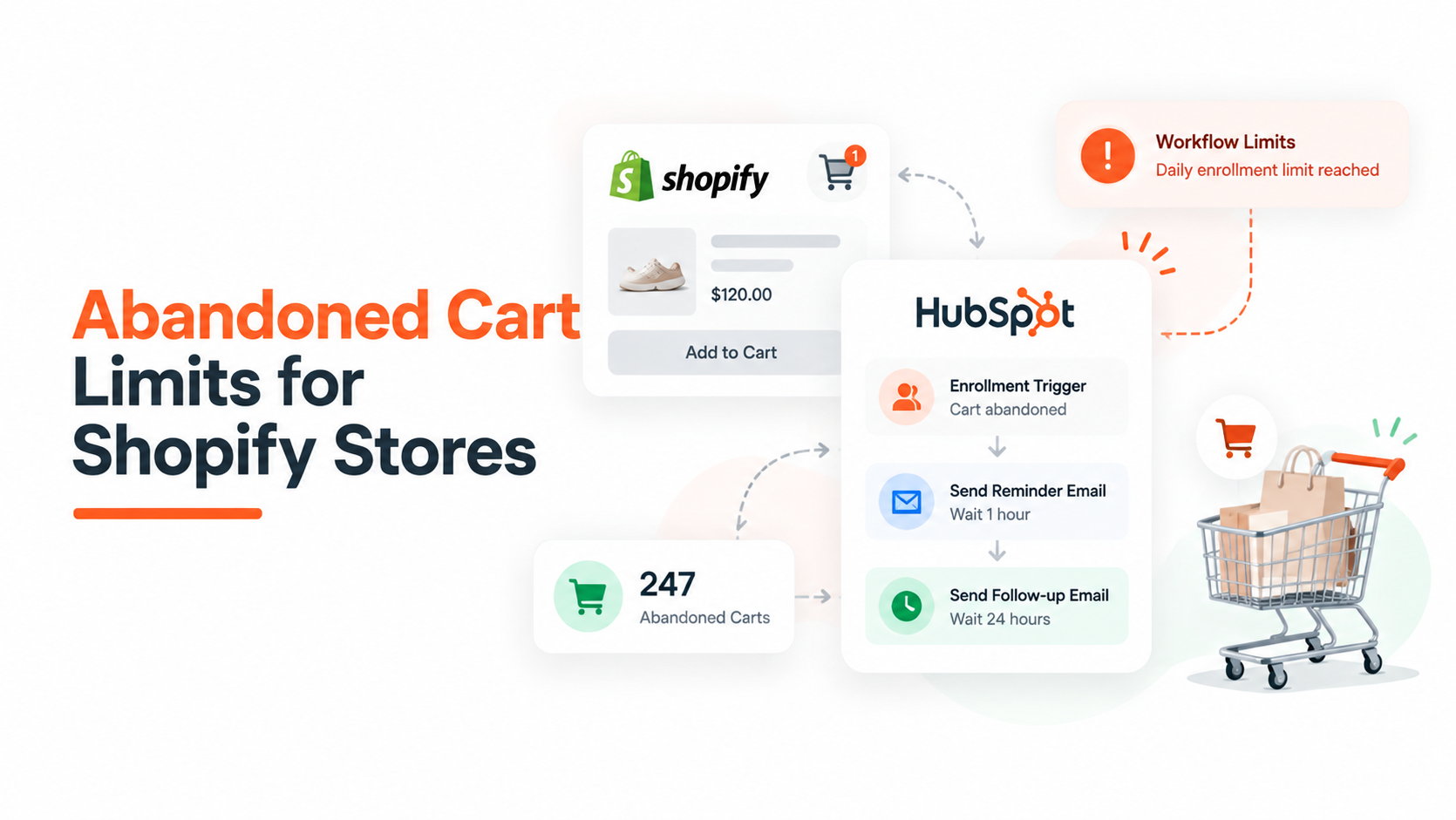
You connect Shopify, turn on the abandoned cart workflow, and it looks done. Then you try to exclude one collection, or send at 45 minutes instead of the default, or catch someone who added to cart but never reached checkout, and nothing moves. This is not a setup mistake.
HubSpot's abandoned cart feature runs on a data model with hard edges, and depending on when your portal was connected, you might be on one of two different versions of that model without knowing it.
This post breaks down where the walls actually are, which ones you can work around inside HubSpot, and which ones need a connector app instead of more workflow branches.
Two Data Models Hiding Inside One Feature
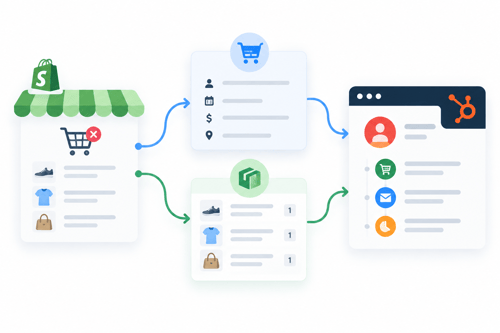
If your HubSpot portal has been connected to Shopify for a while, your abandoned cart setup most likely runs on the older model. Shopify orders sync in as Deals, and an abandoned checkout moves that deal into a Checkout Abandoned stage inside the Ecommerce pipeline.
This happens when a shopper reaches checkout and provides an email, which Shopify treats as an abandoned checkout event. The pre-built workflow HubSpot enrolls deals sitting in that stage and waits, by default, close to a full day before sending the reminder email.
Newer portals, or ones connected through HubSpot's current Shopify integration, get a separate Cart object alongside Contacts, Companies, and Deals. According to HubSpot's own documentation on viewing the cart object, this object stores ecommerce purchase data including abandoned carts synced from Shopify and other platforms like NetSuite or WooCommerce, and it behaves like any other CRM record.
You can customize its layout, build custom properties on it, and run reports off it directly. The Shopify data sync setup page confirms Carts sync from Shopify's Abandoned Checkouts, alongside Companies, Products, and Orders, and that records sync within about ten minutes of a change once the initial sync completes.
Workflows built against this newer Cart object are what HubSpot calls cart-based workflows, and they matter for one specific reason. The cart module, the block you drag into a marketing email to auto-populate product images, names, and a recovery link, can only be inserted into a cart-based workflow email.
HubSpot states this directly in its documentation on using abandoned cart data in marketing emails: the cart module requires a cart-based workflow, caps sends at 250,000 recipients per hour, and cannot be used in an A/B test.
Why this distinction matters before you touch anything: a setup guide written for the Deal-based model sends you hunting for a Checkout Abandoned deal stage that does not exist on a Cart-based portal.
A guide written for Cart-based workflows references a cart module your Deal-based portal cannot use at all. Check which one you are on before you build anything. Go to Contacts in the CRM and look for a Carts record type in the left navigation. If it is there, you are on the newer Cart object model.
The Five Limits That Actually Block Merchants
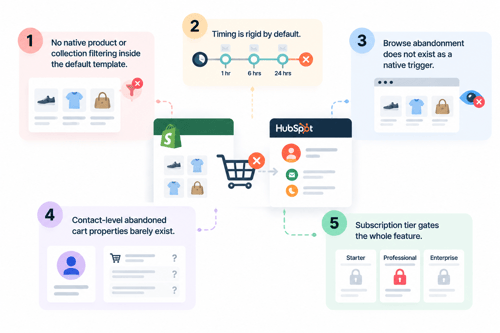
1. No native product or collection filtering inside the default template
The out-of-the-box abandoned cart workflow enrolls on the stage or object change and stops there. A HubSpot Community thread on this exact problem confirms the platform cannot natively exclude specific product lines or control the exact timing of when a cart counts as abandoned.
Because the Shopify sync itself does not expose that level of product filtering or timestamp flexibility. You have to rebuild the workflow with manual if/then branches keyed to SKU, product name, or product type.
2. Timing is rigid by default
Depending on which model your portal runs, the default delay sits somewhere between an hour and a full day. That window is not a setting you adjust with a slider. You override it by replacing the delay step in a custom-built workflow, not by editing a configuration screen.
3. Browse abandonment does not exist as a native trigger
HubSpot cannot natively evaluate whether a contact viewed a product page two or more times, and it does not support conditional logic built around a sequence of page views, at least not without custom behavioral event tracking layered on top. If a client is treating "browse abandonment" as a feature they already have, they do not. It has to be built.
4. Contact-level abandoned cart properties barely exist
Abandoned Cart Products is not a native Contact property inside the Shopify integration. You either look up Deal Products, which inherits every limitation of Deal-based workflows described above, or fall back to a rough workaround like an Orders Count is unknown filter, which only isolates people who have never purchased at all and tells you nothing about what is actually sitting in their cart.
5. Subscription tier gates the whole feature
Both the cart module in marketing emails and cart-based workflows require Marketing Hub Professional or Enterprise, confirmed directly in HubSpot's documentation linked above.
Two operational limits are worth naming even though they will not show up on a settings screen. A cart module email caps out at 250,000 recipients per hour and cannot be A/B tested, both confirmed on HubSpot's cart data page above.
And if you build on the older Deal-based model, unenrollment logic reportedly only tracks the current deal being worked, not every deal tied to that contact, which is why some merchants see a shopper get re-enrolled in a recovery sequence off a stale cart from months earlier.
This last point comes from implementer reporting rather than HubSpot's own documentation, so confirm it on a live portal before treating it as settled.
Native Workflow Vs Custom Workaround Vs Connector App
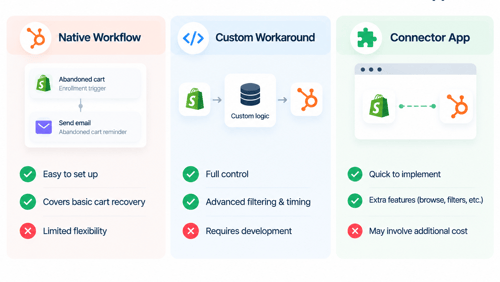
Pick your lane based on what the client actually needs, not on what sounds more advanced.
|
Native default workflow |
Custom-built native workflow |
Connector app |
|
|
Product or SKU filtering |
No |
Yes, with manual if/then branches |
Yes, built in |
|
Browse abandonment |
No |
Only with custom behavioral events |
Often built in |
|
Timing control |
Fixed default |
Fully custom |
Fully custom |
|
Data model |
Locked to whichever sync you have, Deal or Cart |
Same object, worked around |
Adds Contact-level properties like Last Order Date |
|
Plan requirement |
Marketing Hub Pro or Enterprise |
Marketing Hub Pro or Enterprise |
Native plan plus a separate app subscription |
|
Build effort |
None |
Moderate, ongoing maintenance |
Low once configured |
If the only pain point is timing, or excluding one collection, build it natively. If the client needs real browse abandonment or clean Contact-level cart data that survives across multiple deals, a connector app will cost less in engineering hours over a year than maintaining a growing pile of if/then branches inside HubSpot.
Building The Workaround For Filtering & Timing
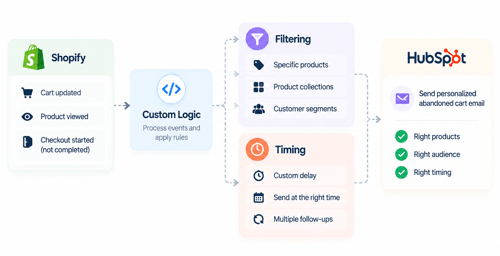
If you are staying native, here is the actual rebuild.
- Confirm your object first. Deal-based or Cart-based, following the check described above. Every step after this depends on getting it right.
- Clone the default workflow instead of editing it. Keep the original live as a fallback while you test the rebuild.
- Replace the single enrollment trigger with a filtered one. On Deal-based portals, this typically means combining Deal Stage is any Checkout Abandoned with a Line Item filter where Product Type equals the collection you want to isolate. HubSpot's guide to setting filter enrollment triggers walks through the filter builder mechanics if your team has not used line item filters before.
- Set your own delay step, not the default. Test against your own store's send data rather than copying a number from a blog post, this one included.
- Add an unenrollment goal that actually matches your data model. For Deal-based builds, add a Contact-level goal like Last Order Date is less than X days ago, since unenrollment logic on the deal itself may not catch a purchase made against a different deal record.
- Turn off Shopify's own native abandoned checkout email if HubSpot's workflow is live. Sending both means a shopper gets messaged twice for the same cart, and it will wreck your workflow reporting since HubSpot cannot tell you the recovery happened through Shopify's email instead of its own.
For teams working directly against the API rather than the visual builder, Shopify's AbandonedCheckout object reference documents every field available at the point of abandonment, including line items, discount codes, and the recovery URL.
Which is useful context if your developer is deciding whether to build a custom sync rather than rely on HubSpot's default field mapping.
When To Stop Fighting Native HubSpot
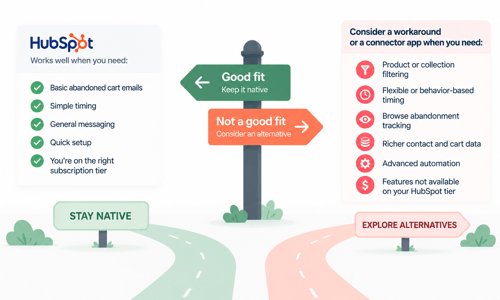
Stop building custom branches and bring in a connector app when any of the following is true. The client needs real browser abandonment. The client needs Contact-level cart properties that survive across multiple deals rather than resetting with each new order. Or the team is spending more billable hours maintaining if/then branches than the recovered revenue justifies.
Connector tools solve the underlying problem by writing Contact-level fields like Last Order Date directly onto the contact record, sidestepping the Deal object limitation entirely rather than working around it.
That is a real trade-off, an added monthly subscription against reduced workflow maintenance, and it deserves an actual ROI conversation with the client instead of a default recommendation in either direction.
FAQs
Can I exclude specific products or collections from HubSpot's abandoned cart workflow?
Not with the default template. You have to rebuild the enrollment trigger with a line item or product-type filter, since the native Shopify sync does not expose per-product filtering on its own. A merchant asking this exact question in HubSpot's Community got the same answer directly from HubSpot support.
Why does HubSpot's abandoned cart email not show product images or names?
This trips up a lot of merchants right after connecting Shopify. A user in HubSpot's Community asking about missing product data was told the fix is the cart module dropped into the email template, which pulls line item data, images, and personalization tokens automatically once it is added. It does not populate on its own without that module in the email.
Do I need Marketing Hub Professional for abandoned cart workflows?
Yes. Cart-based workflows and the cart module in marketing emails both require Marketing Hub Professional or Enterprise. Some Deal-based setups have also required Sales Hub Professional depending on how the workflow was built.
Why does my abandoned cart contact get emailed again for an old order?
This usually happens on Deal-based workflows, where unenrollment logic may only check the current deal rather than every deal tied to that contact. A stale deal from months ago can still be sitting in an old pipeline stage and retrigger the sequence. Confirm this behavior against your own portal rather than assuming it applies uniformly.
Can I report on which email in a multi-step abandoned cart series performs best?
Historically this has been a pain point on Deal-based setups. A merchant in HubSpot's Community building a three-email abandoned cart series reported the same difficulty isolating which specific email drove recovery, since deal-based workflow reporting does not break performance down by individual send step as cleanly as a list-based email campaign would.
Should I run HubSpot's abandoned cart emails and Shopify's native recovery emails at the same time?
No. Running both means the same shopper can get two separate recovery emails for one abandoned cart, which reads as spam and makes your workflow performance data unreliable.
Final Words
What looks like a HubSpot bug is often a data model limitation. Before building complex workflows, understand how your portal handles deals, carts, products, and pre-checkout activity and choose the simplest solution that fits.
If your HubSpot setup needs a stronger foundation, HubXpert can help with the onboarding, architecture, and automation needed to make it work smoothly from the start. Explore HubXpert’s HubSpot onboarding services
As a Hubspot Automation Developer at Hubxpert, I specialize in API integration, seamlessly connecting HubSpot with third-party applications. My role encompasses understanding client needs, crafting custom code solutions, and ensuring the smooth operation of our automation workflows. I actively address any HubSpot integration challenges and stay updated with the platform's latest advancements. My dedication ensures clients harness the full potential of HubSpot.

Tanzinul Kabir
Table of Contents:

Subscribe to our newsletter

Modern Website Design Examples & What Makes Them Work
Browse modern website design examples and modern looking websites, and see exactly what separates a fast, current site from one that already feels dated.

Interactive Web Design Templates & Examples to Study
See interactive web design templates and the best interactive web design inspiration, then compare interactive web page design examples before you build.

Interactive Elements in Web Design & Where to Stop
Add interactive elements in web design that earn their place, covering micro interactions, interactive maps, interactive timelines and knowing when to stop.

3D Web Design Templates & Examples You Can Reuse
Browse 3D web design templates and examples, plus where to find free downloads, and see how 3D web page design lifts a site without slowing the site down.

3D Web Design Tools & Software Compared for 2026
Compare 3D web design tools and web based 3D design software, and see where 3D models and 3D assets for web design fit your existing front-end build pipeline.

HubSpot Onboarding Cost: What the Fee Really Covers
See what HubSpot onboarding cost covers, how onboarding fees get quoted and how to compare implementation quotes line by line before you commit to a partner.
-
Modern Website Design Examples & What Makes Them Work
hello
-
Interactive Web Design Templates & Examples to Study
hello
-
Interactive Elements in Web Design & Where to Stop
hello
-
3D Web Design Templates & Examples You Can Reuse
hello
-
3D Web Design Tools & Software Compared for 2026
hello
-
HubSpot Onboarding Cost: What the Fee Really Covers
hello