





-2.png)


-2.png)



.png)


.webp)

.png)










.png)







-1.webp)
-1.webp)



.webp)

-1-1.webp)



-2.webp)

-1-1.webp)

-2-1.png)

-1-1.webp)
-1-1.webp)
-1-1.png)






.png)
HubSpot earns its reputation by bending around how a business works, instead of forcing every team into the same rigid workflow. Accounting firms lean on that constantly, especially once they start using HubSpot alongside their practice management software.
But that flexibility hits a real wall the moment a firm needs to collect a W-2, an engagement letter, or a signed financial statement from a client. HubSpot does not offer one built-in, two-way document portal the way TaxDome or SmartVault does.
What it offers instead are three separate mechanisms that can each cover this job, depending on how sensitive the documents are and how many you are collecting.
None of these is automatically the right answer. The right one depends on your firm's volume and what you are actually asking clients to send.
Why HubSpot Doesn't Have A Dedicated Document Portal

This is not an oversight. HubSpot's File Manager was built to host marketing assets like images, PDFs for lead magnets, and website files, not to run a two-way exchange where clients upload and your team retrieves.
The Customer Portal lives inside Service Hub and was built to reduce repetitive support ticket emails, letting clients check ticket status and attach a file to a specific request.
Neither tool was designed around the accounting firm use case of collecting a batch of sensitive documents ahead of a filing deadline. That gap is real, and it is why firms searching for a HubSpot document portal come up short. The fix is combining what already exists rather than waiting for HubSpot to build one.
Option 1: Forms with a Sensitive Data property
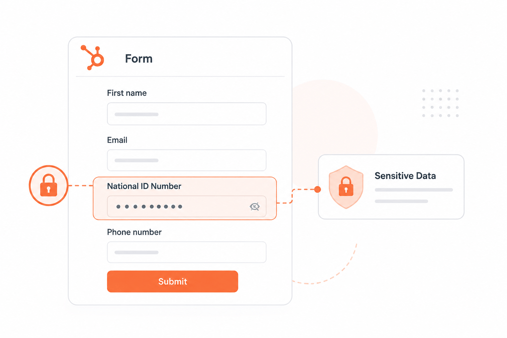
HubSpot's standard form builder includes a file upload field. A client fills out the form, attaches a file, and HubSpot stores it in File Manager while linking it directly to their contact record (Source: "How To Add A File Upload Field To HubSpot Forms"). This costs nothing beyond your existing subscription.
The detail that matters most is security. Files uploaded through a form field associated with a property marked as Sensitive Data are encrypted and restricted to users with sensitive data permissions in your account (Source: "Understand how Sensitive Data is used in HubSpot tools").
Skip that step and the file may be more accessible than you expect. One caveat worth knowing: HubSpot's original file upload field is now considered a legacy feature, and implementers generally advise against treating it as a scalable solution for high-volume external document collection (Source: "HubSpot File Upload Forms Guide").
For occasional requests, a tax organizer or a signed engagement letter, this option works well. For busy season volume across dozens of clients, it starts to strain.
Option 2: Service Hub's ticket-based Customer Portal

HubSpot's Customer Portal lives inside Service Hub, available on the Starter, Professional, and Enterprise tiers, with full branding and knowledge base features gated to Professional and above (Source: "HubSpot Client Portal Setup Guide for 2026").
Clients log in, see their open tickets, and attach files directly to a specific request. File size caps sit at 50MB when uploading from an existing ticket and 100MB when creating a new one, with a limited set of supported file types.
As of early 2026, Professional pricing runs around $90 per seat per month plus an onboarding fee, though tiers and pricing shift often enough that confirming current numbers on HubSpot's pricing page is worth five minutes before committing.
This path makes the most sense for firms already running Service Hub for client support, since document collection becomes a side benefit of a tool you already pay for. It makes less sense as a first purchase made solely to solve document collection.
Option 3: Connect A Dedicated File-Request Tool

The closest HubSpot gets to a real client document portal is through a marketplace connector. Box, connected to HubSpot, lets your team generate a secure file request link directly from a contact or company record.
The client receives an email with a direct upload link, no login required, and the file lands in the connected Box folder while HubSpot logs the request (Source: "Ditch the Secure Portal: How HubSpot and Box File Requests Streamline Client Document Collection").
Files are encrypted in transit and at rest. The workflow can trigger automatically, so a new tax client moving into a specific deal stage receives a document request without anyone sending it by hand.
This option behaves most like a dedicated tax portal. It also means paying for and managing another connected tool, so it earns its cost mainly for firms handling document collection at real volume, not for the occasional one-off request.
Which Option Fits Your Firm
Matching the option to your situation usually comes down to two questions: how sensitive are the documents, and how many clients are you collecting from at once. A firm requesting a handful of signed engagement letters a month has a very different need than a firm chasing forty clients for tax documents in February.
|
Situation |
Best fit |
|
Occasional, low-volume document requests |
Forms with a Sensitive Data property |
|
Already running Service Hub for support |
Ticket-based Customer Portal |
|
High-volume document collection during tax season |
Connected file-request tool such as Box |
|
Highly sensitive documents at any volume |
Sensitive Data property at minimum, regardless of which path you choose |
The two-way sync thinking here is the same logic we cover for connecting client data across systems in Management Software for Accounting Firms.
FAQs
Does HubSpot have a client portal at all?
Yes, through Service Hub's Customer Portal, but it is built around support tickets rather than general document collection, and it is gated to paid tiers.
Are HubSpot form file uploads secure by default?
Not automatically. Security depends on marking the associated field as a Sensitive Data property, which restricts access to permissioned users.
Can I use HubSpot's file upload field for tax documents?
For occasional requests, yes, as long as the field is tied to a Sensitive Data property. For high volume during tax season, a dedicated file-request tool handles it better.
What is the file size limit for HubSpot document uploads?
Ticket attachments cap at 50MB from an existing ticket and 100MB when creating a new one. Form upload limits vary by account and are worth confirming in your settings.
Do I need Service Hub to collect documents securely in HubSpot?
No. The Forms and Sensitive Data property path works without Service Hub. Service Hub only matters if you specifically want the ticket-based Customer Portal.
What is the difference between HubSpot File Manager and a client portal?
File Manager stores and hosts files, mainly for one-way use like marketing assets. A client portal is a two-way, client-facing space for clients to log in and act, which HubSpot does not offer as a single built-in feature.
Senior RevOps Strategist at Hubxpert

Fazle Rabbi
Table of Contents:

Subscribe to our newsletter

Modern Website Design Examples & What Makes Them Work
Browse modern website design examples and modern looking websites, and see exactly what separates a fast, current site from one that already feels dated.

Interactive Web Design Templates & Examples to Study
See interactive web design templates and the best interactive web design inspiration, then compare interactive web page design examples before you build.

Interactive Elements in Web Design & Where to Stop
Add interactive elements in web design that earn their place, covering micro interactions, interactive maps, interactive timelines and knowing when to stop.

3D Web Design Templates & Examples You Can Reuse
Browse 3D web design templates and examples, plus where to find free downloads, and see how 3D web page design lifts a site without slowing the site down.

3D Web Design Tools & Software Compared for 2026
Compare 3D web design tools and web based 3D design software, and see where 3D models and 3D assets for web design fit your existing front-end build pipeline.

HubSpot Onboarding Cost: What the Fee Really Covers
See what HubSpot onboarding cost covers, how onboarding fees get quoted and how to compare implementation quotes line by line before you commit to a partner.
-
Modern Website Design Examples & What Makes Them Work
hello
-
Interactive Web Design Templates & Examples to Study
hello
-
Interactive Elements in Web Design & Where to Stop
hello
-
3D Web Design Templates & Examples You Can Reuse
hello
-
3D Web Design Tools & Software Compared for 2026
hello
-
HubSpot Onboarding Cost: What the Fee Really Covers
hello