





-2.png)


-2.png)



.png)


.webp)

.png)










.png)







-1.webp)
-1.webp)



.webp)

-1-1.webp)



-2.webp)

-1-1.webp)

-2-1.png)

-1-1.webp)
-1-1.webp)
-1-1.png)







CRM data integrity refers to the accuracy, consistency, completeness, and reliability of data throughout a migration. During a HubSpot migration, even small issues such as incorrect field mappings, broken associations, duplicate records, or missing property values can affect reporting, automation, segmentation, and revenue visibility.
Preserving data integrity means ensuring that contacts, companies, deals, activities, and their relationships remain accurate before, during, and after migration.
The goal is not simply to move data into HubSpot, but to ensure the migrated data continues to support business operations exactly as intended.
Importance of Data Integrity During HubSpot Migration
Data integrity directly impacts the reliability of your CRM after migration. If records are incomplete, incorrectly mapped, duplicated, or disconnected from related records, teams quickly lose trust in the system and business processes begin to break down.
A successful HubSpot migration should preserve:
-
Contact, company, deal and ticket data
-
Record ownership
-
Object associations
-
Historical activities
-
Lifecycle stages and pipeline stages
-
Reporting accuracy
-
Workflow and automation logic
For example, if contact-to-company associations are lost during migration, sales teams lose account visibility. If lifecycle stages are mapped incorrectly, lead management workflows and conversion reporting become unreliable.
If revenue-related properties are migrated inaccurately, forecasting and performance reporting can be affected.
Maintaining CRM data integrity ensures that HubSpot continues to support sales, marketing, service, and reporting processes without disruption after go-live.
Common Causes of Data Integrity Issues During a HubSpot Migration
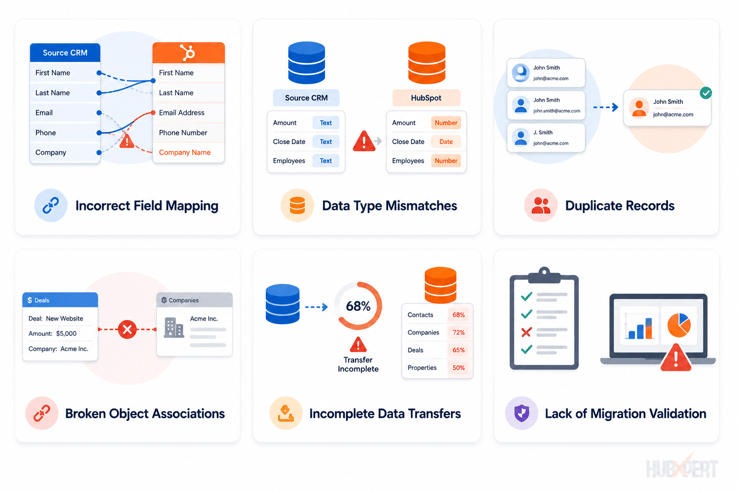
Most data integrity issues are introduced during planning and execution, not during the migration itself. Understanding the most common failure points helps reduce risk before data is moved into HubSpot.
Incorrect Field Mapping
When source CRM fields are mapped to the wrong HubSpot properties, data can become misplaced, overwritten, or unusable. This is particularly common with custom fields, dropdown values, and revenue-related properties.
Data Type Mismatches
A mismatch between source data and HubSpot property types can cause import failures or inaccurate reporting. Examples include importing dates into text fields or numerical values into dropdown properties.
Duplicate Records
Duplicate contacts, companies, and deals create fragmented customer histories and inconsistent reporting. If duplicates exist before migration, they are often amplified after migration.
Broken Object Associations
Relationships between contacts, companies, deals, and tickets are just as important as the records themselves. Losing these associations can impact reporting, automation, and account visibility.
Incomplete Data Transfers
Not all migration tools transfer data equally. Historical activities, notes, attachments, custom objects, and ownership data are often overlooked during migration planning, resulting in incomplete records after go-live.
Lack of Migration Validation
Many businesses verify that records were imported but fail to validate whether the data was imported correctly. Without testing and reconciliation, integrity issues can remain hidden until they affect operations.
Before focusing on migration execution, it's important to address these risks at the source. The best way to preserve CRM data integrity is to prevent issues before the migration begins.
Preserving Data Integrity Before Migration
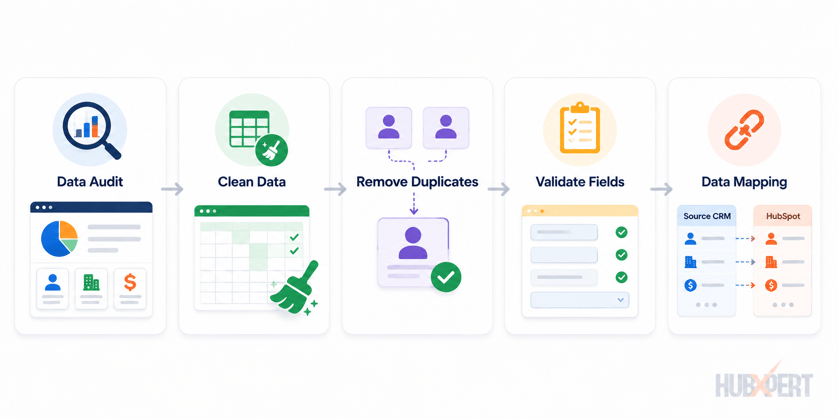
The most effective way to protect CRM data integrity is to address issues before any data is moved. Once records have been imported into HubSpot, correcting mapping errors, missing relationships, and data inconsistencies becomes significantly more time-consuming.
Conduct a CRM Data Audit
Start by auditing the current CRM environment.
Review:
- Contacts
- Companies
- Deals
- Tickets
- Custom Objects
- Custom Properties
- Pipelines
- Record Ownership
The goal is to identify duplicate records, obsolete fields, inactive processes, and data quality issues that should be resolved before migration.
Clean & Standardize Data
Data should be standardized before it reaches HubSpot.
Common examples include:
|
Inconsistent Values |
Standardized Value |
|
USA, U.S.A., US |
United States |
|
CEO, Chief Executive Officer |
CEO |
|
Closed-Won, Closed Won |
Closed Won |
Standardization improves reporting, segmentation, and workflow accuracy after migration.
Remove Duplicate Records
Duplicate contacts, companies, and deals are one of the biggest threats to data integrity.
Before migration:
- Merge duplicate contacts
- Consolidate duplicate companies
- Review duplicate deals
- Define deduplication rules
Migrating duplicates into HubSpot often creates ownership conflicts and fragmented customer histories. Our HubSpot contact deduplication guide covers merge rules and a before, during, and after process in more depth.
Validate Required Fields
Not every field is critical, but some properties are essential for CRM functionality.
Common examples include:
- Email Address
- Contact Owner
- Lifecycle Stage
- Deal Stage
- Company Name
- Lead Source
Review records with missing values and determine whether the data should be completed, archived, or excluded from migration.
Create a Data Mapping Document
Every field should have a defined destination before migration begins.
A mapping document should include:
- Source Object
- Source Field
- HubSpot Object
- HubSpot Property
- Property Type
- Transformation Rules
Documenting these decisions early reduces mapping errors and helps maintain consistency throughout the migration project.
Most data integrity issues can be traced back to poor preparation. By auditing, cleaning, deduplicating, and documenting data before migration, businesses significantly reduce the risk of reporting issues, broken automations, and data loss after moving to HubSpot.
Preserving Data Integrity During Migration
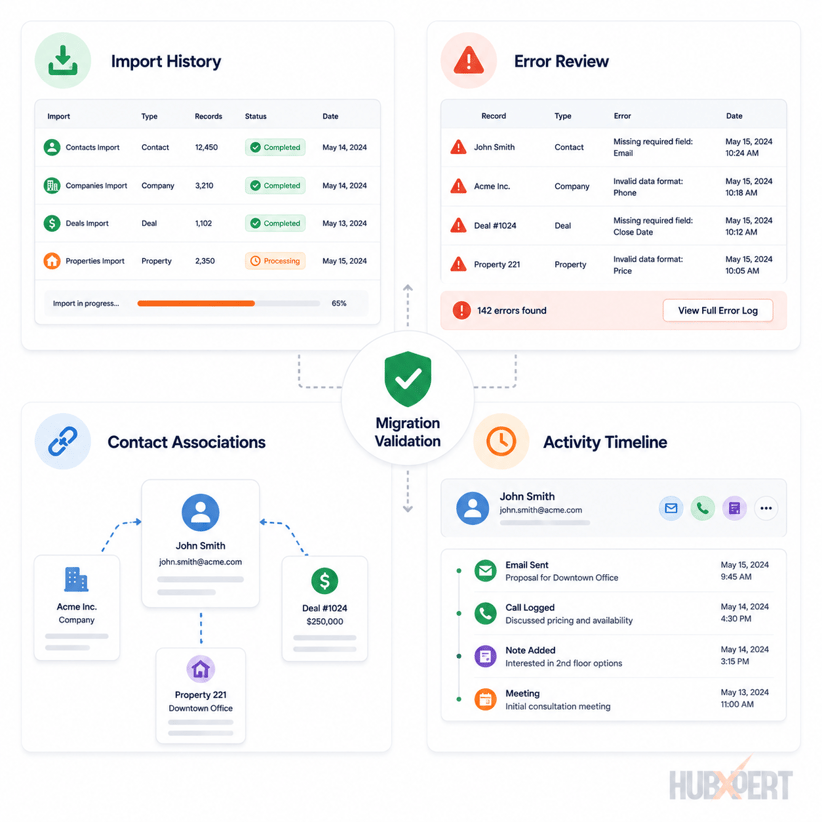
Once migration begins, the focus shifts from preparation to validation. Every import should be treated as a controlled process where data is continuously checked for accuracy, completeness, and consistency.
Use Test Imports First
Never start with a full production migration.
Instead, migrate a small sample of records and validate:
- Property mappings
- Record ownership
- Lifecycle stages
- Deal stages
- Associations
- Historical activities
A test migration helps identify issues before they affect thousands of records.
Validate Object Associations
One of the most common migration issues is losing relationships between records.
Verify that:
- Contacts remain associated with Companies
- Companies remain associated with Deals
- Contacts remain associated with Deals
- Tickets remain associated with Contacts and Companies
A record may import successfully, but if its associations are missing, critical business context is lost.
Monitor Import Errors
Import logs often reveal issues that are not immediately visible.
Review for:
- Failed imports
- Invalid property values
- Missing required fields
- Data type mismatches
- Unsupported values
Resolving these issues during migration prevents larger cleanup projects later.
Verify Record Counts
After each migration phase, compare source CRM totals against HubSpot totals.
Examples include:
|
Object |
Source CRM |
HubSpot |
|
Contacts |
25,000 |
25,000 |
|
Companies |
6,500 |
6,500 |
|
Deals |
3,200 |
3,200 |
Record count discrepancies should always be investigated before moving to the next migration stage.
Protect Historical Activity Data
Historical activities often contain valuable context that sales and customer-facing teams rely on.
Review whether the migration includes:
- Notes
- Emails
- Calls
- Meetings
- Tasks
- Attachments
If activity history is part of the migration scope, validate that it remains attached to the correct records after import.
Maintaining data integrity during migration requires continuous validation, not a single review at the end. Every migration phase should be tested, reconciled, and approved before proceeding to the next stage.
Preserving Data Integrity After Migration
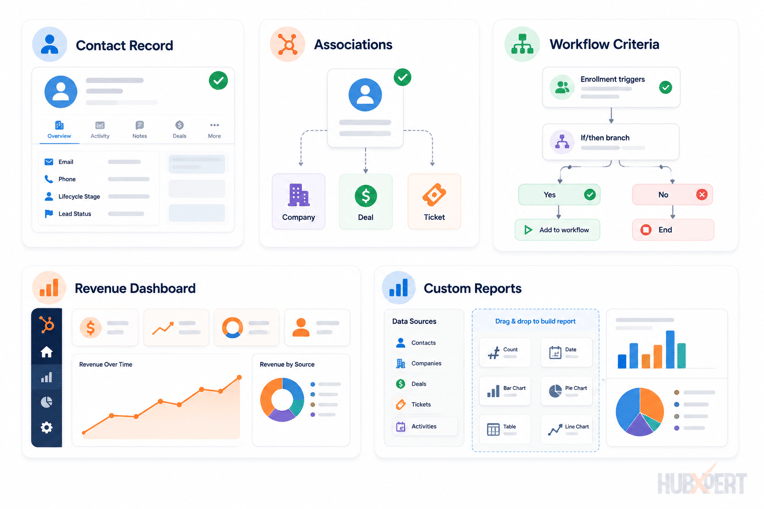
A successful import does not automatically mean a successful migration. Many data integrity issues only become visible after users begin working inside HubSpot. This is why post-migration validation is just as important as the migration itself.
Reconcile Record Counts
Start by comparing record totals between the source CRM and HubSpot.
Review:
- Contacts
- Companies
- Deals
- Tickets
- Custom Objects
Small differences may be expected depending on migration rules, but any significant discrepancy should be investigated before the project is considered complete.
Validate Property Values
Next, verify that critical fields were migrated correctly.
Examples include:
- Lifecycle Stage
- Lead Source
- Deal Stage
- Annual Revenue
- Contact Owner
- Close Date
Focus on fields used for reporting, segmentation, automation, and sales processes.
Verify Contact, Company & Deal Relationships
Associations are often where hidden migration issues appear.
Validate that:
- Contacts are associated with the correct Companies
- Companies are associated with the correct Deals
- Deals remain linked to the appropriate Contacts
- Tickets maintain their relationships
Even if records are present, broken associations can significantly impact reporting and operational workflows.
Test Workflows & Automations
Workflows should be tested using real-world scenarios.
Review:
- Lead assignment workflows
- Lifecycle stage automation
- Internal notifications
- Customer onboarding workflows
- Data management workflows
Pay particular attention to enrollment criteria that rely on migrated properties.
Audit Reports & Dashboards
Finally, validate the reports stakeholders rely on most.
Review:
- Pipeline reports
- Revenue reports
- Conversion reports
- Forecasting dashboards
- Lifecycle reporting
Compare key metrics against the previous CRM to identify unexpected discrepancies.
The objective of post-migration validation is simple: confirm that the data not only exists in HubSpot, but continues to support the same business processes, reporting requirements, and operational decisions as it did before migration.
HubSpot CRM Migration Validation Checklist
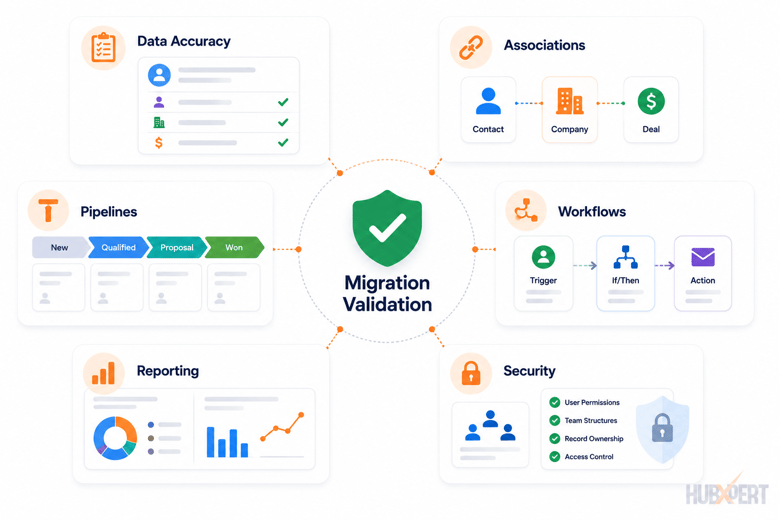
A CRM migration validation checklist helps verify that your data, relationships, automations and reporting remain accurate after moving to HubSpot. Before declaring the migration complete, validate a representative sample of records across all major objects and business processes.
1. Data Accuracy & Completeness Check
Start by validating the core data that was migrated.
Review:
-
Contact, Company, Deal and Ticket counts
-
Required properties such as Lifecycle Stage, Lead Source, and Owner
-
Custom property values
-
Date fields and currency fields
-
Long text fields and notes
-
Special characters and international data
The objective is to confirm that records were migrated completely and that property values remain unchanged.
2. Association Validation Check
Relationships between records are often more important than the records themselves.
Verify that:
-
Contacts remain associated with the correct Companies
-
Deals remain associated with the correct Contacts and Companies
-
Tickets remain associated with the appropriate records
-
Custom Objects maintain their relationships
Even a small number of broken associations can impact reporting, automation, and account visibility.
3. Pipeline & Data Quality Check
Review sales and operational data to ensure business processes remain intact.
Validate:
-
Deal stage mapping
-
Lifecycle stage mapping
-
Lead status values
-
Duplicate records
-
Record ownership
-
Standardized property values
This is also a good time to run HubSpot's duplicate management tools to identify records created during the migration process.
4. Workflow & Automation Check
Workflows should be tested using sample records before go-live.
Review:
-
Lead assignment workflows
-
Lifecycle stage automation
-
Internal notifications
-
Customer onboarding workflows
-
Data management workflows
Confirm that enrollment criteria, triggers, and actions behave as expected with migrated data.
5. Reporting & Dashboard Check
Validate the reports stakeholders rely on most.
Review:
-
Pipeline reports
-
Revenue reports
-
Forecasting dashboards
-
Conversion reports
-
Executive dashboards
Compare key metrics with the previous CRM to identify unexpected discrepancies.
6. Security & User Access Check
Before go-live, verify that users have the correct level of access.
Review:
-
User permissions
-
Team structures
-
Record ownership
-
Sensitive property access
-
Email subscription statuses
This helps ensure both operational continuity and compliance requirements are maintained.
A migration should only be considered complete when the data, relationships, workflows, reporting, and permissions have all been validated successfully.
Common Data Integrity Mistakes During HubSpot Migrations
Most data integrity issues are not caused by HubSpot. They're caused by decisions made before and during the migration process. Here are the most common mistakes we see during CRM migration projects.
Migrating Bad Data
Many businesses assume migration will fix existing CRM issues. In reality, migration simply transfers those issues into a new system.
Common examples include:
-
Duplicate records
-
Incomplete contact data
-
Inconsistent property values
-
Obsolete custom fields
-
Outdated pipeline stages
The best time to improve data quality is before migration begins.
Skipping Sample Imports
A full migration should never be the first migration.
Without test imports, issues such as incorrect field mappings, broken associations, and invalid property values often go unnoticed until thousands of records have already been imported.
Always validate a representative sample before production go-live.
Ignoring Record Associations
Contacts, Companies, Deals, and Tickets do not exist in isolation.
A migration may successfully transfer records while failing to preserve the relationships between them.
Examples include:
-
Contacts disconnected from Companies
-
Deals missing associated Contacts
-
Tickets missing customer records
Broken associations can impact reporting, automation, and account visibility.
Overlooking Historical Activity Data
Notes, emails, calls, meetings, and tasks often contain years of customer history.
If historical activities are part of the migration scope, they should be validated just as carefully as contacts and deals.
Missing activity history can significantly reduce CRM usability for sales and service teams.
Not Testing Reports & Dashboards
Many organizations verify record counts but forget to validate business outcomes.
Before go-live, compare:
-
Revenue reports
-
Pipeline reports
-
Forecasting dashboards
-
Conversion reports
If key metrics don't align with the source CRM, investigate the underlying data before users begin relying on the reports.
Failing to Document Migration Decisions
Migration decisions should never live in someone's memory.
Document:
-
Field mappings
-
Property transformations
-
Deduplication rules
-
Association logic
-
Validation results
Good documentation makes future audits, troubleshooting, and CRM administration significantly easier.
Most data integrity problems can be avoided through proper planning, testing, and validation. The goal is not simply to complete the migration, but to ensure the data remains accurate and trustworthy after the migration is complete.
How HubXpert Protects CRM Data Integrity During Migration
HubXpert preserving data integrity is a core part of every HubSpot migration project. Our focus is not just moving data into HubSpot, but ensuring the migrated data remains accurate, complete, and operationally reliable.
Our migration process typically includes:
-
Contact, company, deal, and custom object association review
-
CRM deduplication and data standardization
-
Test migrations and sample record validation
-
Workflow and reporting validation
-
Post-migration audit and stakeholder sign-off
This approach helps identify issues before they impact reporting, automation, sales processes, or customer operations. By validating data at every stage of the migration, businesses can move to HubSpot with confidence that their records, relationships, and business processes remain intact.
Wrapping Up
A successful HubSpot migration is not measured by how many records are imported. It's measured by whether the data remains accurate, complete, and trustworthy after go-live.
When data integrity is compromised, reporting becomes unreliable, automations break, and users lose confidence in the CRM. That's why data validation should be treated as a critical part of the migration process, not a final checkpoint.
By auditing data before migration, validating it during migration, and testing it afterward, businesses can ensure that HubSpot becomes a reliable foundation for sales, marketing, service, and reporting from day one.
FAQs
What are the most common data issues in a HubSpot CRM migration?
The most common causes are incorrect field mapping, data type mismatches, duplicate records, broken object associations between contacts, companies, and deals, incomplete transfers of historical activity data, and skipped migration validation. Most start during planning, not the migration itself, and are preventable with a pre-migration audit and test imports.
What is CRM data integrity?
CRM data integrity is the accuracy, consistency, completeness, and reliability of data throughout a migration. It means contacts, companies, deals, and their relationships stay correct before, during, and after the move to HubSpot, not just present in the system.
How do I verify that all CRM records were migrated successfully?
Start by comparing record counts between the source CRM and HubSpot for Contacts, Companies, Deals, Tickets, and any Custom Objects. Then validate a representative sample of records to confirm property values, ownership, associations, and activity history were migrated correctly.
Can data integrity issues be fixed after a HubSpot migration?
Yes, but the effort depends on the issue. Missing property values, mapping errors, and duplicate records can often be corrected through updates or re-imports. Broken associations, workflow dependencies, and reporting issues typically require more extensive remediation.
What is data reconciliation during a CRM migration?
Data reconciliation is the process of comparing migrated data against the source CRM to identify discrepancies. This includes validating record counts, property values, object associations, ownership assignments, and reporting outputs to ensure data was transferred accurately.
How much data should be tested before a full migration?
A representative sample should always be tested before production migration. The sample should include different record types, lifecycle stages, pipeline stages, custom properties, and historical activities to ensure the migration behaves as expected across all business scenarios.
Which CRM records are most commonly affected during migration?
Custom properties, historical activities, record ownership, object associations, and pipeline-related data are among the most common areas where migration issues occur. These should receive additional validation during testing and post-migration reviews.
Who should be responsible for validating migration accuracy?
Migration validation should be a shared responsibility. CRM administrators typically validate technical accuracy, while sales, marketing, service, and operations teams verify that the migrated data supports their day-to-day processes, reporting requirements, and workflows.
Founder & CEO @ Hubxpert. My goal is to make every company using HubSpot succeed in their marketing organisation and automation.

Ratul Rahman
Table of Contents:

Subscribe to our newsletter

Can You White Label HubSpot and What Are the Limits?
Can you white label HubSpot? Yes, with limits. See what the best HubSpot white label setup looks like and where a white-label ecommerce CMS build fits in.

White-Label HubSpot Implementation for Partner Agencies
Offer white-label HubSpot implementation under your own brand, covering white-label HubSpot automation, website builds and ongoing SEO content delivery.

How to Choose a White Label Company Without Getting Burned
What is a white label company, and how do you pick one? Compare white label companies in the USA and the contract terms that protect your own clients best.

White Label Solution Explained for Agencies & Startups
Understand what a white label solution is and how white label business opportunities work, plus where to find the best white label options for a small agency.

What Is White Label Marketing & Where It Fits
What is white label marketing, and what does white label mean in business? We cover the definition, the common software uses and several plain examples.

What Is a White Label Service & How the Model Works
What is a white label service, and where does it apply? We explain white labeling services, the meaning behind them and when the model fits your business.
-
Can You White Label HubSpot and What Are the Limits?
hello
-
White-Label HubSpot Implementation for Partner Agencies
hello
-
How to Choose a White Label Company Without Getting Burned
hello
-
White Label Solution Explained for Agencies & Startups
hello
-
What Is White Label Marketing & Where It Fits
hello
-
What Is a White Label Service & How the Model Works
hello