





-2.png)


-2.png)



.png)


.webp)

.png)










.png)







-1.webp)
-1.webp)



.webp)

-1-1.webp)



-2.webp)

-1-1.webp)

-2-1.png)

-1-1.webp)
-1-1.webp)
-1-1.png)






Moving to HubSpot is a great opportunity to improve your CRM. But it's also a chance to bring years of bad data, unused fields, outdated processes and reporting issues into a new system.
90% businesses focus on the migration itself and overlook the condition of the CRM they're migrating from. As a result, they end up with duplicate records, inconsistent data, broken automations and dashboards that no longer provide reliable insights.
This is why a CRM data audit should happen before any migration begins. Before deciding what to move, you first need to understand what currently exists, what's still valuable, and what should be left behind.
What is a CRM Data Audit?
A CRM data audit is the process of evaluating the quality, structure, and usability of the data inside your current CRM before making any major changes, such as a migration to HubSpot.
The goal is not simply to count records or identify duplicates. A proper audit helps you understand whether your CRM is actually supporting your sales, marketing, service, and reporting processes.
A pre-migration CRM audit typically reviews:
-
Data quality and completeness
-
Duplicate records
-
Custom fields and properties
-
Pipelines and lifecycle stages
-
Workflows and automations
-
User ownership
-
Reports and dashboards
-
Third-party integrations
Think of it as a health check for your CRM. Before deciding what data should move to HubSpot, you need to determine what is accurate, what is outdated, and what no longer serves a business purpose.
This is why a CRM audit is often the first step in a successful HubSpot migration project. It provides the visibility needed to make informed migration decisions rather than moving everything by default.
Importance of CRM Audit Before HubSpot Migration
Many businesses treat migration as a data transfer project. In reality, it's a CRM improvement project. If the existing CRM contains poor-quality data, unused properties, broken automations, or outdated processes, those issues will simply follow you into HubSpot.
A pre-migration assessment helps identify problems before they impact your new CRM environment. For example, duplicate contacts can inflate reporting, inconsistent property values can break segmentation, and unused fields can create unnecessary complexity for users.
A CRM readiness assessment also helps answer important questions such as:
-
Which records should be migrated?
-
Which fields are still actively used?
-
Which workflows depend on existing properties?
-
Which reports rely on historical data?
-
Which integrations need to be rebuilt?
Without these answers, migration decisions are often based on assumptions rather than data.
The goal of a CRM data audit is not to move everything. The goal is to move the right data, preserve critical business processes, and start with a cleaner, more scalable CRM structure in HubSpot.
CRM Data Quality Assessment
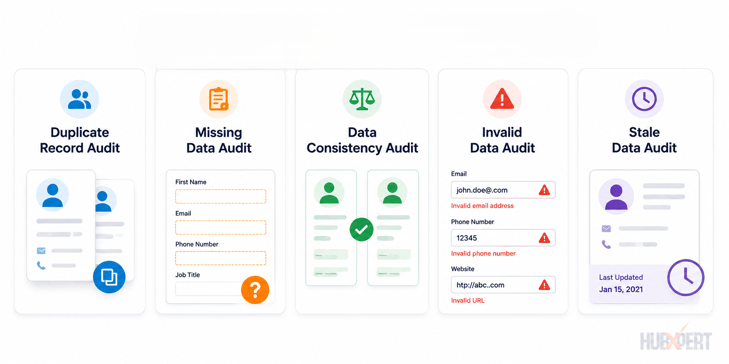
Before reviewing workflows, reports, or integrations, start by evaluating the quality of the data itself. Poor data quality is one of the biggest reasons CRM migrations become more complicated than expected.
A CRM data quality assessment helps identify records that are incomplete, inaccurate, duplicated, or no longer useful. The objective is to improve the quality of the data before it reaches HubSpot.
Duplicate Record Audit
Duplicate records create reporting inaccuracies, ownership conflicts, and fragmented customer histories.
Review for:
-
Duplicate contacts
-
Duplicate companies
-
Duplicate deals
-
Multiple records with the same email address
-
Multiple companies with similar domains
If duplicates exist today, migrating them into HubSpot will only make them harder to manage later. See our guide to HubSpot contact deduplication for the merge rules and cleanup steps to run before migration.
Screenshot Opportunity: Duplicate Management Dashboard
Missing Data Audit
Not every field needs to be populated, but certain properties are critical for reporting, automation, and segmentation.
Common examples include:
-
Email Address
-
Contact Owner
-
Lifecycle Stage
-
Deal Stage
-
Company Name
-
Lead Source
If a significant percentage of records are missing these values, address the gaps before migration.
Data Consistency Audit
Data may be technically complete but still inconsistent.
For example:
|
Variation |
Intended Value |
|
USA |
United States |
|
U.S.A. |
United States |
|
US |
United States |
These inconsistencies often create reporting and segmentation issues. Standardizing values before migration improves data reliability inside HubSpot.
Invalid Data Audit
Review records for data that is no longer accurate.
Examples include:
-
Invalid email addresses
-
Disconnected phone numbers
-
Former employees
-
Closed businesses
-
Placeholder values
Migrating inaccurate data reduces CRM quality from day one.
Stale Data Audit
Not every record needs to move to HubSpot.
Review records that have had no activity, engagement, or ownership updates for extended periods.
Examples:
-
Leads untouched for several years
-
Inactive contacts
-
Obsolete opportunities
-
Retired customer accounts
In many cases, these records can be archived rather than migrated.
A CRM migration is often the best opportunity to improve data quality. The cleaner the data going into HubSpot, the more reliable your reporting, automation, and user adoption will be after the migration is complete.
CRM Readiness Assessment
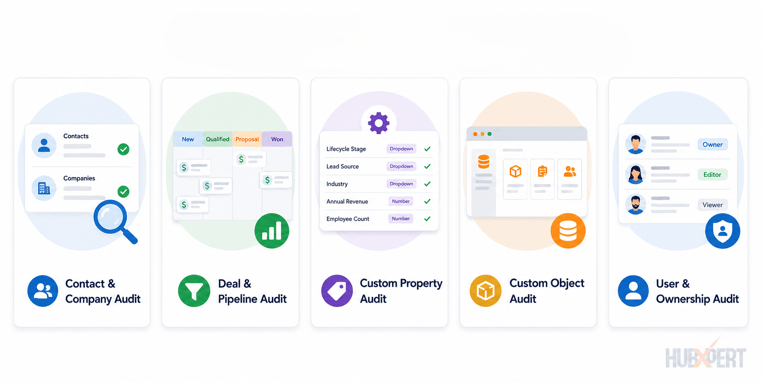
A CRM can have clean data and still be unprepared for migration. This is why a CRM readiness assessment goes beyond data quality and evaluates the overall CRM structure, processes, and dependencies that support day-to-day operations.
The goal is to identify what should be retained, optimized, or rebuilt before moving to HubSpot.
Contact & Company Audit
Start by reviewing your core CRM objects.
Questions to ask:
-
Are contact records complete and actively used?
-
Are companies properly associated with contacts?
-
Are ownership fields accurate?
-
Are lifecycle stages being maintained consistently?
This audit helps determine whether your customer data structure is ready for migration.
Deal & Pipeline Audit
Many businesses discover they have pipeline stages that are no longer used or don't accurately reflect their sales process.
Review:
-
Pipeline structure
-
Deal stages
-
Stage definitions
-
Win/loss tracking
-
Stage conversion rates
If the current pipeline isn't helping sales teams manage opportunities effectively, migrating it as-is rarely solves the problem.
Custom Property Audit
Over time, most CRMs accumulate dozens or even hundreds of custom fields.
Review each property and ask:
-
Is it still actively used?
-
Does it support reporting?
-
Is it used in automation?
-
Does HubSpot already have an equivalent property?
This is often one of the biggest opportunities to simplify CRM architecture before migration.
Custom Object Audit
If your CRM contains objects such as subscriptions, memberships, assets, projects, or contracts, determine whether they need to become HubSpot Custom Objects.
Before migration, document:
-
Object purpose
-
Relationships
-
Reporting requirements
-
Automation requirements
Custom object decisions can have a significant impact on scalability after migration.
User & Ownership Audit
Finally, review the people using the CRM.
Look for:
-
Inactive users
-
Orphaned records
-
Incorrect ownership assignments
-
Permission inconsistencies
-
Unused teams
Migrating outdated ownership structures often creates confusion for users after go-live.
A CRM readiness assessment helps ensure you're not just moving data to HubSpot, but moving a CRM structure that supports future growth, reporting, and automation.
Automation & Workflow Audit
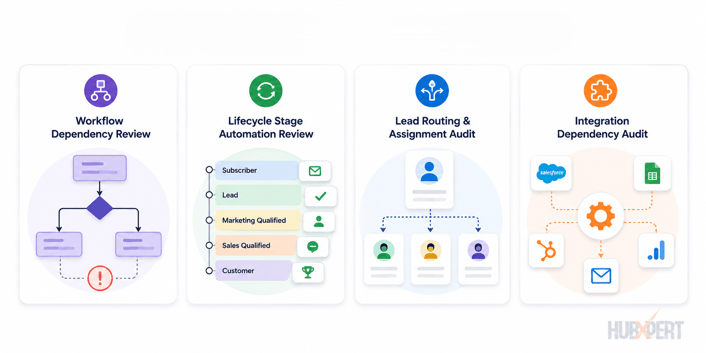
Workflows are often the most overlooked part of a pre-migration assessment. While contacts, companies, and deals are visible, many critical business processes operate behind the scenes through automation.
Before moving to HubSpot, identify every workflow, automation, and process that depends on CRM data.
Workflow Dependency Review
Start by documenting:
-
Lead nurturing workflows
-
Sales automation workflows
-
Customer onboarding workflows
-
Internal notification workflows
-
Data management workflows
For each workflow, determine:
-
Which properties it uses
-
Which records it enrolls
-
What actions it performs
-
Whether it is still actively used
Many businesses discover they have workflows that haven't served a purpose in years.
Lifecycle Stage Automation Review
Lifecycle stages are often connected to reporting, lead management, and automation.
Review:
-
How lifecycle stages are assigned
-
Which workflows update lifecycle stages
-
Whether stage progression is automated or manual
-
Any dependencies tied to lifecycle stage changes
If lifecycle logic isn't documented before migration, it can be difficult to recreate accurately in HubSpot.
Lead Routing & Assignment Audit
Lead assignment processes should also be reviewed before migration.
Common routing criteria include:
-
Territory
-
Industry
-
Product line
-
Company size
-
Lead source
Documenting these rules helps ensure leads continue reaching the correct owners after migration.
Integration Dependency Audit
Many workflows rely on third-party systems.
Review integrations such as:
-
Marketing automation platforms
-
Forms and landing pages
-
Customer support tools
-
ERP systems
-
Billing platforms
-
Data enrichment tools
For each integration, identify:
-
Data being synchronized
-
Trigger conditions
-
Required properties
-
Automation dependencies
A migration can quickly become complicated if critical workflows depend on integrations that have not been identified during the audit.
The objective of an automation audit is simple:
Understand what business processes are currently running behind the scenes so they can be rebuilt, optimized, or retired before moving to HubSpot.
Reporting & Dashboard Audit
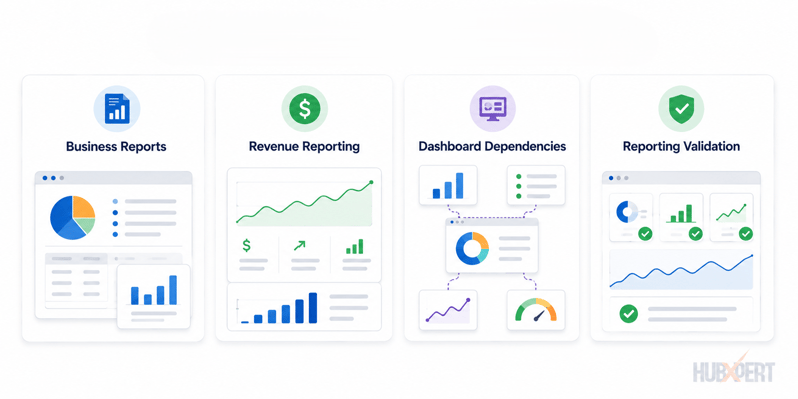
Many CRM migrations focus on records and workflows but overlook reporting. This can create major problems after migration, especially when leadership teams rely on dashboards to make business decisions.
Before moving to HubSpot, identify which reports, dashboards, and metrics are critical to the business.
Critical Business Reports Review
Start by documenting the reports that stakeholders use regularly.
Examples include:
-
Pipeline reports
-
Revenue reports
-
Lead source reports
-
Conversion reports
-
Customer retention reports
-
Sales activity reports
For each report, identify which properties and objects power the calculations.
A report is only as reliable as the data behind it.
Revenue Reporting Audit
Revenue reporting often requires special attention because it typically depends on multiple fields, stages, and business rules.
Review:
-
Revenue properties
-
Deal stages
-
Closed Won criteria
-
Forecasting logic
-
Sales attribution rules
If these elements are not documented before migration, revenue reports may produce different results after moving to HubSpot.
Dashboard Dependency Assessment
Many dashboards rely on custom properties, workflows, calculated fields, or integrations.
Ask:
-
Which dashboards are actively used?
-
Which reports are no longer relevant?
-
Which custom fields support reporting?
-
Which reports need to be recreated in HubSpot?
This exercise often reveals opportunities to simplify reporting while ensuring key business metrics remain available after migration.
The goal of a reporting audit is not to recreate every existing dashboard. It's to identify the reports that drive business decisions and ensure the underlying data structure supports them after the migration.
What Should Be Migrated vs Archived?
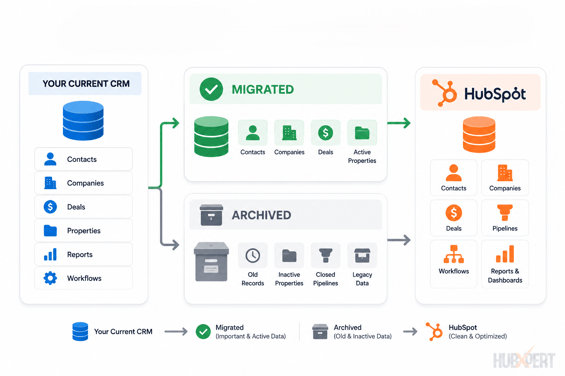
One of the biggest mistakes businesses make during a HubSpot migration is assuming every record, property, workflow, and report needs to be moved.
A migration is an opportunity to improve CRM quality, not replicate years of accumulated technical debt.
Data to Migrate
Prioritize data that is actively used and supports current business processes.
This typically includes:
-
Active customers
-
Active prospects and leads
-
Open deals and opportunities
-
Current support tickets
-
Key reporting properties
-
Ownership data
-
Lifecycle stages
-
Active workflows and automations
If a record contributes to sales, marketing, service, reporting, or customer management today, it likely belongs in HubSpot.
Data to Archive
Not all historical data needs to be migrated.
Common examples include:
-
Duplicate records
-
Test records
-
Obsolete custom properties
-
Retired pipeline stages
-
Inactive users
-
Outdated workflows
-
Legacy campaign fields
-
Unused reports
Archiving these items before migration reduces complexity and improves CRM usability.
Data to Rebuild in HubSpot
Some CRM components should not be migrated directly because HubSpot may offer a better way to manage them.
Examples include:
-
Legacy workflow logic
-
Custom reporting structures
-
Lead routing processes
-
Pipeline architecture
-
Property naming conventions
Rather than recreating old processes exactly as they exist today, use the migration as an opportunity to align them with HubSpot best practices.
The goal is simple: migrate what creates business value, archive what no longer serves a purpose, and rebuild processes that can be improved.
This approach results in a cleaner, more scalable HubSpot environment from day one.
Pre-Migration Assessment Checklist
Before moving to HubSpot, use this checklist to verify that your CRM is ready for migration.
Data Quality Checklist
-
Duplicate contacts reviewed and cleaned
-
Duplicate companies reviewed and cleaned
-
Missing critical fields identified
-
Inconsistent property values standardized
-
Invalid records removed or corrected
-
Stale records reviewed for archival
CRM Architecture Checklist
-
Contacts audited
-
Companies audited
-
Deals audited
-
Custom properties reviewed
-
Custom objects documented
-
Ownership structure validated
Automation Checklist
-
Active workflows documented
-
Lifecycle stage automation reviewed
-
Lead routing rules documented
-
Internal notifications reviewed
-
Workflow dependencies identified
Reporting Checklist
-
Critical dashboards documented
-
Revenue reporting logic reviewed
-
Custom reports inventoried
-
Reporting dependencies identified
-
Key business metrics documented
Integration Checklist
-
Third-party integrations identified
-
Data synchronization rules documented
-
Integration dependencies reviewed
-
Required integrations prioritized for migration
User & Permission Checklist
-
Inactive users identified
-
Record ownership reviewed
-
Team structures validated
-
Permission requirements documented
If you can confidently check off every item above, your CRM is likely ready for migration. If multiple areas remain unanswered, address them before moving data into HubSpot. The more issues you resolve during the assessment phase, the smoother the migration process will be.
How HubXpert Performs a CRM Data Audit Before Migration
HubXpert views a CRM audit as the foundation of a successful HubSpot migration. Before discussing imports, field mapping, or integrations, we first assess the health and structure of the existing CRM.
Our pre-migration assessment typically includes:
-
CRM architecture review
-
CRM data quality assessment
-
Property and field audit
-
Pipeline and lifecycle stage review
-
Workflow and automation audit
-
Reporting and dashboard assessment
-
Integration dependency review
-
Migration roadmap and recommendations
This process helps identify duplicate records, unused properties, outdated workflows, reporting dependencies, and other issues that could impact the migration.
By addressing these challenges before moving to HubSpot, businesses can reduce migration risk, improve user adoption, and start with a cleaner, more scalable CRM environment.
Wrapping Up
A CRM migration is the perfect opportunity to improve your data, processes, and reporting. Yet many businesses spend more time planning the migration than evaluating the CRM they're migrating from.
The reality is simple: moving bad data into HubSpot doesn't solve CRM problems. It often makes them harder to identify and fix later.
A thorough CRM data audit helps you understand what should be migrated, what should be archived, and what should be rebuilt. The result is a cleaner, more scalable HubSpot environment that supports your business long after the migration is complete.
FAQs
How long does a CRM data audit typically take?
The timeline depends on CRM complexity, data volume, and the number of business processes involved. Smaller CRM environments may be audited within a few days, while larger systems with multiple pipelines, custom properties, automations, and integrations can take several weeks.
What is an acceptable duplicate rate before a CRM migration?
There is no universal benchmark, but high duplicate rates often indicate underlying data governance issues. Before migrating to HubSpot, businesses should identify duplicate contacts, companies, and deals and establish a deduplication strategy to prevent reporting and ownership conflicts.
Should inactive contacts be migrated to HubSpot?
Not always. If inactive contacts no longer support reporting, sales activities, marketing campaigns, or compliance requirements, they may be better archived than migrated. A CRM audit helps determine which records still provide business value.
Can a CRM data audit reduce migration costs?
Yes. Identifying unused properties, duplicate records, obsolete workflows, and unnecessary data before migration can significantly reduce cleanup work, testing efforts, and post-migration remediation.
Who should be involved in a CRM readiness assessment?
A CRM readiness assessment should include stakeholders from sales, marketing, customer service, operations, and CRM administration. Each team often relies on different data, workflows, reports, and integrations that need to be considered before migration.
How often should businesses perform a CRM data audit?
Even if a migration is not planned, businesses should review CRM health periodically. An annual audit helps maintain data quality, identify unused properties, improve reporting accuracy, and prevent technical debt from accumulating over time.
Founder & CEO @ Hubxpert. My goal is to make every company using HubSpot succeed in their marketing organisation and automation.

Ratul Rahman
Table of Contents:

Subscribe to our newsletter

Can You White Label HubSpot and What Are the Limits?
Can you white label HubSpot? Yes, with limits. See what the best HubSpot white label setup looks like and where a white-label ecommerce CMS build fits in.

White-Label HubSpot Implementation for Partner Agencies
Offer white-label HubSpot implementation under your own brand, covering white-label HubSpot automation, website builds and ongoing SEO content delivery.

How to Choose a White Label Company Without Getting Burned
What is a white label company, and how do you pick one? Compare white label companies in the USA and the contract terms that protect your own clients best.

White Label Solution Explained for Agencies & Startups
Understand what a white label solution is and how white label business opportunities work, plus where to find the best white label options for a small agency.

What Is White Label Marketing & Where It Fits
What is white label marketing, and what does white label mean in business? We cover the definition, the common software uses and several plain examples.

What Is a White Label Service & How the Model Works
What is a white label service, and where does it apply? We explain white labeling services, the meaning behind them and when the model fits your business.
-
Can You White Label HubSpot and What Are the Limits?
hello
-
White-Label HubSpot Implementation for Partner Agencies
hello
-
How to Choose a White Label Company Without Getting Burned
hello
-
White Label Solution Explained for Agencies & Startups
hello
-
What Is White Label Marketing & Where It Fits
hello
-
What Is a White Label Service & How the Model Works
hello