





-2.png)


-2.png)



.png)


.webp)

.png)










.png)







-1.webp)
-1.webp)



.webp)

-1-1.webp)



-2.webp)

-1-1.webp)

-2-1.png)

-1-1.webp)
-1-1.webp)
-1-1.png)







Your sales pipeline is more than a collection of deals. When migrating to HubSpot, preserving that structure is just as important as migrating the deal records themselves.
Gartner research has found that poor data quality remains one of the most common barriers to reliable sales analytics. While HubSpot research reports that 34% of businesses have experienced revenue loss due to fragmented customer data.
That's why a successful pipeline migration requires more than importing deals. In this guide, we'll walk through the technical process of migrating sales pipelines and deal stages to HubSpot while maintaining data integrity and operational continuity.
Sales Pipeline Visibility Dropped After Migration? Check These FirstWhat Pipeline Data Can Be Migrated to HubSpot?
If your team migrated to HubSpot and deals that used to be visible are now missing from views, boards, or reports, the data usually is not gone. It is more often sitting in the wrong place, hidden by a setting that has no equivalent in your old CRM, or excluded from a view nobody rebuilt. Work through these in order before assuming records were lost.
Deals Landed in the Wrong Stage or Pipeline
A deal can import successfully and still disappear from the board your team checks every day if it landed in a different pipeline or stage than expected. This happens most often when stage mapping was done by matching names instead of matching business meaning, the exact mistake covered in this guide’s Common Pipeline Migration Mistakes section. Check the board view for every pipeline you migrated into, not just the one you expect deals to be in.
Deal Ownership Did Not Match a HubSpot User
HubSpot needs an exact email match between the owner field in your source data and an existing HubSpot user at the time of import. When that match fails, the deal typically ends up unassigned or assigned to whoever ran the import, and reps stop seeing their own deals in any view filtered by owner. Check unassigned deals first, since that filter will surface this problem faster than checking pipeline by pipeline.
Team-Based Visibility Is Hiding Deals
HubSpot can restrict which deals a user sees based on team assignment and permission settings. Many CRMs do not have an equivalent restriction, so a team that had open visibility before migration can find deals now hidden from certain reps or managers after go-live, even though the records themselves are correct. Review deal and pipeline permissions under Settings before assuming the data is missing.
Saved Views and Filters Were Never Rebuilt
Board and list views, filtered and grouped the way a team actually works, do not carry over automatically during migration. A rep who relied on a specific filtered view in the old CRM starts with a default, unfiltered HubSpot view instead, which can feel like a drop in visibility even when every deal is present. Rebuilding the views your team used daily is a separate step from migrating the deal records themselves.
Deals Were Mapped Into a Closed Stage by Mistake
A deal mapped to a Closed Won or Closed Lost stage drops out of the active pipeline board entirely, whether or not that was the intent. This is a variant of the incorrect stage mapping mistake covered earlier in this guide, worth checking specifically because it is the single fastest way for an open deal to look like it vanished.
If none of these explain what is missing, compare total deal counts between your source CRM and HubSpot directly, covered in this guide’s Step 6: Validate Pipeline Data After Migration, rather than continuing to search view by view.
What Pipeline Data Can Be Migrated to HubSpot?
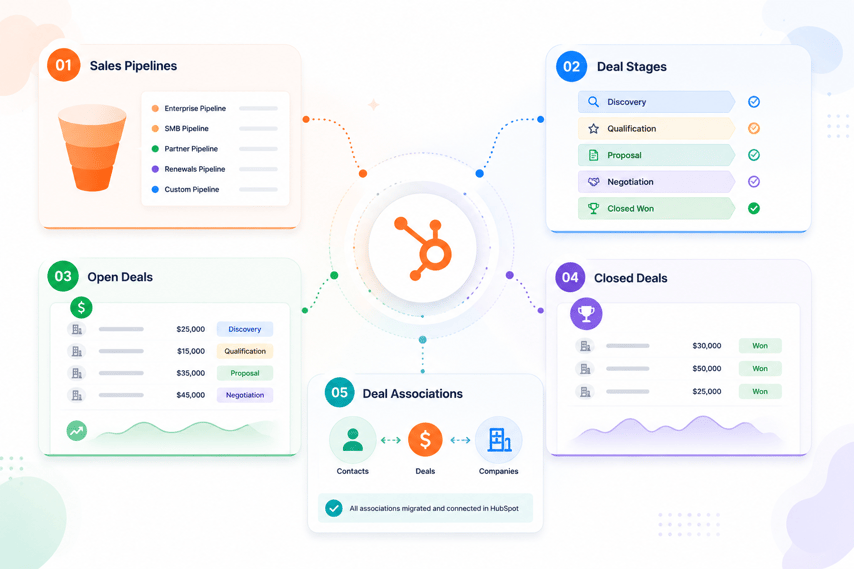
Before planning the migration, it's important to identify which pipeline-related assets need to be transferred. Most CRM platforms store similar sales data, but the structure and configuration may differ from HubSpot.
Sales Pipelines
Sales pipelines can be recreated in HubSpot to match your existing sales process.
Examples include:
- New Business Pipeline
- Enterprise Pipeline
- Renewal Pipeline
- Partner Pipeline
If your current CRM uses multiple pipelines, document each one before migration to ensure the structure is recreated correctly in HubSpot.
Deal Stages
Deal stages define the progression of opportunities within a pipeline.
Examples include:
- Qualification
- Discovery
- Proposal Sent
- Contract Review
- Closed Won
- Closed Lost
Each existing stage should be mapped to a corresponding HubSpot deal stage. If stage names differ, focus on matching the business process rather than the label itself.
Open Deals
Active opportunities can be migrated into HubSpot along with their current stage, owner, value, close date, and associated records.
Common deal properties include:
- Deal Name
- Amount
- Close Date
- Deal Owner
- Pipeline
- Deal Stage
These records typically become the primary focus of the migration because sales teams continue working with them immediately after go-live.
Closed Deals
Historical Closed Won and Closed Lost deals should also be migrated when reporting and forecasting continuity are important.
Migrating historical deals helps preserve:
- Revenue reporting
- Win rate calculations
- Sales performance metrics
- Pipeline trend analysis
Deal Associations
Deal associations define the relationships between deals and other CRM records.
Common associations include:
- Deal to Contact
- Deal to Company
- Deal to Activity Records
These relationships should be preserved during migration to maintain timeline history, reporting accuracy, and workflow functionality.
Before moving any data into HubSpot, verify that all pipelines, stages, deal properties, and associations have been identified and documented.
Pre-Migration Pipeline Audit
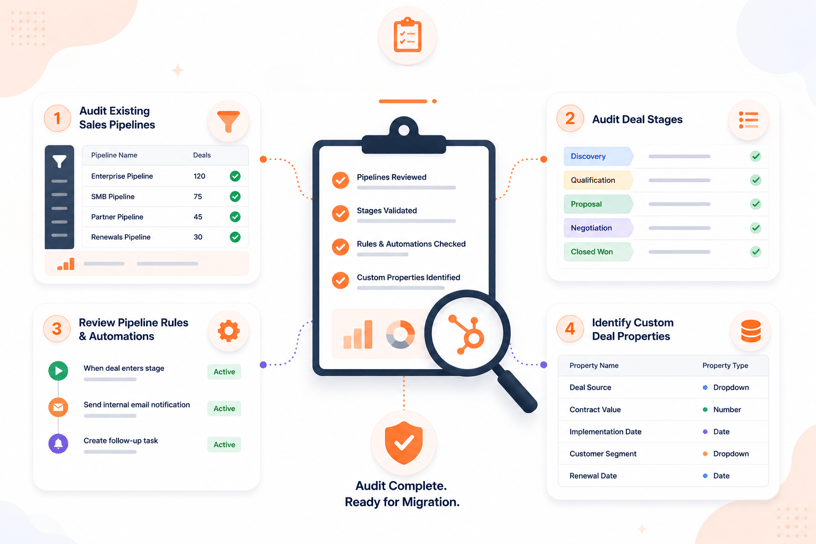
Before rebuilding pipelines or importing deals into HubSpot, audit your existing sales process. This helps identify configuration issues, unnecessary stages, and customizations that could affect the migration.
Audit Existing Sales Pipelines
Start by documenting all pipelines currently used in your CRM.
For each pipeline, capture:
- Pipeline name
- Purpose
- Number of active deals
- Number of closed deals
- Pipeline owner
Many organizations discover duplicate or unused pipelines during this step. These can often be consolidated before migration.
Audit Deal Stages
Review every deal stage within each pipeline.
Document:
- Stage name
- Stage order
- Purpose
- Associated reporting requirements
Example:
|
Existing CRM Stage |
HubSpot Stage |
|
Initial Contact |
Qualification |
|
Product Demo |
Presentation Scheduled |
|
Proposal |
Decision Maker Bought In |
The goal is to understand how deals progress today before mapping them into HubSpot.
Review Pipeline Rules & Automations
Many CRMs have automation tied directly to pipeline stages.
Review:
- Lead assignment rules
- Task creation
- Internal notifications
- Automated emails
- Stage progression logic
Documenting these dependencies ensures critical sales processes can be rebuilt in HubSpot after migration.
Identify Custom Deal Properties
Most businesses track more than standard deal information.
Examples include:
- Contract Type
- Renewal Date
- Product Line
- Lead Source
- Competitor
- Implementation Status
Create a complete inventory of custom deal properties and determine:
- Whether the property is still needed
- The corresponding HubSpot property type
- Whether the property affects reporting or automation
The audit phase often reveals outdated stages, duplicate properties, and unused automation. Addressing these issues before migration simplifies the implementation and reduces cleanup work after go-live.
Step 1: Document Your Existing Pipeline Structure
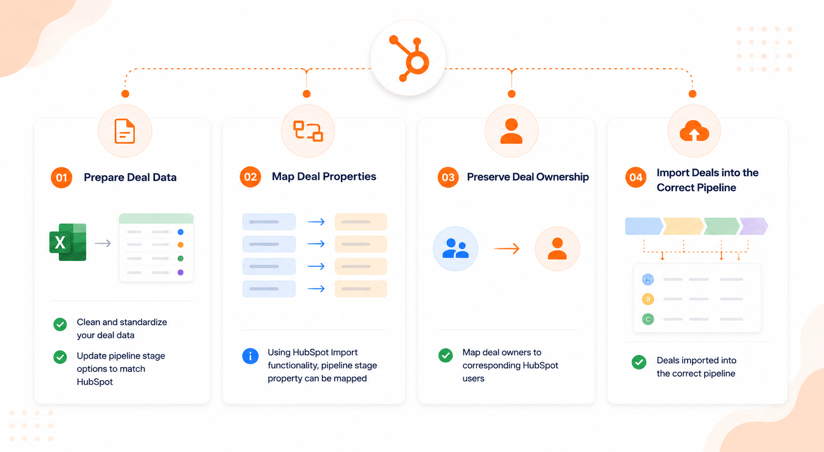
Before creating anything in HubSpot, document how your current pipelines are configured. This documentation becomes the blueprint for rebuilding the sales process and validating the migration later.
Export Current Pipeline Configuration
Export your existing deal data and capture the structure of each pipeline.
Document:
- Pipeline names
- Deal stages
- Stage order
- Stage probabilities
- Required fields
- Pipeline-specific automations
If your CRM supports pipeline exports, save them as a reference throughout the migration project.
Inventory Stage Definitions
Stage names alone do not provide enough information for migration.
For each stage, document:
- Stage purpose
- Entry criteria
- Exit criteria
- Typical sales activities
- Reporting requirements
Example:
|
Stage |
Definition |
|
Qualification |
Lead meets minimum qualification criteria |
|
Discovery |
Requirements gathering is complete |
|
Proposal Sent |
Commercial proposal has been delivered |
|
Closed Won |
Contract signed and opportunity won |
This helps ensure stages are mapped based on business meaning rather than matching labels.
Review Stage Exit Criteria
Many sales teams move deals between stages based on specific actions or milestones.
Examples include:
|
Stage |
Exit Criteria |
|
Qualification |
Discovery meeting scheduled |
|
Discovery |
Opportunity validated |
|
Proposal Sent |
Proposal delivered to buyer |
|
Negotiation |
Commercial discussions active |
Documenting these rules helps when rebuilding:
- Deal stage requirements
- Workflow automation
- Sales process governance
- Pipeline reporting
Without clearly defined exit criteria, teams often recreate inconsistent pipelines that produce unreliable forecasting and reporting.
Once the pipeline structure, stage definitions, and stage movement rules are documented, you're ready to rebuild the sales process inside HubSpot.
Step 2: Rebuild Sales Pipelines in HubSpot
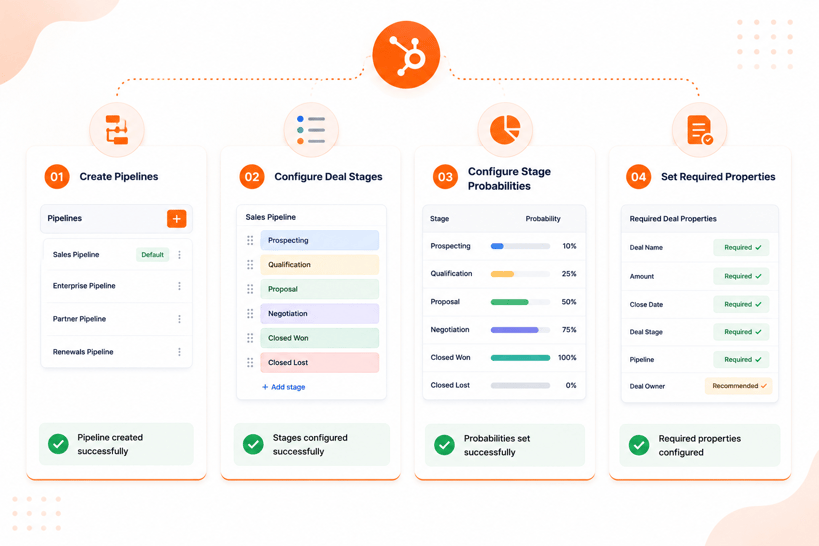
Once the existing pipeline structure has been documented, recreate it inside HubSpot before importing any deal records. This ensures incoming deals are assigned to the correct pipeline and stage during migration.
Create Pipelines
Navigate to:
Settings → Objects → Deals → Pipelines
Create a pipeline for each sales process identified during the audit.
Examples:
- New Business
- Enterprise Sales
- Renewals
- Channel Partners
Avoid creating pipelines that are no longer actively used. Migration is a good opportunity to simplify pipeline management.
Screenshot Opportunity: HubSpot Deal Pipeline Settings
Configure Deal Stages
After creating the pipeline, add the corresponding deal stages.
For each stage:
- Set the stage name
- Arrange the correct stage order
- Define whether the stage represents an open, won, or lost opportunity
Example:
|
Existing CRM Stage |
HubSpot Deal Stage |
|
Initial Contact |
Qualification |
|
Discovery Call |
Appointment Scheduled |
|
Proposal Sent |
Decision Maker Bought In |
|
Contract Signed |
Closed Won |
Focus on matching the sales process rather than copying stage names exactly.
Configure Stage Probabilities
HubSpot uses stage probabilities to support revenue forecasting and reporting (Source: "HubSpot Pipeline Setup Documentation")
HubSpot allows administrators to require specific properties when deals enter or exit stages.
For each open stage, assign a probability that reflects the likelihood of closing.
Example:
|
Deal Stage |
Probability |
|
Qualification |
10% |
|
Discovery |
25% |
|
Proposal Sent |
60% |
|
Negotiation |
80% |
|
Closed Won |
100% |
If your existing CRM already uses stage probabilities, replicate them where appropriate.
Set Required Properties
HubSpot allows administrators to require specific properties when deals enter or exit stages (Source: "HubSpot Pipeline Rules Documentation")
Common examples include:
- Deal Amount
- Close Date
- Product Line
- Contract Type
- Next Step
Required properties improve data quality and ensure sales representatives capture the information needed for forecasting and reporting.
Review your documented stage exit criteria and determine which properties should be mandatory at each stage.
Once pipelines, stages, probabilities and required properties have been configured, HubSpot is ready to receive migrated deal records.
Step 3: Migrate Deal Records
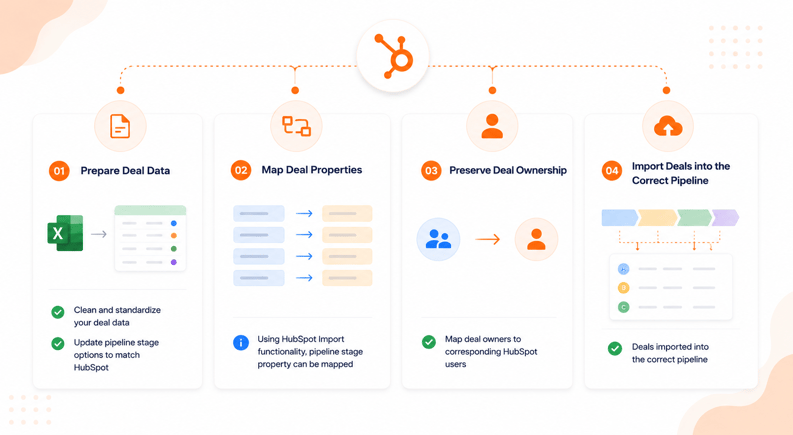
With the pipeline structure in place, the next step is migrating deal records into HubSpot. The goal is to ensure deals are imported into the correct pipeline, assigned to the correct stage, and retain all required business data.
Prepare Deal Data
Before importing, clean and standardize the deal export from your source CRM.
Review:
- Deal names
- Deal stages
- Pipeline values
- Close dates
- Deal amounts
- Deal owners
- Custom deal properties
Most importantly, update the deal stage values in your source data so they align with the HubSpot deal stages you created earlier.
Example:
|
Source CRM Stage |
HubSpot Deal Stage |
|
Initial Contact |
Qualification |
|
Product Demo |
Discovery |
|
Proposal |
Proposal Sent |
|
Contract Signed |
Closed Won |
This simplifies field mapping during import and reduces stage assignment errors.
Map Deal Properties
HubSpot's import tool allows you to map source CRM fields to HubSpot deal properties.
Common mappings include:
|
Source CRM Field |
HubSpot Property |
|
Opportunity Name |
Deal Name |
|
Opportunity Value |
Amount |
|
Expected Close Date |
Close Date |
|
Stage |
Deal Stage |
|
Sales Rep |
Deal Owner |
|
Pipeline |
Pipeline |
Custom properties should also be mapped during this stage.
Examples:
- Contract Type
- Renewal Date
- Product Category
- Lead Source
- Implementation Status
Carefully review all mappings before proceeding with the import.
Preserve Deal Ownership
Deal ownership should be migrated whenever possible to maintain accountability and reporting accuracy.
Before importing deals:
- Create all required users in HubSpot.
- Confirm user email addresses match the ownership data in the source CRM.
- Validate ownership mapping during the import process.
Without existing HubSpot users, deal ownership cannot be assigned correctly during migration.
Import Deals into the Correct Pipeline
Once the data has been prepared and mapped, import the deal records into HubSpot.
Best practice is to:
- Import a small sample first.
- Validate stage assignments.
- Review ownership assignments.
- Confirm custom property values.
- Verify pipeline placement.
After successful testing, proceed with the full import.
Post-import, review a sample of deals from each pipeline to confirm:
- Correct deal stage
- Correct pipeline
- Correct owner
- Correct amount
- Correct close date
- Correct custom property values
The deal import should only be considered complete after both data accuracy and pipeline placement have been validated successfully.
Step 4: Migrate Deal Associations
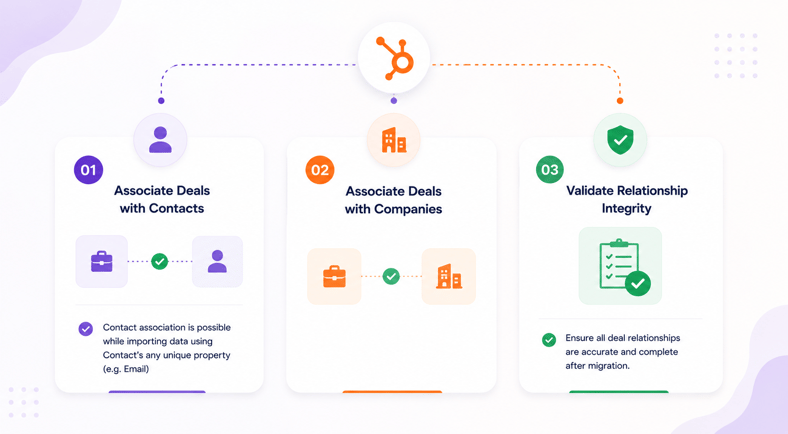
Deals rarely exist on their own. They are typically connected to contacts, companies, activities, and other CRM records. Preserving these relationships is critical because many HubSpot reports, workflows, and timeline views rely on associations.
Associate Deals with Contacts
Each deal should remain connected to the appropriate contacts involved in the buying process.
HubSpot supports deal-to-contact associations during import using a unique contact identifier (Source: "HubSpot Multi-Object Import Guide")
Common identifiers include:
- Email Address
- Record ID
- Custom Unique Identifier
Best practice is to migrate contacts before importing deals so HubSpot can match the association correctly.
Example:
|
Deal Name |
Contact Email |
|
Enterprise License Renewal |
john@company.com |
|
Implementation Project |
sarah@company.com |
When imported correctly, HubSpot automatically associates the deal with the corresponding contact record.
Associate Deals with Companies
Deal-to-company associations are equally important because they support account-level reporting and sales visibility.
HubSpot can associate deals with companies using:
- Company Domain Name
- Company Record ID
- Custom Unique Identifier
Example:
|
Deal Name |
Company Domain |
|
Enterprise License Renewal |
company.com |
|
Consulting Engagement |
business.com |
As with contacts, companies should be migrated before importing deal associations whenever possible.
Validate Relationship Integrity
After importing deals and associations, validate that relationships were created successfully.
Review a representative sample of records and confirm:
- Deals are associated with the correct contacts
- Deals are associated with the correct companies
- Contacts appear on deal records
- Companies appear on deal records
- Associated activities remain accessible
You should also review HubSpot reports and record timelines to verify that the relationships support reporting and workflow requirements.
Step 5: Rebuild Pipeline Automation
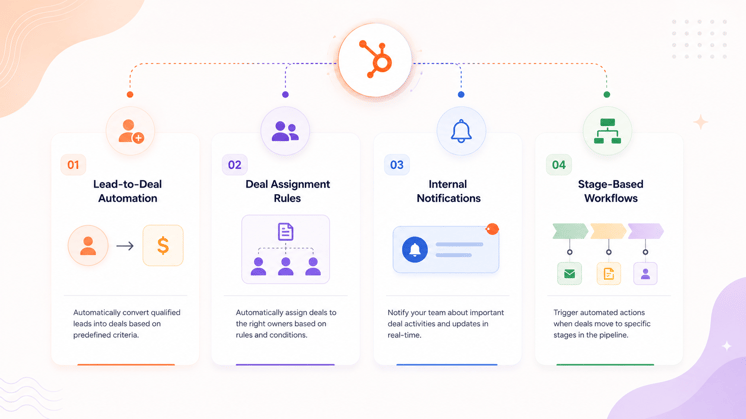
After migrating pipeline data and associations, rebuild the automation that supports your sales process. This ensures opportunities continue moving through the pipeline efficiently and that sales teams receive the right tasks, notifications, and assignments.
Lead-to-Deal Automation
Many organizations automatically create deals when a lead reaches a specific qualification stage.
Examples include:
- Lead becomes Sales Qualified
- Demo is booked
- Opportunity is identified
- Form submission meets qualification criteria
Review your existing CRM automation and recreate the logic using HubSpot workflows.
Screenshot Opportunity: HubSpot Deal Creation Workflow
Deal Assignment Rules
Deal ownership often depends on predefined business rules.
Common assignment criteria include:
- Geographic territory
- Industry
- Company size
- Product line
- Sales team
Using HubSpot workflows, automatically assign deal owners when deals are created or updated.
Example:
|
Criteria |
Assigned Owner |
|
North America |
Sales Team A |
|
Europe |
Sales Team B |
|
Enterprise Accounts |
Enterprise Team |
Automated assignment helps maintain consistency and reduces manual administration.
Internal Notifications
Sales teams often rely on notifications to take action at critical points in the sales process.
Common examples include:
- New deal created
- Deal enters negotiation stage
- Deal becomes stalled
- Deal closes successfully
Recreate these alerts using HubSpot workflow actions to ensure sales representatives and managers remain informed.
Stage-Based Workflows
Many organizations trigger actions when a deal enters a specific pipeline stage.
Examples include:
|
Deal Stage |
Automated Action |
|
Qualification |
Create follow-up task |
|
Discovery |
Notify sales manager |
|
Proposal Sent |
Send proposal follow-up email |
|
Closed Won |
Trigger onboarding workflow |
Using HubSpot workflows, you can automate these actions based on pipeline stage changes.
After rebuilding automation, test each workflow using sample deals to confirm:
- Enrollment triggers work correctly
- Actions execute as expected
- Notifications are delivered
- Ownership updates correctly
- Stage-based automation functions properly
Automation should only be considered migrated when the underlying business process has been validated, not simply recreated.
Step 6: Validate Pipeline Data After Migration
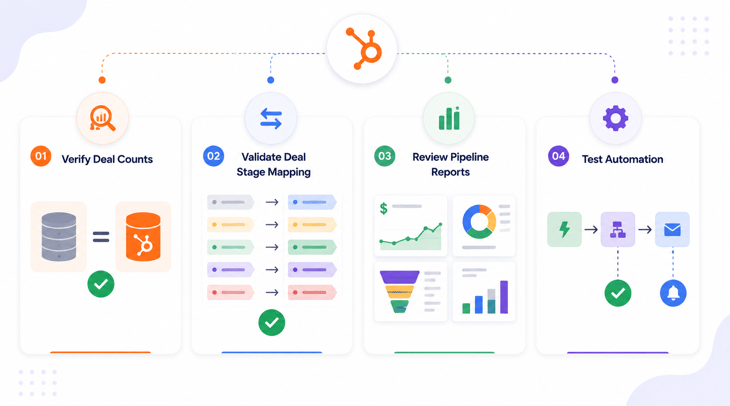
Before the migration is considered complete, validate that pipeline data, associations, reporting, and automation function correctly inside HubSpot. This step helps identify issues before sales teams begin working from the new system.
Verify Deal Counts
Start by comparing deal totals between the source CRM and HubSpot.
Review:
- Total deals
- Open deals
- Closed Won deals
- Closed Lost deals
- Pipeline-specific deal counts
Example:
|
Object |
Source CRM |
HubSpot |
|
Open Deals |
X |
X |
|
Closed Won Deals |
X |
X |
|
Closed Lost Deals |
X |
X |
Any discrepancies should be investigated before proceeding.
Validate Deal Stage Mapping
Review a sample of deals from every pipeline and confirm they were assigned to the correct HubSpot stage.
Validate:
- Pipeline assignment
- Deal stage assignment
- Stage order
- Stage probabilities
- Required property values
Common migration issues include:
- Deals assigned to incorrect stages
- Missing stage values
- Deals imported into the wrong pipeline
Screenshot Opportunity: HubSpot Deal Board View
Review Pipeline Reports
Reporting often reveals migration issues that are difficult to identify at the record level.
Review:
- Pipeline value reports
- Forecast reports
- Revenue reports
- Deal stage reports
- Win rate reports
Compare key metrics against the source CRM to ensure reporting continuity.
Examples include:
- Total pipeline value
- Open opportunity count
- Closed Won revenue
- Average deal size
- Sales cycle length
Significant differences may indicate mapping or association issues.
Test Automation
Finally, validate every workflow connected to the sales pipeline.
Review:
- Deal creation workflows
- Deal assignment workflows
- Internal notifications
- Stage-based workflows
- Closed Won automation
Create test deals and move them through the pipeline to confirm:
- Enrollment triggers work correctly
- Workflow actions execute successfully
- Notifications are delivered
- Ownership updates correctly
- Downstream processes are triggered
A pipeline migration should only be approved after data, reporting, associations, and automation have all been validated successfully.
Common Pipeline Migration Mistakes
Even well-planned migrations can create issues if pipeline structure, deal data, or automation are not reviewed carefully. The following mistakes are among the most common causes of post-migration pipeline problems.
Migrating Poorly Defined Stages
Many CRM systems contain stages that were created years ago and are no longer consistently used.
Examples include:
- Duplicate stages
- Overlapping stages
- Stages with unclear definitions
Migrating these stages into HubSpot often transfers existing process issues rather than improving them.
Incorrect Stage Mapping
Matching stages based on name alone can create reporting and forecasting problems.
For example:
|
Source CRM Stage |
Incorrect Mapping |
|
Proposal Sent |
Closed Won |
|
Discovery Call |
Qualification |
Stage mapping should always be based on business purpose and sales process definitions.
Losing Deal Associations
Deals may import successfully while losing their relationships with contacts or companies.
This can impact:
- Pipeline reporting
- Account visibility
- Workflow automation
- Activity timelines
Always validate associations after migration.
Rebuilding Automation Before Validation
Many organizations immediately recreate workflows after importing data.
If pipeline stages or associations are incorrect, automation may produce inaccurate results.
Validate the data first, then rebuild automation.
Ignoring Historical Reporting Requirements
Historical deals often drive forecasting, revenue reporting, and performance analysis.
Failing to migrate historical opportunities can affect:
- Win rates
- Revenue trends
- Pipeline growth analysis
- Sales performance reporting
Before migration, determine how much historical deal data should be preserved and validate reporting requirements accordingly.
Sales Pipeline Migration Checklist
Use the following checklist before approving a pipeline migration project.
Pipeline Configuration Check
- Existing pipelines audited
- Pipeline structure documented
- Deal stages documented
- Stage definitions reviewed
- Stage probabilities configured
- Required properties configured
Deal Data Check
- Deal data cleaned
- Stage values standardized
- Pipeline values standardized
- Custom deal properties mapped
- Deal owners validated
Deal Import Check
- Test import completed
- Deal property mapping validated
- Pipeline assignment validated
- Deal stage assignment validated
- Ownership assignment validated
Association Check
- Deals associated with contacts
- Deals associated with companies
- Sample records validated
- Timeline history reviewed
Automation Check
- Deal creation workflows rebuilt
- Assignment workflows rebuilt
- Internal notifications rebuilt
- Stage-based workflows rebuilt
- Workflow testing completed
Reporting Check
- Deal counts verified
- Pipeline reports reviewed
- Revenue reports validated
- Forecast reports reviewed
- Historical reporting validated
User Acceptance Check
- Sales team validation completed
- Sales managers approved pipeline structure
- Automation testing approved
- Leadership sign-off completed
A migration should only be considered complete after pipeline configuration, deal data, associations, reporting, and automation have all been validated successfully.
How We Handle Pipeline Migrations
Our HubXpert pipeline migration is more than moving deal records between systems. We focus on preserving the sales process, reporting structure, automation logic, and data relationships that drive revenue operations.
Our migration process typically includes:
- Pipeline audit and discovery
- Deal stage mapping
- Pipeline configuration in HubSpot
- Deal data preparation and cleanup
- Deal ownership validation
- Association migration
- Workflow reconstruction
- Migration QA and user acceptance testing
This approach helps ensure sales teams can continue working in HubSpot without losing visibility into active opportunities, historical performance, or pipeline reporting.
Wrapping Up
Migrating a sales pipeline to HubSpot involves more than importing deals. Pipelines, stages, ownership, associations, automation, and reporting all need to be configured correctly to preserve the integrity of the sales process.
By auditing your existing pipeline, standardizing deal data, rebuilding automation, and validating reporting after migration, you can ensure a smooth transition to HubSpot without disrupting day-to-day sales operations.
When executed properly, a pipeline migration provides an opportunity to improve data quality, streamline sales processes, and create a more scalable revenue operation inside HubSpot.
FAQs
Can I migrate multiple sales pipelines into HubSpot?
Yes. HubSpot supports multiple deal pipelines, allowing businesses to recreate different sales processes for products, regions, teams, or business units.
How do I map existing deal stages to HubSpot?
Deal stages should be mapped based on their purpose and exit criteria rather than matching stage names directly. This helps preserve reporting accuracy and sales process consistency.
Will historical closed deals migrate into HubSpot?
Yes. Closed Won and Closed Lost deals can be imported into HubSpot and are often migrated to preserve historical reporting, forecasting, and revenue analysis.
Can I migrate deal ownership and sales reps?
Yes. Deal ownership can be migrated if the corresponding users are created in HubSpot before the import process begins.
What happens if my CRM uses more deal stages than HubSpot?
HubSpot allows fully customizable pipelines and deal stages. Most organizations can recreate their existing structure, although some stages may be consolidated during the migration process.
How do I validate a sales pipeline after migration?
Validate deal counts, stage assignments, ownership, associations, automation behavior, and pipeline reports before approving the migration.
Why did my pipeline visibility drop after migrating to HubSpot?
Usually because of stage mapping, ownership matching, team-based permissions, or views that were not rebuilt after migration, not because records were lost. Check unassigned deals, team visibility settings, and whether saved views from your old CRM were recreated in HubSpot.
Can I move a deal from one pipeline to another in HubSpot?
Yes. Open the deal record and change its pipeline field, or use the bulk edit tool to move multiple deals at once. This is different from moving a deal between stages within the same pipeline, which is done by dragging the deal card on the board view.
Founder & CEO @ Hubxpert. My goal is to make every company using HubSpot succeed in their marketing organisation and automation.

Ratul Rahman
Table of Contents:

Subscribe to our newsletter

HubSpot Enterprise Onboarding (What Changes by Tier)
See how HubSpot enterprise onboarding differs from Professional and Starter, covering advanced onboarding scope, admin training and what each tier includes.

Best HubSpot CRM Implementation Consulting Agencies for B2B
Compare 6 HubSpot partners for B2B with pros, cons, and pricing. Learn how to judge companies offering HubSpot implementation services and spot red flags.

How to Build a HubSpot Implementation Plan That Holds Up
Follow a HubSpot implementation plan covering scoping, data cleanup and go-live. Includes an implementation checklist and a realistic 60-day timeline.

A HubSpot Onboarding Checklist That Covers Every Setup Step
Work through a HubSpot onboarding checklist covering portal setup, data import and team training. You get an onboarding plan and a 30-day timeline.

Can You White Label HubSpot and What Are the Limits?
Can you white label HubSpot? Yes, with limits. See what the best HubSpot white label setup looks like and where a white-label ecommerce CMS build fits in.

White-Label HubSpot Implementation for Partner Agencies
Offer white-label HubSpot implementation under your own brand, covering white-label HubSpot automation, website builds and ongoing SEO content delivery.
-
HubSpot Enterprise Onboarding (What Changes by Tier)
hello
-
Best HubSpot CRM Implementation Consulting Agencies for B2B
hello
-
How to Build a HubSpot Implementation Plan That Holds Up
hello
-
A HubSpot Onboarding Checklist That Covers Every Setup Step
hello
-
Can You White Label HubSpot and What Are the Limits?
hello
-
White-Label HubSpot Implementation for Partner Agencies
hello