





-2.png)


-2.png)



.png)


.webp)

.png)










.png)







-1.webp)
-1.webp)



.webp)

-1-1.webp)



-2.webp)

-1-1.webp)

-2-1.png)

-1-1.webp)
-1-1.webp)
-1-1.png)






Completing a HubSpot migration doesn't mean the project is finished. It simply means the data has been moved. The real test begins after go-live, when users start relying on HubSpot for reporting, automation, sales activities, and customer management.
Even when a migration appears successful, issues such as missing property values, broken associations, workflow failures, and reporting discrepancies can remain hidden until they affect day-to-day operations.
This is why every migration should include a structured QA process. In this guide, we'll walk you through a practical data migration testing checklist to help you validate your data, identify issues early, and ensure your HubSpot environment is ready for production use.
Why Post-Migration Testing Matters
Post-migration testing is the process of validating that your data, automations, reports, integrations, and business processes continue functioning correctly after the migration is complete.
A successful migration should preserve:
- Record accuracy
- Object associations
- Historical activities
- Workflow functionality
- Reporting consistency
- Integration behavior
By validating the CRM immediately after go-live, businesses can identify problems early and resolve them before they impact reporting, customer experience, or operational performance.
Step 1: Validate Record Counts
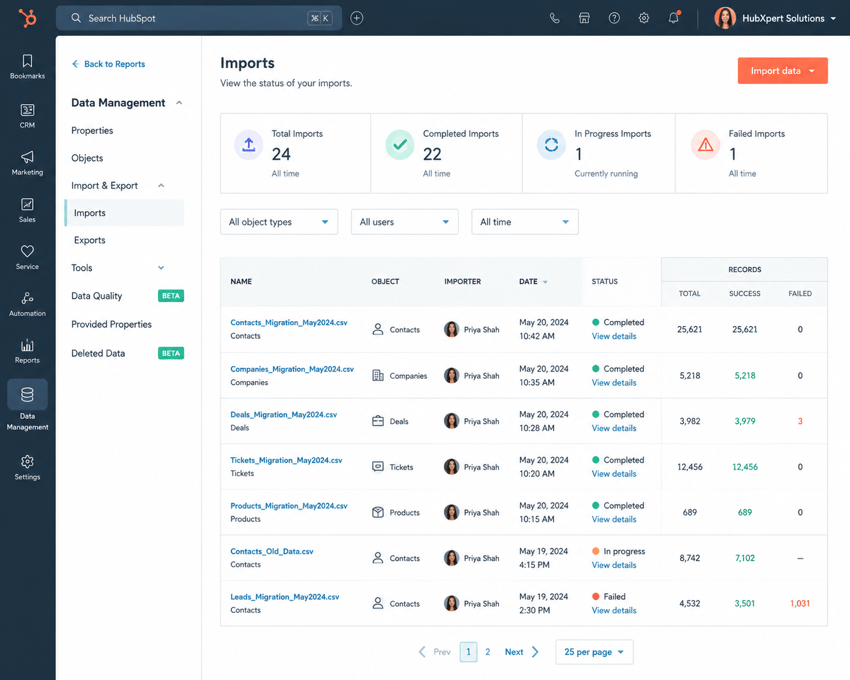
Record count validation is the fastest way to identify missing or duplicate data after a migration. Before reviewing individual records, compare object totals between the source CRM and HubSpot.
Contact Count Validation
Verify that the total number of contacts matches the source CRM.
Review:
- Active contacts
- Customers
- Leads
- Archived records (if applicable)
Large discrepancies should be investigated before proceeding with further testing.
Company Count Validation
Validate:
- Total company records
- Parent-child company relationships
- Company ownership assignments
- Company domain values
Deal Count Validation
Compare:
- Open deals
- Closed Won deals
- Closed Lost deals
- Pipeline-specific deal counts
Deal count mismatches often indicate import, mapping, or association issues.
Ticket & Custom Object Validation
If tickets or custom objects were included in the migration, validate that all expected records were transferred successfully and assigned correctly.
Step 2: Validate Data Accuracy
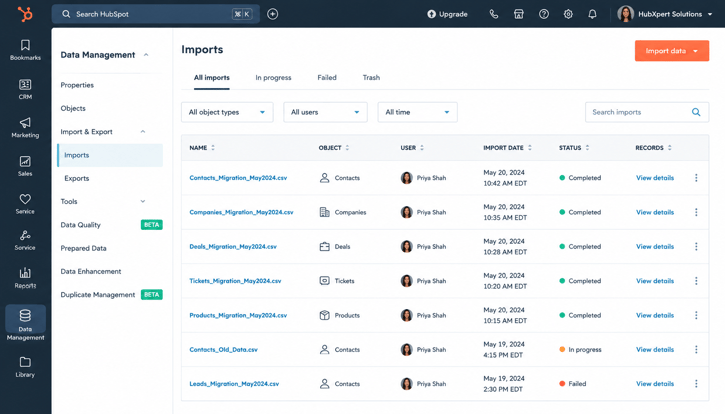
Matching record counts does not guarantee a successful migration. The next step is confirming that the data inside those records was migrated accurately and completely.
Required Property Validation
Start by reviewing the fields your business relies on most.
Examples include:
- Lifecycle Stage
- Lead Source
- Contact Owner
- Deal Stage
- Close Date
- Annual Revenue
Rather than checking a handful of records, validate a representative sample across different teams, pipelines, and customer segments.
Custom Property Validation
Custom properties are often where migration issues appear.
Review:
- Dropdown values
- Multi-select fields
- Number properties
- Date properties
- Custom identifiers
Pay particular attention to fields used in reporting, segmentation, workflows, and integrations.
Data Type Validation
Incorrect property types can affect reporting and automation even when the data appears correct.
Examples include:
|
Data |
Expected Property Type |
|
Revenue |
Number |
|
Close Date |
Date Picker |
|
Lead Source |
Dropdown |
|
Active Customer |
Checkbox |
Validate that values have been stored in the correct property types and that no formatting was lost during migration.
Historical Data Validation
Historical data often contains critical customer context.
If historical activities were included in the migration, verify that records retain:
- Notes
- Calls
- Meetings
- Tasks
- Emails
- Attachments
A migrated contact record may look complete, but missing activity history can significantly reduce its value to sales and service teams.
Step 3: Validate Record Associations
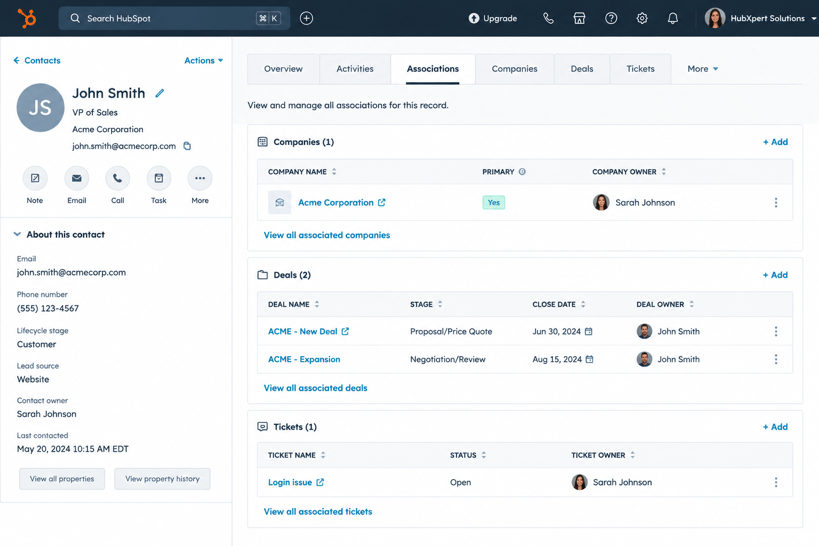
HubSpot relies heavily on relationships between records. Even if the data itself was migrated correctly, broken associations can impact reporting, workflows, and account visibility.
Contact-to-Company Associations
Review contact records and confirm they remain associated with the correct companies.
Validate:
- Primary company relationships
- Parent-child company structures
- Ownership assignments
This is particularly important for account-based sales and customer management.
Company-to-Deal Associations
Deal records should remain connected to the appropriate company accounts.
Review:
- Open opportunities
- Closed Won deals
- Historical deals
- Multi-company relationships (if applicable)
Missing associations can affect pipeline reporting and revenue visibility.
Contact-to-Deal Associations
Confirm that opportunities remain linked to the contacts involved in the buying process.
This helps preserve:
- Deal history
- Stakeholder visibility
- Attribution reporting
Custom Object Relationships
If custom objects were migrated, validate that relationships remain intact.
Examples include:
- Contracts
- Projects
- Memberships
- Assets
- Subscriptions
Broken custom object associations are often difficult to identify without targeted testing.
Step 4: Test Workflows & Automation
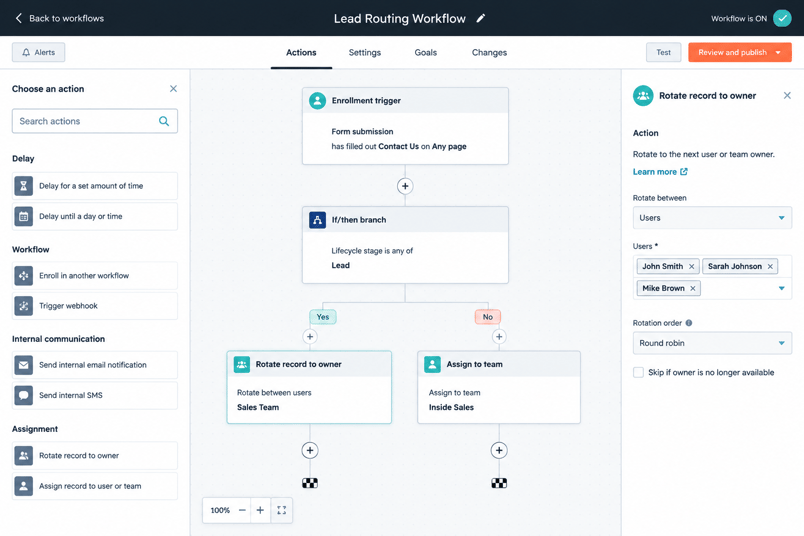
Once the data has been validated, test the processes that depend on that data. Workflow failures are one of the most common post-migration issues because automation logic often depends on specific property values and associations.
Lead Routing Workflows
Create test records and confirm that leads continue being assigned correctly.
Review routing logic based on:
- Territory
- Industry
- Company size
- Lead source
- Product interest
Incorrect routing can create immediate operational issues after go-live.
Lifecycle Stage Automation
Validate lifecycle stage progression throughout the customer journey.
Review:
- Automatic stage updates
- Enrollment criteria
- Exit criteria
- Stage-based notifications
Many reporting and automation processes depend on lifecycle stages functioning correctly.
Internal Notifications
Test notifications used by sales, marketing, customer success, and service teams.
Examples include:
- New lead alerts
- Deal stage notifications
- Task creation workflows
- Escalation workflows
Customer Onboarding Automation
If onboarding processes are automated, run end-to-end tests using sample records.
Validate:
- Welcome emails
- Internal handoffs
- Task assignments
- Customer success notifications
The objective is to confirm that migrated data continues to support business processes exactly as intended after go-live.
Step 5: Test Reports & Dashboards
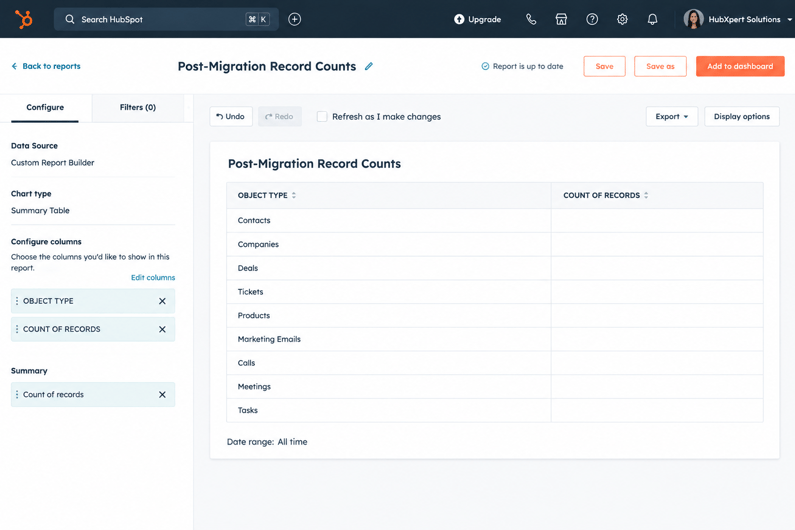
Reports are often where migration issues become visible for the first time. Even if records and workflows appear correct, reporting discrepancies can indicate problems with field mappings, associations, ownership assignments, or historical data.
Revenue Reports
Start by validating revenue-related reports against the source CRM.
Review:
- Total revenue
- Closed Won revenue
- Revenue by owner
- Revenue by pipeline
- Forecast reports
Any significant differences should be investigated before stakeholders begin relying on the data.
Pipeline Reports
Validate that sales pipeline reports accurately reflect the migrated data.
Review:
- Open opportunities
- Pipeline value
- Stage distribution
- Win rates
- Average deal size
Pipeline reports often reveal stage mapping or association issues that aren't obvious at the record level.
Conversion Reports
Compare key conversion metrics before and after migration.
Examples include:
- Lead-to-MQL conversion
- MQL-to-SQL conversion
- Opportunity-to-Customer conversion
Unexpected changes may indicate lifecycle stage mapping issues or missing records.
Executive Dashboards
Finally, review the dashboards used by leadership and management teams.
Validate:
- KPI calculations
- Report filters
- Dashboard visibility
- Historical trends
- Data refresh behavior
A successful migration should not change how business performance is measured.
Step 6: Validate Integrations
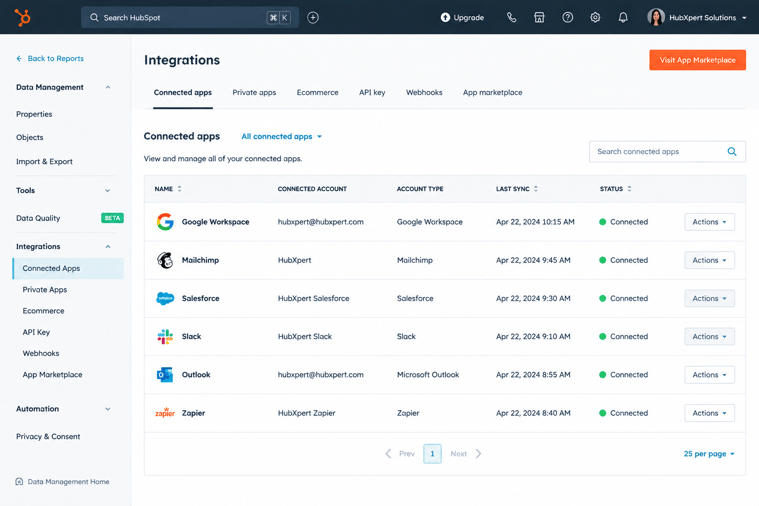
Most HubSpot environments connect with other business systems. Even if the CRM data is accurate, integration failures can quickly create data inconsistencies after go-live.
Data Synchronization Testing
Verify that records continue syncing correctly between HubSpot and connected platforms.
Review:
- Contact updates
- Company updates
- Deal updates
- Custom property updates
Test updates in both directions if bidirectional syncing is enabled.
Third-Party Application Testing
Validate integrations that support critical business processes.
Common examples include:
- Salesforce
- Stripe
- QuickBooks
- Zendesk
- ERP systems
- Customer portals
Run real-world scenarios to confirm that data is flowing correctly between systems.
Sync Error Review
Review integration logs for:
- Failed syncs
- Mapping conflicts
- Missing values
- Duplicate record creation
- Permission issues
Many integration-related issues are easier to resolve immediately after migration than after users begin relying on the system.
Step 7: User Acceptance Testing (UAT)
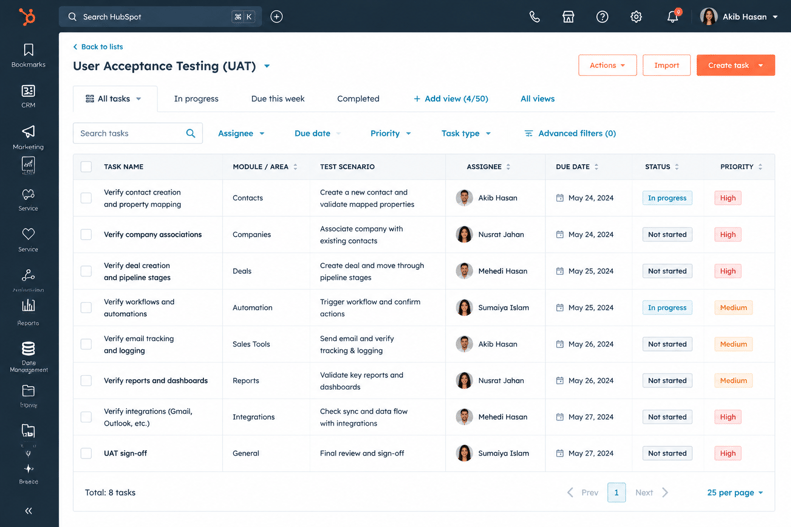
Technical validation is important, but the final approval should come from the teams that use HubSpot every day.
Sales Team Validation
Sales teams should review:
- Contact records
- Company records
- Deal pipelines
- Ownership assignments
- Activity history
They are often the first users to identify missing information or workflow issues.
Marketing Team Validation
Marketing teams should validate:
- Audience segmentation
- Lifecycle stages
- Lead source data
- Attribution reporting
- Workflow enrollment
This helps ensure campaigns and automation continue functioning as expected.
Customer Service Validation
Customer-facing teams should review:
- Ticket history
- Customer records
- Communication timelines
- Ownership assignments
- Service workflows
Maintaining customer context is critical after migration.
Leadership Sign-Off
Before closing the migration project, leadership teams should validate:
- Executive dashboards
- Revenue reporting
- Pipeline visibility
- Forecasting accuracy
A migration should only be considered complete once technical teams and business stakeholders confirm that HubSpot is operating as expected.
Common Post-Migration Testing Mistakes
Even well-planned migrations can encounter issues if testing is rushed or incomplete. The following mistakes are among the most common causes of post-migration problems.
Only Checking Record Counts
Matching record totals does not guarantee migration success.
A contact record may exist in HubSpot but still contain:
- Incorrect property values
- Missing activity history
- Broken associations
- Incorrect ownership assignments
Record counts should be the starting point, not the final validation step.
Ignoring Associations
Many migration teams validate records but fail to review relationships between records.
Common examples include:
- Contacts disconnected from Companies
- Deals disconnected from Contacts
- Tickets disconnected from Customers
- Custom Objects missing associations
These issues often impact reporting and automation more than missing records themselves.
Skipping Workflow Testing
Automation should never be assumed to work after migration.
Changes to:
- Property values
- Lifecycle stages
- Deal stages
- Associations
can affect workflow enrollment and execution.
Every critical workflow should be tested using real-world scenarios before sign-off.
Not Comparing Reports
Business stakeholders rely on reports, not individual records.
Revenue reports, forecasting dashboards, and conversion metrics should be compared against the previous CRM to identify discrepancies before go-live is finalized.
Failing to Document Issues
Every testing issue should be tracked and documented.
Include:
- Issue description
- Affected records
- Severity level
- Resolution owner
- Resolution status
A structured QA log helps ensure issues are resolved systematically.
Data Migration Testing Checklist
The following data migration testing checklist can be used as a final review before approving a HubSpot migration.
Data Validation Checks
- Contact counts verified
- Company counts verified
- Deal counts verified
- Ticket counts verified
- Custom Object counts verified
- Required properties validated
- Custom properties validated
- Historical activity data reviewed
Association Validation Checks
- Contact-to-Company associations verified
- Company-to-Deal associations verified
- Contact-to-Deal associations verified
- Ticket associations verified
- Custom Object relationships validated
Workflow Validation Checks
- Lead routing workflows tested
- Lifecycle stage automation tested
- Internal notifications tested
- Customer onboarding workflows tested
- Data management workflows tested
Reporting Validation Checks
- Revenue reports validated
- Pipeline reports validated
- Forecast reports reviewed
- Conversion reports reviewed
- Executive dashboards validated
Integration Validation Checks
- Data synchronization tested
- Third-party integrations validated
- Sync errors reviewed
- Data mapping verified
User Acceptance Checks
- Sales team approval received
- Marketing team approval received
- Customer service team approval received
- Leadership sign-off completed
A migration should only be considered complete when every validation area has been reviewed and approved.
How HubXpert Performs Migration QA
Migration QA is a standard part of every HubSpot migration project we deliver. Our goal is to ensure that data, automations, reporting, and business processes continue functioning correctly after go-live.
Our QA process typically includes:
- Record count reconciliation
- Property validation
- Association testing
- Workflow testing
- Reporting validation
- Integration testing
- User acceptance testing
- Post-go-live review
This structured approach helps identify issues early and ensures HubSpot becomes a trusted system of record from day one.
Wrapping Up
A HubSpot migration is not complete when the data is imported. It's complete when the data is validated. By testing records, associations, workflows, reports, integrations, and user experiences after go-live, businesses can identify issues before they affect operations.
A structured migration QA process helps ensure that HubSpot supports the same business processes, reporting requirements, and customer experiences that teams depend on every day.
The more thorough the testing process, the more confidence users will have in the CRM after launch.
FAQs
How long should post-migration testing take?
The timeline depends on migration complexity. Smaller migrations may require a few days of validation, while larger migrations involving custom objects, integrations, and advanced automation can require several weeks of testing.
Who should participate in migration QA?
Migration QA should involve CRM administrators, sales teams, marketing teams, customer service teams, operations teams, and leadership stakeholders. Each group validates different aspects of the migrated environment.
What is user acceptance testing in a CRM migration?
User acceptance testing (UAT) is the process of having end users validate that HubSpot supports their daily workflows, reporting requirements, and business processes before the migration is formally approved.
What should I do if record counts don't match?
Start by identifying which records are missing or duplicated. Review import logs, migration rules, archived records, and deduplication activities before determining whether additional imports or corrections are required.
How much data should be tested after migration?
Validate a representative sample across different object types, owners, lifecycle stages, pipeline stages, and business scenarios. Testing only a small number of records can leave migration issues undiscovered.
Can migration issues be fixed after go-live?
Yes, but issues are generally easier and less expensive to resolve during the QA phase. The sooner discrepancies are identified, the lower the risk of impacting reporting, automation, and user adoption.
Founder & CEO @ Hubxpert. My goal is to make every company using HubSpot succeed in their marketing organisation and automation.

Ratul Rahman
Table of Contents:

Subscribe to our newsletter

How to Build a HubSpot Implementation Plan That Holds Up
Follow a HubSpot implementation plan covering scoping, data cleanup and go-live. Includes an implementation checklist and a realistic 60-day timeline.

A HubSpot Onboarding Checklist That Covers Every Setup Step
Work through a HubSpot onboarding checklist covering portal setup, data import and team training. You get an onboarding plan and a 30-day timeline.

Can You White Label HubSpot and What Are the Limits?
Can you white label HubSpot? Yes, with limits. See what the best HubSpot white label setup looks like and where a white-label ecommerce CMS build fits in.

White-Label HubSpot Implementation for Partner Agencies
Offer white-label HubSpot implementation under your own brand, covering white-label HubSpot automation, website builds and ongoing SEO content delivery.

How to Choose a White Label Company Without Getting Burned
What is a white label company, and how do you pick one? Compare white label companies in the USA and the contract terms that protect your own clients best.

White Label Solution Explained for Agencies & Startups
Understand what a white label solution is and how white label business opportunities work, plus where to find the best white label options for a small agency.
-
How to Build a HubSpot Implementation Plan That Holds Up
hello
-
A HubSpot Onboarding Checklist That Covers Every Setup Step
hello
-
Can You White Label HubSpot and What Are the Limits?
hello
-
White-Label HubSpot Implementation for Partner Agencies
hello
-
How to Choose a White Label Company Without Getting Burned
hello
-
White Label Solution Explained for Agencies & Startups
hello