





-2.png)


-2.png)



.png)


.webp)

.png)










.png)







-1.webp)
-1.webp)



.webp)

-1-1.webp)



-2.webp)

-1-1.webp)

-2-1.png)

-1-1.webp)
-1-1.webp)
-1-1.png)







Duplicate records are one of the most common data quality issues businesses encounter during a CRM migration. Over time, contacts can be created through multiple forms, integrations, imports, and manual entries, resulting in multiple records for the same person.
While duplicates may seem like a minor inconvenience, they can affect reporting accuracy, workflow performance, lead assignment, and the overall customer experience. A successful HubSpot migration isn't just about moving data. It's about ensuring every contact exists as a single, accurate source of truth.
Let’s walk through how to approach CRM deduplication before, during, and after a HubSpot migration to maintain clean, reliable customer data.
Why CRM Deduplication Matters Before a HubSpot Migration
Many businesses discover duplicate records only after migration begins. By then, duplicates have often spread across contacts, companies, deals, and activities, making cleanup significantly more difficult.
How Duplicate Records Impact Reporting
CRM reports depend on accurate record counts and customer data.
Duplicate contacts can:
-
Inflate lead and contact totals
-
Distort conversion rates
-
Impact attribution reporting
-
Create inaccurate customer counts
-
Affect revenue reporting
For example, if a single prospect exists as three contact records, reporting may treat them as three separate leads rather than one buyer journey.
How Duplicates Affect Automation
Workflows rely on clean data to function correctly.
Duplicate records can cause:
-
Multiple workflow enrollments
-
Duplicate marketing emails
-
Conflicting lifecycle stages
-
Incorrect lead routing
-
Duplicate task creation
These issues become more noticeable after migration when workflows are rebuilt inside HubSpot.
How Duplicates Impact Sales & Customer Experience
Duplicate contacts often create fragmented customer histories.
Sales teams may see:
-
Multiple records for the same prospect
-
Inconsistent activity timelines
-
Conflicting ownership assignments
-
Missing communication history
Customers may receive duplicate emails, be contacted by multiple representatives, or experience inconsistent service.
This is why CRM deduplication should be treated as a core migration activity rather than a post-migration cleanup task.
Common Types of Duplicate Records
When people think about CRM deduplication, they usually focus on contacts. In reality, duplicate issues often affect multiple CRM objects.
Duplicate Contacts
The most common duplicate type.
Typical causes include:
-
Multiple form submissions
-
Manual record creation
-
Data imports
-
Third-party integrations
-
Different email variations
Examples:
-
john@company.com
-
john.smith@company.com
-
j.smith@company.com
Without review, these may represent the same individual.
Duplicate Companies
Company duplicates often occur because of inconsistent naming conventions.
Examples:
-
HubXpert
-
Hub Xpert
-
HubXpert Ltd.
-
HubXpert Limited
Duplicate companies can create inaccurate account reporting and broken account-based sales processes.
Duplicate Deals
Sales teams sometimes create multiple opportunities for the same prospect or customer.
This can affect:
-
Pipeline visibility
-
Forecasting accuracy
-
Revenue reporting
-
Win rate calculations
Duplicate Activities
Historical activities such as emails, calls, meetings, and tasks may also be duplicated through integrations or migration processes.
Duplicate activities clutter timelines and make customer engagement history harder to understand.
Before beginning a HubSpot migration, review all four areas to ensure duplicates are not transferred into the new CRM environment.
CRM Deduplication Before Migration
The best time to eliminate duplicate records is before data enters HubSpot. Once duplicate contacts are imported, they can affect reporting, ownership, automation, and customer history across the CRM.
A structured contact deduplication process helps ensure that only clean, trusted records are migrated.
Identify Duplicate Contacts
Start by identifying contacts that may represent the same person.
Review records using:
-
Email address
-
First and last name
-
Phone number
-
Company association
-
Website domain
-
CRM unique IDs
Examples include:
|
Contact A |
Contact B |
|
john@company.com |
john@company.com |
|
John Smith |
Jonathan Smith |
|
Same phone number |
Same phone number |
Not all duplicates are obvious. Some require manual review to determine whether records should be merged or kept separate.
Screenshot Opportunity: Duplicate Contact Report
Standardize Contact Data
Before merging records, standardize important fields to improve matching accuracy.
Common examples include:
|
Inconsistent Value |
Standardized Value |
|
USA, U.S.A., US |
United States |
|
VP Sales, Vice President Sales |
VP Sales |
|
Closed-Won, Closed Won |
Closed Won |
Also review:
-
Phone number formatting
-
Country values
-
Job titles
-
Lifecycle stages
-
Lead source values
Standardized data improves reporting, segmentation, and future duplicate detection.
Define Merge Rules
Not every duplicate should be merged automatically.
Establish clear rules for determining which record becomes the primary record.
Common approaches include:
-
Most recently updated record wins
-
Most complete record wins
-
Oldest CRM record wins
-
Customer record wins over lead record
The objective is to preserve the highest-quality version of the contact.
Archive Low-Quality Records
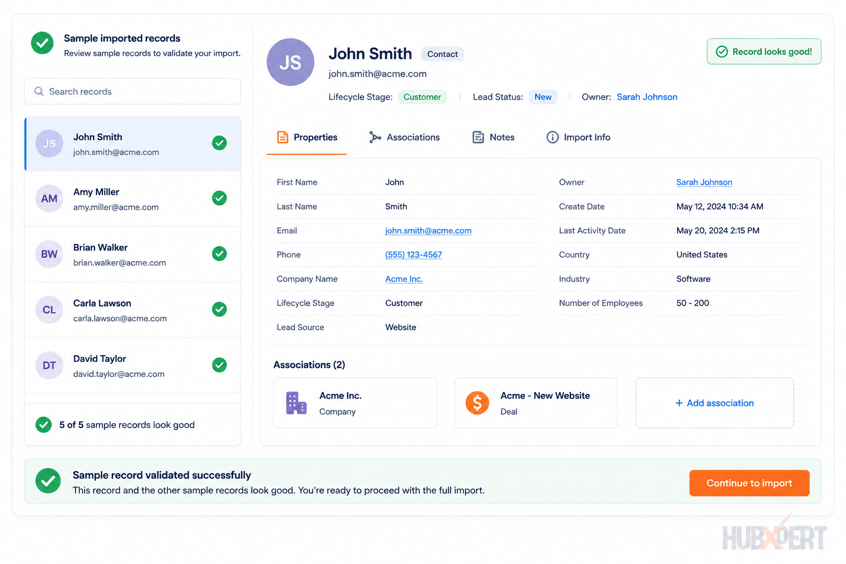
A migration is a good opportunity to remove records that no longer provide value.
Examples include:
-
Test contacts
-
Invalid email addresses
-
Spam submissions
-
Inactive leads
-
Temporary imports
Rather than migrating everything, focus on preserving data that supports active business processes.
Validate Primary Record Selection
Before merging records, confirm that important information will not be lost.
Review:
-
Contact owner
-
Company associations
-
Open deals
-
Ticket history
-
Email engagement
-
Notes and activities
A merge should consolidate customer history, not remove it.
The goal of pre-migration deduplication is simple: ensure every customer, prospect, and account enters HubSpot as a single, complete, and trusted record.
HubSpot Deduplication During Migration
Even after cleaning source data, duplicate prevention should continue throughout the migration process.
How HubSpot Handles Duplicate Contacts
HubSpot primarily uses email addresses to identify contacts.
If a contact is imported with an email address that already exists in HubSpot, the existing record is typically updated rather than a new contact being created.
This behavior helps reduce duplicate contacts but should not be relied upon as a complete deduplication strategy.
Email-Based Deduplication Rules
Email matching works well for many scenarios, but there are exceptions.
Common challenges include:
-
Shared inboxes (info@, sales@)
-
Personal vs business email addresses
-
Alias email addresses
-
Missing email values
Examples:
-
john@company.com
-
jsmith@company.com
These records may belong to the same person but will not automatically be treated as duplicates.
Import Mapping Best Practices
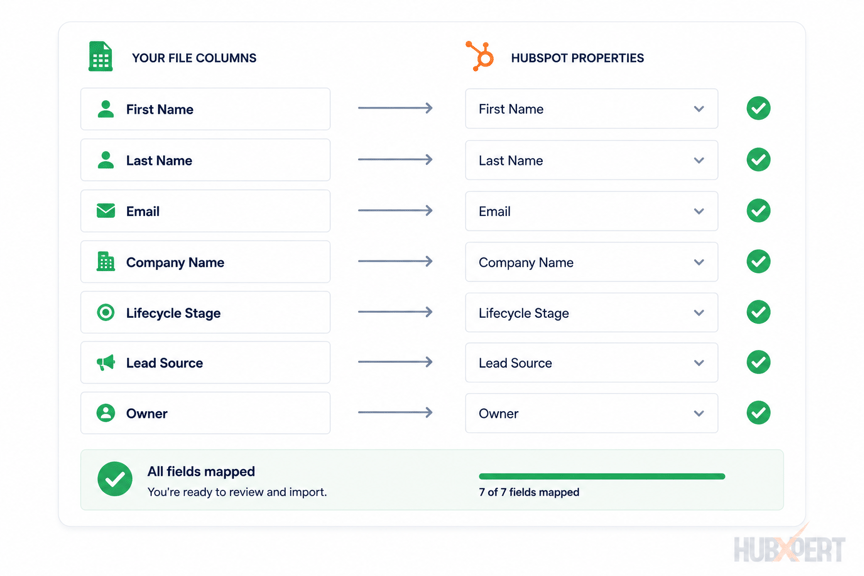
Import errors can introduce duplicate records.
Before importing:
-
Validate unique identifiers
-
Review email fields
-
Confirm property mappings
-
Test imports with sample data
-
Review import settings
A well-prepared import process significantly reduces duplicate creation.
Preventing New Duplicates During Import
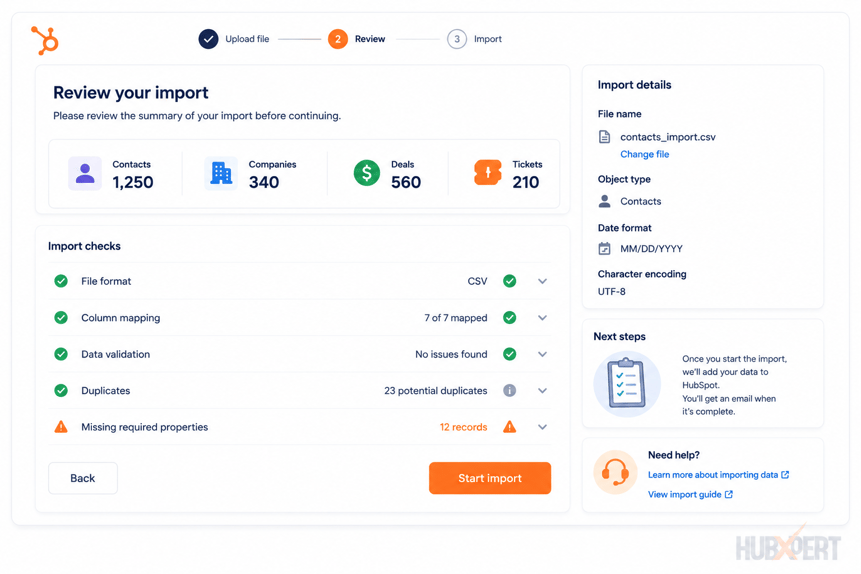
Before every import:
-
Run duplicate detection on source data.
-
Validate email uniqueness.
-
Remove obsolete records.
-
Test a representative sample.
-
Review imported records before proceeding.
A successful migration is not simply about importing data. It's about importing clean data that remains usable after go-live.
HubSpot Duplicate Management After Migration
Deduplication doesn't end when the migration is complete. New contacts continue entering the CRM through forms, integrations, imports, and manual record creation.
Without an ongoing process, duplicates will eventually return.
Using HubSpot Duplicate Management Tools
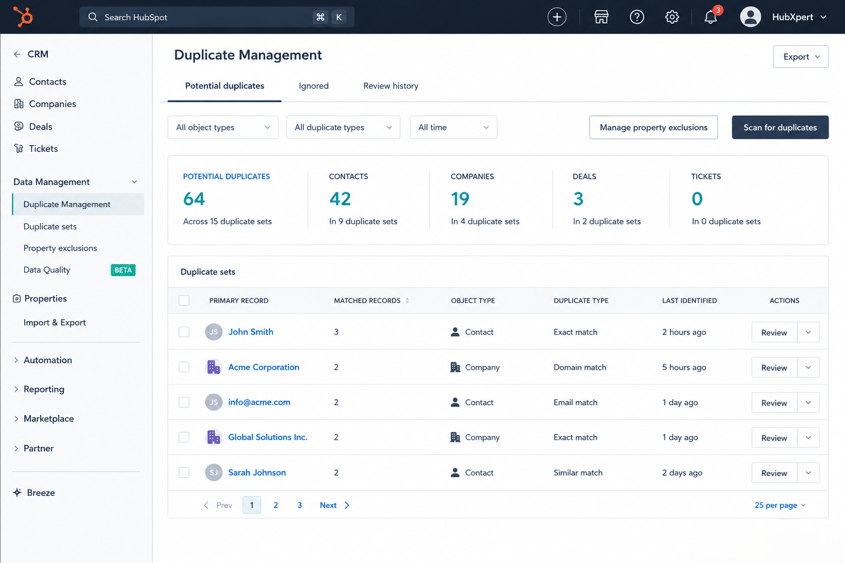
HubSpot provides built-in duplicate management capabilities that help identify potential duplicate contacts and companies.
Review duplicates regularly and evaluate:
-
Matching names
-
Matching email addresses
-
Similar company information
-
Duplicate ownership records
These tools help maintain CRM health after migration.
Ongoing Contact Deduplication Process
A regular review process prevents duplicate growth.
Recommended cadence:
-
Monthly for high-growth organizations
-
Quarterly for smaller teams
-
Before major imports
-
Before system integrations
Deduplication should become part of ongoing CRM administration rather than a one-time project.
Duplicate Prevention Workflows
Workflows can help identify potential duplicate records before they impact users.
Examples include:
-
Internal duplicate notifications
-
Data quality alerts
-
Owner review tasks
-
Form submission monitoring
These processes help catch duplicate records early.
Ownership & Data Governance Rules
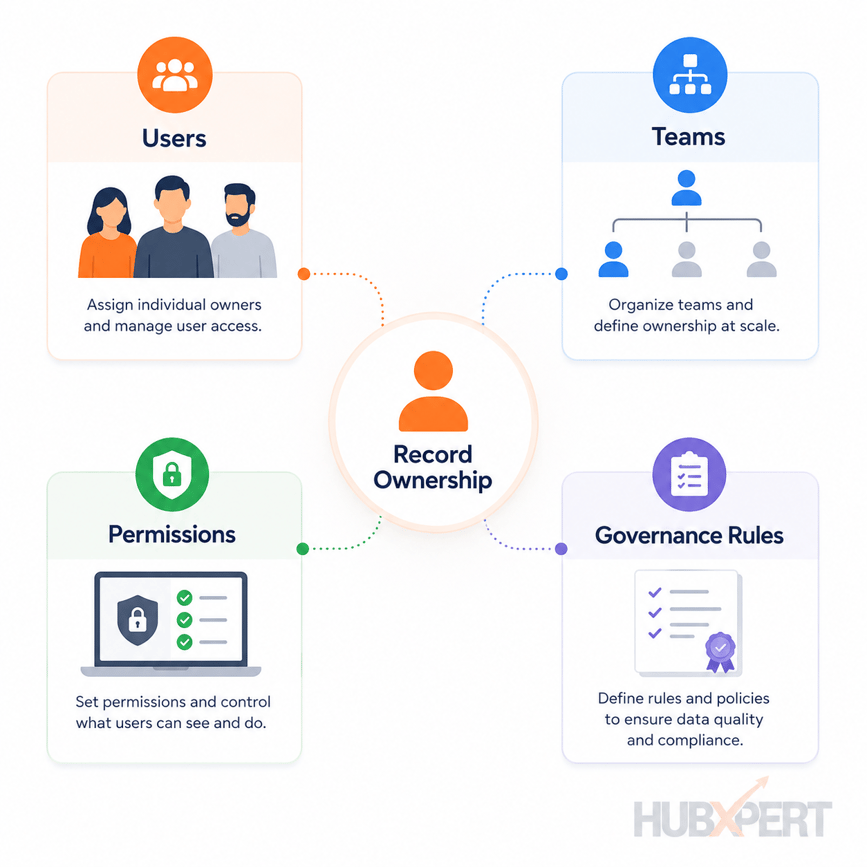
Clear ownership and governance standards reduce duplicate creation.
Establish rules for:
-
Manual contact creation
-
Data imports
-
Integration management
-
Property updates
-
Record ownership
The cleaner the CRM governance process, the easier it becomes to maintain data quality long-term.
Common Contact Deduplication Mistakes
Even with the right tools, duplicate records can persist if the deduplication process is not handled carefully. These are some of the most common mistakes we encounter during HubSpot migration projects.
Merging Records Too Aggressively
Not every similar record is a duplicate.
For example:
-
Parent company vs subsidiary
-
Shared inbox vs individual contact
-
Multiple stakeholders from the same organization
Before merging records, verify that they truly represent the same person or company.
Ignoring Company Duplicates
Many businesses focus exclusively on contact deduplication.
However, duplicate company records can create:
-
Inaccurate account reporting
-
Broken contact-to-company associations
-
Duplicate opportunities
-
Conflicting ownership
Contact and company deduplication should always be reviewed together.
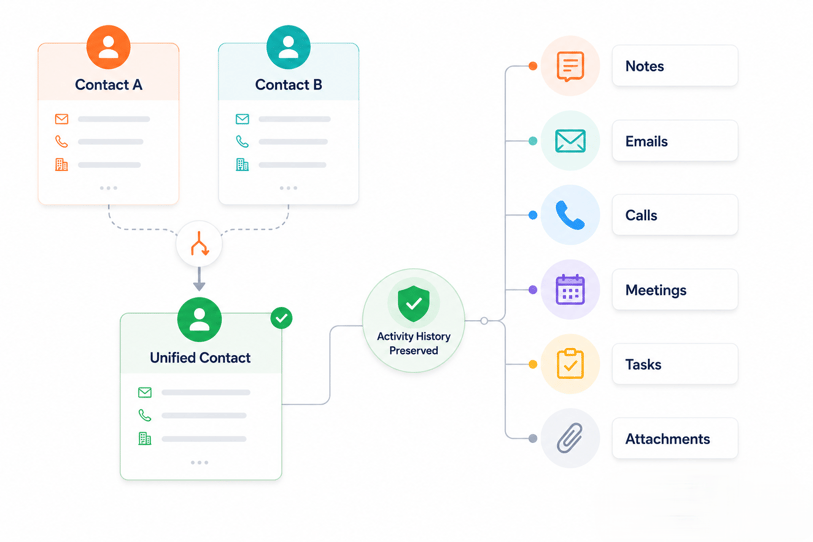
Failing to Preserve Activity History
A merged record should retain customer history.
Before merging contacts, validate:
-
Notes
-
Emails
-
Calls
-
Meetings
-
Tasks
-
Attachments
Losing historical context can impact both sales and customer service teams.
Deduplicating After Automation Is Built
Building workflows on top of duplicate data often creates additional cleanup work later.
Examples include:
-
Duplicate workflow enrollments
-
Multiple task assignments
-
Duplicate marketing emails
-
Incorrect lead routing
Deduplication should happen before major workflow implementation whenever possible.
Relying Only on Email Matching
Email is a strong identifier, but it's not perfect.
Duplicate contacts may still exist because of:
-
Multiple email addresses
-
Personal and business emails
-
Shared inboxes
-
Missing email values
Effective CRM deduplication should consider multiple matching criteria, not just email addresses.
CRM Deduplication Checklist
A CRM deduplication checklist helps ensure duplicate records are identified, reviewed, and addressed before they impact migration quality.
Contact Deduplication Check
-
Duplicate contacts identified
-
Duplicate contacts merged
-
Email uniqueness reviewed
-
Phone number duplicates reviewed
-
Contact ownership validated
Company Deduplication Check
-
Duplicate companies identified
-
Naming conventions standardized
-
Company domains reviewed
-
Company ownership validated
Data Quality Check
-
Invalid email addresses removed
-
Test records archived
-
Inactive contacts reviewed
-
Property values standardized
-
Lifecycle stages validated
Migration Validation Check
-
Sample imports tested
-
Duplicate creation monitored
-
Record counts validated
-
Associations reviewed
-
Activity history preserved
Post-Migration Check
-
HubSpot duplicate management reviewed
-
Duplicate prevention process established
-
Data governance rules documented
-
Ongoing review schedule defined
The objective is not simply to reduce record counts. The objective is to ensure every customer, company, and opportunity exists as a single trusted record inside HubSpot.
How HubXpert Handles Contact Deduplication Before Migration
For HubXpert, contact deduplication is a standard part of every HubSpot migration project. Before mapping fields or importing records, we assess the quality of the source CRM and identify duplicate contacts, companies, and related records.
Our process typically includes:
-
CRM data audit
-
Duplicate contact analysis
-
Company deduplication review
-
Data standardization
-
Merge rule definition
-
Activity history validation
-
Test migration and QA review
-
Post-migration duplicate validation
This approach helps reduce reporting issues, workflow conflicts, ownership inconsistencies, and fragmented customer histories after migration.
Wrapping Up
The goal of CRM deduplication is not to remove records. It's to create a single, accurate source of truth for every customer and prospect.
By addressing duplicates before migration, validating data during migration, and establishing governance after migration, businesses can improve reporting accuracy, automation performance, and user trust in HubSpot.
A clean CRM is easier to manage, easier to scale, and far more valuable to the teams that rely on it every day.
FAQs
Can HubSpot automatically merge duplicate contacts?
HubSpot can identify potential duplicate contacts and companies, but record merges typically require user review. This helps prevent accidental merges that could result in data loss or inaccurate customer histories.
What happens if duplicate contacts have different owners?
When records are merged, ownership should be reviewed carefully. Businesses should establish clear merge rules to determine which owner should remain associated with the primary record.
Should duplicate records be archived or merged?
It depends on the record quality. If two records represent the same person and both contain valuable information, merging is usually the best option. If a record is outdated, invalid, or no longer useful, archiving may be more appropriate.
Does HubSpot detect duplicates based only on email address?
Email address is the primary identifier for contact deduplication, but duplicate reviews should also consider names, phone numbers, company associations, and other identifying information.
Can duplicate contacts affect reporting accuracy?
Yes. Duplicate contacts can inflate lead counts, distort conversion rates, impact attribution reporting, and create inaccurate customer metrics across dashboards and reports.
How often should businesses perform CRM deduplication?
CRM deduplication should be an ongoing process. At a minimum, businesses should review duplicate records before major imports, after new integrations are added, and as part of regular CRM maintenance.
Founder & CEO @ Hubxpert. My goal is to make every company using HubSpot succeed in their marketing organisation and automation.

Ratul Rahman
Table of Contents:

Subscribe to our newsletter

Can You White Label HubSpot and What Are the Limits?
Can you white label HubSpot? Yes, with limits. See what the best HubSpot white label setup looks like and where a white-label ecommerce CMS build fits in.

White-Label HubSpot Implementation for Partner Agencies
Offer white-label HubSpot implementation under your own brand, covering white-label HubSpot automation, website builds and ongoing SEO content delivery.

How to Choose a White Label Company Without Getting Burned
What is a white label company, and how do you pick one? Compare white label companies in the USA and the contract terms that protect your own clients best.

White Label Solution Explained for Agencies & Startups
Understand what a white label solution is and how white label business opportunities work, plus where to find the best white label options for a small agency.

What Is White Label Marketing & Where It Fits
What is white label marketing, and what does white label mean in business? We cover the definition, the common software uses and several plain examples.

What Is a White Label Service & How the Model Works
What is a white label service, and where does it apply? We explain white labeling services, the meaning behind them and when the model fits your business.
-
Can You White Label HubSpot and What Are the Limits?
hello
-
White-Label HubSpot Implementation for Partner Agencies
hello
-
How to Choose a White Label Company Without Getting Burned
hello
-
White Label Solution Explained for Agencies & Startups
hello
-
What Is White Label Marketing & Where It Fits
hello
-
What Is a White Label Service & How the Model Works
hello