





-2.png)


-2.png)



.png)


.webp)

.png)










.png)







-1.webp)
-1.webp)



.webp)

-1-1.webp)



-2.webp)

-1-1.webp)

-2-1.png)

-1-1.webp)
-1-1.webp)
-1-1.png)






Healthcare businesses increasingly rely on CRM automation for scheduling, intake workflows, patient communication, follow ups, and operational management. Platforms like GoHighLevel simplify these workflows significantly, especially for clinics, medical spas, wellness businesses, and agencies managing healthcare clients.
However, healthcare automation introduces operational risks that most industries never have to consider.
That leads to one important question:
Is GoHighLevel HIPAA compliant?
The short answer is that GoHighLevel is not automatically HIPAA compliant out of the box. HighLevel HIPAA compliance depends heavily on how workflows are configured, how communication is handled, what information is stored, and how carefully businesses manage PHI exposure across operational systems.
Most healthcare workflow risks do not come from the CRM interface itself. They come from workflow behavior, employee access, communication practices, integrations, and automation design decisions.
This is where most healthcare businesses underestimate operational risk.
GoHighLevel HIPAA Compliance Depends on Workflow Design
Many articles discussing GoHighLevel HIPAA compliance oversimplify the topic.
Some immediately claim the platform is HIPAA compliant. Others immediately say it is not. In practice, healthcare compliance depends far more on operational workflow management than the software itself.
Healthcare businesses still remain responsible for:
-
employee access management
-
communication workflows
-
PHI exposure
-
integration oversight
-
intake handling
-
automation visibility
This distinction matters because many healthcare businesses focus heavily on automation efficiency while overlooking operational exposure.
For example, businesses commonly create unnecessary risk through:
-
unsecured SMS workflows
-
excessive employee permissions
-
storing PHI inside CRM notes
-
exposed intake forms
-
unreviewed webhook automations
-
duplicated workflows across accounts
Even well designed automation systems can become risky when sensitive information moves across too many operational layers without oversight.
Protecting PHI Inside GoHighLevel Workflows
Protecting PHI should shape every healthcare workflow decision inside HighLevel.
One of the biggest operational mistakes healthcare businesses make is storing significantly more patient information than necessary inside CRM workflows. Over time, sensitive data spreads across:
-
internal notes
-
appointment reminders
-
intake submissions
-
automation workflows
-
reporting systems
-
integrations
-
employee notifications
The larger the exposure surface becomes, the harder workflows become to manage safely.
Healthcare businesses should focus on:
-
limited PHI exposure
-
controlled employee access
-
simplified workflows
-
operational visibility
-
communication restraint
In many healthcare environments, simpler workflows are usually safer workflows.
Understanding HighLevel HIPAA Compliance Risks
Most HighLevel HIPAA compliance risks come from operational workflow decisions rather than the platform itself.
The most common risk areas include:
-
SMS communication workflows
-
employee permission sprawl
-
excessive automation layering
-
unreviewed third party integrations
-
storing PHI inside pipeline notes
-
duplicated healthcare workflows across multiple accounts
Many agencies unintentionally create operational exposure while trying to improve automation performance or reporting visibility.
This becomes especially risky for agencies managing multiple healthcare clients inside standardized workflow systems. A single workflow mistake can scale across several client accounts very quickly.
Healthcare automation requires operational discipline, not just technical automation skills.
HIPAA Compliant Communication Requires Simplicity
Many healthcare businesses expose unnecessary patient information through communication workflows.
This commonly happens inside:
-
appointment reminders
-
automated follow ups
-
SMS campaigns
-
voicemail systems
-
intake notifications
HIPAA compliant communication usually works best when messaging remains minimal and operational.
For example:
Less safe:
“Your anxiety treatment consultation is tomorrow.”
Safer:
“You have an appointment scheduled tomorrow.”
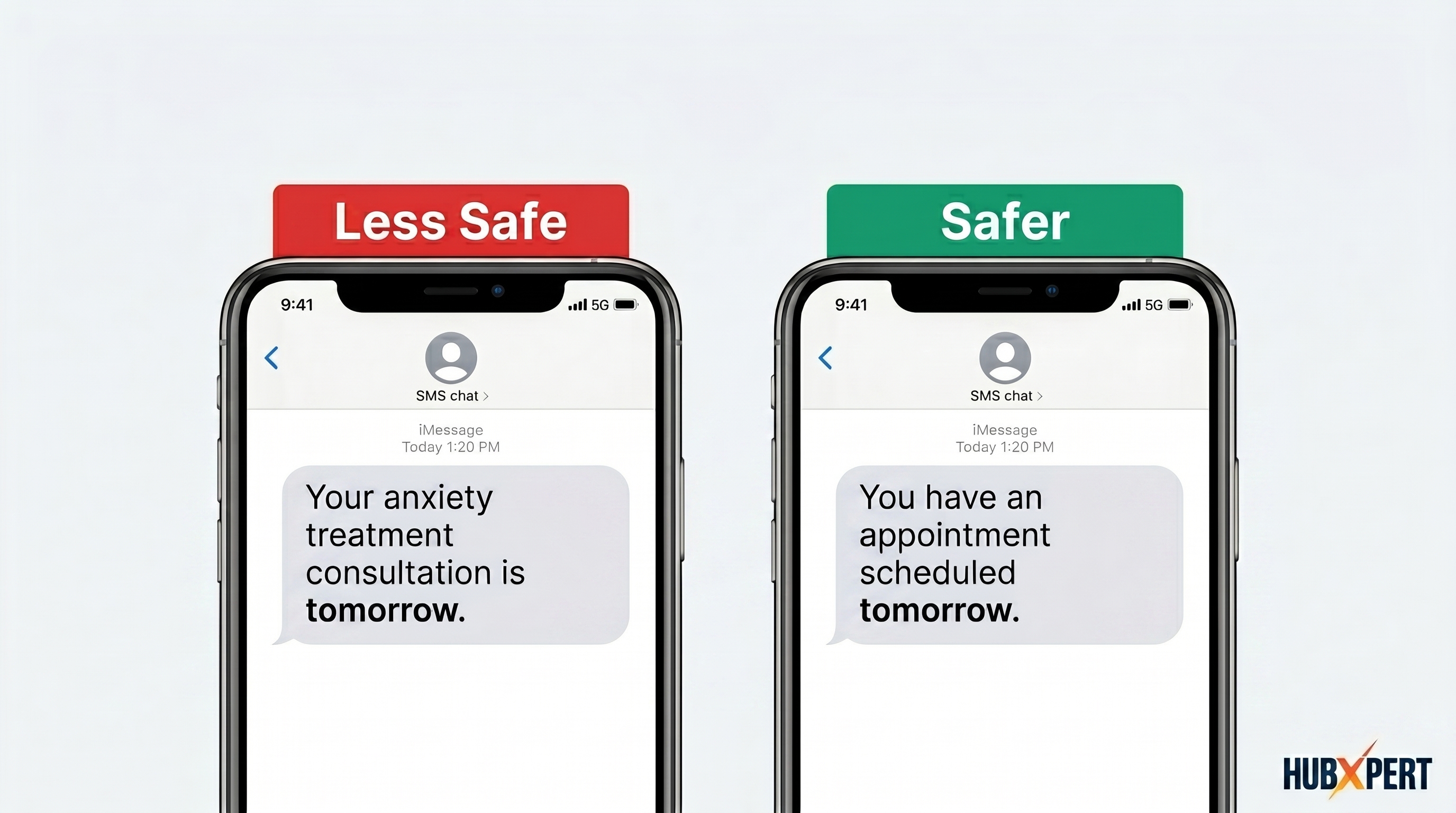
The safest communication workflows reveal only the information necessary to complete the interaction.
This is one of the most overlooked areas inside healthcare CRM automation.
How to Configure Safer Healthcare Workflows in GoHighLevel
Healthcare businesses using GoHighLevel should prioritize operational simplicity over automation complexity.
A safer healthcare workflow setup usually includes:
1. Limit PHI Storage
Avoid storing unnecessary patient information inside:
-
CRM notes
-
pipeline stages
-
internal comments
-
automation triggers
Only collect information operationally required for workflow execution.
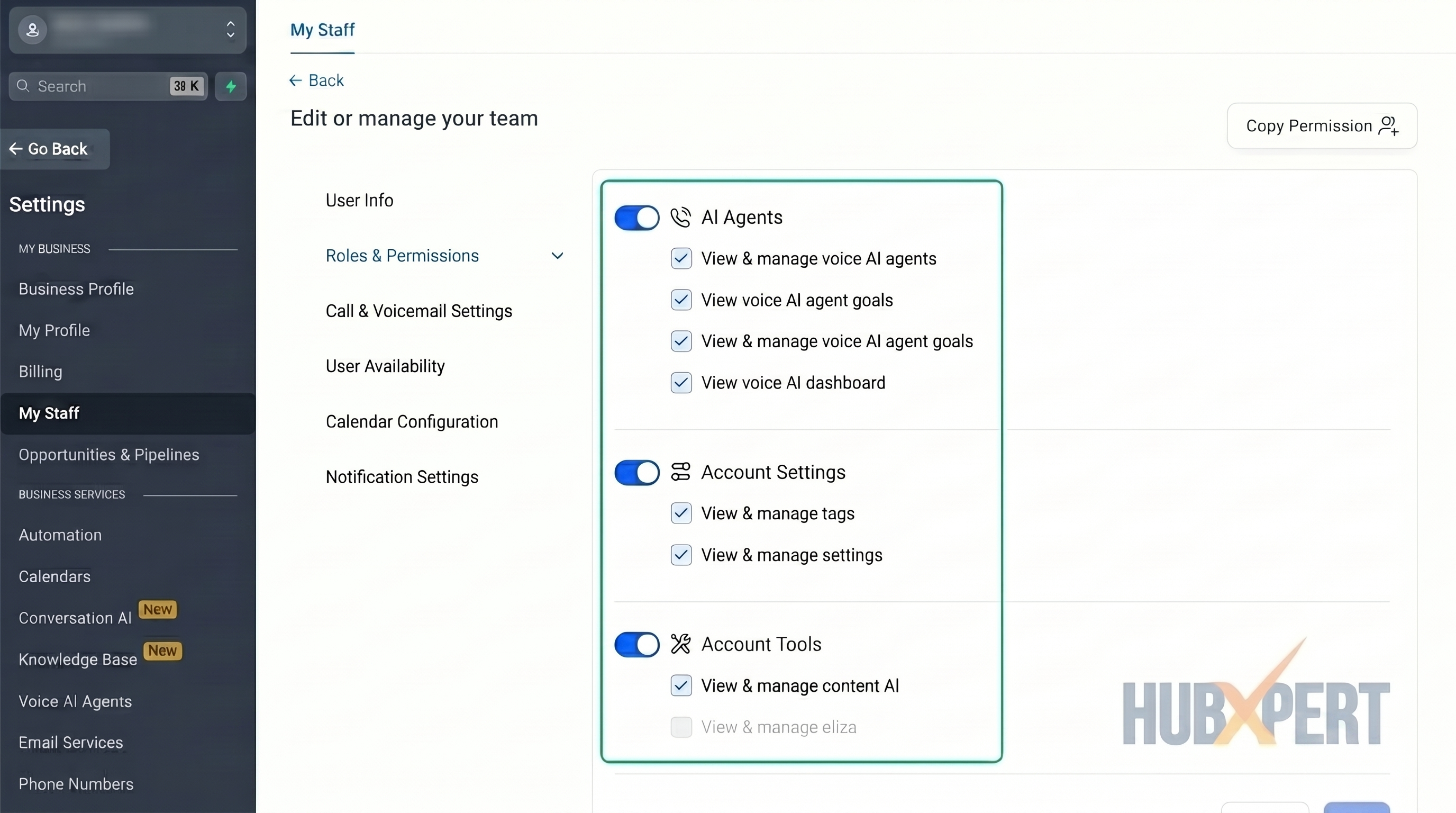
2. Reduce Employee Access
Not every employee needs visibility into every workflow.
Healthcare businesses should regularly review:
-
account permissions
-
workflow visibility
-
admin access
-
communication access
Overexposed employee permissions are one of the most common operational risks.
3. Simplify Communication Workflows
SMS reminders, emails, and follow ups should avoid unnecessary treatment related details whenever possible.
Communication should remain:
-
operational
-
minimal
-
workflow-focused
4. Review Third Party Integrations
Many healthcare businesses connect:
-
webhook systems
-
external CRMs
-
AI tools
-
reporting platforms
-
automation connectors
without reviewing how patient information moves across systems.
Every integration increases operational complexity and potential exposure.
5. Reduce Workflow Duplication Across Accounts
Agencies managing healthcare clients should avoid blindly copying workflow systems between accounts without reviewing:
-
communication structure
-
PHI exposure
-
intake handling
-
employee access controls
Small workflow mistakes can scale quickly across healthcare environments.
GoHighLevel HIPAA Compliance Pricing
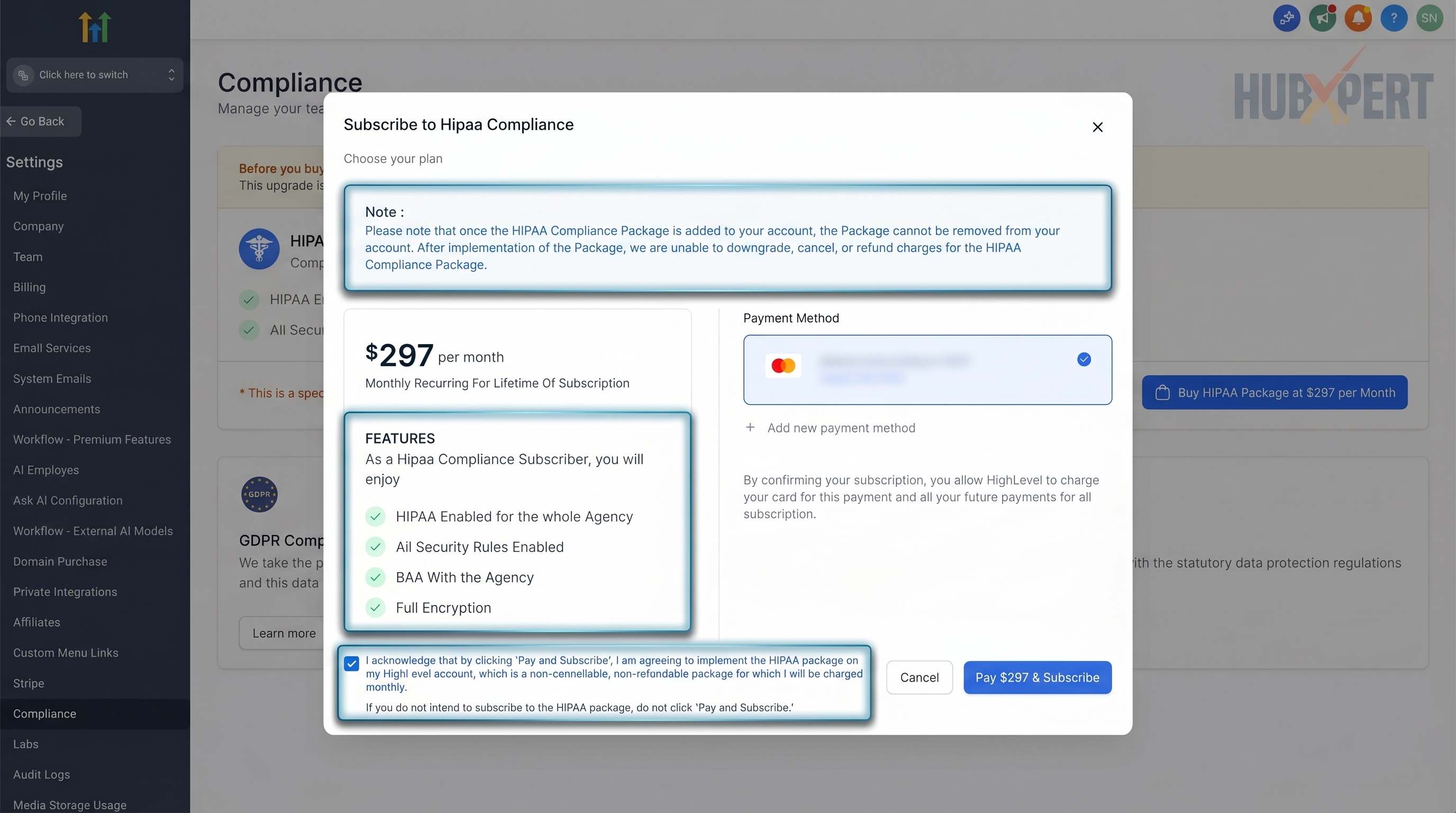
GoHighLevel is not HIPAA compliant by default. Businesses handling protected health information (ePHI) must purchase the HIPAA compliance add-on separately on top of their existing GoHighLevel subscription (Source: HHS Summary of the HIPAA Security Rule)
At the time of writing, the HIPAA add-on costs:
-
$297/month
-
or $2,970/year
(Source: GoHighLevel HIPAA Compliance Support Article)
This cost is added on top of the standard GoHighLevel plan pricing.
Total GoHighLevel HIPAA Compliance Cost
Your total monthly cost depends on your existing GoHighLevel subscription tier:
-
Starter Plan + HIPAA: $97 + $297 = $394/month
-
Unlimited Plan + HIPAA: $297 + $297 = $594/month
-
SaaS Pro Plan + HIPAA: $497 + $297 = $794/month
Healthcare businesses and agencies should factor this additional cost into their operational planning before handling PHI inside HighLevel workflows.
Important HIPAA Add-On Restrictions
Before enabling the HIPAA package, businesses should understand several important limitations.
Permanent Activation
Once the HIPAA add-on and Business Associate Agreement (BAA) are signed, the configuration cannot be canceled, refunded, or downgraded (Source: "GoHighLevel HIPAA Compliance Support Article)
Agency-Level Setup
The HIPAA package activates compliance support at the agency level, but individual sub-accounts still need to be manually configured inside Advanced Settings.
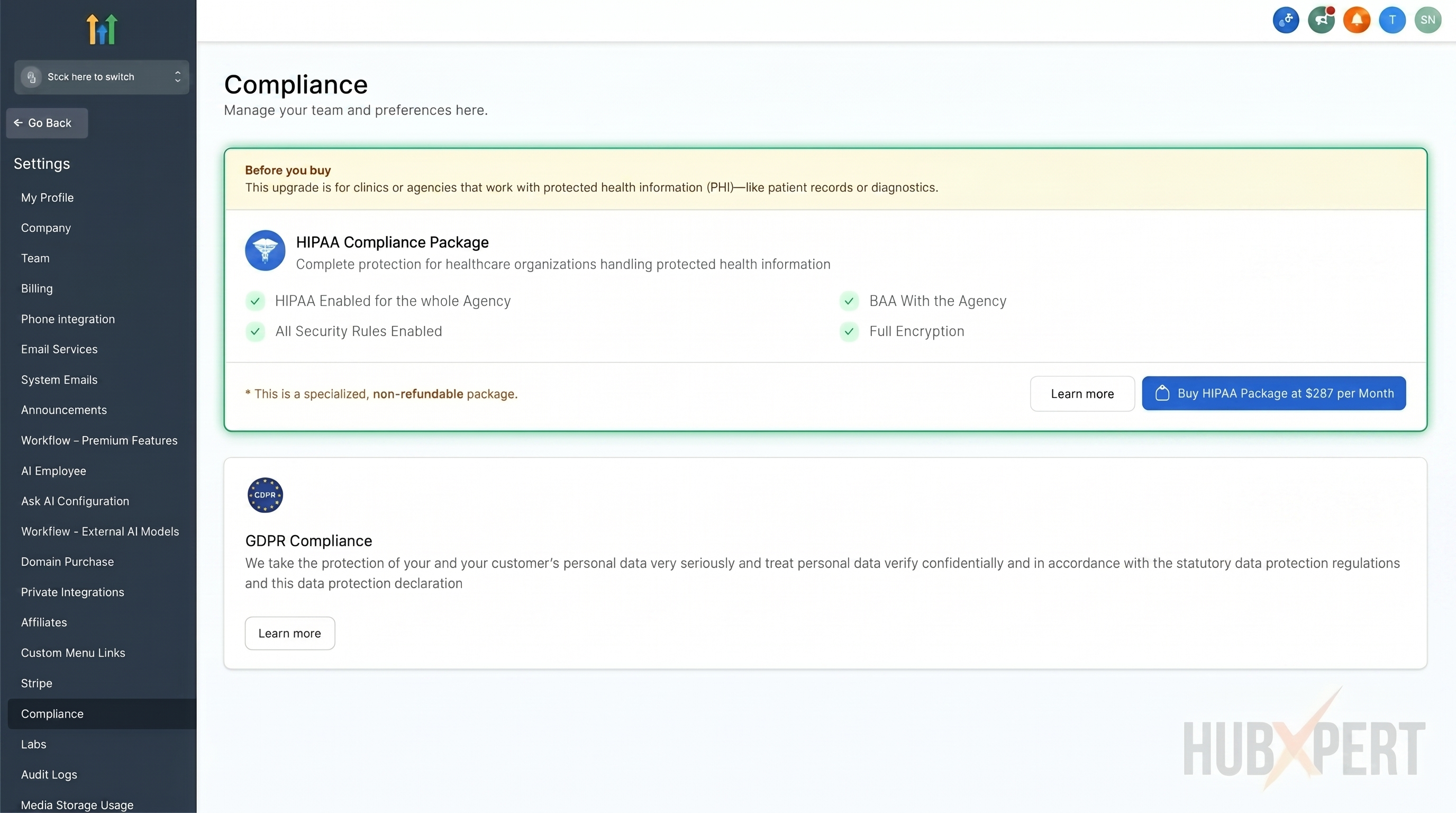
What the HIPAA Add-On Includes
The add-on includes:
-
Business Associate Agreement (BAA)
-
audit logging
-
multi-factor authentication enforcement
-
encryption related protections
-
HIPAA focused security controls
(Source: HHS Business Associate Contract Requirements)
Because GoHighLevel occasionally updates pricing and compliance policies, healthcare businesses should verify the latest information directly through the official GoHighLevel documentation before implementation.
Is GoHighLevel a HIPAA Compliant CRM for Small Business Operations?
Many smaller clinics and healthcare businesses search for a HIPAA compliant CRM for small business operations because they need:
-
scheduling
-
intake workflows
-
patient communication
-
follow ups
-
automation
-
operational visibility
without managing multiple disconnected systems.
GoHighLevel can support healthcare related workflows when businesses:
-
reduce unnecessary PHI storage
-
simplify communication systems
-
limit employee access
-
review integrations carefully
-
maintain operational oversight
The safest healthcare workflows are usually the ones designed around controlled exposure and operational clarity from the beginning.
Final Thoughts
GoHighLevel can support healthcare workflows when businesses approach automation responsibly and understand the operational risks involved.
However, healthcare businesses should not assume any CRM platform automatically creates compliance safety on its own.
GoHighLevel HIPAA compliance depends heavily on:
-
workflow behavior
-
communication practices
-
employee access
-
integration oversight
-
and how carefully businesses protect PHI across operational systems
In healthcare environments, operational simplicity is often more valuable than aggressive automation complexity.
Frequently Asked Questions
Does GoHighLevel offer a BAA for HIPAA compliance?
Yes. GoHighLevel offers a Business Associate Agreement (BAA) through its HIPAA compliance add-on.
Does the GoHighLevel HIPAA add-on cost extra?
Yes. The HIPAA compliance add-on costs an additional $297/month on top of the standard GoHighLevel subscription.
Can agencies enable HIPAA compliance for specific sub-accounts?
Yes. HIPAA compliance is activated at the agency level, but agencies must manually enable it for individual sub-accounts inside Advanced Settings.
Is the GoHighLevel HIPAA add-on refundable?
No. Once the HIPAA add-on and BAA are activated, the configuration cannot be canceled, downgraded, or refunded.
Is SMS safe for HIPAA compliant communication?
SMS workflows can create unnecessary PHI exposure if messages contain sensitive patient information. Healthcare communication should remain minimal whenever possible.
Should PHI be stored inside GoHighLevel notes or pipelines?
Healthcare businesses should avoid storing unnecessary PHI inside CRM notes, pipeline stages, or internal workflow comments whenever possible.
How do I move from tracking patient leads in a spreadsheet to a HIPAA compliant CRM without breaking existing workflows?
Start by mapping exactly which fields your current spreadsheet holds that count as PHI, then migrate only active, in-progress leads first rather than the full historical file. Set up the CRM’s HIPAA add-on and BAA before importing anything, not after, and rebuild your intake and follow-up workflows with the same minimal-information approach covered earlier in this guide before turning off the spreadsheet completely.
Founder & CEO @ Hubxpert. My goal is to make every company using HubSpot succeed in their marketing organisation and automation.

Ratul Rahman
Table of Contents:

Subscribe to our newsletter

Modern Web App Design & UI Patterns That Scale
See how modern web app design differs from a marketing site, covering modern web application design and modern web app UI design for dense data dashboards.

Modern Responsive Web Design Techniques for 2027
Apply modern responsive web design techniques in 2026. Review modern web design best practices and why responsive design still decides your conversions.

Modern Website Design Examples & What Makes Them Work
Browse modern website design examples and modern looking websites, and see exactly what separates a fast, current site from one that already feels dated.

Interactive Web Design Templates & Examples to Study
See interactive web design templates and the best interactive web design inspiration, then compare interactive web page design examples before you build.

Interactive Elements in Web Design & Where to Stop
Add interactive elements in web design that earn their place, covering micro interactions, interactive maps, interactive timelines and knowing when to stop.

3D Web Design Templates & Examples You Can Reuse
Browse 3D web design templates and examples, plus where to find free downloads, and see how 3D web page design lifts a site without slowing the site down.
-
Modern Web App Design & UI Patterns That Scale
hello
-
Modern Responsive Web Design Techniques for 2027
hello
-
Modern Website Design Examples & What Makes Them Work
hello
-
Interactive Web Design Templates & Examples to Study
hello
-
Interactive Elements in Web Design & Where to Stop
hello
-
3D Web Design Templates & Examples You Can Reuse
hello